Turn on suggestions
Auto-suggest helps you quickly narrow down your search results by suggesting possible matches as you type.
Showing results for
Get 50% OFF QuickBooks for 3 months*
Buy nowThanks for reaching out to us, @luxnmaininc1.
I want to make sure you're able to get your bank transactions in your company file.
This Unable to Verify Financial Institution Info error is caused by incorrect information in the .qbo file. The bank will need to be contacted to correct this issue. In the meantime, we do have a workaround that will allow you to import the file.
Follow these steps:
If you're still getting the same error, I recommend that you contact our Support Team. This way we can report this TD Bank issue to our engineers.
Here's how to contact us:
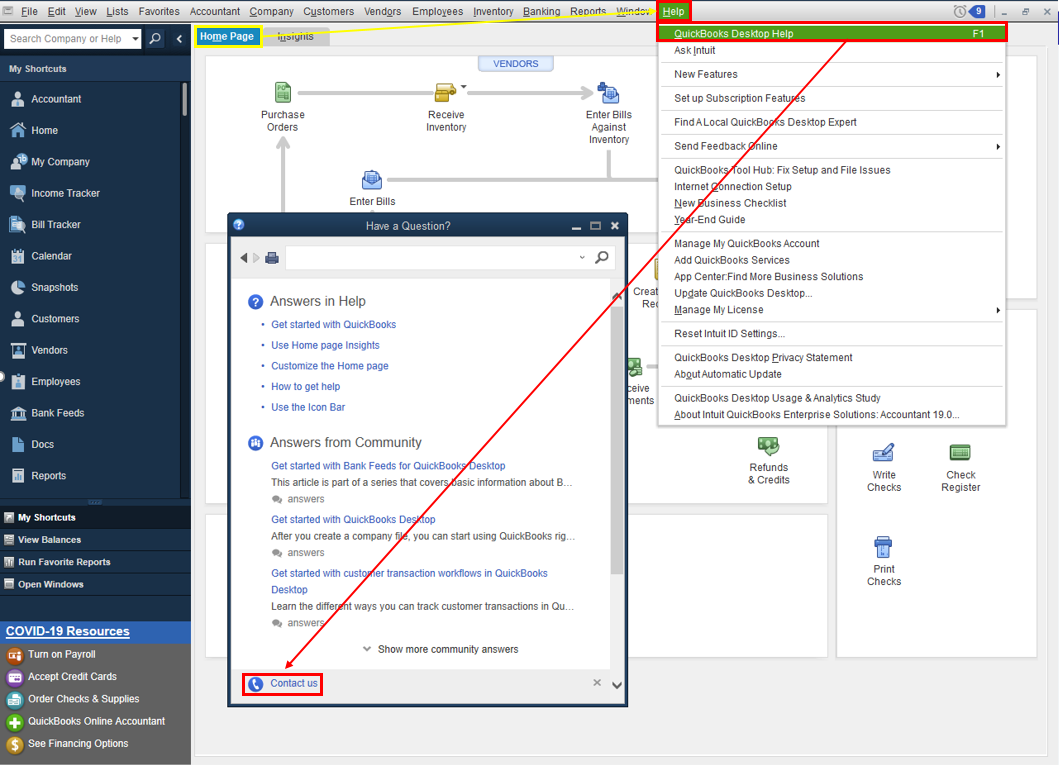
Refer to this article to learn more about our contact options and support availability: Contact QuickBooks Desktop support
Come back here anytime for other concerns about using the bank features in QuickBooks. I'll be right here if you need other help with the program too. Have a good one.

