Turn on suggestions
Auto-suggest helps you quickly narrow down your search results by suggesting possible matches as you type.
Showing results for
Get 50% OFF QuickBooks for 3 months*
Buy nowThanks for getting back here, lovdensproperty.
Please note that there are banks or financial institutions that does not connect to all types of account for online banking with QBO. This can be why you can see your other cards, but not the one from AMEX Bonvoy Card.
Just in case it's a supported one, you can follow these steps to make sure you'll see it when adding in QBO:
Here's an article that shares more details about this: Find Your Bank or Credit Card Account When you Connect to Online Banking.
If AMEX Bonvoy Card isn't supported at the moment, click the link that says "Still can't find your bank?". Then, enter the name of the bank and the web address. Once done, click Request.
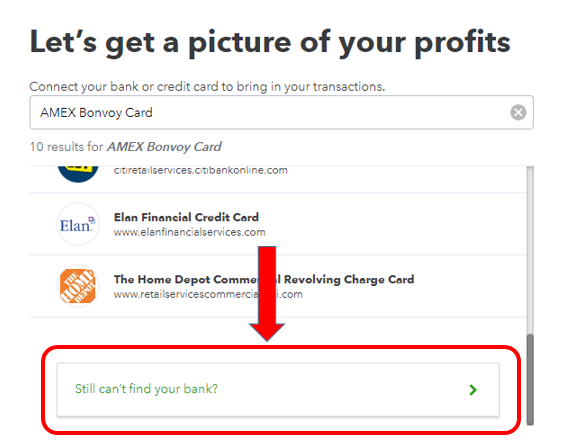
This will send a request to our engineering team so they can work with your financial institution and have it added in our online banking.
In the meantime, you'll want to use the workaround that was shared in the previous responses. Allow me to share more online-banking references in case you might need them:
Let me know if you're able to sync the right account or import your banking transactions. The Community is always here if you need anything else.

