Turn on suggestions
Auto-suggest helps you quickly narrow down your search results by suggesting possible matches as you type.
Showing results for
Get 50% OFF QuickBooks for 3 months*
Buy nowEvery single time I try to update my banking transactions, I get Error 324 for my two Ally Bank accounts. I click "Fix", re-enter the sign-in details and it syncs that one time. I have to do this every single time. Why isn't this connection staying connected??? There is nothing different at the bank site - no need to update password, etc.

Hello there, @Freelsdraft.
I appreciate your effort for re-entering the sign-in details every time you update your banking transactions and this is not the experience we want you to have.
Error 324 occurs when QuickBooks can't find your account while trying to connect to your bank or credit card's website. I understand that this disrupts your workflow, but rest assured, our Live Support Expert team is here to help. They can investigate this matter further and conduct a screenshare session to better understand the issue.
Here's how to connect with our Live Support:
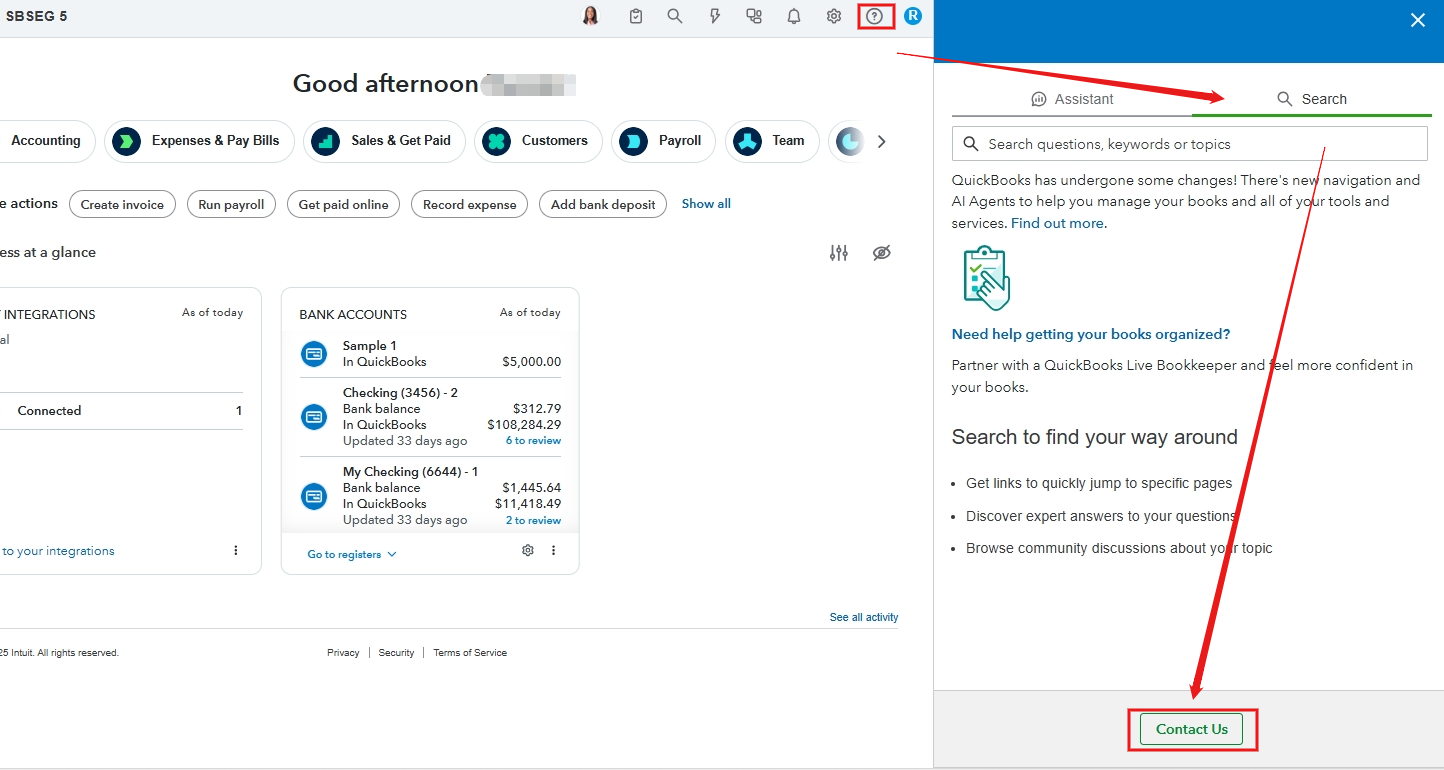
Support availability:
Solopreneur, Simple Start, Essentials, Plus
Advanced
In the meantime, you can manually upload your bank transactions into your QuickBooks Online account to keep your books up to date.
If you have additional questions, feel free to click the Reply button.
This is happening with our Amex@Work account, and has been for weeks. There is clearly an ongoing system issue. What is the resolution?
I am having exactly the same problem with an Ally account, and it’s maddening.
Thank you for sharing your experience in this thread. I understand how challenging it can be to encounter an error with your Ally Bank. To effectively address this issue, I recommend reaching out to the QuickBooks Support team.
The Support team has the tools necessary to review your account and identify the root cause of the error you're experiencing in QuickBooks Online.
Here's how:
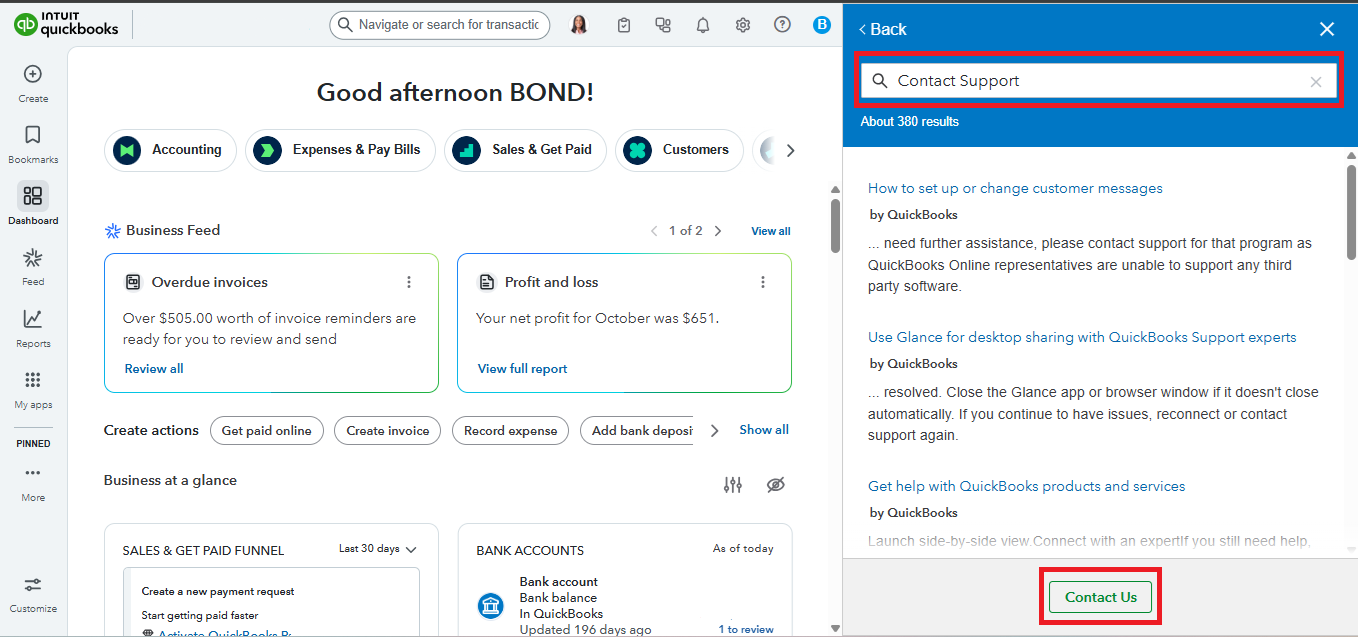
If you have more concerns related to QuickBooks, don't hesitate to reply in this thread. We're here to help.
This doesn't fix the issue. It is happening across several companies we own, and it seems to work at first, but once you refresh, it happens again, and transactions do not download. I have spoken with several people over the phone, but no one has been able to fix the issue.
I too, am having this issue. I've followed all the steps to disconnect and reconnect and my transactions are imported, and then this stupid error comes right back. And nowhere in this thread is Intuit providing any useful suggestions whatsoever.
Has anyone found a solution? Are QB and Ally bank just never going to talk again? Is Intuit just blowing us off? WTF??
Hi Geof, I appreciate you taking the time to troubleshoot your bank connection. We understand this impacts your workflow and will ensure it gets the attention it deserves.
To effectively address this bank error, we recommend contacting our Live Support team. They have the tools to access your account and investigate the issue further.
Here's how to connect with them:
You can refer to this article to view our support hours and choose a convenient time to connect: Get help with QuickBooks products and services.
If you have any further questions or need additional support, please don't hesitate to reply.
Well, I followed directions and got to the Assistant. It worthlessly regurgitated the same troubleshooting steps that I already went through, and then, when I clicked on the button for live chat, told me "an expert will join the chat shortly," yet no expert appeared.
It seems Intuit support has turned into circular AI Hell and we're screwed on this one.
Thanks, Intuit.
I've been having this same issue for weeks now. We pay a monthly or annual fee for this software. It should work as expected.
Thank you for getting in touch, Jeremiah. Your bank connection keeps your business moving, and we’ll move quickly to get everything back on track.
We recommend reaching out to our QuickBooks Live Support team. They’re equipped with the necessary tools to diagnose the issue and get this fixed promptly.
Here's how:
You can check our support hours and pick a convenient time in the article: Get help with QuickBooks products and services.
If you have any other questions or need more assistance, feel free to Reply. We're here to help.


You have clicked a link to a site outside of the QuickBooks or ProFile Communities. By clicking "Continue", you will leave the community and be taken to that site instead.
For more information visit our Security Center or to report suspicious websites you can contact us here


