Turn on suggestions
Auto-suggest helps you quickly narrow down your search results by suggesting possible matches as you type.
Showing results for
Connect with and learn from others in the QuickBooks Community.
Join nowHi there, gstuart.
I love to help you with your issue about QuickBooks Online (QBO).
To ensure that I'm on the same page, can you add more details about the assistance you need? Any additional data would be greatly appreciated so I can provide you with the right information.
In the meantime, if you need some assistance with managing your account, you can visit our Community Help Articles hub.
Keep me posted so I can help you further. Take care always and have a great day.
I don't know what else to tell you. In the Customize dialog, I need to filter out one account from the report. How do I do that?
Hello there, @gstuart.
Thank you for reaching out to us. I'm here to help you locate the exclude button in QuickBooks Online (QBO).
Before you exclude a downloaded transaction, make sure to exclude the right transaction.
Here’s how to do it:
Check the box beside the transactions you want to exclude.
Click the Batch actions drop-down, choose to Exclude Selected.
The items will be moved to the Excluded section.
From the Excluded tab, put a check in the box for the transaction you'd like to permanently delete.
Choose Batch actions, then Delete.
You'll be asked if you're sure. Click YES to confirm.
You can undo transactions that were excluded incorrectly.
Here’s an article for you to learn how to customize reports in QuickBooks Online. For future reference, see QuickBooks product or service.
There you have it. Drop me a reply if you have any follow-up questions about excluding transactions. I'm always happy to help.
Were you able to get this excluded?
I'm wanting to do the same thing. I have a checking account that I don't want included in my P/L statement.
Hello, Adam.
I'd like to share some important pointers about what affects the Profit and Loss report. I'll also throw in a process that'll help you filter out your checking account from the report.
The Profit and Loss reports are driven by income and expense accounts. Your banks are classified under Balance Sheet accounts, so they won't affect the Profit and Loss report (we're unable to filter them out).
However, there is a workaround for this. You'll want to use the Location tracking feature, then assign locations to your transactions as you record them (works if you have the Plus or Advanced version).
Turn on the Location tracking:
Add locations for your bank accounts:
As you enter your income or expense transactions, there will be a field where you can assign a location (for the bank account). Simply add a location, then enter the transaction details normally.
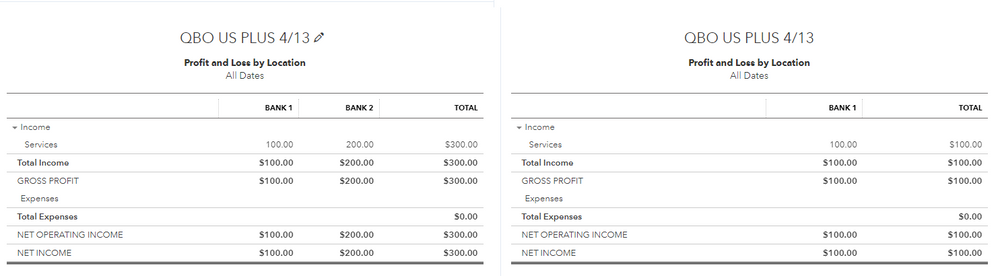
Now, run the Profit and Loss by Location report, and filter out the bank accounts you don't want using the Location filter option.
A side-by-side comparison between unfiltered and filtered Profit and Loss by Location report:
This works well if you only have a few transactions entered. It may not be viable if there are hundreds of entries already recorded, but you can always pull them up and assign the locations.
Though, comparing your Balance Sheet and your Profit and Loss reports can also be an option. Then, use the Location tracking workaround for the next succeeding transactions.
A reference about this method can be found here: Run a Profit and Loss report by bank account in QuickBooks Online.
If you're ready to reconcile your bank accounts, we have a guide that'll help you with the process: Reconcile an account in QuickBooks Online.
Do you need help recording a specific transaction or would you like to run other reports? Let me know and I'd be glad to assist you again.
OK perfect, so to be clear, in order to EXCLUDE something, we have to classify everything we DO NOT want to EXCLUDE, thereby making the EXCLUDE function basically useless right?
Hi there, @Wilson,
To clear up your confusion, let me share some information about Exclude function in Quickbooks Online (QBO).
The option to exclude has separate functions from what my colleagues @LollyNino_C and @jamespaul mentioned above.
Normally, it is only applicable in banking if you want to keep a downloaded transaction from going into your company expenses.
On the other hand, the workaround that @jamespaul has provided is only used for excluding the bank accounts on the Profit & Loss report.
For detailed information, kindly visit: Exclude a bank transaction you downloaded into QuickBooks Online.
You may also want to read this article to learn how to review downloaded bank and credit card transactions and put them in the correct accounts: Categorize and match online bank transactions in QuickBooks Online.
Don't hesitate to leave a reply if you require further assistance with excluding transactions in QBO. I'm here to help anytime. Have a great day!
Hello @DHeraV We might be speaking about completely separate things here, from my understanding the original question was talking about the filter in customisation of the P&L Statement.
What you are talking about is excluding transactions from import into a bank account.
This is something completely different and we are not discussing this.
Instead we are discussing excluding certain accounts from the P&L statement.
The problem becomes even more acute when choosing to excluding 'customers'.
Because the issue is when you use the select filter, you can only INCLUDE, not EXCLUDE.
This begs the question: "why not select ALL customers EXCEPT the customers that you do not want included in the report?"
And the answer to that question is of course: "The resulting report does not include transactions for which there is no customer"
So then the resulting P&L Statement where you select all customers EXCEPT the one you want to exclude does not produce an accurate report.
A simple solution would be to change filter to exclude OR include (currently forced to include only)
OR
Allow non-defined to be a checkbox instead of a summary selection (such as it is now)


You have clicked a link to a site outside of the QuickBooks or ProFile Communities. By clicking "Continue", you will leave the community and be taken to that site instead.
For more information visit our Security Center or to report suspicious websites you can contact us here