Thanks for reaching out, @straighttooth.
To clarify, are you trying to delete a duplicate paycheck? You can delete a paycheck if it hasn't been processed yet.
Here's how:
- Go to the Workers/Payroll menu, select Employees.
- Click Paycheck List under Run Payroll,
- Change the date range if necessary. Then, look for the paycheck you need to delete.
- Select Delete.

- Check the box to confirm and click Delete Paycheck.
These instructions are available from our guide on deleting or voiding employee paychecks.
If you are unable to delete the paycheck, I suggest contacting our Payroll Support team. They have more tools to securely pull up your account and help you further in voiding.
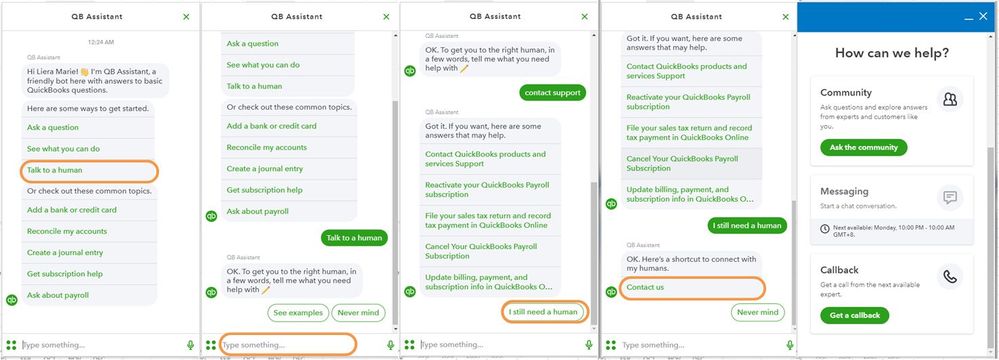
- Click the (?) Help icon in the upper right-hand corner of the Dashboard.
- Select Talk to a Human.
- Enter a short description of your concern and press Enter.
- Click I still need a human.
- Select Contact Us to connect with our live support.
- Choose Get a callback.
To ensure we address your concern, our representatives are available from 6:00 AM to 6:00 PM on weekdays and 6:00 AM - 3:00 PM on Saturdays, PST. For more information, check out our support hours and types.
Additionally, you can run several payrolls reports QuickBooks Online Payroll. This will help you view useful information about your business and employees.
Please know that our doors are always open to help you with any QuickBooks-related concern. Take care.


