Hi there, @kimforbes.
To clarify, was it overstating your employees' income? To correct them, you'll have to find the paycheck that was recorded twice. Then, delete the duplicate one. However, if you have entered the amount twice in the paycheck, then you'll have to edit it instead.
Before doing that, make sure to back up the QuickBooks company file. This way, you can restore your data if you ever run into problems.
Here's how to delete a paycheck:
- From the Employees menu select Edit/Void Paycheck.
- Enter a date range to find a paycheck.
- Select the paycheck, then click Edit.
- Click Delete.
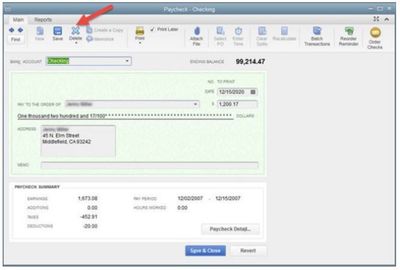
- Click OK to confirm.
To edit a paycheck:
- Find and open the paycheck, and then click the Paycheck Detail button.
- Make the necessary changes.
- Click OK, then choose Yes to confirm the action.
You can refer to this article on how to create and print W-2: Fix an incorrect W-2. To give you complete details about entering the 3rd party sick pay in QuickBooks Desktop, please check out this link: Track and submit taxable third-party sick pay.
I got your back if you have any other questions. It's my pleasure to help you out. Have a good one.


