Turn on suggestions
Auto-suggest helps you quickly narrow down your search results by suggesting possible matches as you type.
Showing results for
Get 50% OFF QuickBooks for 3 months*
Buy nowI'm suddenly having this problem. When I 'create invoices', which used to page sequentially back from the current newest as I clicked 'previous', now goes back to 2002 and I have to click through 20 years of invoices to get to the recent ones. I can't find anywhere to change the order of this search sequence. (QB2000)
Solved! Go to Solution.
Since support is unlikely to help with this version of QB I just went back to my last good copy and re-entered everything since then again. Invoice tab order is fixed again. Good reason to save a dated copy of each updated QB file.
Let's fix this odd behavior within your company file, dbur971.
We can run the Verify and Rebuild data to identify if there are existing data issues. Before doing so, make sure to create a backup copy. Damaged data in QuickBooks can cause unusual behavior while doing tasks within your company file. Once done, rebuild data to resolve data integrity issues: Verify and Rebuild Data in QuickBooks Desktop.
If it doesn't work, I'd suggest purchasing or upgrading your QuickBooks to a supported version. It helps you have a better experience and ensure you have the latest features and fixes. We can install the latest version of your QuickBooks Desktop from our official website. Here's how:
In addition, you can read this article for more information about the service discontinuation of the QuickBooks Desktop. This article also contains answers to frequently asked questions about service discontinuation.
Also, I've added a few articles below. These articles provide information on how we can use QuickBooks efficiently without experiencing odd behavior in the future.
I'm always around to help and share more details about the sales transactions and anything related to QuickBooks. If you have more questions about software compatibility, just let me know by adding a new post. I'm here to help.
Looking closer the previous paging is still going backwards through invoice dates, but it skips all invoices from current to 2002. I tried the verify and it says my data is fine. It is still OK with another company, but all copies of this one company starting after 6Jan23 have this problem. After a rebuild the file is 1 MB smaller, but no change to this behavior. I would think it has to be some setting in this company that got changed, but I can't find what it is.
The invoices that get skipped are still there. If I do a report on a specific customer they all show up and I can click on them to open and they look fine.
(issue title changed to reflect actual behavior)
I can see how difficult this has been, dbur971.
I appreciate you for taking the time to do all the suggested steps. I've come to provide additional steps to fix this odd behavior with your company file.
The first thing we'll want to do is to run the Tool Hub utility to check for any file-related issues. Here's how:

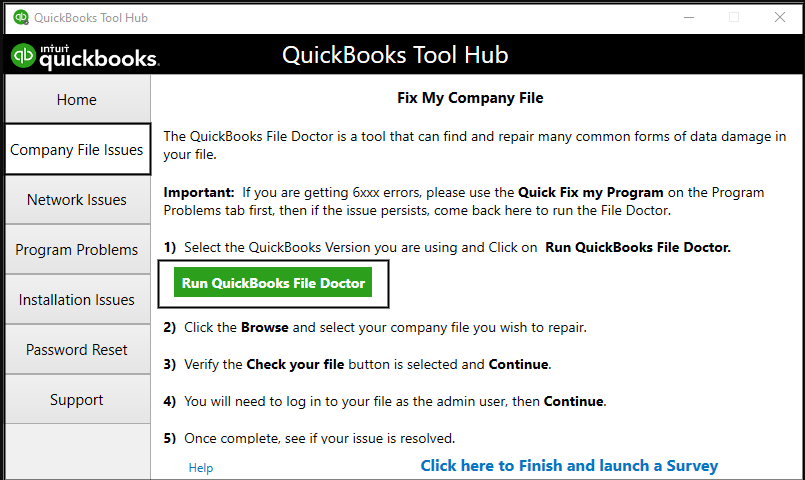
To learn more about repairing QuickBooks and its complete steps, go to this link: Repair your QuickBooks Desktop for Windows.
Another solution we can do is to clean install QuickBooks Desktop. A guide can be found here: Re-install QuickBooks Desktop.
Let me know how the steps go. I'd like to know updates about the process of fixing this odd behavior. I'm just around the corner to help and lend a hand. Keep safe and have a good day.
It says cannot fix the company file. Maybe it doesn't work with the older versions?
Thanks for following up with the Community, dbur971. I appreciate you performing SarahannC and LeizylM's recommended troubleshooting steps.
Since none of our recommended processes have solved your problem with invoice order, I'd recommend getting in touch with our Customer Care team. They'll be able to pull up the account in a secure environment, conduct further research, and create an investigation ticket if necessary.
They can be reached while using QuickBooks.
Here's how:


If you can't reach them inside of your product, they can also be reached through our website.
Be sure to review their support hours so you'll know when agents are available.
I'll be here to help if there's any additional questions. Have a lovely day!
Since support is unlikely to help with this version of QB I just went back to my last good copy and re-entered everything since then again. Invoice tab order is fixed again. Good reason to save a dated copy of each updated QB file.
Hello, dbur971.
I appreciate you sharing the steps you've done to fix the issue. This will definitely help other users as well in the future. Please keep on posting here in the Community.
Stay safe and have a great rest of the day.


You have clicked a link to a site outside of the QuickBooks or ProFile Communities. By clicking "Continue", you will leave the community and be taken to that site instead.
For more information visit our Security Center or to report suspicious websites you can contact us here


