Turn on suggestions
Auto-suggest helps you quickly narrow down your search results by suggesting possible matches as you type.
Showing results for
Get 50% OFF QuickBooks for 3 months*
Buy now
Hello there, @lovdensproperty-.
I'm here to help get your AMEX bank account linked to QuickBooks.
Let's ensure that you have the correct link to your financial institution. Once verified, connect your account using a private browser.
Once done, you can switch to the main browser and clear the cache. You'll also want to connect the account using a private browser.
You can upload CSVs with either the following 3-column or 4-column format. These are the only columns QuickBooks can handle and this order. Each bank formats CSV files differently. This means you may not be able to import CSVs from certain banks since files don't have the format QuickBooks needs.
The 3-column format has a Date, Description, and Amount column. 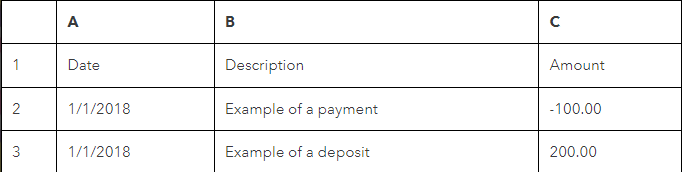
The 4-column format has a Date, Description, Credit, and Debit column.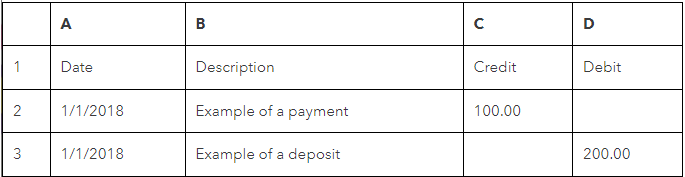
For detailed information, kindly visit: Format CSV files in Excel to get bank transactions into QuickBooks.
Also, keep in mind that the maximum file size is 350 KB. If the file is too big, shorten the date range and download transactions in smaller batches.
I've added some links you can check. These will show you more info on how to make your bank accounts in balance:
Please let me know how it goes or if you have any other banking concerns. I want to make sure everything is taken care of for you. I'm always here to help. Have a good one
Another option, use MT Online or one of the converter tools (e.g csv2qbo) as a workaround.
https://www.moneythumb.com/?ref=110
It gives the same result trying to link through the app, so I don’t think it is a browser setting or cache issue on my computer.
Manually importing and sorting .csv values defeats the whole purpose of quick poke integrations. A temporary workaround perhaps, but as a new subscriber to QuickBooks I’ll just cancel if I can’t get it all to work as promised out of the box.
Thanks for getting back here, lovdensproperty.
Please note that there are banks or financial institutions that does not connect to all types of account for online banking with QBO. This can be why you can see your other cards, but not the one from AMEX Bonvoy Card.
Just in case it's a supported one, you can follow these steps to make sure you'll see it when adding in QBO:
Here's an article that shares more details about this: Find Your Bank or Credit Card Account When you Connect to Online Banking.
If AMEX Bonvoy Card isn't supported at the moment, click the link that says "Still can't find your bank?". Then, enter the name of the bank and the web address. Once done, click Request.
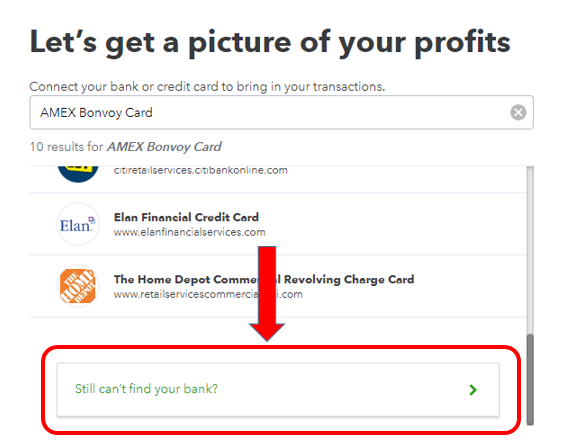
This will send a request to our engineering team so they can work with your financial institution and have it added in our online banking.
In the meantime, you'll want to use the workaround that was shared in the previous responses. Allow me to share more online-banking references in case you might need them:
Let me know if you're able to sync the right account or import your banking transactions. The Community is always here if you need anything else.


You have clicked a link to a site outside of the QuickBooks or ProFile Communities. By clicking "Continue", you will leave the community and be taken to that site instead.
For more information visit our Security Center or to report suspicious websites you can contact us here



