Turn on suggestions
Auto-suggest helps you quickly narrow down your search results by suggesting possible matches as you type.
Showing results for
Get 50% OFF QuickBooks for 3 months*
Buy nowI just migrated from Desktop 2016 PC to Desktop 2021 Mac. In 2016 MPN (manufacturers part number) was an available field in item listings. It is now gone. This poses a problem for me. All my listings are now incomplete as the MPN does not show. Please add this back.

I can see how the Manufacturer's Part Number (MPN) field would aid you in managing your item lists with QuickBooks Desktop (QBDT) for Mac, @JordanMW. That's why I'm here to share a few details about this.
When you move from QBDT for Windows to Mac, your item list will be converted. However, the MPN isn't included. You can learn more about this through this article: Convert a QuickBooks for Windows file to QuickBooks for Mac.
We take customer suggestions as opportunities to improve the various features within our products. Therefore, I would encourage you to send suggestions or product recommendations.
Your valuable feedback will be forwarded and reviewed by our Product Development team to help improve your experience while using the program. Here's how:
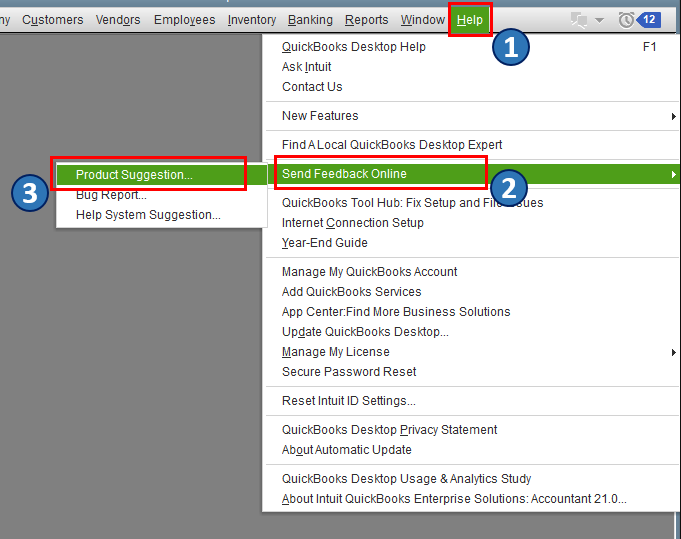
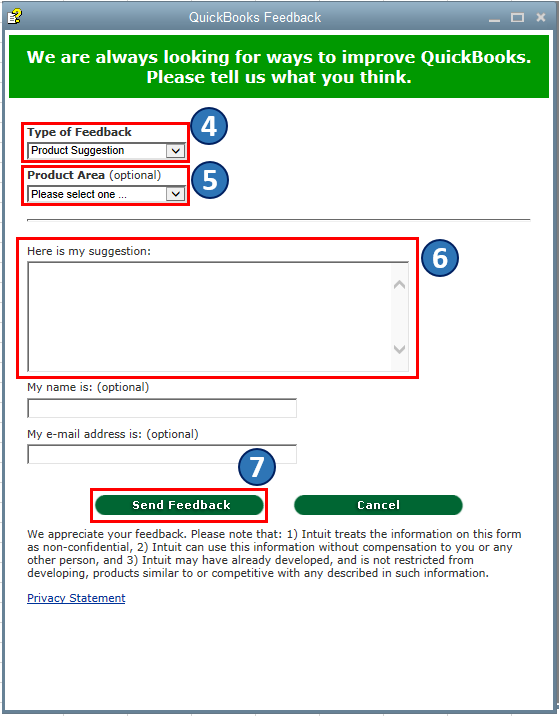
Also, you're able to add your customized item fields in QBDT. This way, you can capture specific customer, vendor, employee, product, and service details. Then, you're able to focus on the info that matters most to your business. To learn more about this, you can check out this article: Create and use custom fields in QuickBooks Desktop for Mac.
Please feel free to comment below if you have other concerns about managing item lists in QBDT for Mac. I'm always around to help. Take care, and I wish you continued success, @JordanMW.
I agree with this customer, as a company that sells lots of parts, Manufacturer part numbers are key. I just converted my whole company to Mac and I'm sorry I did as far as QB goes. your telling me to go back 20 years as a QB user and modify or drop every part number? how professional is that going to look on an estimate, sales order, purchase order, and Invoice. how does my customer know what he is order? when they order 25 or so parts from the same manufacturer, how am I supposed to know what they are ordering without a pad and a pencil (somebody needs to add this feature back on the software side)? I see in the chain that you added an option but gave no link for us to start seeing if this is an option. Here's my twist, Apple is a big company, why are they being penalized in regards to software. How is it QB offers several option for PC and just one option for MAC. Sorry for venting at the end, my company invested thousands of dollars in new equipment, and four days of trying to make this conversion work, only to find that it may not happen and I may have to switch my world back to PC.
CMBinc
Another option, running QBD Windows on Parallels with Win 10 Home to lower your cost. You don't need to purchase o use PC.


You have clicked a link to a site outside of the QuickBooks or ProFile Communities. By clicking "Continue", you will leave the community and be taken to that site instead.
For more information visit our Security Center or to report suspicious websites you can contact us here


