Turn on suggestions
Auto-suggest helps you quickly narrow down your search results by suggesting possible matches as you type.
Showing results for
Get 50% OFF QuickBooks for 3 months*
Buy now
Thank you for joining this thread and providing detailed information about your experience when logging in to your account, Sandy. We truly appreciate the efforts you've put into following my colleague's recommendations and even changing your passcode. Let's work together to connect you with our Live Support team without requiring you to log in to your account.
Currently, we do not have direct phone lines or a contact number for our Live Support team. Since the issue persists and you're unable to log in to your account, we recommend using our QuickBooks Online (QBO) Test Drive to connect with them. They can conduct a detailed review of your account, identifying the root cause of the problem and guiding you through the appropriate steps to resolve it.
Here's how:


Also, make sure to check their support hours so you will know when representatives are available to help.
Regarding the email login code, please know that it can take a couple of minutes for the code to arrive. Here are a few things to check in your email:
If you didn’t receive a code, select I didn’t get an email or I didn’t get a text message to request a new one. Please note that only the most recent code will work.
Thank you again for sharing your experience with us, Sandy. It helps us understand how we can support you better. If you have any additional questions or need further assistance, please don’t hesitate to leave a comment below. We’re here to make sure you get the most out of our service, and look forward to hearing from you!
THis information does not work any more? What is the customer support number? I have a law firm and we are suddenly getting a message that "we didn't find any companies for this account". This is an urgent matter and we have depended on quickbooks for almost 2 decades. We are being charged for this service. What am I supposed to do!
What happens if you can't log in to your account?
Hi, paceleader.
I noticed that you have posted twice in the Community Forum regarding your inability to find your companies after signing in. My colleague, Bryan_M, has already responded to your concern.
You can review their response by visiting this link: https://quickbooks.intuit.com/learn-support/en-us/account-management/re-when-i-sign-on-to-quickbooks...
Feel free to reply here if you have any additional questions or need further assistance.
Is [PII removed] actual Quick Books phone number?
Hi there, BE22.
Currently, 833-654-8442 is not verified as an official phone number for QuickBooks Live Support. Intuit has clear guidance on how you should contact us safely to avoid scam, or fraud.
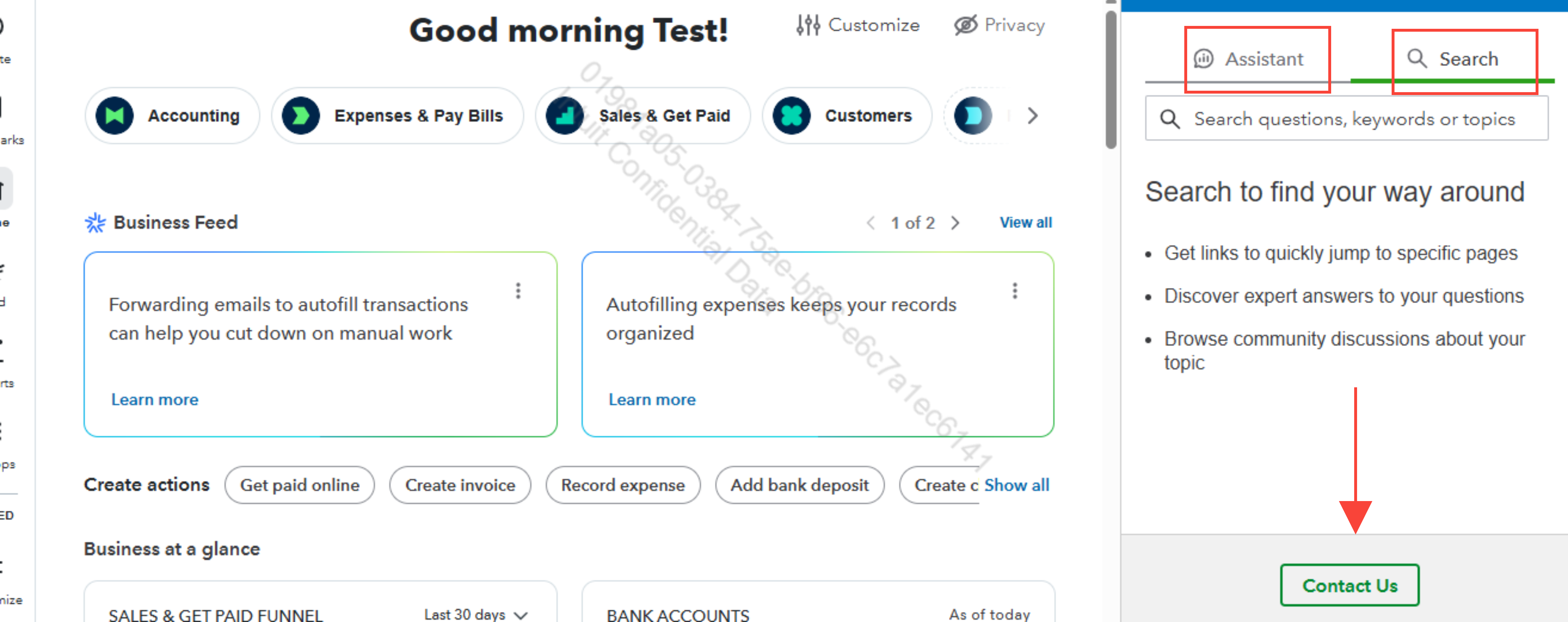
To connect to our Live Support team:
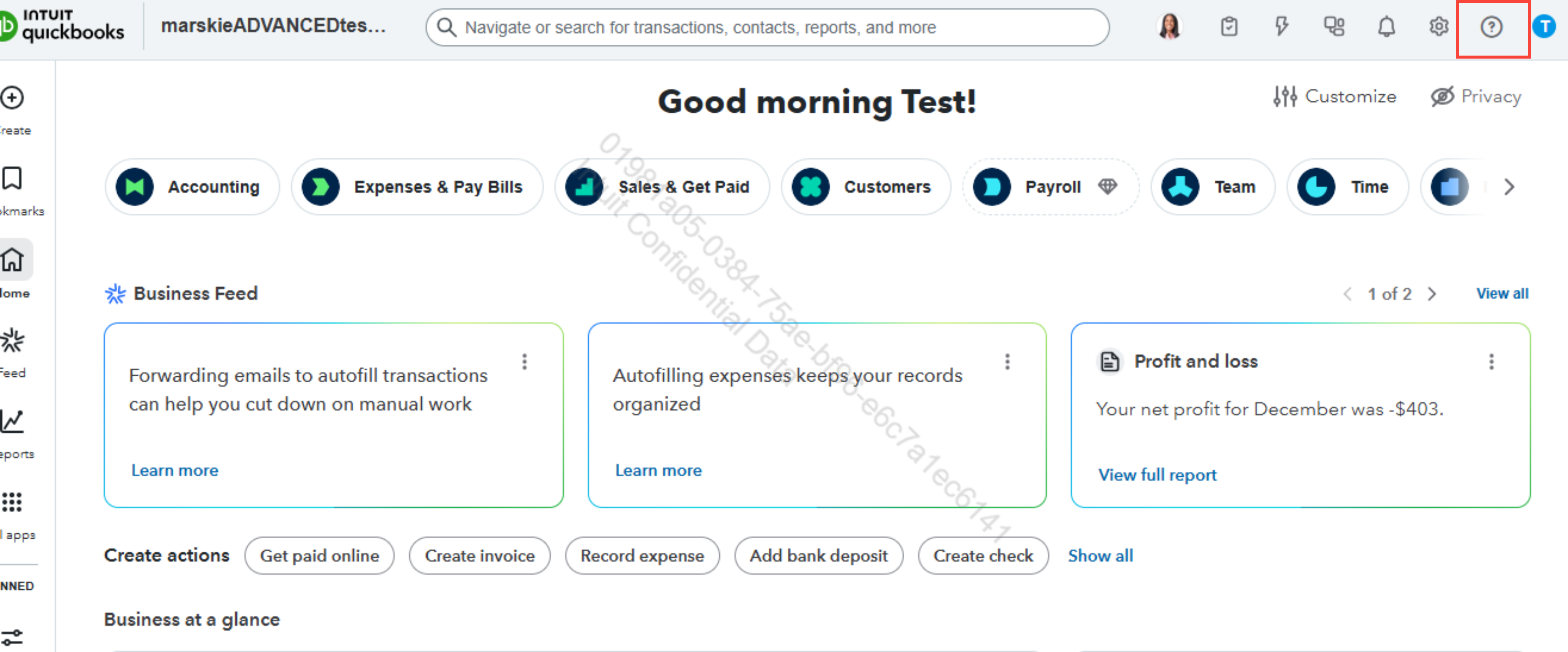
2. Select either tab to get started:
- Start a chat with a QuickBooks support expert online.
- Ask the community to get help from businesses like yours.
Take note of the Support Hours And Types for you to contact Live Support team to ensure we're open and be assisted.
If you have any additional questions, please don’t hesitate to reach out. We're always here to assist you.
Help!
My account has been hacked. Please contact me as soon as possible.
[name removed]
[phone number removed]
Hi there, I know how stressful and scary it is to feel like your business's financial data is at risk.
To make sure I give you the best possible guidance moving forward, are you currently able to access your QuickBooks Online (QBO) or Intuit Account account, or are you locked out? Also, have you noticed any suspicious payments, new users, or altered vendor details in your account so far?
Since I am assuming you can still log into your account, your best next action is to change your password immediately. Please click the circle with your initial in the top right corner of your screen, select Manage your Intuit Account or sign in to accounts.intuit.com using your Intuit credentials. Then, go to Sign In & security. Update your password to something completely unique, and while you are on that page, please turn on 2-step verification. This will require anyone trying to log in to have a code sent directly to your phone, stopping the hacker in their tracks. Once done, follow these steps:
If you can no longer access your account, I recommend reaching out to our live support team for a detailed security review. You can use a QuickBooks "test drive" account to contact us:
Please check our Live Support Hours to ensure a representative is available to assist you.
We are here to help you through this. Feel free to send us an update by clicking on the Reply button.
And when the button doesn't work? Like the way it's been designed. Then what? It seems that quickbooks is intentionally putting up a wall to prevent customers from reaching customer service because as quickbooks keeps adding more ai, the service becomes less and less usable, increasing complaints. So instead of removing the Ai, you've removed the ability for the customer to contact quickbooks


You have clicked a link to a site outside of the QuickBooks or ProFile Communities. By clicking "Continue", you will leave the community and be taken to that site instead.
For more information visit our Security Center or to report suspicious websites you can contact us here


