Turn on suggestions
Auto-suggest helps you quickly narrow down your search results by suggesting possible matches as you type.
Showing results for
Get 50% OFF QuickBooks for 3 months*
Buy nowWhat QB Desktop year version?
Appreciate your effort in raising your concern here in the Community, sue1108.
Error 1603 comes up when the security policy of the computer has been enabled or there is a problem installing the Microsoft NET Framework.
There are a few solutions to address this issue, and we'll start by using the QuickBooks Tool Hub and setting up the Install Diagnostic Tool.
If you haven't already installed QuickBooks Tool Hub, here's to download and set it up:
Next, let's run the Install Diagnostic Tool through the Tool Hub:
After restarting and the error still persist, the next step is to update your Windows version directly through Microsoft.
You can find detailed instructions in this article: Windows Update.
If you have other questions and concerns, our Community Team is always here to assist you.
I have tried to update my quickbooks desktop and it keeps locking up and unable to update. I am getting errors 1712-1326-1603
2024
Thanks for sharing your concerns with us, @Glo45.
I hope your day is going great so far.
To clarify, have you tried using the QuickBooks Tool Hub as suggested by my colleague, raymund_A, above? If not, I recommend doing that. Our QuickBooks Install Diagnostic Tool within the Tool Hub helps to clear errors 1712, 1326, and 1603.
Here are the steps to install and use the tool:
Next, let's run the Install Diagnostic Tool through the Tool Hub:
That should do the trick. If you have tried these steps already, please let me know so we can take troubleshooting to the next level. I'll be sure to keep an eye out for your reply. Take care!
Help!!
I am haveing this same issue. I ran the diagnostic tool, I restarted the computer - nothing changed. Same error, and program will not run until the patch is installed.
What do I do?
Nancy
I'm glad to see you in this thread, Nancy. I appreciate your effort in following the troubleshooting steps provided to resolve the issue in updating QuickBooks Desktop (QBDT). I understand that this has been challenging on your end, and I'm here to guide you toward the best assistance for this matter.
Since the issue persists despite performing the troubleshooting steps, I recommend contacting QuickBooks Desktop (QBDT) live support team. They have the necessary tools to identify the root cause of the error affecting your QBDT system during the installation or update of a new patch.
Here's how:
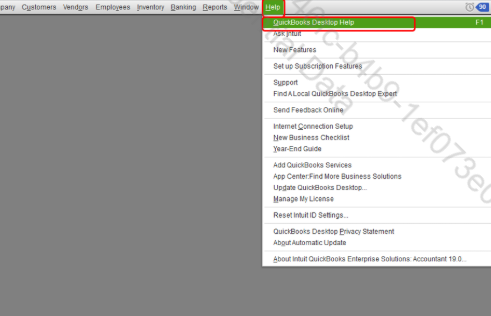
Feel free to return here if you have additional questions. We're always here to assist you promptly.
I can't get into my quickbooks. It says: Could not initialize license properties. Error 3371, Status Code-1. QB would not load the license data.
Not sure how to fix it.
[Removed PII]
Quickbooks Premier 2024
One of you try to help me but was not able to fixt it
Thanks for joining this thread, cindyhickman.
If you're encountering Error 3371 in QuickBooks Desktop, there can be a few possible causes:
I'd initially recommend troubleshooting with your QuickBooks Tool Hub.
Here's how:
If the error continues displaying, you'll want to try deleting your entitlement data store file. Detailed steps for this process can be found in our Fix Error 3371 - Could not initialize license properties article.
Please feel welcome to send a reply if there's any additional questions. Have a wonderful Wednesday!
I'm trying to update quickbooks, getting a message code 1603
24.0
Hi, tfa1. Thank you for clarifying which version you're using.
Error 1603 in QuickBooks Desktop (QBDT) occurs when the update installer has encountered an internal error or when there is a problem installing the Microsoft .NET Framework. To resolve this, I recommend following the troubleshooting steps provided by my colleague raymund_A.
If the issue persists, it's best to contact our QDBT Live Support team. They can securely access your account and help you clear the error. Here's how:
Feel free to reply if you have additional questions. We're here to help.
QB Desktop 2024 Premier or QB Desktop 2024 Premier Plus?
Can you login to CAMPS and find your license code there?
How do I fix Error 1712??
2024
Hi there, mcnamara1. Joining this conversation to share some fixes for the error message you encountered.
Error 1712 is often due to missing Windows components. You can resolve this using the QuickBooks Tool Hub. The QuickBooks Tool Hub helps fix common errors. Follow these steps:
If the issue persists, add or create a Windows user with Administrator rights and install it again. You could also troubleshoot your Windows Update and Windows Installer. If unsure, consider consulting an IT professional.
Feel free to leave a comment below if you have follow-up questions about this.
Thanks so much all! The situation has been resolved.
Thanks all, the situation has been resolved.
Hi there, Bec11.
I’m glad to hear that my colleagues were able to assist you in resolving the error 1603.
If you have any additional questions or concerns about your QuickBooks, please don't hesitate to reply here. We're here to help.
code 1603, 1712, and 1328 are keeping me from getting into quickbooks
Hello, mdockery.
The codes 1603, 1712, and 1328 are common QuickBooks errors related to installation and updates. To resolve these, you can use the QuickBooks Tool Hub, which helps diagnose and fix these issues.
Here’s how to install and use the tool:
After that, run the Quick Fix my program to resolve the errors:
If the error persists, proceed to Solution 2.
Feel free to reach out in the comments if you have additional questions.


You have clicked a link to a site outside of the QuickBooks or ProFile Communities. By clicking "Continue", you will leave the community and be taken to that site instead.
For more information visit our Security Center or to report suspicious websites you can contact us here


