Turn on suggestions
Auto-suggest helps you quickly narrow down your search results by suggesting possible matches as you type.
Showing results for
Get 50% OFF QuickBooks for 3 months*
Buy nowThis error may occur due to one or more missing Windows components, lenduffey. You'll need to close QuickBooks in order to use the Tool Hub. I'll provide you with the steps to fix this one.
Here's how:
We recommend you use Tool Hub on Windows 10, 64-bit.
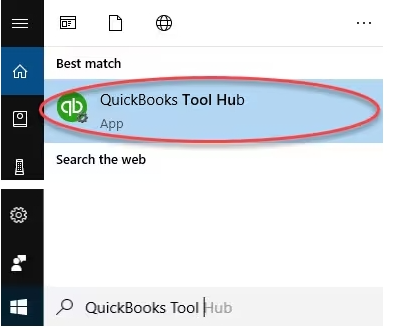
Please know that if you can't find the icon, do a search in Windows for QuickBooks Tool Hub and select the program.
Moving forward, run the Fix my Program from the QuickBooks Tools Hub.
1. In the QuickBooks Tools Hub, select Program Problems.
2. Select Quick Fix my Program.
3. Retry installing QuickBooks.
If that did not fix the error, Add or create a Windows user with Administrator rights, then attempt QuickBooks installation.
Furthermore, we can open this link to learn what to do if you get a subscription error when you install update your QuickBooks: Fix Error: Verify your subscription before installing QuickBooks Desktop.
For future reference to learn different ways in tracking customer transactions in QuickBooks Desktop, check out this article: Get started with customer transaction workflows in QuickBooks Desktop.
If you have any more questions about this topic, please don't hesitate to ask here in the Community. We'll provide continuous assistance. Have a nice one ahead.
I was asked to update payroll but I get error code 15270. How do I fix this?
I'll ensure that your QuickBooks Online Payroll is updated successfully, Alop2025.
To provide you with the most effective assistance, please let me know if you have already implemented the troubleshooting steps suggested by my colleague Jevee.
If you haven’t already, I recommend following those steps to resolve the error. For more comprehensive guidance, please refer to this article: Fix error message 15XXX when downloading payroll updates.
Should the problem persist after you've followed these instructions, I encourage you to reach out to our Live Payroll Support team for further support. They have the specialized tools and expertise necessary to effectively update your payroll.
Here's how to connect with them:
You might also find this article helpful for future reference if you need help running, printing, and customizing payroll reports in QuickBooks Desktop Payroll: Run payroll report.
This channel is always available if you have any additional questions or need more assistance.
Error message 1603. How do I clear that?
I've got you covered, Dennis. We can utilize the QuickBooks Tool Hub to troubleshoot the error you’re experiencing.
To begin, the error message 1603 indicates a problem during the installation process. In this case, let’s download the most recent QuickBooks Tool Hub version and run the QuickBooks Install Diagnostic Tool to fix it. I'll show you how.

Next, follow these steps to use the QuickBooks Install Diagnostic Tool:
If the issue persists, I recommend updating your Windows operating system. You can find guidance on how to do this by visiting the page: Fix Error 1603 when you install QuickBooks Desktop (QBDT). Once everything is settled, reinstall QuickBooks.
If you continue to encounter this error, please contact our Support Team for further assistance. They can take a look at this issue in detail and help ensure a successful software update.
Here are some resources to assist you with activating the program:
Feel free to hit the Reply button if you have any further questions related to the installation process. I'll be here to address them. Take care.
Which QB Desktop year version?
while updating i cannot get the update due to error code 15270
There are several reasons why the error code 15270 is showing, Ellis.
Here are the following:
To resolve this, you'll need to download the updates as an administrator. Follow these steps to begin:
If you have already updated as an administrator but the issue persists, please follow the steps in Solutions 2-4 in this article: Fix error message 15XXX when downloading payroll updates.
Feel free to hit the Reply button if you have additional questions about payroll updates.
I can't open QB Desktop because it wants me to register/activate but id doesn't go anywhere, it just stalls
I'll try
How do I Add or create a Windows user with Administrator?
Let’s perform the troubleshooting steps so you can access your QuickBooks Desktop (QBDT), M-B.
It’s possible that the antivirus software on your computer is in the way. Let’s disable your antivirus software and attempt to activate your QBDT. After that, you can turn it back on. I recommend reaching out to your antivirus provider if you need help getting it to work with QuickBooks.
If you don’t get asked to enter your validation code, you can manually activate QuickBooks. Here’s how:
Regarding your second concern, to create a window user with administration, add a Windows user with admin rights, then sign out and log in as the new user.
Let us know in the comments below if you have follow up questions.
Error code 1603 does not appear to show how to resolve the issue. Could you provide instructions please. 9-21-2025
Hi there, @Bec11.
We can run the diagnostic tools from the tool hub if you encounter error 1603 when installing QuickBooks Desktop.
Here's how to download QBDT Tool Hub:
After that, you'll need to start using the QBDT Diagnostic tool. Feel free to visit this article for more instructions: Fix Error 1603 when you install QBDT.
Please don't hesitate to leave a reply if you have additional concerns in QBDT. We're always here to help.
lost my file can’t find it
Help please
Hi Agui, I appreciate you bringing this up. Let's work together to find your file and ensure everything is back on track.
To help locate your lost QuickBooks Desktop file, use the Windows Search and type QBW on your computer. Then, check the default folders or the folder where you usually save files.
If you can't find the file on your system, I recommend checking the Recycle Bin to restore it.
Afterward, open QuickBooks Desktop and navigate to the File menu. Then, click Open Recent Company.
Alternatively, if you set up Intuit Data Protect to back up your file, you can securely access and view your QuickBooks files anytime.
If you have other questions, let us know below. We're still here to help.
Did you reinstall QB on the new PC or else?
I had to reload QuickBooks because of computer problems now I cannot get in. I am using a 2012 version. Is there anyway I can get the data off? I was just ready to print my reports for the accountant and it knocked me out.
Thanks for following along and sharing your concerns, @Lbeller.
Are you receiving any error messages when trying to get into the company file? Or what issues are occurring?
If you only wish to pull your data, you can always install a newer trial version of QuickBooks, then extract your data. However, please know if you upgrade your company file to a newer version, your company file can no longer be opened in the older 2012 version.
Before you start, please make sure your computer meets minimum requirements to install QuickBooks Desktop Enterprise 24.0.
Important: Don't try to register the trial. If you try to register, it could lock you out of QuickBooks.
You'll want to save the trial install file somewhere you can find it, like on your desktop screen. You don't need any codes to open the trial.
Once you have installed the trial version, you'll need to open and upgrade your company file. Here's how:
That should do the trick. Please let me know if you have any additional questions or concerns. Take care!
Will you get back to me asap
I do not have a current back up. I was just ready to back up when it kicked me out. My question is can I open that 2012 version to get the data off?
Try to reinstall your QB program. Another option, use the trial license to open your company file.
fix eror 1603


You have clicked a link to a site outside of the QuickBooks or ProFile Communities. By clicking "Continue", you will leave the community and be taken to that site instead.
For more information visit our Security Center or to report suspicious websites you can contact us here


