Year-End Learning! AI Webinar: Watch by Dec. 31. Watch Now! 
An image of a business owner setting up automated revenue recognition.
Enterprise

Automated revenue recognition: What it is, benefits, and best practices


Key takeaways:

  • Revenue recognition is the accounting process of recording income when you’ve done what you promised a customer—not when the money hits your account. 
  • Automated revenue recognition is the use of software that captures your transactions, applying revenue recognition accounting rules over time without the need for spreadsheets or manual adjustments.
  • End-to-end automation connects your CRM, billing, and financial systems to create a single source of truth from quote to close.


Manual revenue recognition under ASC 606 stifles growth and undermines effective financial management, raising the risk of compliance failure. For finance teams, it delays close, drains time and resources, and leaves C-suite leaders making decisions with incomplete or inaccurate data. Automation reduces compliance risk and accelerates close cycles—PwC reported that one client shortened its close by 85%.

In this article, we’ll explain what revenue recognition automation is and how it works. You’ll find out why scaling businesses adopt the technology and the returns it delivers. Plus, we’ll share best practices for getting the implementation right.

Jump to:

Introducing Intuit Enterprise Suite

Simplify complex operations with multi-entity management, custom roles and permissions, and automated revenue recognition. Make faster decisions with multi-dimensional reporting and deeper insights in real time.

What is automated revenue recognition, and how does it work? 

Revenue recognition is an accounting rule that requires you to count income only after you’ve earned it—in other words, when you’ve delivered on your promise to a customer. That could be when you provide a product or perform a service, either in whole or to a milestone or agreed percentage of completion.

The purpose of the rule is to stop companies from overstating their financial performance by recording income they haven’t actually earned.

Here’s how contract revenue recognition rules apply to two industries:

  • SaaS firm: You use straight-line revenue recognition only if you deliver the service evenly over time. For example, if a customer pays you $12,000 upfront for a year, you record $1,000 each month as you deliver it. If part of the plan is usage-based, you record that revenue as the customer uses it—for example, charging per gigabyte of storage or per API call.
  • Construction firm: With a $2 million contract to build a building, you recognize revenue as you perform the work. If 25% of the work is certified complete, you can record $500,000 in revenue, even if the cash hasn't arrived. 

Traditionally, revenue recognition has been a human- and spreadsheet-led process. The problem is that the process breaks down, often once you’ve exceeded 50 active contracts. Your team has to track complex contracts across different spreadsheets and hand-key journal entries. The more contracts your team juggles, the slower and more error-prone the process becomes.

Automated revenue recognition is the use of software that manages every stage of revenue transactions, from contract to close. There is no manual entry or need to cross-link disparate spreadsheets to calculate what you’ve earned across contracts.

Software with revenue recognition provides:

  • Compliance with the revenue recognition principle, known in the US as ASC 606
  • Real-time visibility into the performance of each contract
  • Automated data capture from CRM and billing systems
  • Rules-based revenue scheduling and compliance
  • Accurate journal entries posted to your general ledger

Automated revenue recognition software allows CFOs to scale confidently while creating time to focus on higher-value work, like reporting to the board and forecasting performance.

6 elements of automated revenue recognition

Here are the six key elements you need to build an automated revenue recognition system for your company:

An infographic showing the six core components of automated revenue recognition.

1. System integration

You first need to connect your CRM, billing platform, and other relevant apps to your revenue automation software. Now, when you close a deal or the customer signs up, this flows straight into your general ledger and sub-ledgers.

This automation eliminates the errors that occur when your team enters financial information on individual contracts into different systems, spreadsheets, and databases.

2. Automatic data capture

Revenue recognition software automatically detects and logs sales transactions, whether they’re recurring subscriptions or one-time charges.

  • Example: A customer signs up for a three-year enterprise plan that requires a one-time implementation fee. The system logs both the recurring and one-time components, ensuring it gets the right accounting treatment.

3. Rule application

To make sure your automated revenue recognition software correctly classifies transactions, set up different ASC 606 or IFRS 15 rules to handle your company’s various revenue streams.

For example, that might be:

  • SaaS services: Use a straight-line rule for "Software Subscriptions.”
  • Custom software development service: Use a milestone-based template for "Professional Services." 

note icon Involve your head of sales when you define your revenue templates. The rules you build must handle the deals your team sells in the real world.


4. Adjustments and alterations

You can also configure revenue recognition software to recognize and account for adjustments like:

  • Contract upgrades and downgrades (for example, mid-subscription)
  • Sales team discounts
  • Service team refunds or credits
  • Changes in subscription tiers
  • Accounting guideline changes

Once configured, the software can re-run your revenue waterfall for all future periods, so forecasts and journal entries reflect your actual, current contract terms.

5. Reporting

Automated revenue recognition software provides powerful reporting capabilities that give you a complete, real-time view of your company's financial health. It moves beyond basic spreadsheets to offer on-demand reports that are always accurate and audit-ready. 

For example, you can generate a deferred revenue waterfall report for a board meeting in minutes, a task that would otherwise take days to build and verify in Excel manually.

6. Audit trails

Finance teams can generate complete and time-stamped audit trails for every revenue transaction, from the point of initial sales up to the final journey entry.

This robust system ensures that your finance department remains in a perpetual state of audit-readiness, minimizing last-minute scrambles and providing complete transparency and accuracy for internal and external audits alike.

  • SaaS example: When a customer subscribes to a SaaS platform for $500 a month, the system instantly creates a time-stamped audit trail. This trail logs every step, from the initial signup to the monthly revenue recognition—including each time the customer pays $500 for their subscription. 

In this example, if an auditor needs to verify monthly revenue, the finance team can easily present a complete, transparent journey from subscription activation to final revenue recognition.

Why businesses need to automate revenue recognition

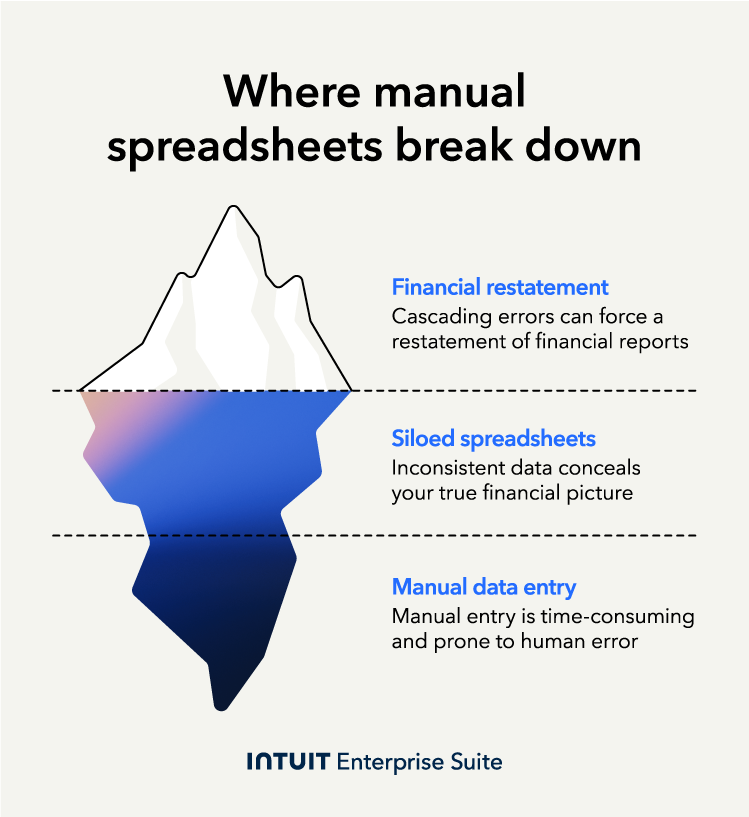
At $2 million revenue, finance teams often start to struggle with accuracy and workload related to revenue recognition. Much higher, and the system cracks. Automated revenue recognition software eliminates manual work, reduces human error, and delivers reliable, compliant financial records.

An infographic showing the three main risks of using manual spreadsheets for revenue recognition.

Revenue compliance complexities

One bad formula can lead to a material misstatement. Under ASC 606, this could lead to a breach of your loan covenant, a negative audit finding, or the need for a full financial restatement. 

These risks are serious, according to a report by Ideagen Audit Analytics. It found that revenue recognition issues accounted for 12% of all restatements, behind only debt and equity errors, between 2005 and 2024.

Automation reduces these risks by applying consistent, compliant rules-based logic to every transaction. 

Diverse revenue models

You may be juggling multiple revenue streams at once, like complex revenue sharing agreements, five-figure monthly subscriptions, and milestone invoices on long-term projects. 

Tracking each stream in its own spreadsheet makes tracking metrics accurately, like monthly recurring revenue (MRR), revenue by product line, and deferred revenue, hard. This increases the risk of noncompliance with GAAP standards, especially if your customers pay you upfront, in arrears, or on variable terms.

Automation simplifies this complexity by automatically applying the correct rule to each model. This makes it easy to accurately report how much revenue the business earns.

Inefficiencies and costs of manual processes

Manual revenue recognition leads to bottlenecks. Teams spend hours trying to fix and find errors. Sometimes, you even need to hire additional staff just to keep up with the workload.

This continual uncertainty over accuracy makes effective financial planning and analysis much more challenging. It slows down decision-making across the business and leads to spending more time on historical data than on future forecasting and planning.

Automation removes friction from revenue recognition. Your team is more productive, ready to react faster to business or market changes, and has more time for accurate budgeting.

Benefits of automated revenue recognition

As we’ve seen, manual revenue recognition suffers from slowness and difficulty in scaling. Automated revenue recognition software turns the process into a fast, accurate, audit-ready workflow.

ASC 606 and IFRS 15 compliance

Revenue recognition software automatically applies pre-set accounting rules to each transaction. This ensures every entry is compliant with your own revenue policies and accounting standards like ASC 606 and IFRS 15.

This reduces errors and the risk of misstatements. It also makes cross-border reporting and real-time compliance tracking simpler and faster.


note icon Make your sales contract language crystal clear, especially for multi-element deals. Your automation is only as good as the contract data it reads. Ambiguity in the contract creates manual workarounds and future compliance risk.


Increased accuracy and consistency

Automation eliminates human errors in complex and repetitive tasks like posting journal entries and updating deferred revenue schedules. According to a 2025 Intuit QuickBooks survey, automation has led to a 98% improvement in data accuracy in accounting, demonstrating its effectiveness in ensuring consistent financial records.

Plus, the software tracks revenue you’ve billed but not earned yet, syncing it with your general ledger so your leadership team works from reliable and trustworthy data.

Strategic enablement

Automation transforms the finance function from a reactive team to a strategic partner. Instead of being bogged down by manual data entry, fixing formula errors, and chasing down numbers, CFOs and their teams can now focus on what matters: strategic financial planning.

The need for this shift is clear. A recent survey of financial planning and analysis (FP&A) professionals revealed that they spend just 25% of their time on value-added analysis, with the remaining 75% dedicated to data gathering and administrative tasks. By automating these low-value activities, teams can reclaim that time and enable a more strategic and impactful role for finance.

Time and cost savings

Automation significantly reduces the time your team spends on revenue recognition-related tasks. For example, month-end closes that previously took days may now take just a few hours. This reduces the need to pay staff overtime, allowing you to keep your department within budget.

But don't just take our word for it. A recent study by Forrester found that companies using QuickBooks Online Advanced actually gained operational efficiencies equivalent to 45 hours a month by the third year of use, demonstrating a dramatic reduction in labor that directly translates into significant cost savings.

Revenue insights, analysis, and decision-making

Revenue recognition software gives leadership teams instant access to comprehensive and up-to-date financial data without waiting for reports. They can do their job better, making faster, data-driven decisions on key issues like pricing, product strategy, employee performance, and future investments.

For example, produce a deferred revenue waterfall report to see how much revenue you recognize from your contract base each month. This helps leadership spot revenue slowdowns early and plan cash flow more accurately.

Scalability

Employees working with a manual revenue recognition system have a maximum capacity. Automated software, on the other hand, scales with your business, applying the same rules to every transaction.

That means there’s no need to add to headcount. Every accountant you don’t have to hire saves you $66,689 in base salary.

Audit readiness

Automating revenue recognition creates a permanent, time-stamped, up-to-date audit trail for every transaction with ease. A recent Forrester study shows that with Intuit Enterprise Suite, a finance team can expect to spend 50% less time running ad hoc reports—a benefit that directly translates into faster report generation and a more streamlined audit process.

When audit season comes around, your finance teams can generate detailed and traceable reports showing you recorded every revenue recognized, satisfying your auditor’s requests.

Introducing Intuit Enterprise Suite

Simplify complex operations with multi-entity management, custom roles and permissions, and automated revenue recognition. Make faster decisions with multi-dimensional reporting and deeper insights in real time.

Revenue recognition automation best practices

Follow these seven best practices to ensure your revenue recognition automation is accurate, compliant, and scalable.

1. Understand accounting standards

Make sure the processes you implement adhere to ASC 606 and IFRS 15 rules. They must be correct from day one of your automation setup for accuracy in every contract and revenue stream.

Before going live, ask external auditors to review and approve your revenue templates. This ensures your reports are audit-ready from the start and reinforces the reliability of your financial data.


note icon Identify your five most complex contracts from the last year. If your new ASC 606 policy can’t handle them cleanly, it’s not ready for implementation.


2. Match revenue with expenses

To show an accurate picture of your company’s financial health, make sure your automation process matches revenue with the costs linked to earning it in the same period.

For example, if you pay a commission on a 12-month contract, amortize that cost over the length of the contract term instead of recognizing it all upfront. Doing this means your reported profit is consistent with the work that generated it.

3. Document and review contracts thoroughly

The accuracy of your automation systems depends on clearly written and consistently structured sales contracts.

Make sure every contract defines the key terms, especially the standalone selling price for each deliverable and any usage-based fees. Your sales and finance teams should collaborate on nonstandard deals to agree on how accounts will treat them in advance. Regular contract reviews reduce the risk of misinterpretation and ensure your automation continues to recognize revenue correctly.

4. Integrate systems

The goal of implementing automated revenue recognition software should be a single, reliable source of constantly updated financial truth.

To achieve this, integrate your revenue recognition software with your CRM, ERP, billing platform, and other relevant business applications, ensuring seamless data flow between systems and accurate processing of all revenue entries. 

Set a passline before you retire your spreadsheets—for example, all balances must reconcile within 1% before launch. After launch, you can monitor performance in real time and identify any integration issues before they impact reporting.

5. Regularly review and update policies

Treat your revenue recognition policy as a living document. Reassess it when you launch a new product, official accounting rules change, or you change your prices. Every time ASC 606 or IFRS 15 rules change, trigger a fresh reassessment.

As part of your overall risk management strategy, set up a regular meeting with key finance and sales staff to identify policy gaps, operational issues, or areas of conflict between sales contracts and accounting treatment.

6. Be transparent with stakeholders

Communicate your revenue recognition policies and procedures clearly to build and maintain trust with the board and investors.

Whenever you change a policy, let them know how it’s changed and why. Proactively show stakeholders the impact of any changes in GAAP and ARR review. This transparency demonstrates your control over the situation and reinforces your credibility.

7. Stay updated on regulations

As your company’s financial leader, you own the responsibility for business-wide compliance with accounting standards. Ignoring regulatory changes is not defensible to board members or other stakeholders.

To stay on top of updates, adopt one or more of the following practices:

  • Subscribe to relevant newsletters from accounting bodies like the FASB.
  • Subscribe a team member to industry publications and give them ownership of briefing the team on any changes.
  • Appoint a third-party accounting advisory firm to provide quarterly compliance updates.

Hold a quarterly review with your external auditor to discuss upcoming standards. This ensures you can proactively update your internal policies and recognition templates before a new or amended rule is introduced.


Revenue recognition automation implementation

Successful revenue recognition software selection and launch is a strategic effort. Focus on these two areas:

Revenue recognition software

When choosing software, don’t focus on its basic features. Instead, look for a platform whose features shield your company against future risk, have ASC 606 and IFRS 15 built in, and can scale with you.

Ask for free trials to test the limits of their systems. If a free trial is not available, ask for a free demo, requesting the company’s sales rep to walk you through how the software handles your most complex multi-element contracts, especially those involving a midterm upgrade or modification.

CPQ (configure, price, quote)

Many revenue recognition errors start with the initial sales quote. A nonstandard quote built on a spreadsheet is the typical cause of accounting issues downstream.

Select a CPQ tool that generates accurate quotes, incorporates standard terms, and utilizes pre-approved pricing to ensure a seamless integration from your CRM to your revenue recognition software.

Sales ops should own the catalog, as they’re closest to the process and can update pricing and product information faster. Make sure your team sets the rules they operate on minimum gross margins and maximum discount levels. This way, the sales team can be agile within your guardrails and you retain control over profitability.

Boost productivity and enhance profitability

Moving from tactical risk to strategic control starts when you replace manual spreadsheets with an automated, compliant system. This shift does more than ensure accuracy; it frees your finance team to focus on forward-looking analysis and decision-making, significantly increasing your team’s workplace productivity.

To make the change, you need a platform built for scaling businesses. A custom ERP like Intuit Enterprise Suite provides the tools to make this strategic shift a reality. With real-time dashboards, tailored KPIs, and integrations that create a single source of truth from quote to close, you can confidently manage complex revenue streams and lead your business forward.

Keep growing with a more powerful suite

Boost productivity with business and financial management in one solution. Make faster decisions with real-time data and visibility across your portfolio.

When you schedule a demo, you agree to permit Intuit to use the information provided to contact you about Intuit Enterprise Suite and other related Intuit products and services. Your information will be processed as described in our Global Privacy Statement.


Recommended for you

How can we help?


Get product support
Mail icon
Get the latest to your inbox
No Thanks

Get the latest to your inbox

Relevant resources to help start, run, and grow your business.

By clicking “Submit,” you agree to permit Intuit to contact you regarding QuickBooks and have read and acknowledge our Privacy Statement.

Thanks for subscribing.

Fresh business resources are headed your way!

Looking for something else?

QuickBooks

From big jobs to small tasks, we've got your business covered.

Firm of the Future

Topical articles and news from top pros and Intuit product experts.

QuickBooks Support

Get help with QuickBooks. Find articles, video tutorials, and more.