Final Days! Profitable growth replay with Nick Schiffer ends Nov. 30! 
Business owners researching what is ERP.
Enterprise

What is ERP? Your guide to enterprise resource planning


Key takeaways:

  • Enterprise Resource Planning (ERP) software is invaluable for growing and enterprise-sized businesses because it easily integrates business processes into a single, unified solution.
  • In general, ERP software can be suitable for businesses of any size, but many solutions are more specifically designed for smaller, medium-sized, or larger companies.
  • ERP implementation requires careful planning and coordination, and most ERP vendors offer dedicated support and training to facilitate easier onboarding.


As organizations grow, processes can become increasingly complex and difficult to manage. Many companies are turning to ERP solutions to integrate their business functions into one software platform—and it's paying off. 

In fact, one Forrester study projected a 299% ROI over three years for the Intuit Enterprise Suite. This ERP alternative helps boost productivity and financial management by providing real-time data and visibility. 

Much of that projected growth is also due to the other advantages that ERP software offers versus in-house process management. In this guide, we’ll take a look at what ERP is, the types of implementation options, and how an ERP system could make sense for your company.

What is ERP software?

How do ERP systems work?

Why and when ERP is important

Types of ERP implementation

The 5 most common ERP software options

Benefits of ERP

Understanding the total cost of ERP

What to look for in an ERP system

Common challenges in ERP implementation (and how to overcome them)

Boost productivity and enhance profitability

Introducing Intuit Enterprise Suite

Simplify complex operations with multi-entity management, custom roles and permissions, and automated revenue recognition. Make faster decisions with multi-dimensional reporting and deeper insights in real time.

What is ERP software? 

Enterprise Resource Planning (ERP) software is a platform that enables companies to manage all their core processes in one place. Think of it as a control panel that allows you to see the organization's data across all entities and key departments, like HR, finance, and manufacturing. 

The idea is that better visibility and accurate information about your company's overall financial health will give you the tools to make better decisions. 

For example, instead of juggling separate spreadsheets or software for each branch or department, a controller can use an ERP system to view all financial data in one place and close the books faster each month.


note icon ERP capabilities go beyond financial management. For example, businesses can use ERP for money services, marketing, and customer support.

Is Excel an ERP system?

Excel is not an ERP system; it's spreadsheet software that offers numerous features to help organize your business and track and analyze data. It's helpful and accessible but lacks the comprehensive functionality and integration capabilities that an ERP system provides. 

If you’re using Excel for these purposes, you’ll be surprised at how much you could accomplish in far less time by switching over to an ERP alternative like Intuit Enterprise Suite. 

How do ERP systems work? 

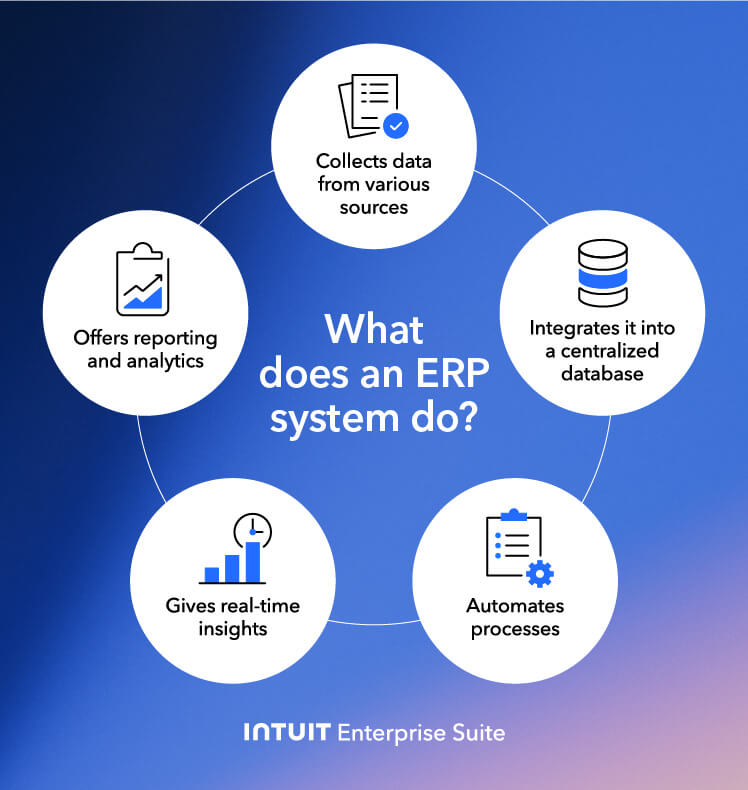
ERP systems integrate various business processes and data into a centralized platform. This integration is achieved through a common database that stores information from different departments.

A graphic showing what an ERP system does

Here are some of the key components of enterprise resource planning software:

  • Data collection: ERP services collect data from various sources within an organization, including transactions, customer information, and employee records. 
  • Integration: This data is then integrated into a centralized database, creating a single source of truth.
  • Process automation: ERP systems can help automate various business processes, including order processing, inventory management, accounting, HR management, and financial reporting.
  • Real-time insights: ERP provides real-time access to data, enabling you to make informed decisions quickly.
  • Reporting and analytics: ERP systems provide robust reporting and analytics tools that enable the identification of trends, patterns, and opportunities based on sorted data.
Leaders and decision makers from three growing businesses share how they are driving their businesses forward with Intuit Enterprise Suite, a configurable, AI-powered business platform.

Why and when ERP is important 

ERP services are essential tools for businesses seeking to improve efficiency, streamline operations, and make data-driven decisions. These are not the only benefits of ERP—enhanced collaboration, scalability, and risk mitigation are some more. When the time is right, you can tap into these benefits and modernize your ERP system.

Also, ERP systems help optimize several business functions. Here are some examples to get a better idea of how an ERP software program works:

  • Financial management: Handling accounting, budgeting, and financial reporting
  • Human resources: Keeping track of payroll, benefits, employee data, and performance reviews
  • Customer relationship management: Managing customer interactions, sales opportunities, and customer service
  • Supply chain management: Coordinating the flow of goods and services from suppliers to customers
  • Project planning: Planning schedules, tracking work, and managing quality control

In short, ERP solutions integrate various business functions, providing a comprehensive view of your organization's operations and enabling better control, efficiency, and decision-making.


note iconCloud-based ERP solutions can offer more flexibility and scalability than on-premise platforms because they rely on modern technology as opposed to outdated and unsupported software.


What is the most significant difference between cloud ERP and on-premise ERP?

The biggest difference between cloud ERP and on-premise ERP is the location of the software. Cloud ERP is just that—software that is hosted in the cloud through third-party platforms, and delivered via the Internet. On-Premise ERP is installed and operated through a company’s own servers and hardware. 

Ultimately, the system you choose should be based entirely on the specific needs of your organization. 

What is the difference between cloud ERP and SaaS?

People commonly use the term "SaaS", or software as a service, interchangeably with "cloud ERP," but they have different meanings. 

  • SaaS is any subscription software that is managed remotely over the internet. For example, popular tools such as Slack, Dropbox, and Salesforce are considered SaaS applications.
  • Cloud ERP is a specific type of SaaS that provides businesses with enterprise resource planning services using the SaaS model. 

In other words, all Cloud ERP solutions are SaaS, but not all SaaS solutions are Cloud ERP. 

Types of ERP implementation

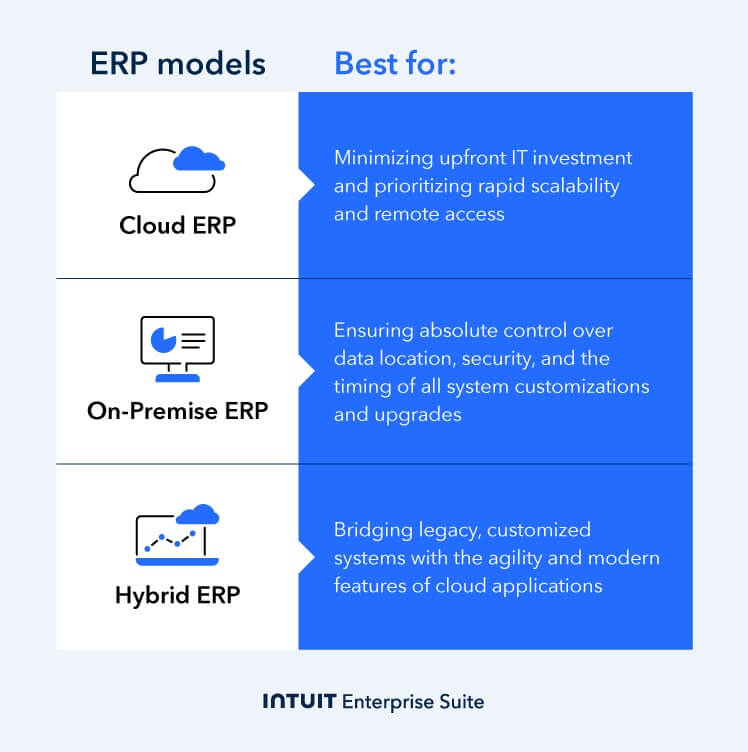
There are three primary deployment models for ERP systems: cloud-based, on-premise, and hybrid. Each model offers distinct advantages and considerations for businesses. Let’s take a closer look at each type of ERP.

The ERP types, including cloud, on-premise, and hybrid.

Cloud ERP 

Cloud ERP services are hosted on a third-party cloud platform, such as Amazon Web Services (AWS) or Microsoft Azure. This model eliminates the need to invest in hardware and IT infrastructure, as the ERP provider manages all technical aspects of the system. 

Advantages of cloud ERP include:

  • Lower upfront costs: You don’t need to invest significant capital in hardware and software.
  • Scalability: Cloud ERP can easily scale up or down to accommodate changes in business needs.
  • Accessibility: You can easily access ERP software from anywhere in the world. All you need is an internet connection.
  • Regular updates: Cloud providers typically handle software updates and maintenance.

On-premise ERP 

On-premise ERP solutions are installed and operated on a company's own servers and hardware. It gives full control over ERP systems but requires significant upfront investment and ongoing IT management. 

Here are some advantages of on-premise ERP:

  • Complete control: You have full ownership and control over your ERP data and systems.
  • Customization: On-premise ERP can be highly customized to meet specific business requirements.
  • Security: Some businesses may prefer the perceived security benefits of having their data on their own premises.

Hybrid ERP 

Hybrid ERP combines elements of cloud and on-premise ERP—certain modules or components in the cloud, others on-premises. This approach offers flexibility and can be useful in complex IT environments or specific security requirements.

Hybrid ERP offers several advantages, such as:

  • Flexibility: You can choose which components to deploy in the cloud and which to keep on-premises.
  • Cost-effective: Hybrid ERP can be a cost-effective option for businesses with varying needs.
  • Security: You can maintain control over sensitive data while benefiting from the scalability and accessibility of cloud-based components.

The 5 most common ERP software options 

What is the best ERP system? While you’ll see a lot of options on the market, the best choice will depend on your company’s specific needs. 

Overall, these are the five most common ERP systems:

1. Intuit Enterprise Suite

The Intuit Enterprise Suite offers a competitive alternative to traditional ERP systems. This software is an AI-powered business platform designed to cater to mid-market businesses with complex operational needs. It’s also ideal for service-based industries like construction and other professional services that need an integrated, scalable solution. 

The Intuit Enterprise Suite platform provides industry-specific customizations, multi-entity management, and multidimensional reporting. It integrates tools for:

  • Financial management
  • Payroll
  • Human Resources
  • Marketing
  • Cash flow management
An image showing a quote from an Intuit Enterprise Suite customer.

2. SAP

SAP is a global leader in enterprise application software. Large corporations widely utilize this company across various industries due to its comprehensive, robust, and highly integrated solutions. With over 50 years of experience in the industry, the company operates 109 development locations nationwide. 

SAP’s features include modules for:

  • Finance
  • Supply chain management
  • Sales
  • Human Resources
  • Customer relationship management

The company’s software provides real-time data access, advanced analytics, and forecasting tools. Due to its ability to offer deep customization and extensive functionality, SAP is well-suited for large enterprises and multinational corporations.

3. Oracle

Oracle is also a major player in the ERP industry with a strong focus on cloud-based solutions. The company’s Oracle Fusion Cloud ERP provides a modern, AI-powered platform that automates manual processes. Unlike SAP, Oracle Fusion Cloud ERP is built for both mid-sized and larger companies that want a cloud-first platform. 

Oracle Fusion Cloud ERP includes built-in AI, machine learning, and analytics for real-time insights. The software offers modules for:

  • Financial management
  • Project management
  • Procurement
  • Risk management
  • Enterprise performance management (EPM)

4. Microsoft Dynamics

Microsoft Dynamics is a suite of business applications that provides both ERP and CRM solutions. It easily integrates with other Microsoft products, like Microsoft 365 and the Power Platform. This ERP solution is ideal for small, medium, or large businesses that are already integrated into the Microsoft ecosystem. 

Microsoft Dynamics uses AI and a low-code/no-code environment to simplify data management and automation. It offers modules for:

  • Finance
  • Supply chain management
  • Commerce
  • Human Resources

5. NetSuite

NetSuite is a leader in cloud-based business management software, offering a unified platform that integrates various business functions. This software is best for fast-growing organizations of any size that want to run their entire business from a single cloud platform. 

Due to its native integration capabilities, which eliminate the need for third-party integrations, NetSuite can help with:

  • Financial management
  • Inventory
  • Order management
  • Supply chain management

Benefits of ERP 

ERP systems offer many benefits to businesses of all sizes. One key benefit of ERP systems is their ability to enhance enterprise performance management by providing real-time data and analytics that help organizations optimize decision-making, improve efficiency, and drive overall business performance.

By integrating various business processes and providing a centralized platform for managing information, ERP systems can deliver significant advantages in terms of cost savings, scalability, data management, reporting, and productivity. Here’s how:

  • Cost savings: Streamlines processes, eliminating redundant tasks, and improving efficiency
  • Increased productivity: Automates accounting processes and streamlining workflows
  • Scalability: Seamlessly adapts to a company's growth and changing needs
  • Centralized data: Provides a single source of truth for all business data, improving data accuracy and accessibility

What’s more? ERP software offers powerful reporting and analytics tools that can help identify trends, patterns, and opportunities.


note iconLook for an ERP with accounting features to help you streamline financial operations—you get a comprehensive suite of tools to manage various accounting tasks, from general ledger and accounts receivable to financial reporting and tax compliance.


Understanding the total cost of ERP 

The total cost of ownership (TCO) for ERP implementations encompasses more aspects than you might know. This includes both visible expenses and others that you might overlook.

The total cost of ownership for an ERP, including visible and hidden costs.

Visible costs

Other than the software licensing fees, i.e., the initial cost of purchasing the ERP software, visible costs include:

  • The cost of acquiring or upgrading hardware and IT infrastructure to support the ERP system
  • Fees for consultants, project managers, and other professionals involved in the implementation process
  • Training cost to educate your employees on how to use the ERP system to make the most out of it
  • The cost of customizing the ERP solution to meet specific business needs

Unexpected costs

Unexpected or underestimated costs are less evident than visible costs and can significantly contribute to the overall cost of ERP implementation. It includes:

  • The cost of migrating existing data into the new ERP system
  • The cost of modifying or redesigning business processes to align with the ERP system
  • The potential loss of productivity during the implementation process and as employees adjust to the new system
  • The cost of maintaining the ERP system, including software updates, technical support, and security patches

Another thing that can help is understanding the factors that affect TCO:

  • ERP system complexity: More complex ERP systems generally have higher costs.
  • Business size and industry: The size and industry of your business can influence the total cost of ERP implementation.
  • Customization requirements: The level of customization you need can significantly increase costs.
  • Implementation methodology: The chosen implementation methodology (e.g., Big Bang, phased, etc.) can impact costs.

Carefully considering all costs can help you make informed decisions about ERP investments and allocate resources accordingly.

Keep growing with a more powerful suite

Boost productivity with business and financial management in one solution. Make faster decisions with real-time data and visibility across your portfolio.

When you schedule a demo, you agree to permit Intuit to use the information provided to contact you about Intuit Enterprise Suite and other related Intuit products and services. Your information will be processed as described in our Global Privacy Statement.

What to look for in an ERP system 

First and foremost, look for functionality. Ensure the ERP system meets your specific business needs, including modules for finance, HR, sales, production, and other critical areas.

Enterprise business intelligence capabilities are also essential, offering advanced reporting and analytics that transform raw data into actionable insights.

Here are some other things to consider when evaluating ERP systems:

  • Scalability: The ERP system should be able to accommodate your business's growth and changing requirements.
  • Integration capabilities: Check if the ERP can integrate with your CRM or other systems you use.
  • User-friendliness: The system should have an intuitive interface that is easy for employees to learn and use.
  • Customization options: Assess whether the ERP can be customized to fit your unique business processes and workflows.
  • Security: Make sure the ERP system includes strong security measures to safeguard your sensitive data.
  • Support and maintenance: Look for an ERP provider with a strong track record of providing support and maintenance.

How to determine if you need an ERP system

To determine if your business is ready for an ERP system, ask yourself these questions:

  • Are your current processes inefficient or manual?
  • Are you experiencing challenges with data management or reporting?
  • Do you need a more comprehensive view of your business operations?
  • Are you struggling to scale your business due to limited resources or outdated systems?
  • Are you facing increasing regulatory compliance requirements?
An image showing a positive quote from an Intuit Enterprise Suite customer.

Common challenges in ERP implementation (and how to overcome them)

You may face several challenges while implementing an ERP service, especially if it’s your first time. For instance, some platforms can have costly onboarding services, training, and ongoing maintenance. 

Other implementation challenges include: 

Employee training

When your business invests in robust software like ERP systems, employees must receive adequate training to ensure the organization maximizes its features and benefits. 

One example of a failed ERP training process comes from Hershey in 1999. With Y2K approaching, Hershey sought to avoid the perceived issues and accelerated the implementation timeline – reducing it from 48 to 30 months. 

The sped-up timeline caught employees unprepared and coincided with Halloween, one of the company’s busiest times of year. Hershey couldn't fulfill $100 million in orders, resulting in a 19% decrease in profit and a 12% decline in sales. 

Takeaway: Never rush employee training or implement a new system during a crucial business period. A slow, thorough transition protects your bottom line.

Data conversion and migration challenges

Any significant software change will present challenges, and that’s certainly the case when migrating existing data from legacy systems to ERPs. This transition requires careful planning and execution. 

In 2006, LeasePlan, a leader in the global leasing industry, began using an ERP solution alongside its existing legacy systems. Ten years later, they attempted to move to ERP only. 

The problem was that leadership wanted to integrate 35 systems into one single platform in a rushed timeframe. Eventually, after $119 million in costs, LeasePlan had to abandon the entire project.

Takeaway: Avoid attempting to migrate too many complex systems at once, and ensure your timeline is realistic to prevent project failure.


note icon Migrating to a modern ERP solution presents challenges, but planning ahead and ensuring employees receive proper training can help ease the transition.


Resistance to change

It’s natural for employees to resist change, especially regarding major tasks that affect their workflow. This is a common potential problem when it comes to a successful ERP adoption. 

This was the case with Nestlé in the late 1990s, when it spent $210 million to integrate 29 different business units into a unified ERP solution. One of the company’s major issues in the transition turned out to be resistance to change from its workforce. 

Confusion and frustration built when employees were asked to use the new system without adequate preparation or training. 

Takeaway: Address employee concerns proactively and provide robust communication and training to earn team buy-in.

Dedicated IT resources

Any type of ERP implementation will require major IT resources for configuration, customization, and ongoing support. Even though ERP solutions can make processes more efficient, they can’t fix underlying process or policy issues that affect efficiency. 

Nike is an example of a company that failed to maximize IT resources during its ERP implementation in 2000. The project was a $400 million failure, partly due to failed communication and coordination between the separate business units and the IT team. 

The company also apparently didn’t realize how complex it would be to integrate the new ERP software into Nike’s existing systems. 

Takeaway: Successful ERP implementation requires unifying your IT and business units and gaining an accurate understanding of the integration's complexity before beginning the project.


note icon Work closely with the IT department to ensure the ERP migration proceeds smoothly and to receive the ongoing technical support it will require.


Boost productivity and enhance profitability

ERP solutions offer numerous advantages to modern businesses, including increased productivity and better internal collaboration and communication.  

If it's time for your business to upgrade its outdated legacy system, learn how Intuit Enterprise Suite can help you leverage real-time data and visibility to make faster decisions. When you’re ready to start the process, we’re here to help you.


Recommended for you

How can we help?


Get product support

Looking for something else?

QuickBooks

From big jobs to small tasks, we've got your business covered.

Firm of the Future

Topical articles and news from top pros and Intuit product experts.

QuickBooks Support

Get help with QuickBooks. Find articles, video tutorials, and more.