Year-End Learning! AI Webinar: Watch by Dec. 31. Watch Now! 
Two business professionals performing gap analysis in ERP.
Enterprise

The complete guide to gap analysis in ERP


Key takeaways:

  • Gap analysis in ERP helps identify where a solution’s standard features fall short by comparing current business processes to your ideal workflows under the new system.
  • This strategic planning tool can create a clear project roadmap, reduce potential scope creep, and encourage user adoption.
  • To set yourself up for success, start gap analysis early, involve key stakeholders, and use specialized tools to streamline process mapping.


Many businesses are looking for ways to stop wasting valuable time each month on clunky, manual workflows. In fact, our Business Solutions Survey revealed that 72% of businesses prioritize business solutions that provide more automation to streamline processes. For CFOs, these inefficient processes often translate directly into high-risk situations, such as compliance issues or inaccurate forecasts.

Enterprise resource planning (ERP) systems are among the best tools for reducing tedious work, but they’re not a magic bullet. In many cases, their standard features won’t support all of your ideal workflows, which is what makes ERP gap analysis so important.

Let’s explore what you should know about this process, including what it is, its key steps, and how it can help your transition be successful.

Jump to:

Introducing Intuit Enterprise Suite

Simplify complex operations with multi-entity management, custom roles and permissions, and automated revenue recognition. Make faster decisions with multi-dimensional reporting and deeper insights in real time.

What is a gap analysis in ERP?

Gap analysis is a strategic planning technique that compares your organization’s current state (your “as is”) with a desired future state (your “to be”) and identifies the gap between them. Fundamentally, the process revolves around defining these three main components.

In the context of an ERP implementation, your “as-is” state refers to your existing set of business processes. Meanwhile, your “to-be” state is the way those processes would ideally function under your new ERP system.

The purpose of ERP gap analysis is to identify where a prospective solution’s features might fail to support your "to-be" state. In other words, you’re looking to pinpoint any potential “gaps” that need to be addressed.

This discovery is critical for finance teams because uncovered gaps can severely impact data accuracy and ultimately inflate the total cost of ownership (TCO) for the new system.

The 4 key steps of performing ERP gap analysis

Now that we’ve covered the basics of gap analysis in ERP, let’s take a closer look at how to go about it. Here are the four main steps involved in ERP gap analysis:

An image showing the four steps of ERP gap analysis.

1. “As-is” process mapping

The first step in ERP gap analysis is to define your "as-is" state. This vital discovery phase involves documenting your current business processes in detail. The goal is to understand precisely how your business operates today.

Some practical ways to gather this information:

  • Observation of daily tasks
  • Interviews with key stakeholders
  • Workshops with department heads and end-users
  • Reviewing existing documentation and process flowcharts

For example, imagine you run a SaaS company that offers a project management solution. You’re growing rapidly, so you’re looking to implement a new cloud ERP system that can help streamline workflows.

Automating business processes like recurring billing and renewals is a top priority. To kick off your gap analysis, have your finance team gather all documentation on the function and review it with the department head.

This reveals that your subscription data is currently spread across several systems. As a result, your team has to spend several days exporting it into spreadsheets and performing manual reconciliations before they can record the appropriate journal entries in your accounting software.


note icon

According to the 2024 Business Solutions Survey, businesses spend an average of 25 hours every week on manual data entry and reconciliation.1 That’s a full day’s worth of time your team could be using for more valuable work.


2. “To-be” process definition

The second step in ERP gap analysis is to define your ideal "to-be" state. This is where you should determine precisely how you’d like your improved processes to work under the new ERP system.

Once again, it’s important to involve the people who actually manage those functions day to day. Consulting them helps ensure the new ERP system actually solves their current pain points—without creating new ones.

It’s also important to consider your strategic business goals. Your future "to-be" state should directly support long-term objectives, like reducing customer churn or accelerating financial reporting.

Let’s continue using our hypothetical SaaS business to demonstrate. You and your team have determined that the current billing and renewals system involves too much manual work.

With that in mind, you meet again to outline your ideal workflows under the new ERP system. Together, you determine that you’d like the new solution to automatically:

  • Aggregate payment data
  • Sync customer account details
  • Match active users to real-time billing records
  • Record the proper journal entries in your accounting module

This would free your finance team to focus on more valuable business intelligence tasks and help speed up the month-end close.

AI-powered financial management software, like Intuit Enterprise Suite, can deliver these productivity benefits by enabling a faster month-end close, minimizing manual reconciliation time, and providing stronger intercompany visibility through streamlined workflows.

3. The gap identification

Once you’ve defined your "as-is" and "to-be" states, you can move forward with the core of gap analysis: identifying any potential shortcomings in your ERP system.

Remember, a gap is an area where your new solution’s standard features don’t support the workflows you’ve envisioned. Generally, these fall into three categories:

  • Process gaps: The software can’t efficiently support a key business process—or maybe not at all.
  • Technical gaps: The software doesn’t integrate with other key aspects of your tech stack.
  • Functional gaps: The software lacks a specific feature or capability your business needs.

Let’s continue with our SaaS example. You discover that your ERP can automate most recurring billing tasks but lacks global tax-compliance features.

Since you already operate across multiple states and plan to expand internationally over the next few years, that represents a functional gap. You also find that the new ERP system cannot connect directly to your payroll system. Because it involves tech stack integrations, this represents a technical gap.

For the finance department, unaddressed functional gaps are a serious concern, as they can directly lead to missed revenue recognition, reporting delays, and increased risk of compliance penalties.

4. Solutioning and decision making

The final step in ERP gap analysis is determining how to close each identified gap. Typically, there will be several potential solutions to evaluate, each with its own pros and cons.

Here are some of the most common approaches to addressing gaps:

  • Process changes: Modifying your business’s methods to align with the new ERP’s features
  • Customization: Modifying the ERP’s source code to add missing features or functionality
  • Workarounds: Developing an external process or using a third-party tool to support integrations

Let’s revisit our SaaS example one last time to demonstrate.

For the functional gap in tax compliance, you determine that the easiest solution is to purchase a separate tax automation tool that integrates with your ERP system, such as TurboTax for Business.

You use a similar workaround to address the technical gap in your payroll system. Your team implements a third-party integration app that connects the ERP solution to your payroll management tool.

Keep growing with a more powerful suite

Boost productivity with business and financial management in one solution. Make faster decisions with real-time data and visibility across your portfolio.

When you schedule a demo, you agree to permit Intuit to use the information provided to contact you about Intuit Enterprise Suite and other related Intuit products and services. Your information will be processed as described in our Global Privacy Statement.

Benefits of performing an ERP gap analysis

The value of performing ERP gap analysis goes far beyond simply identifying problems with a new solution. Let’s explore some of its most significant benefits to help you get the most out of the process.

An image highlighting how Intuit Enterprise Suite could save growing businesses $447K with a 299% return on investment over 3 years.

Reduces project risk and cost

Gap analysis is key to reducing the risk of scope creep in ERP projects. Without it, you may not discover where your new system falls short until after you’ve started implementation.

These late discoveries can be highly disruptive, breaking budgets by extending timelines. They can also cause you to incur direct expenses, such as the cost of buying additional software to compensate for a missing feature.


note icon

According to our 2024 Business Solutions Survey, 98% of businesses targeting growth say their digital solutions aren’t optimized to support it.1 Gap analysis is the key to avoiding that outcome with your ERP system.


Improves user adoption

Even the best ERP system can fail if the end users resist it, and unfortunately, this happens all too often. According to the 2024 ERP Report, only about 31% of businesses report an intense focus on change management during ERP implementation.

However, when the end users of your ERP system are involved in the gap analysis process, you can ensure their actual pain points remain top of mind throughout.

This helps you avoid replacing old issues with new variations. It can also foster a sense of ownership among employees, which may encourage adoption.

Defines a clear project roadmap

Gap analysis in ERP isn’t just a thought experiment. It should result in a tangible action plan you can use to guide your implementation project.

In addition to a list of system modules to implement, include any customizations, workarounds, or business process adjustments necessary to create your ideal "to-be" state.


note icon

The 2024 ERP Report found that about 31% of implementations take longer than expected, and around 33% go over budget.2 As a result, having a clear project roadmap from the start can be invaluable.


Optimizes business processes

In the first two stages of ERP gap analysis—documenting your "as-is" and ideal "to-be" states—you’ll almost inevitably find opportunities to improve your business processes.

After all, you’re mapping out how your business currently works and how it would function in an ideal world. That’s a sure way to reveal inefficiencies in your current workflows.


note icon

Almost 90% of organizations that successfully implemented ERP systems in 2024 reported productivity and efficiency gains.2 Adopting these tools is very likely to transform your business processes.


Common challenges in ERP gap analysis

As vital as it is to the success of your ERP implementation, gap analysis isn’t without its challenges. Here are some of the most significant hurdles you’re likely to encounter:

  • Poor documentation: You may find it surprisingly tricky to find a clear record of your current processes. Don’t move forward without one, as it should inform all future steps in the ERP project.
  • Low stakeholder buy-in: Your team’s direct input is a key source of information in "as-is" and "to-be" mapping, but getting them to contribute their time and energy may be challenging.
  • Scope creep: You might be tempted to address every minor gap in your new ERP system, but try not to go overboard. Adding too many customizations or workarounds can break budgets and timelines.
  • Resistance to change: Employees may prefer to keep old processes simply because they’re comfortable, even if they’re less efficient than those under the new ERP system.

For example, if your teams feel constrained by your legacy systems, you could modernize them or purchase a new centralized ERP solution to help you scale.

When you conduct a gap analysis, you find there’s little documentation of “as-is” workflows. In addition, your team leaders are reluctant to help fill in the blanks. They see your requests as extra work, especially since you didn’t consult them before choosing the new tool.

As a result, you discover unforeseen gaps during implementation, leading to scope creep. These extend your timeline and cause you to exceed initial cost estimations. Once the system goes live, your employees resist the new processes, preferring to do things how they always have.

Best practices for success in ERP gap analysis

ERP gap analysis can be challenging, but you can avoid many pitfalls with the right approach. Here are some of the best ways to set yourself up for success:

  • Start early: Begin your gap analysis before committing to an ERP system or implementation provider to avoid locking yourself into the wrong contracts.
  • Involve the right people: Engage representatives from every department and level of your organization so you don't miss valuable perspectives.
  • Be realistic: Focus on gaps that have a significant impact on performance. Ironically, chasing down every minor inefficiency is an inefficient use of resources.
  • Document everything: Create a single, accessible repository for all findings and decisions. This helps keep everything organized and prevents the loss of key information.
  • Use specialized tools: Leverage process mapping and project management software to help you organize and clarify your "as-is" and "to-be" documentation.

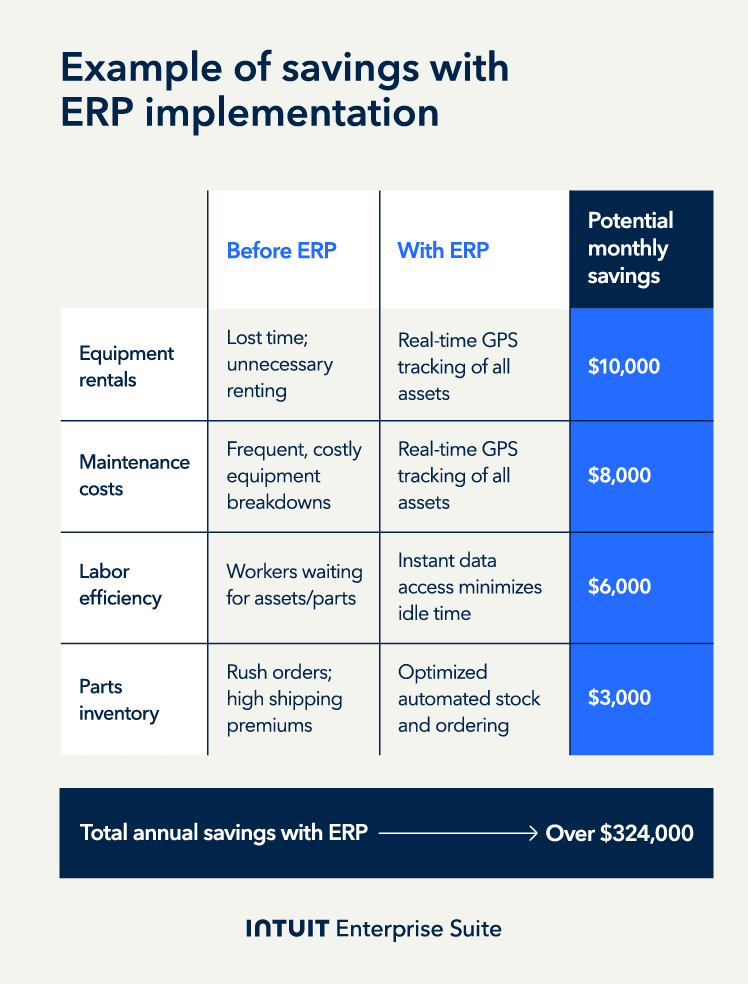
Let’s continue with our construction firm example from the previous section to demonstrate. Imagine that you’d taken a more strategic approach from the start.

Before committing to an ERP solution, involve your team, including key stakeholders from every part of the organization. This helps them feel ownership over the project, improving buy-in.

When you start gap analysis and find process documentation lacking, you provide specialized tools to help your team create more complete records.

Thanks to their early involvement, your team is more willing to contribute. As a result, it’s also easier to define your ideal "to-be" state, and your implementation expectations are more accurate. You experience relatively little scope creep and finish under budget.

Once the ERP solution goes live, your employees will embrace the new system. It accurately resolves their most significant pain point by optimizing the coordination of multi-site building projects.

An image showing an example of how ERP implementation could save a construction company money in the long run.

note icon

G2's top-rated business process mapping tools include monday, Miro, and ClickUp.


Boost productivity and enhance profitability

A gap analysis in ERP is a key step before adopting a new system. Approached strategically, it can reduce scope creep, ease employee onboarding, and help create a clear roadmap for implementation, ultimately helping teams eliminate manual workflows and protect margins.

If you’re looking to replace complex or outdated workflows, try Intuit Enterprise Suite. Schedule a call today to learn how our Finance AI Agent can help you reclaim your time and track your performance against strategic goals.


Recommended for you

How can we help?


Get product support

Looking for something else?

QuickBooks

From big jobs to small tasks, we've got your business covered.

Firm of the Future

Topical articles and news from top pros and Intuit product experts.

QuickBooks Support

Get help with QuickBooks. Find articles, video tutorials, and more.