Hello, Tim Ashton.
I have news about the issue you've encountered when sending Workforce invitations.
We currently have a reported issues where employees can't receive the Workforce invitation email. Our engineers are now working around the clock to get this invitation system back to normal again.
In the meantime, you'll want to manually send your paychecks or paystubs to your employees. Here's how:
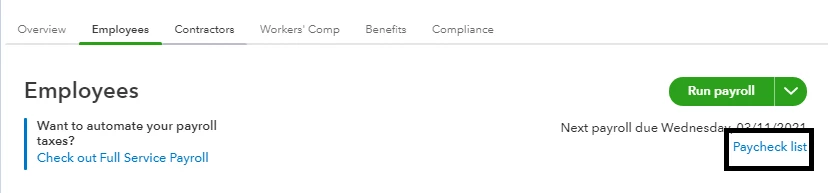
- Go to Payroll, then click the Employees tab.
- Click the Paycheck list link.
- Set the date range for the paychecks you want to send.
- Check the paychecks.
- Click the Print button, then save it as a PDF.
- Email them to your employees.
Also, I recommend contacting our support agents if you want to get updates regarding the issue. I'd like to do it here but it requires me to access your contact information (which we're unable to do in a public space).
Here's how to reach them:
- Click the the Help menu.
- Select Talk to a human.
- In the chat box, enter "I'm affected by the Workforce invitation issue. Reference number:
INV-55693."
- Proceed with I still need a human.
- Click the Get help from a human link.
- Select Get a call back or Start a message.
You'll receive an email as soon as the issue is fixed.
Need to run your next payroll or want to manage your employees? We have guides to help you complete your payroll-related tasks. Check them out in the Payroll articles list page.
We appreciate your patience as we're getting the service back to normal. If you have other questions, I'll hear them out. I'll give some guides and pointers to address them.
