Turn on suggestions
Auto-suggest helps you quickly narrow down your search results by suggesting possible matches as you type.
Showing results for
Get 50% OFF QuickBooks for 3 months*
Buy nowHow do I apply a credit memo to an invoice?
When I go to Receive payments I get a list of invoices, but just indicating that a credit is to be applied to one of them seems impossible.
Do I put the amount in the "Amount" field at the top? Or just next to the invoice?
When I check "Apply existing credits" it seems to want to apply all the credits, which I don't want.
Why is this so hard? Why can't I just click on the credit and tell QB to apply it to a specific invoice?
Please note: I am using the Mac Desktop version.
Solved! Go to Solution.

To apply a credit memo to an invoice in QuickBooks Desktop for Mac or QuickBooks Online, the steps depend on which version you're using. Jump to the section that matches your product below.
QuickBooks Desktop for Mac
Step 1: Create the credit memo (if you haven't already)
Step 2: Apply the credit to an invoice
QuickBooks will apply the available credit to the customer's open invoices in date order. A few things to know about how this works:
If the "Apply Existing Credits?" checkbox isn't showing up, make sure you're accessing Receive Payments through Customers > Receive Payments — not through the Receive Payment button on the invoice itself. The option only appears through the Customers menu path.
For more details, including how to write a refund check instead of applying a credit, see: Create and apply credit memos in QuickBooks for Mac
QuickBooks Online
In QuickBooks Online, you can apply a credit memo to an invoice manually, or let QuickBooks apply it automatically.
Optional: Turn on automatic credit application
If you'd like QuickBooks to automatically apply credits to a customer's oldest unpaid invoice, turn on the Automatically apply credits setting:
When this setting is on, QuickBooks applies the credit to the oldest unpaid invoice and closes it if the credit covers the full balance. Any remaining credit carries over to the next oldest invoice. If there are no open invoices, the credit memo status shows as Unapplied.
Step 1: Create the credit memo
Step 2: Apply the credit memo to an invoice manually
If you have Automatically apply credits turned off, here's how to apply the credit yourself:
For more, see: Create and apply credit memos or delayed credits in QuickBooks Online
Have more questions? Drop a reply below. We're happy to help.
Hey there, @byomtov.
Thanks for reaching out to the Community for support.
You have two different options when applying a credit memo to a specific invoice in QuickBooks for Mac. I've covered some steps below to help guide you through this process.
An alternative way is to use the Receive Payments option. Here's how:
That should do it. Please don't hesitate to let me know if you have any questions or concerns about this process.
Take care and have a great day ahead!
Are you referring to the Customer Center and the list of trans ctions that appears in the right pane?
I'm sorry, but I don't see a "Use Credit" dropdown.
Can you tell me where it is?
Are you sure this is supposed to work on the Macintosh version?
Thank you.
Thank you for following up, byomtov.
If the other option is not available for you, you can try the other steps in applying credits to an invoice in QuickBooks Desktop for Mac.
Here's how:
I've also added this article just in case you want to learn how to write a refund check: Create and apply credit memos in QuickBooks for Mac.
Let us know how it goes or if you still have other questions about credit memos. I'll be in touch. Keep safe.
OK. That works, though it apparently does not let me select which CM to apply, but goes by date order.
Can we apply the credit notes in bulk? I have so many transactions. I am uploading the credit memo's but they are not being applied to the invoices. I have to apply them one by one. Is there any way to apply them to the invoice upon automatically?
You have a fantastic idea, @Walid87.
At the moment, the option to automatically apply a credit memo to an invoice isn't available in QuickBooks Desktop (QBDT) for Mac.
Rest assured our engineering team is working diligently in enhancing QuickBooks to meet the needs of our users. For the time being, I recommend sending your feedback to them. This allows them to review your suggestion and possibly implement it in future updates.
Here's how:
In the meantime, you'll want to manually apply the credit memo to your invoice.
Furthermore, I've added this resource that contains details to help you efficiently manage your QBDT for Mac: QuickBooks Desktop Mac Guide.
I'm all ears if you need more help managing your credits and invoices. Simply tag me in your reply and I'll get back to you as soon as I can. Keep safe!
Hi all,
I am either using a different version of this software or going crazy!!!
Is there a difference between the UK and the USA version? We call it credit note in the uk not memo.. but for this difference aside I cant see none of those in my UK version :
Thanks for posting here, @delta-gama. I'm here to ensure you'll be able to apply a credit memo to the invoice in QuickBooks.
First off, let me discuss information about the process.
In QuickBooks Desktop for Mac, the steps in creating a credit memo or credit note and linking it to the existing invoice of the customer were already provided by my colleagues above. For reference, feel free to check this article: Create and apply credit memos in QuickBooks for Mac.
If you're having trouble performing the task, I recommend reaching out to our Technical Support team to assist you in creating a credit note. Once connected, you can also request a screen-sharing session so they can further view and check your set-up.
Additionally, here's a helpful resource that you can access to look for guides whenever you encounter navigating your QuickBooks account: QuickBooks Help page.
Feel free to post here again if you have any other concerns in creating a credit memo in QuickBooks. I got your back and I'm ready to lend a hand. Have a good one.
What is we only want to apply a certain amount of credit to a customer? Using MAC Desktop 2021 Quickbooks. I do not want to apply all the credits
Doug
Hi there, Doug.
Thanks for joining this thread. I'm happy to provide additional insight about applying credits to invoices.
At this time, the only option to apply credits to an invoice is by checking the Apply existing credits box at the bottom of the invoice. However, I can see how having the ability to apply a specific amount would be beneficial for you and your business. I'll relay this message to our team in concern here on my end, so this can be considered in a future update.
I also encourage you to add your vote for this one by sending a request within QuickBooks. They're always looking to the opinions of users like yourself when determining how best to improve QuickBooks.
Here's how:
Please let me know if there's anything else that I can do for you. You can reach out to the Community at any time. Enjoy your day!
I forgot to select the invoice before clicking on available credits and now I can't find the credit to correct my mistake. How do you find credits that were not applied to any invoice?
Thank you!
I forgot to select the invoice I wanted a credit applied to before selecting available credits. So the credit was used but not applied to the specific invoice and I can't find the credit now. How do I apply the used credit to the correct invoice?
I am using QuickBooks Desktop through Right Networks. Thank you!
Hi mkitchens,
Welcome to the QuickBooks Community. I'll be happy to help you find your credit memo.
There isn't a hint if a particular credit memo is the one you look for, so try to remember which customer was it. Then, check the credit memo transactions of that customer and open them one by one. See the transaction history by pressing Ctrl+H to find out which invoice a particular credit memo was applied for. This will at least help you remember if it's the right transaction.
Once you find the right credit memo, delete, recreate, and apply the recreated one as payment to the right invoice.
I also want to add for your reference in the future that credit memos can be turned into a refund. Check out the detailed steps in this article: Give your customer a credit or refund in QuickBooks Desktop for Windows.
Feel free to comment below if you need more help with finding your credit memo. Take care and have a good one!
Hi - I have applied a credit memo to apply to an invoice and it does appear as 'payment applied' on the Invoice window.
However, it does not show the credited amount when I print this same invoice.
I need to send an invoice to the customer with the "credit applied" showing so they know how much to pay.
Anna
Hi there, @Anna70.
I'm glad to assist you today so you can print an invoice with the credited amount.
I've tried replicating your scenario and I was able to see the payments applied when I attempt to print it. It shows as Payments/Credits. In your case, it might've been caused by the formatting of your invoice.To fix this, let's customize your invoice.
Here's how:
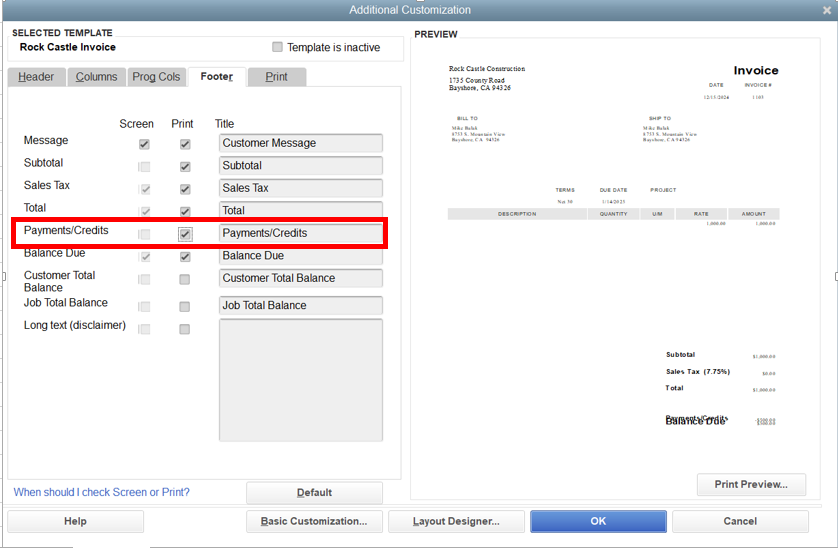
Once done, print the invoice again. You should now be able to see the Payments/Credits applied.
Feel free to visit this article for more information on customizing forms: Use and customize form templates in QuickBooks Desktop.
Additionally, if you wish to split an estimate into as many invoices as you need, feel free to browse through this article: Set up and send progress invoices in QuickBooks Desktop.
Whenever you need further assistance in printing your invoices, just leave a comment below. I'm always here to help you. Have a great day!
What if there isn't an apply existing credits button?
There are existing credits, I just created one but it isn't showing as an option.
Hello marual,
I've checked and see the thread is about QuickBooks Desktop for Mac. Allow me to chime in and help you with your question about applying a credit memo to an invoice.
I want to confirm if you're also using the same version as the other users here. This way, I can provide the exact information you need for the issue.
The button should show when using the Mac version. The option is only visible if you access the Receive Payments section of the invoice.
Here's how:
For QuickBooks Online, the credit memo when receiving payments is also available when receiving payments (see screenshot below).

Also, did you know you can create a refund using a check? I have an article here that you can use as a reference in the future: Create and apply credit memos in QuickBooks for Mac.
Keep in touch with us anytime you need additional assistance locating the button. You can add more details by clicking the Reply button below. We'll help you out.
This not work!!!!!!!!!!!!
How does this help!!!! Like I literally want a specific amount. Like why is it so difficult for QB to do that! Beyond Annoyed!!!!! I need a video to show to do that cause none of it make sense!!!!!@!@!@!!@!@1
This is the ridiculousness of QuickBooks. You can apply a credit from the New -> Customer -> Receive Payment but not from the Invoice -> Receive Payment.
Hello there, SummitComp:
Ideally, you can apply for the credit from the Invoices tab, then Receive Payment option. Can you send a screenshot of the steps that you've tried? This way, we'll be able to check if the correct process has been followed when applying a credit to an invoice.
Anyway, if there's anything else that you need help with, let us know so we can get back to you as soon as possible. Have a great day ahead!
Just had the exact same thing happen to me. Been trying for 15 min to apply a credit from the receive payment button on the invoice. Tried the New -> Receive payment route you said and it worked first time....
Neither method (New-> Receive Pmts OR Invoice->Receive Pmts) works for me to apply a credit to an invoice.
I created the credit last week and it's in the customer's transactions, but does not show in receive payment.
FYI - The credited amount is not the same as the new invoice I want to apply it to so it doesn't show.
So... how do I apply a credit to an invoice when it's not the exact amount of the invoice I want apply it to?
So... You can't apply a credit to an invoice unless the customer pays and you also apply payment at same time?
I found that I can go to the customer, select new transaction then receive payment to see all invoices & credits.
However, it shows the full amount of the invoice in the payment column and won't let me edit it.
How does that help when you want to apply a credit to decrease the amount of the invoice before sending it?


You have clicked a link to a site outside of the QuickBooks or ProFile Communities. By clicking "Continue", you will leave the community and be taken to that site instead.
For more information visit our Security Center or to report suspicious websites you can contact us here


