Get 50% OFF QuickBooks for 3 months*

Buy now
Switch to QuickBooks and 70% off for 3 Months
January 9, 2021
Solved

PayPal won't reconnect.

  • January 9, 2021
  • 1 reply
  • 13 views

Chart of Account >PayPal Bank > Reconnect (Under Action) > Connect to PayPal > Let's do it > Give Permission 


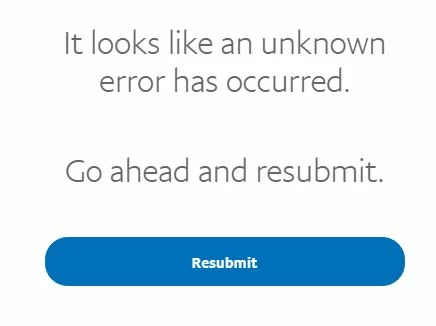
After I enter my PayPal credential (of course correct one.  I can log in PayPal by using the credential), it won't connect.  the message is like below.

I DID sign out from QBO, reboot my laptop. 

I DID use incognito mode on Chrome.   

What is the solution? 

Best answer by Miiiki

Hi @Miiiki,


Thank you for posting here in the Community. I'm here to help you connect to PayPal in QuickBooks Online.


As long as your PayPal is no longer connected to a different account, you should be able to connect it again. Please make sure to use a master or company admin access in QuickBooks when performing the process.


Lastly, the credentials you enter must be for a PayPal admin user. Using the login information of an authorized user only will not allow you to connect to the account.


If the problem persists, I'd suggest using the Get a callback or Start a chat feature from the Help menu. This way, they can securely access your account and resolve your issues timely.


Here's how:


  1. Go to the Help menu at the upper right. 
  2. Choose Contact Us
  3. Enter your specific concern in the What can we help you with? box. 
  4. Click Let's talk
  5. Select Get a callback or Start a chat
  6. Enter your contact information. 
  7. Choose Confirm my call or Send message

For additional reference, I've attached a link you can use to view the frequently asked questions about Connect to PayPal: Connect to PayPal FAQ.


Fill me in if you have additional questions about connecting the account in QBO. I'm always here to help. Take care always.


Well, I thought about the solution for a couple of days and I actually found the solution myself. 

It is not QBO side settings. 


You have to remove the history of "Permissions you've given" under Account > Security on PayPal.

After that, back to QBO and proceeded "Connect to PayPal".  It worked. 

1 reply

Level 4
January 9, 2021

Hi there, @Miiiki.


I'm here to lend a helping hand in syncing your PayPal account into QuickBooks Online.


At this time, we haven't received similar issues reported. There are three ways to connect with PayPal to your QuickBooks Online. If Bank feeds don't work for you, you can try to sync with the PayPal app with your QuickBooks Online account. You can get this app at apps.intuit.com, or via the Apps tab in your QuickBooks Online.


Here's how:

  1. Login to your QuickBooks Online account
  2. Select Apps from the left menu.
  3. Select Find Apps, then enter Paypal into the search bar.
  4. From the choices, choose Sync with PayPal.
  5. Select Get App Now in the upper right.
  6. Choose the appropriate answer to the question, then select Next.
  7. Select Connect to Paypal, then choose Let's do it.
  8. Follow the remaining steps to connect and set up the app settings to your choice.

For more details, check out this article: https://quickbooks.intuit.com/community/Apps/Sync-with-PayPal-First-time-setup/m-p/186330#M23. Also, you may find this article helpful: Differences between Sync with PayPal app, PayPal Bank Feeds, and the all-new Connect to PayPal app.


You'll be back to business in no time. Keep me posted if there's anything else you need. Take care.

MiiikiAuthor
January 9, 2021

As I mentioned above, I used "Connect to PayPal" then "Let's do it". But it didn't work. 

* I wrote "Chart of Account >PayPal Bank > Reconnect (Under Action) > Connect to PayPal > Let's do it > Give Permission" in my original post. 


I connected PayPal and QBO once but for several different reasons I had to disconnect.  Then I wanted to reconnect. So I went to Chart of Account page > PayPal Bank > Choose "Connect Account" (Under Action) > Connect to PayPal.  It didn't work. 

If PayPal bank got disconnected once, it cannot be re-connected anymore?


And also I read somewhere to say "if the PayPal was connected to other account, it would't connect. "

Is it true?    

AlcaeusF
Level 14
January 9, 2021

Hi @Miiiki,


Thank you for posting here in the Community. I'm here to help you connect to PayPal in QuickBooks Online.


As long as your PayPal is no longer connected to a different account, you should be able to connect it again. Please make sure to use a master or company admin access in QuickBooks when performing the process.


Lastly, the credentials you enter must be for a PayPal admin user. Using the login information of an authorized user only will not allow you to connect to the account.


If the problem persists, I'd suggest using the Get a callback or Start a chat feature from the Help menu. This way, they can securely access your account and resolve your issues timely.


Here's how:


  1. Go to the Help menu at the upper right. 
  2. Choose Contact Us
  3. Enter your specific concern in the What can we help you with? box. 
  4. Click Let's talk
  5. Select Get a callback or Start a chat
  6. Enter your contact information. 
  7. Choose Confirm my call or Send message

For additional reference, I've attached a link you can use to view the frequently asked questions about Connect to PayPal: Connect to PayPal FAQ.


Fill me in if you have additional questions about connecting the account in QBO. I'm always here to help. Take care always.