Compare QuickBooks products
From side-hustles to complex companies, we have the tools you need to run your business.
From side-hustles to complex companies, we have the tools you need to run your business.
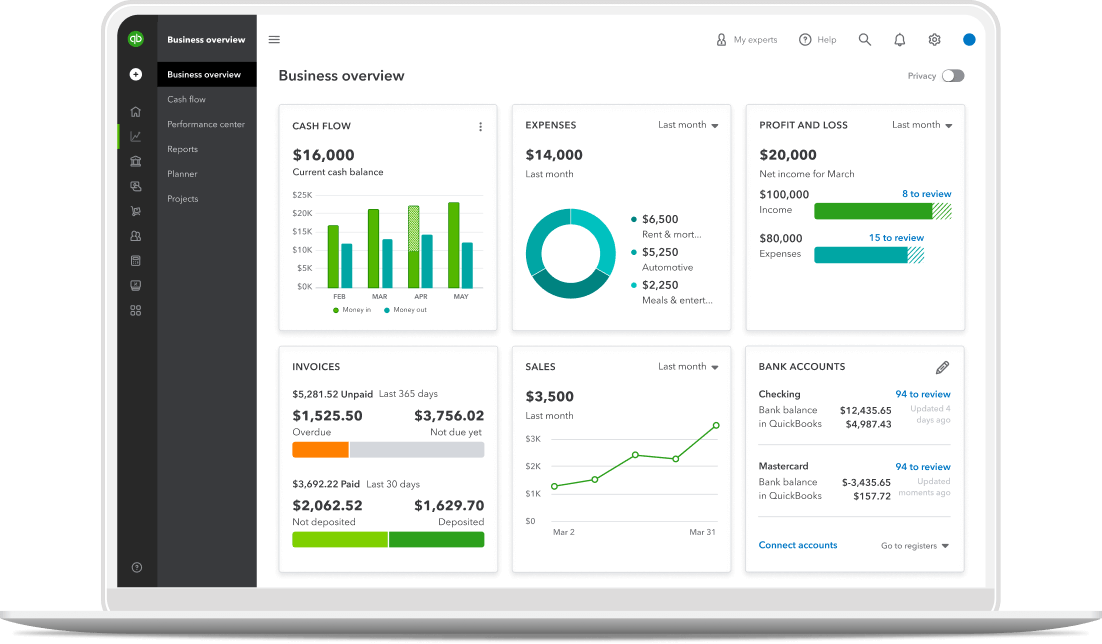
From side-hustles to complex companies, we have the tools you need to run your business.
Online accounting tools for businesses of all sizes—all with free guided setup.*
Intuit Expert Bookkeeping
Add Expert Full Service Bookkeeping to get accurate books, managed and maintained by a certified expert.**
Our newest, purpose-built solution for teams of one.
Take charge of payday with streamlined payroll and access to HR and team benefits.**
Pay contractors, e-file 1099s, and be ready when tax season comes.**
Get on-the-go time tracking, project management tools, and save over 4% on payroll.1
Intuit Enterprise Suite unifies financial and operational workflows, provides tools for heavy project costing and more.
Intuit Enterprise Suite is an AI-native ERP solution built for multi-entity organizations needing heavy project costing for construction or service industries. It unifies financials, payroll, workforce, and operational tools in one platform, delivering real-time visibility and deeper automation across the entire business.
Intuit Enterprise Suite includes:
Manage your firm, clients, and team on one AI-powered platform
All your client files in one place at no cost.
FREE
Improved efficiency and streamlined operations at scale.
$149/mo starting on January 20, 2027.
0/mo*
Yes, you can switch to another plan from any version of QuickBooks Online, QuickBooks Workforce, and QuickBooks Time. Pricing may vary when you switch plans.
Yes! You can subscribe to Intuit Expert Bookkeeping by signing in to your QuickBooks Online account or by calling sales.
For pricing and subscription details, refer here.
Yes. QuickBooks Time Premium is included with Workforce Premium and Time Elite is included with Workforce Elite.
QuickBooks Online Advanced is a powerful cloud-based platform for companies who need automation and real-time insights. It supports up to 25 users with no additional fees, includes AI-driven insights, batch transaction tools, and cash flow forecasting—making it a strong option for businesses moving from QuickBooks Desktop Pro or Premier.
Intuit Enterprise Suite (IES) is an AI-native ERP solution built for multi-entity organizations needing heavy project costing for construction or service industries. It unifies financials, payroll, workforce, and operational tools in one platform, delivering real-time visibility and deeper automation across the entire business. IES is a strong option for existing Desktop users needing an AI-powered ERP ready for your industry.
QuickBooks Desktop Enterprise is a Desktop solution with the capacity to scale up to 40 users. Learn more about moving from Desktop to an online solution.
Learn more about moving from Desktop to an online solution.
QuickBooks and Intuit are a technology company, not a bank. Banking services provided by our partner, Green Dot Bank, Member FDIC.
Guarantees
Payroll Tax Accuracy Guarantee: As long as the information you provide us is correct and on time, and you have sufficient funds in your account, we’ll calculate your payroll taxes, file your tax forms and make tax payments directly from your account accurately and on time, or we’ll pay the resulting federal or state payroll tax penalties and interest. You are responsible for paying any additional tax liability you may owe. Additional terms apply. See QuickBooks Terms of Service.
Tax penalty protection: Only QuickBooks Workforce Elite users who have completed expert review of their payroll tax setup and enrolled in e-services for automated tax payments and filings are eligible to receive the tax penalty protection. If you receive a tax notice for payroll taxes paid and filed by QuickBooks on behalf of your company, and send it to us within 15 days of the tax notice, we will help you resolve it with the applicable tax agency and cover the payroll tax penalty and interest, up to $25,000 per year. You are responsible for paying any additional tax liability you may owe. Additional terms apply. Learn more about tax penalty protection.
*Offer terms
QuickBooks Online and/or QuickBooks Workforce - Free 30-Day Trial: Free trial applies to the monthly base price for the first thirty (30) days of new subscriptions to QuickBooks Online and/or Workforce. You’ll automatically be charged at the end of the free trial and on a monthly basis thereafter at the then-current price for the service(s) you’ve selected until you cancel. Free trial does not apply to per-employee fees, per-contractor fees or state tax filing fees for QuickBooks Workforce, or to other add-on fees or services. To be eligible for this offer, you must be a new QuickBooks Online and/or Workforce customer, as applicable, and sign up for a monthly plan using the 30-day free trial option. Offers for the same product cannot be combined. Intuit reserves the right to modify or terminate this offer at any time for any reason in its sole discretion.
QuickBooks Online and/or QuickBooks Workforce - Introductory Discount Offer: The listed discount is applied to the monthly base price for new subscriptions to QuickBooks Online and/or Workforce for the first 3 months (the “Introductory Period”). After the Introductory Period, you’ll be charged on a monthly basis thereafter at the then-current price for the service(s) you’ve selected until you cancel. Discount does not apply to per-employee fees, per-contractor fees or state tax filing fees for QuickBooks Workforce, or to other add-on fees or services. To be eligible for this offer, you must be a new QuickBooks Online and/or Workforce customer, as applicable, and sign up for the monthly plan using the 3-month discount option. Offers for the same product cannot be combined. Intuit reserves the right to modify or terminate this offer at any time for any reason in its sole discretion.
**Features
QuickBooks features
Annual percentage yield: The annual percentage yield (“APY”) is accurate as of December 9, 2024, and may change at our discretion at any time. The listed APY will be paid on the average daily available balances distributed across your created envelopes within your primary QuickBooks Checking account. Balances held outside an envelope will not earn interest. See Deposit Account Agreement for terms and conditions.
Envelopes: You can create up to 9 Envelopes within your primary QuickBooks Checking account. Money in Envelopes must be moved to the available balance in your primary QuickBooks Checking account before it can be used. Envelopes within your primary QuickBooks Checking account will automatically earn interest once created. At the close of each statement cycle, the interest earned on funds in your Envelopes will be credited to each Envelope in proportion to the average daily balance of each Envelope. See Deposit Account Agreement for terms and conditions.
Receipt capture: Requires QuickBooks Online mobile (“QBM”) application. The QuickBooks Online mobile app works with iPhone, iPad, and Android phones and tablets. Devices sold separately; data plan required. Not all features are available on the mobile apps and mobile browser. QuickBooks Online mobile access is included with your QuickBooks Online subscription at no additional cost. Data access is subject to cellular/internet provider network availability and occasional downtime due to system and server maintenance and events beyond your control. Product registration required.
Collaborate with your accountant: You can connect up to the following for each product: 1 billable user and 2 accounting firms for QuickBooks Online Simple Start, 3 billable users and 2 accounting firms for QuickBooks Online Essentials, 5 billable users and 2 accounting firms for QuickBooks Online Plus, 25 billable users and 3 accounting firms for QuickBooks Online Advanced. Accounting firms must connect using QuickBooks Online Accountant.
QuickBooks Payments: QuickBooks Payments account subject to eligibility criteria, credit and application approval. Subscription to QuickBooks Online is required. Money movement services are provided by Intuit Payments Inc., licensed as a Money Transmitter by the New York State Department of Financial Services.
Mileage tracking: Mileage tracking is only available to the master administrator of the QuickBooks Online account. Requires QuickBooks Online mobile (“QBM”) application. The QuickBooks Online mobile app works with iPhone, iPad, and Android phones and tablets. Devices sold separately; data plan required. Not all features are available on the mobile apps and mobile browser. QuickBooks Online mobile access is included with your QuickBooks Online subscription at no additional cost. Data access is subject to cellular/internet provider network availability and occasional downtime due to system and server maintenance and events beyond your control. Product registration required.
QuickBooks Checking Account opening is subject to identity verification and approval by Green Dot Bank.
QuickBooks and Intuit are a technology company, not a bank. Banking services provided by our partner, Green Dot Bank.
Deposit Sweep Program: Cash balances above $250,000 will be automatically swept from Green Dot Bank and equally spread across our participating financial institutions, providing you with up to $5 million in FDIC insurance coverage. Customers are responsible for monitoring their total assets at each institution. Learn more and see a list of participating institutions here
Mobile signatures: Requires QuickBooks Online mobile application. The QuickBooks Online mobile app works with iPhone, iPad, and Android phones and tablets. Devices sold separately; data plan required. Not all features are available on the mobile apps and mobile browser. QuickBooks Online mobile access is included with your QuickBooks Online subscription at no additional cost. Data access is subject to cellular/internet provider network availability and occasional downtime due to system and server maintenance and events beyond your control. Product registration required.
Pay-enabled invoices: Requires a separate QuickBooks Payments account which is subject to eligibility criteria, credit and application approval. Additional fees may apply. Additional terms and conditions apply.
Third party apps: Third party applications available on apps.com. Subject to additional terms, conditions, and fees.
Automated 1099 e-file & delivery: Prepare your 1099s in QuickBooks at no extra charge. If you choose the 1099 E-File Service, Intuit will e-file your Federal 1099 information with the IRS, and then print and mail a copy directly to your contractors; fees apply. As part of the paid 1099 E-File Service, we also give your contractors online access to their 1099s. State filing not included. You should check with your state agency on any state filing requirements.
Accelerated Invoicing: QuickBooks Online Advanced supports the upload of 1000 transaction lines for invoices at one time. 20% faster based off of internal tests comparing QuickBooks Online regular invoice workflow with QuickBooks Online Advanced multiple invoice workflow.
Priority Circle: Access to Priority Circle and its benefits are available only to customers located in the 50 United States, including DC. Eligibility criteria may apply to certain products. Terms, conditions, pricing, service, support options, and support team members are subject to change without notice.
Automatic data backup and recovery: QuickBooks Online uses technical and administrative security measures such as, but not limited to, firewalls, encryption techniques, and authentication procedures, among others, to work to maintain the security of your online session and information.
Guided setup: Free one-time 60-min virtual session with a QuickBooks expert. Only available to new customers who are within the first 30 days. Does not include data migration.
Expert guidance: Limited Intuit Expert access is included with your QuickBooks Solopreneur, Simple Start, Essentials Plus, Advanced, or Enterprise Suite subscription. Additional access to Intuit Experts and benefits are available with a separate subscription. Additional terms conditions, limitations, and fees apply.
Intuit implementation consultants: Our dedicated Migration & Onboarding team will help evaluate your business needs and present you with options if you require additional migration support.
Onboard fast to Intuit Enterprise Suite: Based on internal data of customer onboarding and feature adoption activity. Actual timelines vary by business complexity.
**QuickBooks Workforce features
401(k): 401(k) and other retirement offerings are provided and administered by independent third parties and not by Intuit. Intuit is not a retirement plan administrator, fiduciary or other provider. Intuit receives a fee for referred clients. Additional third party terms and conditions apply.
Automated I-9s: Available in QuickBooks Workforce Premium and Elite only.
Auto payroll: Available after first successful payroll run for salaried employees or hourly employees on default hours, with direct deposit set up.
Automated tax payments and filings: Requires completion of tax setup. Available for state and federal taxes. Certain local taxes available in QuickBooks Workforce Premium and Elite only.
Automated benefits deductions: Must sign-up for benefits through integrated third party benefits partners or purchase benefits administration services in order for QuickBooks Workforce to automatically calculate employee benefit deductions.
Expert product support: Phone and chat support included with QuickBooks Workforce during business hours. Weekend phone and chat support is only available with Workforce Premium and Elite.
Expert review: Only available with QuickBooks Workforce Premium and Elite.
Expert setup: Only available with QuickBooks Workforce Elite.
Garnishments and deductions: Available for employees only. User is responsible for setting the garnishment amount and making the garnishment payment to the appropriate entity.
Guided Setup: Free one-time 60-min virtual session with a QuickBooks Workforce expert. Only available to new Workforce customers who are within the first 30 days and have not yet run payroll. Does not include data migration.
Health benefits: Health insurance info is provided by Intuit Insurance Services Inc., a licensed insurance broker, through a partnership with Allstate Health Solutions. Intuit Insurance Services Inc. is owned and operated by Intuit Inc. and is paid a fee by Allstate Health Solutions in connection with referred clients. Intuit is not an insurance carrier. Plans are sold separately and require acceptance of Allstate's Terms of Use and Privacy Policy.
Mineral HR resources & experts: HR resources and experts are provided by Mineral, Inc. Access to Mineral resources varies by plan. Mineral experts are included with QuickBooks Workforce Elite, or available as a paid add-on to other Workforce plans. Mineral’s Privacy Policy and Terms of Service apply.
Next-day direct deposit: Subject to eligibility criteria. Payroll processing cut-off times apply for timely deposit. Deposit delays may occur due to third party delays, risk reviews, or issues beyond Intuit’s control. Available for contractors for an additional fee.
Same-day direct deposit: Subject to eligibility requirements. Available to QuickBooks Workforce Premium and Elite users only. Payroll processing cut-off times apply for timely deposit. Deposit delays may occur due to third party delays, risk reviews, or issues beyond Intuit’s control. Available only for employees, not available for contractors.
Payroll cost allocation: Allocation of payroll costs by class or project only available to QuickBooks Workforce Premium and Elite users who have a QuickBooks Online Plus, QuickBooks Online Advanced, or Intuit Enterprise Suite plan.
1099 E-file: 1099 forms are e-filed with the IRS only for the current filing year and for payments recorded in QuickBooks. Includes state filings for eligible states participating in IRS Combined Federal/State Filing program; please check with your state agency on any additional state filing requirements. Additional fees may apply to print and mail a copy to your vendors and contractors.
Automated 1099s: Add-on to standard 1099 e-file; additional fees apply. Requires QuickBooks Online or Intuit Enterprise Suite
Workers’ comp & business insurance: Benefits are powered by ERGO NEXT Insurance and require acceptance of ERGO NEXT's Privacy Policy and Terms of Use. Additional fees apply. Eligibility criteria applies to transfer active insurance policy broker of record, including insurance carrier, policy renewal date, and payment method. Workers compensation insurance is not available in OH, ND, WA and WY.
Time Tracking: Available in QuickBooks Workforce Premium and Elite only.
Benefits administration: Sold separately. Must have 20+ employees to be eligible. Benefit plan setup required; not all benefit plans are supported. Subscription to QuickBooks Workforce required.
Background Checks: Background check services provided by Checkr. Checkr's terms and additional fees apply. Subscription to QuickBooks Workforce required.
**Product Information
QuickBooks Online Advanced: includes one license of Smart Reporting powered by Fathom at no additional charge. Fathom supports up to 3,000 active or inactive accounts in the QuickBooks Online chart of accounts, and up to 20 classes for the importing, reporting, and analysis of QuickBooks data. More information here. Fathom terms and conditions. Fathom privacy policy. Fathom support. Additional Fathom licenses can be purchased at $39 per month, as of 1/23/2019.
QuickBooks Online system requirements: QuickBooks Online requires a persistent internet connection (a high-speed connection is recommended) and computer with a supported Internet browser or a mobile phone with a supported operating system (see System Requirements) and an Internet connection (a high-speed connection is recommended). Network fees may apply.
QuickBooks ProAdvisor: Subject to the ProAdvisor Program terms.
QuickBooks Online Accountant: Additional terms, conditions, and fees apply.
QuickBooks Desktop Enterprise: Your selected subscription plan for QuickBooks Desktop Enterprise Silver, Gold, Platinum or Diamond (“QuickBooks Desktop Product(s)”) will automatically be charged on a monthly (“Monthly Plan”) or annual (“Annual Plan”) basis until you cancel. You can cancel at any time by going to Account & Settings in QuickBooks and selecting “Cancel” or by calling 800-300-8179, prior to your renewal date.
The Annual Plan commits you to a 12-month term; fees vary per QuickBooks Desktop Product. If you cancel inside the 60 day money back guarantee period, you can opt to receive a refund. If you cancel outside of the 60 day money back guarantee period, you will not receive a prorated refund and you will have access to your QuickBooks Desktop Product for the remainder of the 12 month term for which you've paid.
With the Monthly Plan, your QuickBooks Desktop Product cancellation will become effective at the end of the then-current monthly billing period. You will have access to your QuickBooks Product for the remainder of the month and you will not receive a prorated refund.
See End User License Agreement for additional details.
QuickBooks Desktop user licenses: Each unique user requires a license. Each license sold separately. All copies of QuickBooks must be the same version-year. Licenses are available in single-user increments from 1 to 10 users. 20 or 30 user licenses are also available. Diamond can support up to 40 users. Fees apply.
#Claims
1Payroll Cost Savings: Based on a survey of 1,408 customers in the U.S. in August 2021. On average, businesses that report gross payroll costs savings save 4.00%.
Call Sales: 1-877-866-5232





© 2026 Intuit Inc. All rights reserved.
Intuit, QuickBooks, QB, TurboTax, Credit Karma, and Mailchimp are registered trademarks of Intuit Inc.
Money movement services are provided by Intuit Payments Inc., licensed as a Money Transmitter by the New York State Department of Financial Services. For details about our money transmission licenses, or for Texas customers with complaints about our service, please click here.
By accessing and using this page you agree to the Website Terms of Service.