Space for pervasive banner when authenticated

Accountant tools: Review list changes


Find out how to use the Review List Changes tool in QuickBooks Desktop Accountant and Enterprise.
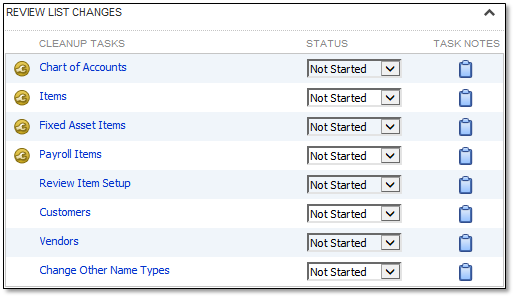
The Review List Changes tool shows you all the changes in your lists such as Chart of Accounts, Item List, Payroll Items, and Fixed Asset Items. This way you can keep track of all the changes you’ve made in your lists. We’ll show you how to access it and how it works.
What you can review
Here are the lists that you can review.
Chart of Accounts, Items, Fixed Asset Items, and Payroll Items
These lists let you see and review the changes you’ve made in your items. Once you open one of these, you’ll see the added, changed, deleted, and merged items.
Review Item Setup, Customers, Vendors, and Change Other Name Types
These lists directly open the existing QuickBooks features. It lets you check the items you need to change or those you already changed.
How to access the tool
Let’s now start reviewing your lists. Here’s how.
From the Accountant menu, select Client Data Review.
Select Client Data Review.
In the Review List Changes section, select the list you need to review.
Note: You can change the status of each list for your checklist.Not Started
In Progress
Completed
Not Applicable
Review the added, changed, deleted, and merged items.
Select Mark All as Reviewed after you finish reviewing all of the items.
Note: Once you mark all items as Reviewed, you can’t change their status to unreviewed. To see all items, you can select the Include Reviewed Items checkbox.
What changes are tracked
Chart of Accounts
Account type, name, and number
Tax line mapping
Active or inactive status
Account or subaccount changes
Items
Item type
Cost of good sold, income, expense, and asset account
Sales Tax code
Unit of Measure
Sales Tax Rate or Agency (for Sales Tax Items only)
Active or inactive status
Item or sub-item changes
Fixed Asset Items
Account type, name, and number
Tax line mapping
Purchase date and cost
Sales date and cost
Sale expense amount
Active or inactive status
Account or sub-account changes
Payroll Items
Agency
Accounts assigned to the rate of the item (e.g., Federal unemployment tax rate)
Limit
Tax tracking type
Payment frequency
Payroll schedule
Status
Sign in now for personalized help
See articles customized for your product and join our large community of QuickBooks users.
Call Sales: 1-800-365-9606




