Salary and hourly payroll calculator for 2026

1. Personal details

Employee first name

Employee last name

2. Pay information

Pay type

Amount

$

Pay rate

$

Hours worked

** Federal law- 40 hours for OT

** Some states have OT laws

** If an employee is subject to federal and state laws, the law paying the higher amount of OT is followed

Pay date

Pay schedule

3. Additional pay

Bonus

$

Overtime hours

Commission

$

Salary

$

Commission

$

4. Federal tax information

$

6. Local tax jurisdiction

Work zip

Work city

Work county

Residence zip

Residence city

Residence county

Loading...

Here's that paycheck info

These paycheck details are based on your pay info and our latest local and federal tax withholding guidance.

Download paycheck details

$0.00

NET PAY
Employee

Rate

$0 / hr

Hours worked

0

Salary

$0

Total pay

$0.00

Taxes and deductions

-$0.00

Net pay

$0.00

Use our free hourly and salary paycheck calculator to estimate an employee’s net pay, based on their taxes and withholdings. Get an accurate picture of the employee’s gross pay, including overtime, commissions, bonuses, and more. Deduct state and federal taxes—factoring in employee‑requested withholding amounts—to get a more accurate picture of each employee’s earnings. It’s a convenient tool to help you stay compliant and calculate your employees’ take-home pay with confidence. When you’re ready to take the next step, QuickBooks Workforce offers an all-in-one solution to run payroll, manage taxes, and stay compliant with ease.


Jump to:


Who the paycheck calculator is for

The paycheck calculator is ideal for small business owners, HR managers, bookkeepers, and payroll professionals who want a quick way to estimate employee pay.

What to expect

The paycheck calculator provides you with an estimated, itemized breakdown of an employee’s gross pay, state and federal tax deductions, and employee net pay. (For accurate employer payroll tax amounts, rely on dedicated payroll software instead of this calculator.)
Why accurate paychecks support a stronger business

Accurate paychecks help employers avoid errors, keep records clean, and maintain a more efficient payroll process. Let’s look at some of the ways correct paycheck calculations can benefit both your daily operations and your employee relationships.

Stay compliant with IRS requirements and state tax rules

Accurate payroll data supports correct withholding and reporting. It also lowers the chance of filing issues.

Budget payroll expenses more accurately 

Reliable numbers give you a clearer view of labor costs, facilitating planning and cash flow management.

Build employee trust

Employees feel confident–and may have fewer questions–when their pay is correct and transparent.

Spend less time on fixes

When your payroll data is right the first time, admin work stays simple.

What you need to calculate an accurate paycheck

To calculate an accurate paycheck, you’ll need a complete set of employee and payroll details. Each item below plays a role in determining gross pay, taxable wages, deductions, and final take-home pay.

Employee’s Form W-4

The most recent W-4 determines how much federal income tax to withhold. Employers must keep this form on file and use the information provided by the employee. Updated W-4 forms and instructions are available from the IRS.

State withholding form

Some states require their own withholding forms to calculate state income tax. These forms outline withholdings, exemptions, or additional withholding amounts specific to the employee’s state of residence. They’re typically found on the state tax agency’s website.

Pay rate

You’ll need the employee’s hourly rate or annual salary to calculate gross wages, also known as gross pay. This should match what’s recorded in your payroll system and in any employment agreement or offer letter.

Pay schedule

Your pay frequency — weekly, biweekly, semimonthly, or monthly — determines how earnings, deductions, and taxes are calculated within each pay period. Employers should follow their state-mandated minimum pay frequency laws.

Hours worked and overtime

Accurate hours and overtime calculations are required under the Fair Labor Standards Act (FLSA) for nonexempt employees. Employers typically track these through timesheets, time-tracking software, or punch systems.

Bonuses, commissions, or additional earnings

Any extra earnings must be included in the pay period to which they apply. These amounts may be taxed differently depending on whether they are considered supplemental wages. Documentation usually comes from internal sales reports, performance metrics, or manager approvals.

Pre-tax and post-tax benefit deductions

Benefits such as health insurance, retirement contributions, HSAs, or other voluntary plans affect taxable wages. Employers can reference benefits enrollment forms, plan documents, or payroll system settings to determine the correct deduction amounts.

Wage garnishments or child support orders

Court-ordered withholdings must be deducted exactly as instructed. Employers receive official notices directly from government agencies and are responsible for applying the correct withholding amounts each pay cycle.

How to use this paycheck calculator (employer walkthrough)

This free paycheck calculator makes it easy for you to calculate pay for all your workers, including hourly wage earners and salaried employees.


Here’s a step-by-step guide to walk you through the payroll calculator

Step 1. Enter employee details 

Enter the employee's name and the state in which they reside. The tool will calculate some of the employee's state taxes.

Step 2. Select pay type and enter pay information

You should see fields that say pay type, pay rate, hours worked, pay date, and pay period. Start with “Pay type” and select hourly or salary from the dropdown menu. 

If the employee is hourly, input their hourly wage under “Pay rate,” and fill in the number of hours they worked that pay period. If the employee worked more than 40 hours, and thus accrued overtime, record 40 here and save the rest for “Additional pay.”

If the employee is salaried, both the “Pay rate” and “Hours worked” fields will disappear. Instead, you’ll need to know how much the employee makes each pay period. You’ll put that into the field labeled “Amount.” 

Then select the pay date and the employee’s pay frequency—or, rather, if you pay them weekly or every two weeks. 

Step 3. Add any additional compensation

If the employee is salaried, you will only see two fields: bonus and commission. Fill in those amounts, if applicable.

If the employee is hourly, you should see four fields: overtime worked, bonus, commission, and salary. This is your opportunity to add in any additional pay they should receive this pay period. If the employee earned overtime, input the number of overtime hours they worked. One thing to keep in mind for California employees is that this calculator does not account for double-time pay. The tool calculates overtime pay using time and a half.

Step 4. Enter federal tax information

Step 4 includes the employee’s filing status and withholdings. This information should be readily available from the employee's Form W-4. If you don’t yet have the employee’s W-4, the calculator can fill in tax rates to help you create a semi-accurate paycheck estimate.

Step 5. Enter state tax information

Again, this includes the employee’s filing status and number of allowances. This information can be taken from the employee’s state Form W-4. 

Step 6. Calculate paycheck

To view an estimate of the employee’s earnings for the pay period, select “Calculate check.”

Understanding employer payroll calculations

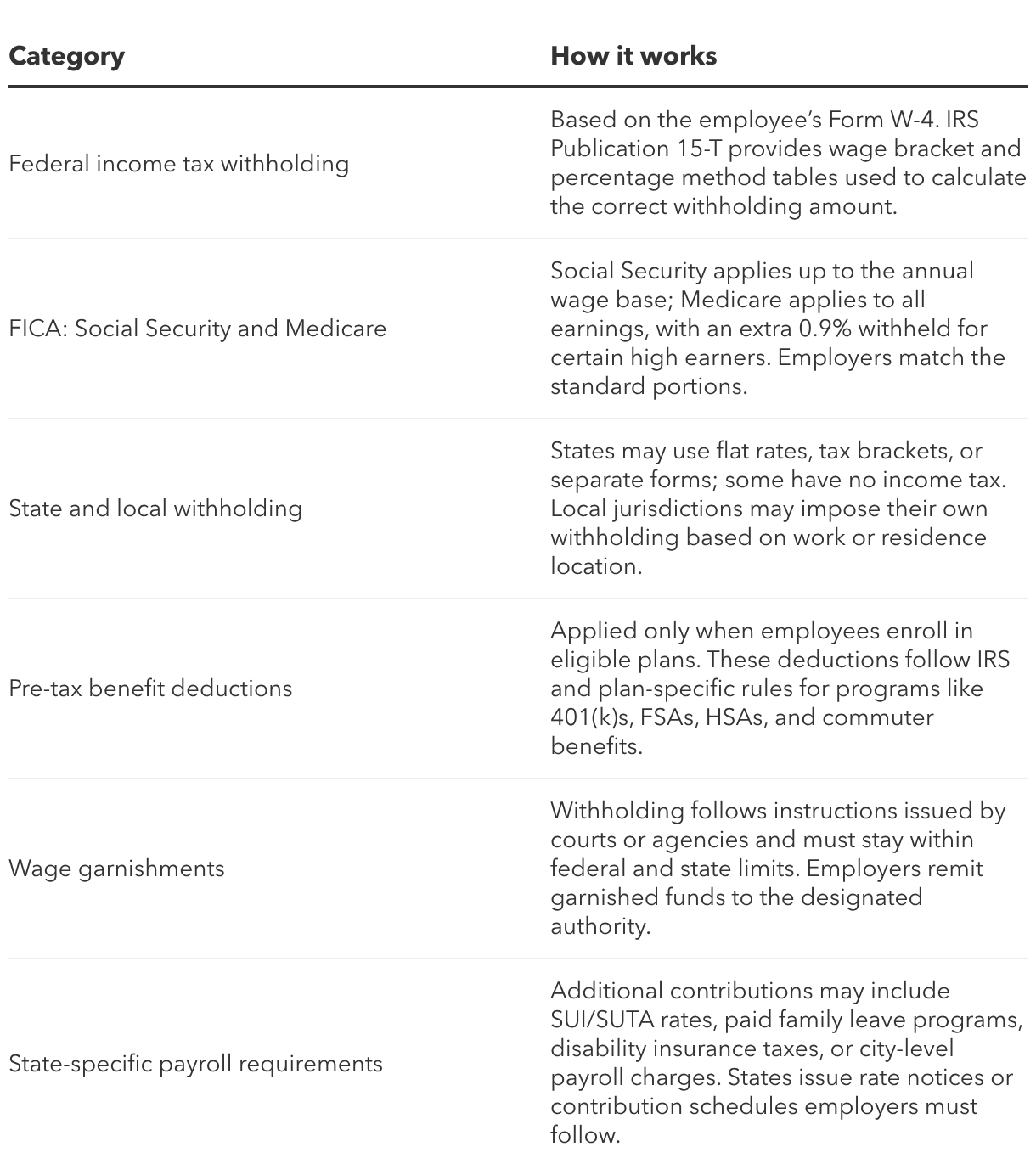
A paycheck calculation combines earnings, adjustments, and required withholdings. The chart below breaks down the core components employers use to estimate each paycheck.

Payroll taxes and deductions employers must understand

Employers must adhere to several tax and deduction rules that influence each paycheck. Understanding how these requirements operate helps ensure accurate and compliant payroll processing. Here’s a breakdown: 

Understanding how the above tax withholdings and payroll deductions function behind the scenes helps employers apply the rules correctly and avoid issues throughout the year. Below is a closer look at several important withholding categories.

Federal income tax withholding

Federal withholding is the portion of an employee’s paycheck sent to the government to cover their income tax liability. The amount depends on:

  • Total earnings
  • Filing status
  • Details provided on Form W-4

Employees may update their W-4 if they want to increase or decrease withholding. Employers can reference the IRS website and Publication 15-T to determine the correct amount for each pay period.

FICA withholding

FICA covers Social Security and Medicare taxes, and employers are responsible for withholding the employee portion and matching it. Together, these FICA taxes total 15.3%. As of 2025, the rates are:

  • Social Security: 12.4% (6.2% employee + 6.2% employer). This applies only up to the annual Social Security wage base, which the IRS updates each year. Employers must use the published limit for the applicable tax year.
  • Medicare: 2.9% (1.45% employee + 1.45% employer). Medicare applies to all covered wages with no cap. An additional 0.9% Medicare surtax is withheld from employees whose wages exceed the federal threshold; employers don’t match this surtax.

State and local tax withholding

Some states require their own withholding forms or use different calculation methods than the federal government. Local jurisdictions may also impose additional withholding obligations to support community services, such as schools, transportation, and public safety. Employers must verify the correct jurisdiction and withholding rules for each employee, especially in multi-state workplaces.

Benefit deductions

Employee benefit deductions may include health insurance premiums, retirement plan contributions, and other employer-offered programs. Many of these deductions can be applied on a pre-tax basis, lowering the employee’s taxable income and potentially reducing their overall tax bill. Employers must apply the correct deduction type in accordance with the plan documents and employee elections.

Wage garnishments

Garnishments are legally mandated deductions used to pay obligations, such as child support, unpaid taxes, or certain debts. Employers must follow the instructions provided in each wage garnishment order and apply the required withholding within federal and state limits. Once withheld, payments must be sent to the appropriate agency or court.

Common employer payroll mistakes to avoid

Even with the best intentions, payroll can get complicated, especially when you’re juggling so many parts of your business. Here are a few common employer payroll mistakes to watch for so you can stay ahead of issues.


Misclassifying workers

Treating someone who should be an employee as an independent contractor can cause unpaid payroll taxes, miscalculated benefits, and potential fines from federal and state agencies. 

Using outdated tax information

Using outdated tax rates or expired withholding tables can result in under- or over-withholding of federal, state, and local taxes, which may trigger notices or penalties. 

Not updating for new W‑4s

If an employee submits a new Form W‑4 and payroll is not updated, their federal income tax withholding will be wrong, leading to surprises at tax time. 

Incorrect overtime calculations

Calculating overtime only on base pay or forgetting to include certain nondiscretionary pay can violate federal and state wage laws. 

Missing pre-tax benefit deductions

Failing to account for pre-tax deductions (such as health insurance premiums or retirement contributions) can inflate taxable wages and increase both employer and employee tax liability. 

Cross‑state taxes

When employees live in one state and work in another, employers may need to register and withhold income taxes in more than one state, plus applicable local jurisdictions. If those withholdings are missed, states can assess back taxes, penalties, and interest, and employees may end up owing unexpected balances on their personal returns.

What this calculator does not cover

The paycheck calculator is designed to estimate an employee's net pay after accounting for factors such as bonuses, overtime, and taxes. Please note that this calculator is not a one-size-fits-all solution. You’ll want to consult an accountant or invest in full-service payroll software to ensure you’re paying employees correctly. 


Here are a few things missing from this calculator:

  • Exempt versus nonexempt status: In many cases, salaried employees are exempt from earning overtime, while hourly employees are not. But you don’t want to make assumptions. Review the Fair Labor Standards Act (FLSA) to learn more. 
  • Double-time pay: California has the most unique overtime law in the country. There, qualified employees are paid twice their standard rate when they work more than 12 hours in a workday or more than eight hours on their seventh consecutive day of work. This is “double-time pay,” which is not included in this payroll calculator. 
  • Non-tax-specific withholdings or deductions: This paycheck calculator factors in federal taxes, like FICA taxes, which include Medicare and Social Security. It also factors in state taxes. But it does not account for the myriad of other deductions or withholdings that might be present. These deductions may include insurance premiums and HSA withholdings, retirement and 401(k) withholdings, and deductions for uniform fees or meal expenses. 
  • Other gross pay contributors: An employee's gross pay is the total amount an employer pays before any deductions are made. This includes bonuses, overtime pay, and commissions, which are part of this calculator. But there may be others. For instance, any money you pay toward your employee’s health insurance or any reimbursements you give for employee wellness.

Employer Paycheck Calculator FAQs

How accurate is this paycheck calculator?

The calculator uses current federal and state withholding guidance to estimate gross and net pay, including overtime, bonuses, and commissions. It does not capture every possible deduction or special rule (like some double‑time rules or certain benefit deductions), so results are estimates rather than guaranteed figures.

Can I use this tool for multiple states?

You enter the employee’s state so the tool can apply that state’s tax rules, and you can rerun the calculator for employees in different states as needed. However, it does not handle every nuanced multi‑state or local tax scenario, so employers with complex cross‑state situations should rely on full‑service payroll software.

Does it include employer payroll taxes?

The calculator focuses on estimating the employee’s net pay after withholdings, including FICA and income taxes. Employer payroll tax costs (such as the employer share of Social Security, Medicare, and unemployment taxes) are not fully itemized in this tool and are better managed inside dedicated payroll software.

What’s the difference between gross pay and net pay?

Gross pay is the employee’s total earnings before any taxes or deductions, including regular wages, overtime, commissions, and bonuses. Net pay is the amount the employee actually takes home after subtracting taxes, benefit deductions, and other withholdings from gross pay.

How often is this calculator updated?

The calculator is maintained using the latest available federal and state withholding guidance so that tax estimates stay current. When tax rules change, QuickBooks updates its tools and payroll experiences to reflect new rates and thresholds.

What’s the best way to automate payroll calculations?

For ongoing payroll, the most efficient way to automate calculations is to use full‑service payroll software that automatically calculates wages, withholds and pays payroll taxes, and updates for new tax rules. QuickBooks Workforce connects time tracking, taxes, and benefits so you can reduce manual data entry, cut errors, and run payroll automatically after setup.

Make payroll easier for your business

A paycheck calculator is great for quick estimates, but running payroll for your team day after day calls for something more complete. If you’re ready to simplify payroll and reduce compliance risks, consider QuickBooks Workforce.

How can we help?
Talk to sales 1-877-202-0537

Monday - Friday, 5 AM to 6 PM PT

Get product support


