





- Start Your BusinessStart Your Business
- Starting a BusinessThe tools and resources you need to get your new business idea off the ground.
- PaymentsEverything you need to start accepting payments for your business.
- Funding & CapitalResources to help you fund your small business.
- Small Business StoriesCelebrating the stories and successes of real small business owners.
- Self-EmployedThe tools and resources you need to run your own business with confidence.
- Run Your BusinessRun Your Business
- Running a BusinessThe tools and resources you need to run your business successfully.
- AccountingAccounting and bookkeeping basics you need to run and grow your business.
- Cash FlowTax and bookkeeping basics you need to run and grow your business.
- PayrollPayroll essentials you need to run your business.
- TaxesTax basics you need to stay compliant and run your business.
- EmployeesEverything you need to know about managing and retaining employees.
- Grow Your BusinessGrow Your Business
- Growing a BusinessThe tools and resources you need to take your business to the next level.
- Sales & MarketingSpread the word: What you need to know about marketing your small business.
- FundingHow to find funding and capital for your new or growing business.
- Midsize BusinessesThe tools and resources you need to manage your mid-sized business.
- Enterprise Suite BlogThe tools and resources you need to grow your own business with confidence.
- E-CommerceHow to start and run a successful e-commerce business.
- TaxesTaxes
- How to fill out a 1099-NEC formLearn how to fill out and file 1099-NEC forms for independent contractors and freelancers.
- How to file small business taxesLearn how to navigate tax season with confidence and minimize your tax liability with this guide.
- Small business 1099: What you need to know for 2025Navigate the complexities of small business 1099 forms and filings with our comprehensive guide.
- 13 documents to give your accountant for small business taxesYour accountant will need these documents to file your small business taxes successfully.
- What's NewWhat's New
- NewsBrowse the latest news, press releases, and reports from QuickBooks.
- AI Resource HubFind the latest on Artificial Intelligence.
- Small Business DataThe latest research and insights for Small Businesses from QuickBooks.
- Small Business StoriesCelebrating the stories and successes of real small business owners.
- Holiday SuccessEverything you need to thrive during your business's busiest seasons.
- AI InnovationsBrowse the latest AI innovations in QuickBooks on the Intuit platform.
- ToolsTools
- All ToolsFree accounting tools and templates to speed up and simplify your workflow.
- AI-Powered Invoice GeneratorTry out this free invoice generator to create an invoice online using Intuit Intelligence.
- Payment Cost CalculatorFind out how much you could save by switching to QuickBooks Payments.
- Paycheck CalculatorAccurately estimate pay for all your employees.

What are FICA taxes? 2026 rates and tips to save money
Table of contents
Table of contents
What you need to know about Fica taxes:
- FICA taxes fund Social Security and Medicare and total 15.3%.
- Employers split FICA taxes with employees, while self-employed individuals pay the full amount.
- AI-powered payroll tools can calculate and file FICA automatically.
- Knowing exemptions and deductions can lower what you owe.
Payroll taxes are confusing enough, then you add Federal Insurance Contributions Act (FICA) into the mix. Whether you’re running payroll or filing self-employment taxes, you’re required to contribute to Social Security and Medicare. But how much do you actually owe, and are there ways to reduce it?
With 2025 rates now in effect, and AI payroll tools making compliance easier than ever, here’s a quick breakdown of how FICA taxes work, who pays what, and how to save.
How do FICA taxes work?
FICA taxes, short for Federal Insurance Contributions Act, are federal payroll taxes that fund Social Security and Medicare.
These programs provide crucial benefits for:
- Retirement: Ensuring financial security for individuals in their later years.
- Disability: Supporting those who can no longer work due to a disability.
- Survivors: Providing financial assistance to families of deceased workers.
- Healthcare: Medicare offers health insurance coverage for people 65 and older and some younger individuals with disabilities.
FICA taxes are shared between employers and employees. Employers withhold a percentage from each employee's paycheck and contribute an equal amount. Self-employed individuals are responsible for paying both the employer and employee portions of FICA, but more later.
Is FICA the same as Social Security?
While people often say “Social Security tax” and “FICA tax” interchangeably, Social Security is just one part of FICA. The other part is Medicare taxes.
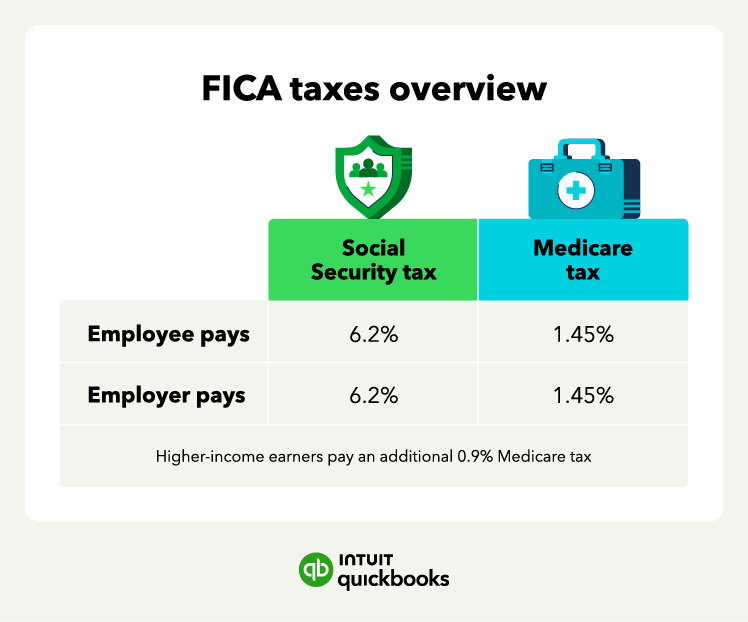
The total FICA tax rate is 15.3%, which includes:
- Social Security: 12.4% (6.2% employee + 6.2% employer) This applies to earnings up to the Social Security wage base limit of $176,100 in 2025.
- Medicare: 2.9% (1.45% employee + 1.45% employer) There's no earnings limit for Medicare tax, though an additional 0.9% Medicare tax applies to higher earners (over $200,000 for single filers and $250,000 for married couples filing jointly).

Make calculating and deducting these taxes more streamlined and alleviate concerns of payroll penalties with payroll software that has built-in tax penalty protection like QuickBooks Payroll.
Keep track of your earnings throughout your career and periodically check your Social Security statement online to ensure your records are accurate and you're earning the proper credits for future benefits.
FICA tax exemptions
FICA tax exemptions are provisions that exempt certain individuals or groups from paying FICA taxes. Exemptions apply to specific individuals like “nonresident aliens,” qualifying students, or members of religious organizations who earn income solely through their ministry.
Current FICA tax exemptions include:
- College students attending university or vocational school can get FICA tax exemptions if they also work part-time.
- Religious groups, such as ministers and members of a religious order, can be eligible for FICA tax exemptions.
- “Nonresident aliens” may be exempt from FICA taxes on earnings from employment in the country.
To be eligible for these exemptions, you may have to meet certain requirements, such as specific visa and immigration criteria for “nonresident aliens.”
You're never too small to feel more stable
With competitive APY, no monthly fees, and seamless payments—QuickBooks Checking works harder for those who work for themselves.**
FICA taxes vs. self-employed taxes
While "FICA taxes" technically refers to taxes withheld from employee wages, self-employed individuals pay similar taxes under the Self-Employed Contributions Act (SECA).
Here's how they compare:
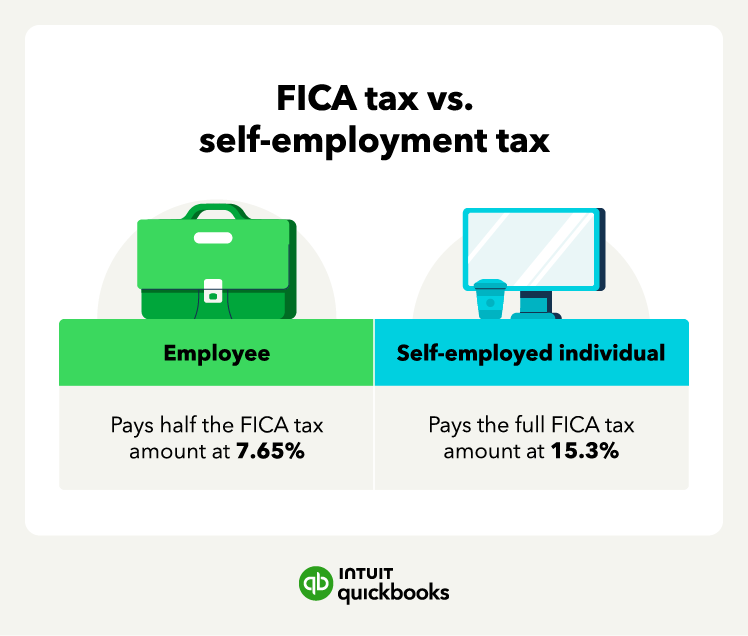
- FICA tax: This is a payroll tax deducted directly from employee wages. Employers withhold 7.65% to cover the employee's share of Social Security and Medicare taxes, and they match that amount for a total of 15.3%.
- SECA tax: This is an income tax. It's calculated on 92.35% of your net self-employment earnings. Self-employed individuals are considered both the employer and employee, so they are responsible for paying the full 15.3% SECA tax themselves.
Essentially, self-employed individuals pay the combined employer and employee share of Social Security and Medicare taxes.
Even though self-employed individuals pay a higher rate, they can deduct half of their self-employment tax as a business expense. This helps reduce their overall tax liability.

How to calculate and file FICA taxes
Calculating and filing FICA taxes is different for employers and self-employed individuals.
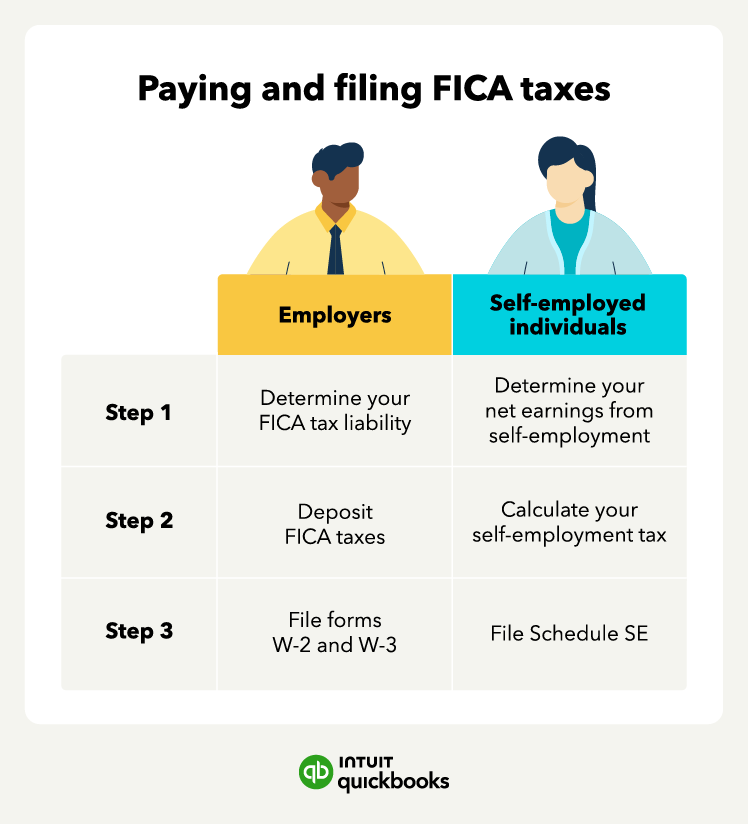
If you’re an employer, you can file and pay FICA taxes in three steps:
- Determine your FICA tax liability: Employers are responsible for withholding the employee portion of FICA taxes from their employee's wages and also for paying the employer portion.
- Pay FICA taxes: Employers must pay their FICA taxes either semi weekly or monthly to the IRS, as well as file Form 941 quarterly or Form 944 annually, depending on the company size.
- File forms W-2 and W-3: Employers file W-2 forms with the Social Security Administration for each employee annually to report the employee's wages and FICA taxes withheld. Employers must also file Form W-3, which summarizes the information on all Forms W-2 that they filed.

Filing and paying FICA taxes is a bit different for self-employed individuals. Sole proprietors and freelancers don’t have an employer to collect and pay FICA taxes. Instead, they pay both the employer and worker amounts.
It’s also possible to overpay or underpay FICA taxes—especially if an employee works multiple jobs and each employer withholds without knowing their total income. Employers should use payroll software to detect overages and prevent IRS adjustments later.
If you’re self-employed, you can pay and file self-employment taxes using these three steps:
- Determine your net earnings from self-employment: Calculate your net earnings from self-employment, which is your total income from self-employment activities minus your self-employment deductions.
- Calculate your self-employment tax: To calculate your self-employed FICA and self-employment tax liability, multiply your income from self-employment by 92.35%. Then multiply that figure by 15.3% (assuming it’s less than the current Social Security income limit).
- File Schedule SE: You’ll file Schedule SE on Form 1040 to report your self-employment tax liability. Schedule SE helps calculate the amount of self-employment tax you owe and what tax you can deduct from your adjusted gross income.
The self-employment tax calculation uses 92.35% of your income to account for the fact that regular employees only pay FICA taxes on their gross pay, while self-employed workers can deduct half of the self-employment tax as a business expense.
Self-employed individuals who expect to owe more than $1,000 in income tax come tax time must make quarterly estimated tax payments to the IRS.
Take time back with AI agents in your corner
Let QuickBooks AI agents handle the busywork so you and your team can focus on what really matters.
Other payroll taxes to consider
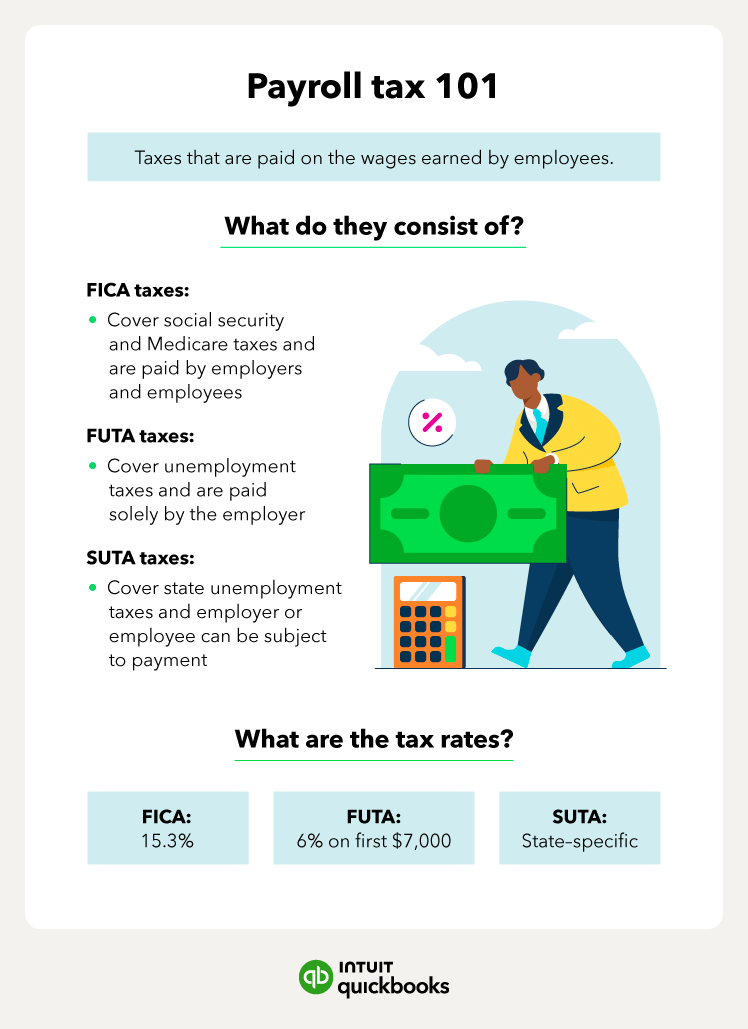
FICA taxes are just one part of payroll withholdings, which also include unemployment taxes. Federal unemployment tax withholding is known as FUTA, while state unemployment is SUTA.
- Federal Unemployment Tax Act (FUTA): This federal tax funds unemployment benefits for workers who have lost their jobs. Employers pay FUTA tax on the first $7,000 of each employee's wages. The FUTA tax rate is 6.0%, but employers can receive a credit of up to 5.4% for paying state unemployment taxes, resulting in an effective FUTA tax rate of 0.6%.
- State Unemployment Tax Act (SUTA): Each state has its own unemployment tax program, with rates and requirements varying by state. Employers typically pay SUTA taxes on a portion of employee wages, which fund unemployment benefits for workers within that state.
Understanding these additional payroll taxes is crucial for employers to ensure compliance and avoid penalties.

Advanced accounting software, including free accounting software for small businesses, can help you keep detailed records of all your payroll taxes, including deposit dates and amounts. It makes the tax season smoother and ensures you can easily respond to any inquiries from tax authorities.
Find peace of mind come tax time
FICA taxes aren’t optional, but overpaying is. Whether you’re an employer or a freelancer, using automation and Intuit’s AI-powered payroll services can take the guesswork out of calculating, filing, and staying compliant. When you know your rates, track your earnings, and use smart technology like AI Agents to stay ahead, tax season gets a whole lot easier.
Disclaimers:
QuickBooks Online Payroll & Contractor Payments: Money movement services are provided by Intuit Payments Inc., licensed as a Money Transmitter by the New York State Department of Financial Services, subject to eligibility criteria, credit, and application approval. For more information about Intuit Payments Inc.'s money transmission licenses, please visit https://www.intuit.com/legal/licenses/payment-licenses/
QuickBooks Money: QuickBooks Money is a standalone Intuit offering that includes QuickBooks Payments and QuickBooks Checking. Intuit accounts are subject to eligibility criteria, credit, and application approval. Banking services provided by and the QuickBooks Visa® Debit Card is issued by Green Dot Bank, Member FDIC, pursuant to license from Visa U.S.A., Inc. Visa is a registered trademark of Visa International Service Association. QuickBooks Checking Deposit Account Agreement applies. Banking services and debit card opening are subject to identity verification and approval by Green Dot Bank. Money movement services are provided by Intuit Payments Inc., licensed as a Money Transmitter by the New York State Department of Financial Services. For more information about Intuit Payments' money transmission licenses, please visit https://www.intuit.com/legal/licenses/payment-licenses/. No subscription cost or monthly fees. Other fees and limits, including transaction-based fees, apply.
**QuickBooks Checking account: Banking services provided by and the QuickBooks Visa® Debit Card is issued by Green Dot Bank, Member FDIC, pursuant to license from Visa U.S.A., Inc.. Visa is a registered trademark of Visa International Service Association. Green Dot Bank operates under the following registered trade names: GoBank, GO2bank and Bonneville Bank. Registered trade names are used by, and refer to, a single FDIC-insured bank, Green Dot Bank. Deposits under any of these trade names are deposits with Green Dot Bank and are aggregated for deposit insurance coverage up to the allowable limits. Green Dot is a registered trademark of Green Dot Corporation. ©2022 Green Dot Corporation. All rights reserved. QuickBooks products and services, including Instant Deposit, QuickBooks Payments, Cash flow planning / forecasting are not provided by Green Dot Bank.
Industry-leading Annual Percentage Yield (APY): Competitive rate information based on publicly available data for small business checking accounts provided by the largest national and online banks as of September 18, 2023. APYs are subject to change at any time.
You could save up to 25% on transaction costs².
Speak with us now to see if you qualify.
Talk to sales 1-800-515-8366
Monday - Friday, 6 AM to 4 PM PT
Payroll Compliance

Details on the One Big Beautiful Bill Act and how it affects payroll

USPS changes may affect your postmark date

Mandatory State Paid Family Leave Programs
Accounting

Here’s what’s new in QuickBooks Online for August 2026

The accounting equation: A beginner’s guide with examples
Customer Stories

Why Amborella Organics trusts QuickBooks AI to handle the heavy lifting of a $10M+ vision

At Petal Salon, Amanda Lee Harvey keeps her clients in the pink

Normal Ice Cream saves 7 hours a week on banking admin thanks to QuickBooks Bill Pay

How The Baby Pantry shows up for families in need
Recommended for you
Explore what you can do with QuickBooks
See profit at a glance
Get expert help
Looking for something else?
Firm of the Future
Topical articles and news from top pros and Intuit product experts.
QuickBooks Support
Get help with QuickBooks. Find articles, video tutorials, and more.
Call Sales: 1-800-285-4854
© 2026 Intuit Inc. All rights reserved.
Intuit, QuickBooks, QB, TurboTax, Credit Karma, and Mailchimp are registered trademarks of Intuit Inc.
Money movement services are provided by Intuit Payments Inc., licensed as a Money Transmitter by the New York State Department of Financial Services. For details about our money transmission licenses, or for Texas customers with complaints about our service, please click here.
By accessing and using this page you agree to the Website Terms of Service.