You could save up to 25% on transaction costs².
Speak with us now to see if you qualify.
Talk to sales 1-800-515-8366
Monday - Friday, 6 AM to 4 PM PT

Table of contents
Table of contents
As projects scale, construction inventory management becomes harder to control. Purchasing spreads across sites, tracking varies between teams, and material usage is not always recorded consistently.
Without a clear connection between purchasing, inventory, and job costing, it’s easy for costs to be misallocated, budgets to drift, and margins to erode. These operational gaps are what ultimately drive financial issues, affecting margins, cash flow, and overall project performance.
Material costs can make or break project profitability. According to the U.S. Bureau of Labor Statistics, construction material costs have risen by more than 40% since 2020. With costs rising, the margin for error shrinks—especially as purchasing becomes more fragmented.
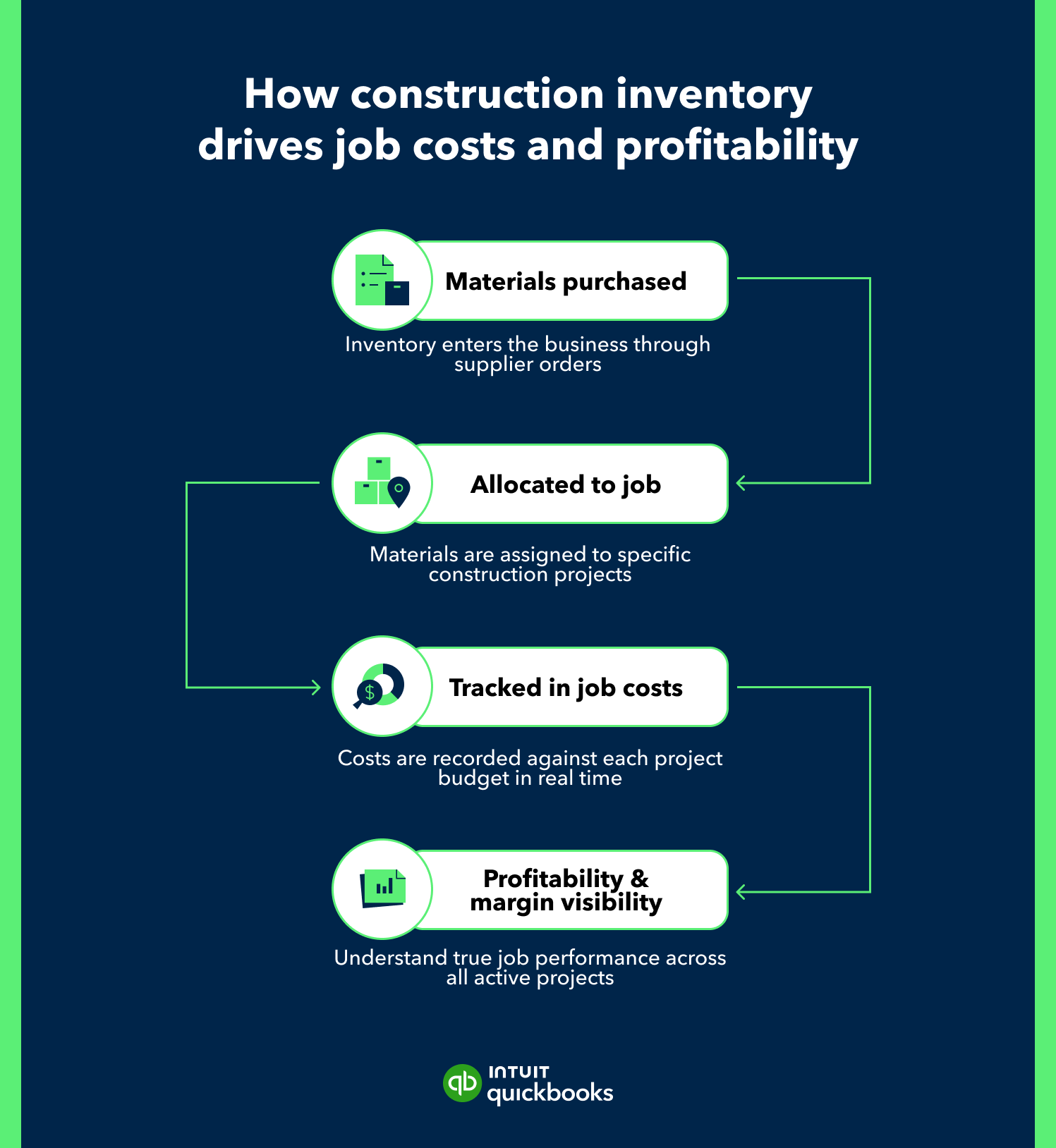
Bringing these data points together is where stronger inventory management comes in. It connects purchasing, inventory, and job costing, helping you track spending more accurately and maintain better control over financial performance.
This guide covers practical steps to improve inventory processes, align purchasing with job costing, and gain better visibility into cash flow and profitability.
When construction businesses take on more projects, add crews, and expand purchasing activity, inventory management becomes more complex. Materials move between multiple job sites, teams order through different channels, and tracking can vary depending on how each project is managed.
Materials are often the largest expense on any project, and even seemingly minor tracking gaps can quickly affect overall financial performance. Inconsistent inventory tracking can lead to misallocated costs and unreliable reporting, making it harder to understand true project performance.
At scale, these breakdowns tend to emerge across systems and processes:
When teams source materials independently without a centralized system, financial data becomes inconsistent. This can make it harder to consolidate spend, track project costs, and maintain reliable margin reporting.
If one site manager orders through a local supplier and another uses a national distributor, reconciliation becomes more complex. A lack of a standardized process makes it difficult to monitor spending, compare costs, and ensure you’re getting the best value.
Without a single source of truth for your inventory and purchasing data, data becomes fragmented, increasing the likelihood of costly business errors. Duplicate orders, missing invoices, and manual reconciliation increase the risk of mistakes while adding extra work for finance and operations teams.
When there isn’t a clear view of where materials are and how they’re being used, resources can be over-ordered or left unused. This ties up working capital and makes it harder to plan effectively across active projects.
With these challenges in mind, the next step is putting more structured processes in place. The following steps focus on improving inventory management to strengthen job costing, cash flow, and project control.
Inconsistent tracking makes financial reporting harder to trust. Standardization creates a reliable foundation for job costing calculations and margin analysis.
Better visibility into purchasing decisions helps prevent cost overruns and improves financial forecasting.
Supplier strategy plays a direct role in cost stability and project timelines.
Material spend needs to be reflected accurately in both project performance and cash position.
Manual processes become harder to maintain as transaction volume grows. Leverage automation to improve consistency, operational control, and financial accuracy.
Strong inventory practices directly influence financial performance and long-term growth. Keep these priorities in focus:
Material costs often make up a significant portion of total project spend. When purchases aren’t tied to the right job or cost code, margins can appear stronger—or weaker—than they actually are.
For example, if materials for Project A are mistakenly logged under Project B, both jobs reflect inaccurate cost and margin performance, making it harder to evaluate profitability or adjust future bids.
When material usage and availability are visible at a portfolio level, teams can make faster, more informed decisions.
For instance, instead of ordering new supplies for a job, teams can reallocate unused materials from another active site—reducing waste and avoiding unnecessary spend.
Inconsistent workflows and manual entry increase the risk of duplicate orders, missing invoices, or misclassified expenses.
Automated updates ensure material costs hit job budgets as soon as they’re received, helping maintain accurate financials without added manual work.
When inventory, purchasing, and job costing data are aligned, financial reporting becomes more reliable and easier to act on.
Consider a scenario where material costs begin trending above budget. Real-time tracking highlights the variance early, giving teams time to adjust before it impacts project margins or cash flow. They may need to reassign costs, delay purchases, or correct allocation at the job level.
The steps above depend on consistent processes, real-time visibility, and connected financial data. QuickBooks Online Advanced with the construction module brings these together, linking day-to-day purchasing, project updates, and reporting in one system. It helps growing construction teams standardize workflows, control costs, and manage inventory with greater precision.

Set up products and services, cost codes, and project tracking in one system. QuickBooks applies these structures consistently across jobs, with every purchase and material entry following the same classification as transactions are entered.
This keeps materials, purchases, and job costs aligned, with data moving from initial purchasing through project tracking into financial reporting. Teams work from a single, consistent view of costs at every stage.
Create and track purchase orders, assigning them to projects at the time of ordering using the Projects feature. As bills and expenses are recorded, costs flow into job budgets.
Teams can monitor committed and actual spend in real time. They can see the impact of each PO and bill on project budgets as they post, which helps reduce out-of-scope purchases and catch overruns earlier in the project lifecycle.
Monitor vendor activity using built-in reports and transaction histories to capture spend as it occurs. AI helps categorize transactions based on past activity, keeping similar costs recorded consistently across suppliers as new bills and payments are processed.
With better insight into vendor spend and pricing trends, teams can evaluate suppliers more effectively. This helps them control costs and act sooner when pricing or performance begins to shift rather than waiting for month-end reports.
Track costs at the point of entry by recording bills, expenses, and purchase orders and assigning them to projects. Costs appear in project profitability reports as they are captured, giving teams visibility into how material spend affects each job.
This improves margin tracking and provides earlier insights into upcoming cash needs, since project and cash flow impacts are updated as inventory spend is recorded.
Use customizable reports, dashboards, and project profitability views to track cost versus budget and overall performance, including estimates vs. actuals and work in progress (WIP) reporting.
AI surfaces patterns and flags unusual activity, with updates reflected as project data changes, so shifts in costs or usage on active jobs appear quickly in the metrics leaders review. Teams will be able to identify variances promptly and adjust accordingly, rather than waiting for periodic, manual report runs.
Use QuickBooks Online Advanced automation tools, like recurring transactions, bank feeds, and batch actions, to handle data entry and transaction processing.
AI assists with data capture and categorization, keeping financial data consistent without additional manual effort. Higher transaction volumes can then flow cleanly from purchasing into projects and reports without extra back-office headcount.
In construction, financial performance is shaped long before a project is complete. It shows up in how materials are purchased, tracked, and accounted for every day. When those processes are connected, teams catch issues sooner, act faster, and keep margins on track.

Call Sales: 1-800-285-4854