You could save up to 25% on transaction costs².
Speak with us now to see if you qualify.
Talk to sales 1-800-515-8366
Monday - Friday, 6 AM to 4 PM PT

Table of contents
Table of contents
If you knew exactly what the future held for your business, what actions would you take today to ensure success? While there's no magic crystal ball to see the future, pro forma financial statements can give you insight into your business's potential performance over the coming months and years.
More than 50% of business owners expressed concerns about rising operational costs in quarter four of 2025, according to the Small Business Insights survey. To support your proactive planning, we'll explore key forecasting methods and analyze pro forma financial statement example scenarios. We'll also provide you with a step-by-step guide for generating these statements.
Pro forma financial statements are detailed projections that estimate future financial performance based on hypothetical scenarios.
For example, what would happen if your business adds a new location or the cost of materials increases? Pro forma statements use historical info and detailed research to see how major business moves like this might impact your bottom line.
Modeling different scenarios like this can help you make well-informed decisions, but only if the data is accurate.
QuickBooks AI can help you get started by instantly pulling 24 months of historical data to establish your base case. The added forecasting tools and AI-driven modeling that are part of the Plus and Advanced packages can also help you create real-time simulations. Together, this makes manual entry and static spreadsheets a thing of the past.
Pro forma financial statements come in various forms, each serving a unique purpose in your business planning. Let’s explore the most common types of pro forma forecasts and what information they can provide.

A pro forma income statement projects your business’s revenue, expenses, and profits over a set period. It provides a better understanding of future profitability, helping with pro forma valuations and decisions such as pricing or cost-cutting.
Using a pro forma model, you can simulate how changes in sales or expenses will affect your bottom line, making it easier to select an effective strategy. For example, let’s say you anticipate a 20% increase in cost of goods sold (COGS) for the coming year, thanks to inflation and expiring supplier contracts. A pro forma income statement will show you exactly how this increase could impact your future revenue and net profit.
Cash is king, and the pro forma cash flow statement forecasts your future inflows and outflows. This projection ensures liquidity and operational efficiency. A solid financial forecasting strategy helps you avoid cash shortfalls by showing where funds are coming from and how you’ll spend them.
For instance, let’s say you plan to shift to a 1099-contractor labor model. The pro forma cash flow statement can help you evaluate how the resulting changes to your payroll timing and cash reserves will impact your future liquidity and burn rate.


If you use pro forma invoices, for either payables or as quotes to your customers, these can help you with modeling your pro forma cash flow.
This statement estimates your future assets, liabilities, and equity. By comparing this forecasted balance sheet with current numbers, you can assess whether you’ll need additional funding or how future growth might affect your capital structure.
This is especially helpful if you are planning on future expansion. New equipment and property liabilities recorded on your pro forma balance sheets will demonstrate how your capital structure will change.
Sometimes your business planning requires highly tailored forecasts that move beyond standard financial templates. If you are preparing for a major strategic pivot—such as a market downturn, a massive capital expansion, or a corporate merger—specialized pro forma models allow you to stress-test variables unique to that event.
For example, if you are looking to acquire a competitor, a basic projection won't give you the full picture.
You have to map out a complex web of moving parts, including:
Beyond these structural balance sheet adjustments, a specialized pro forma model lets you look under the hood of how the target company actually makes money.
By analyzing their historical Customer Acquisition Cost (CAC) (what they spend to get a single customer) and Customer Lifetime Value (LTV) (how much profit that customer brings in over time), you can map out a realistic projection of future profits.
Instead of guessing, this customized forecast helps you see if their customer base is truly healthy, or if those customers will cost you too much to keep happy down the road. Ultimately, it ensures you aren't just buying a list of names, but a reliable money-making machine that will help your business grow.
 For accurate forecasting, prepare for variability by creating multiple scenarios and regularly updating projections based on new data. Also, continuously compare your forecasts with actual performance to refine your methods.
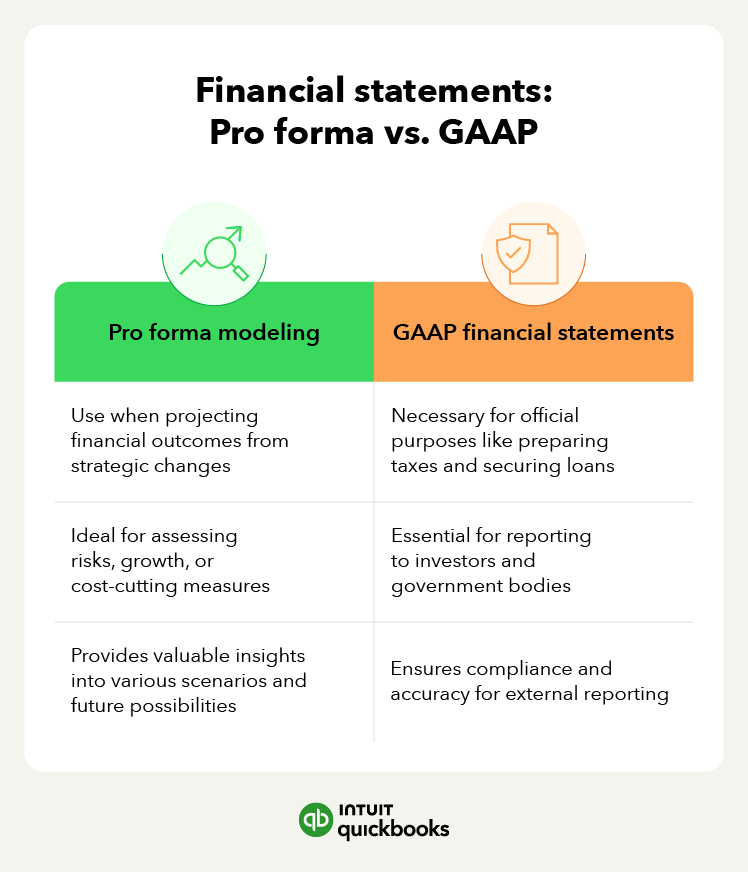
While both pro forma and GAAP financial statements are useful tools in financial reporting, they serve different purposes and follow different rules. Pro forma statements are largely for personal use, while GAAP statements can be required as part of financial transparency. Let’s explore these differences in more detail.
Pro forma modeling is primarily focused on forecasting and flexibility, allowing businesses to create projections based on hypothetical scenarios, such as launching new products or inflation.
In contrast, GAAP accounting emphasizes accuracy and consistency by presenting a company's financial position based on historical data like invoices and payables. These financial documents must adhere to the standards set forth by the Financial Accounting Standards Board (FASB).
Pro forma statements enable adjustments to historical data, accounting for one-time expenses or anticipated future revenue streams, which allows for assumptions and projections. The modeling can be continually adjusted with real-time data, new research, and updated scenarios.
Conversely, GAAP statements strictly adhere to recognized accounting practices, ensuring that the financial information presented is standardized and reflects a true and fair view of past and present financials. These financial statements are only updated periodically, with real data, not projections.
Publicly traded companies must use GAAP statements for official reporting to investors, regulators, and tax authorities, as required by law. These statements must follow strict accounting rules to ensure transparency and consistency.
While there is no legal requirement for smaller, private companies, individual lenders and investors may also require GAAP-compliant statements. And these financial documents can help ensure your business is audit-ready.
In contrast, businesses use pro forma financial statements mostly for internal decision-making or investor presentations, especially when highlighting future potential rather than past performance. Still, to remain compliant with potential regulatory audits, these statements should be clearly labeled as “pro forma”, describe in detail how calculations were made, and include all ongoing expenses (no omissions to inflate performance).
Pro forma financial statements can play a vital role in various aspects of business operations. Here are some cases where you can use them:
To get the most from your pro forma statements, base your assumptions on solid research and update them regularly. This will provide clearer insights into how different types of accounting can impact your financial projections.
To create pro forma financial statements, you need an objective, historical data, and research. The goal is to generate a detailed financial statement that explores a specific scenario, like obtaining seed funding or planning for inflation.
The old way of doing this was to create static spreadsheets with limited data, which no longer works for modern businesses. Let's explore how you can create insightful, error-free pro forma financial statements using QuickBooks automation and AI capabilities.
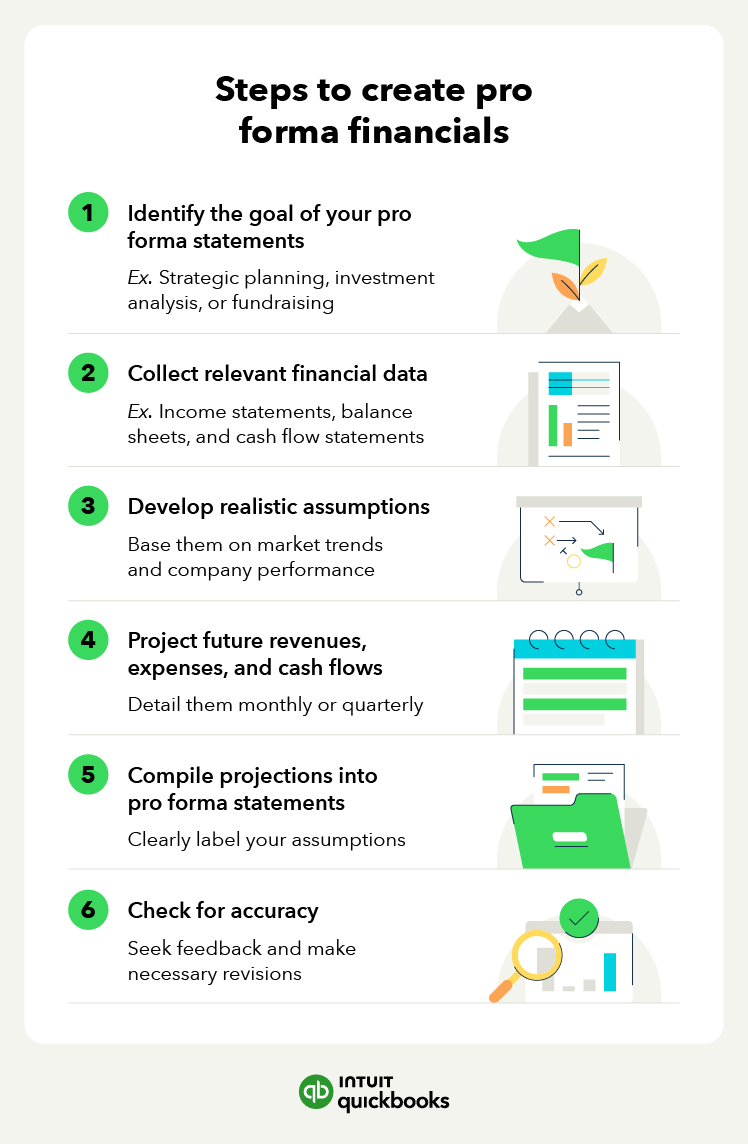
The first step in creating your pro forma statement is to decide what type of projections you need. For example, if you were considering expanding your business to a second location, you might want to prepare a pro forma cash flow statement to assess how upfront expenses will affect your cash flow.
In addition, a pro forma income statement might be helpful in estimating future profitability, weighing additional potential revenue against increased operating expenses.
With a clear objective in mind for your pro forma statements, you can craft financial projections that are accurate and insightful instead of generalized guesses.
With a scenario in mind, it's time to gather your historical data. Automation is key, and manual data entry is not only dated but can also be a liability. With QuickBooks Online, you can automatically pull 24 months of historical data into your pro forma statements to create a solid foundation for your projections.
No need to manually search through your income statements and balance sheets; QuickBooks can help you gather all the data you need for your custom scenario within a matter of seconds. For in-depth insights and business recommendations, QuickBooks offers Finance AI with their Advanced package.
All of QuickBooks plans include access to Intuit Intelligence, which is a combination of artificial intelligence (AI) and business intelligence (BI) that can provide you with custom insights.
In addition to having an abundance of historical data, you also need research data so that you can build realistic assumptions. For instance, if you wanted to generate pro forma statements to estimate the impact of inflation, you would look at data such as market trends, current Producer Price Indexes (PPI), planned supplier price hikes, wage statistics, and estimated shipping costs.
To help build a solid set of data and supplement your research, QuickBooks Finance AI delivers detailed insights on your business performance. This can help you monitor and adjust your budget, business goals, and forecasts.
Now that you have all of your base data and research done, it's time to start generating your projections. Using spreadsheets or accounting software, you can estimate future revenue, expenses, cash flow, etc., using your what-if assumptions. For accuracy purposes, it is best to focus on a monthly or quarterly interval.
In particular, this forecasting can help you when evaluating investment scenarios such as expansion, acquisition, or expensive upgrades. Your projections should cover not only the initial downward phase and payback period of the J-curve, but also long-term revenue forecasts. This can help you spot potential cash flow gaps before they occur and develop a concrete plan to address them.
For quick, automated forecasting, you can create custom scenarios in QuickBooks Online Advanced to get an idea of how your future cash flow might change.

For example, with the Custom Report Builder in Advanced, you can estimate how a 10% increase in cost of goods sold (COGS) will impact your cash flow, in the same way a pro forma cash flow statement would.
With your projections in hand, you can now use that data to generate individual pro forma financial statements, like:
When adjusting the data and scenario, all these documents have to remain interconnected, ensuring that, when you update one, the others will remain accurate as well. With your QuickBooks data as your base, your numbers will update in real time.
A pro forma financial statement is only as good as the data used to create it, so it's important to continually review and revise your numbers. If you are getting strange results or just want another set of eyes to check over your projections, consulting an Intuit Expert can help you get the assurance you need.
Another good way to check your accuracy is with variance analysis. Essentially, this is to compare your actual data with your projections. If, for instance, you estimated March revenue would go down 10%, and it actually went down 15%, you can use this data to adjust your forecasting going forward.
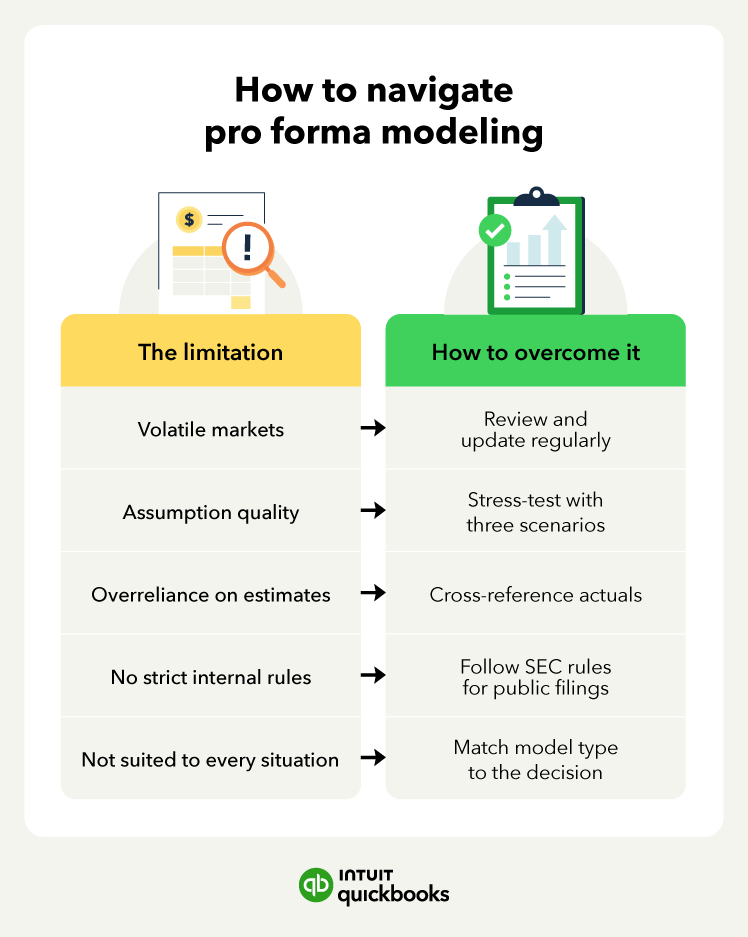
Pro forma statements can be insightful, but they don’t work for every situation, and overreliance on them can set you up for disappointment. For example, if you aren’t routinely reviewing your projections, a volatile market can leave your estimations outdated, resulting in lost revenue.
To avoid the frustration of models that don’t align with actual performance, we’ll explore the uncertainty and limitations of pro forma statements and how you can overcome these challenges.
Use pro forma financial statements when you're planning significant changes, such as launching a new product, expanding operations, or seeking investment. They can help assess potential financial outcomes and guide decision-making.
However, pro forma modeling will not be a good fit for all situations. For instance, if you lack good base data, then your forecasting will be flawed. Or if the scenario revolves around a highly speculative project, your projections could be way off base.
This is why it’s important not to rely on just pro forma modeling. Instead, consider what your goal is and determine what other facts and documents can help you reach a confident business decision.
The risk here is one of overreliance on your estimates. Especially since the accuracy of pro forma projections depends on the quality of your assumptions. While pro forma financial statements offer valuable insights, projections are estimates, so it's important to account for potential variability.
This is why it’s important to verify your data. Ensure your research is solid, and update your projections with real numbers as you get them. You may also want to consider running a best-case and worst-case scenario so you can see the range of potential outcomes.
There are no strict regulations for internal pro forma statements, but public companies must follow certain disclosure rules when using them in reports or filings, particularly with the SEC. This includes clearly labeling statements as pro forma, delineating which data is historical versus estimated, and providing detailed footnotes detailing how the results were reached.
Even if you aren’t a publicly traded company, clearly identifying your pro forma statements as such, is good practice. If you were to disseminate pro forma statements without the appropriate disclosures, this could be considered misleading at best, or cost you valuable investors as well as your business reputation.
When crafting pro forma scenarios and statements, try to avoid any bias, like being overly optimistic, making aggressive adjustments, or using non-researched assumptions.
Pro forma statements typically project 1-3 years into the future, but this can vary depending on your business goals or the type of forecast needed. The risk of stretching it out too far is that marketing volatility can greatly affect your predictions.
To combat this, the best practice is to update your pro forma statements whenever significant changes occur in your business or the market. Regular updates ensure your projections stay relevant and accurate. This is an easy task for QuickBooks users, who have instant access to real-time data.
Pro forma financial statements help you plan your next big move, but creating them doesn’t have to take up all your time. With QuickBooks Online you gain access to a variety of tools to help you with all of your bookkeeping and accounting needs. This includes gathering base data for pro forma statements.
Whether you’re assessing a potential investment or preparing for expansion, accurate projections are key. For detailed insights and specialized reporting tools, the Advanced package can simplify your financial forecasting so that you can focus on growing your business.

Call Sales: 1-800-285-4854