You could save up to 25% on transaction costs².
Speak with us now to see if you qualify.
Talk to sales 1-800-515-8366
Monday - Friday, 6 AM to 4 PM PT

Table of contents
Table of contents
You’ve invested in equipment, vehicles, computers, or other assets to keep the business running. As more people purchase and use them, keeping the books current takes more coordination. An asset might be moved to another location or replaced, and finance may not hear about it right away. You might first notice during the close, when the records no longer match what’s actually in use, or a depreciation entry needs a closer look.
Fixed asset accounting helps keep those records up to date from purchase through disposal. Here’s how to account for asset costs, depreciation, and disposals while keeping your books accurate.
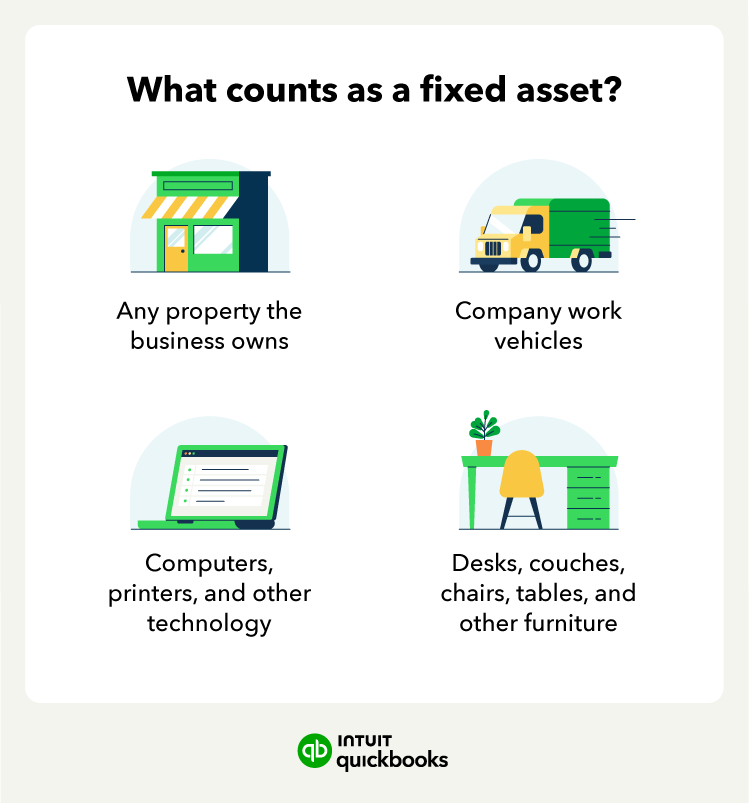
Fixed asset accounting is the process of recording and tracking long-term assets a business uses in its operations, such as equipment, vehicles, computers, and buildings. These assets generally appear on the balance sheet rather than being expensed in full at purchase.
As an asset is depreciated, its accumulated depreciation increases and its net book value decreases. Depreciation expense is recorded on the income statement, while the asset’s cost and accumulated depreciation remain on the balance sheet.

Keep fixed asset records current throughout the asset’s useful life. Update them for events such as depreciation, impairment, and disposal.
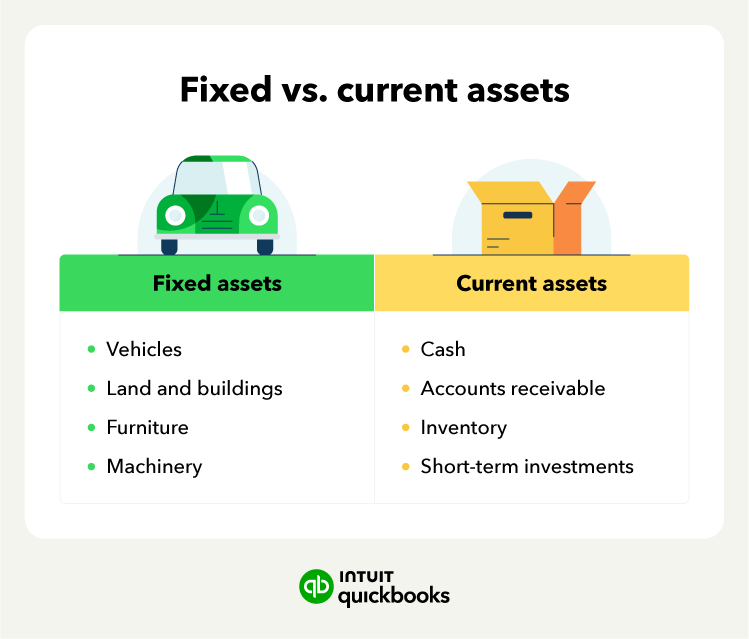
The fixed assets on your books depend on what your business owns and uses in its operations. Here are some common examples:

Classification depends on how you use an item. For example, a computer purchased for an employee may qualify as a fixed asset under your capitalization policy. If your business buys that same computer to sell to a customer, it would be inventory.
The examples above are tangible assets, meaning they have a physical form. Intangible assets have no physical form and can include patents, copyrights, and trademarks. Intangible assets follow different accounting rules from tangible fixed assets.
The accounting for a fixed asset changes throughout its useful life. The example below follows a $60,000 equipment purchase to show how the entries and records change from acquisition through disposal.

A capitalization policy sets the rules your business uses to decide which purchases are recorded as fixed assets rather than expenses. Common considerations include:
For a qualifying asset, the recorded cost can include the purchase price and certain costs needed to prepare it for use, such as installation. Routine repairs and maintenance are generally expensed, while qualifying improvements may be capitalized.
There’s no single capitalization threshold that applies to every business. Document your company’s threshold and apply the policy consistently to similar purchases.
Once the equipment qualifies for capitalization, record its total capitalized cost.
For this example, assume the equipment has a capitalized cost of $60,000, and the business pays in cash.

The journal entry records the equipment as an asset and reduces cash by the same amount.
The accounting entry is only part of the record. You should also keep the information your finance team will need to identify the asset and account for it throughout its useful life:

Depreciation spreads an asset’s depreciable cost over its useful life. Continuing with the $60,000 equipment purchase, assume a five-year useful life and $6,000 salvage value. Using straight-line depreciation:
($60,000 − $6,000) ÷ 5 = $10,800 in annual depreciation
Each year, the business would record:

Depreciation expense appears on the income statement. Accumulated depreciation reduces the asset’s net book value on the balance sheet without changing its original recorded cost.
The asset register should also stay aligned with the general ledger. During regular reviews, check for damage, obsolescence, or changes in how the equipment is used that may require further accounting review.
Suppose the business sells the equipment after three full years. At that point, it has $32,400 in accumulated depreciation, leaving a $27,600 net book value. If the equipment sells for $30,000, the business records a $2,400 gain, assuming there are no selling costs.
The journal entry would be:

The entry removes both the equipment’s original cost and its accumulated depreciation from the books, while recording the cash received and the gain on the sale.
If the sale price were below the asset’s net book value, the difference would be recorded as a loss. For an asset retired without any proceeds, remove its cost and accumulated depreciation and recognize any remaining net book value as a loss.
The depreciation method you choose affects when an asset’s cost is recognized as an expense. The method should reflect how you expect to use the asset and receive its economic benefits.

Using the $60,000 equipment example:
Book depreciation and tax depreciation can follow different rules. The depreciation recorded in your financial statements is based on the method and estimates used for your books, while federal tax depreciation follows IRS depreciation requirements.
Tax rules may also allow accelerated deductions, such as bonus depreciation, for qualifying property.
Multiple locations put more people between an asset purchase and the accounting record. Finance needs a consistent way to capture purchases, transfers, damage, and retirements so the asset register reflects what each location actually has.
The following best practices can help finance keep asset records current, even when assets move between locations.
Similar purchases should receive consistent accounting treatment, regardless of which department or location makes them. Give teams one documented capitalization policy that covers:
Using the same policy helps prevent one location from capitalizing a purchase that another location would expense.
Assign someone at each location or team to report asset changes to finance, including new purchases, transfers, damage, and retirements. If you use accounting software such as QuickBooks Online Advanced, custom user roles and permissions can also help you control which team members have access to financial data and accounting tasks.
For example, if a service vehicle moves to another location, finance needs to know so the asset record can be updated. Knowing who reports changes helps finance keep asset records current.

During the close, compare the asset register with the general ledger to confirm that activity for the period is reflected in both records. Review:
If your team reviews financial data in spreadsheets, features such as Spreadsheet Sync in QuickBooks Online Advanced let you work with your accounting data directly in Excel without relying on separate exports.
Regular reconciliation can uncover duplicate purchases, missed retirements, or depreciation entries that need correction.
Periodically compare the assets listed in your records with the equipment your business actually has. How often you perform these checks can depend on the value and risk associated with the assets.
A physical check can identify equipment that is missing, no longer being used, or nearing replacement. It can also catch location or ownership details that need to be updated in the asset register.
As your asset base expands, spreadsheets and separate depreciation schedules can add more work to each close. QuickBooks Online Advanced keeps fixed asset records and depreciation schedules in your accounting system and automates some recurring tasks.
The business still owns the accounting decisions, including reviewing asset setup, reconciling balances, and confirming the accounting treatment for disposals. Fixed Asset Manager can remove disposed assets from the balance sheet without requiring manual journal entries.
A fixed asset process should keep pace with where your business is headed. With reliable records and routine depreciation handled in QuickBooks Online Advanced, finance has a more complete view of existing assets to inform future planning and investment decisions.

Call Sales: 1-800-285-4854