- Start Your BusinessStart Your Business
- Starting a BusinessThe tools and resources you need to get your new business idea off the ground.
- PaymentsEverything you need to start accepting payments for your business.
- Funding & CapitalResources to help you fund your small business.
- Small Business StoriesCelebrating the stories and successes of real small business owners.
- Self-EmployedThe tools and resources you need to run your own business with confidence.
- Run Your BusinessRun Your Business
- Running a BusinessThe tools and resources you need to run your business successfully.
- AccountingAccounting and bookkeeping basics you need to run and grow your business.
- Cash FlowTax and bookkeeping basics you need to run and grow your business.
- PayrollPayroll essentials you need to run your business.
- TaxesTax basics you need to stay compliant and run your business.
- EmployeesEverything you need to know about managing and retaining employees.
- Grow Your BusinessGrow Your Business
- Growing a BusinessThe tools and resources you need to take your business to the next level.
- Sales & MarketingSpread the word: What you need to know about marketing your small business.
- FundingHow to find funding and capital for your new or growing business.
- Midsize BusinessesThe tools and resources you need to manage your mid-sized business.
- Enterprise Suite BlogThe tools and resources you need to grow your own business with confidence.
- E-CommerceHow to start and run a successful e-commerce business.
- TaxesTaxes
- How to fill out a 1099-NEC formLearn how to fill out and file 1099-NEC forms for independent contractors and freelancers.
- How to file small business taxesLearn how to navigate tax season with confidence and minimize your tax liability with this guide.
- Small business 1099: What you need to know for 2025Navigate the complexities of small business 1099 forms and filings with our comprehensive guide.
- 13 documents to give your accountant for small business taxesYour accountant will need these documents to file your small business taxes successfully.
- What's NewWhat's New
- NewsBrowse the latest news, press releases, and reports from QuickBooks.
- AI Resource HubFind the latest on Artificial Intelligence.
- Small Business DataThe latest research and insights for Small Businesses from QuickBooks.
- Small Business StoriesCelebrating the stories and successes of real small business owners.
- Holiday SuccessEverything you need to thrive during your business's busiest seasons.
- AI InnovationsBrowse the latest AI innovations in QuickBooks on the Intuit platform.
- ToolsTools
- All ToolsFree accounting tools and templates to speed up and simplify your workflow.
- AI-Powered Invoice GeneratorTry out this free invoice generator to create an invoice online using Intuit Intelligence.
- Payment Cost CalculatorFind out how much you could save by switching to QuickBooks Payments.
- Paycheck CalculatorAccurately estimate pay for all your employees.











An ACH payment is an electronic bank-to-bank money transfer in the US. They cost less than card payments and usually take 1-3 business days to clear, making them ideal for one-off or recurring payments.
ACH bank transfers are a practical way for businesses to improve how quickly their clients pay up. A major QuickBooks survey reported that 56% of small companies have to wait more than 30 days for customers to pay their invoices. ACH payments settle in just a few days, easing pressure on your cash flow by closing the gap between sending an invoice and getting paid.
Below, learn about the different types of ACH payments, how they work, their benefits, and how to handle them with your accounting software.
Jump to:
- Understanding what ACH payments are
- How ACH payments work
- Types of ACH payments
- What's the difference between ACH payment vs. wire transfers?
- How to accept ACH payments as a business
- What are the benefits of ACH payments?
- How much does ACH payment processing cost?
- How long do ACH transfers take?
- Choose the best payment setup for your business
Understanding what ACH payments are
ACH (Automated Clearing House) electronic payments are bank-to-bank transfers that are processed through the ACH network. They’re a way of moving money between US financial institutions without needing to use paper checks, cash, or card networks.
You can use ACH transactions to:
- Run payroll via direct deposits
- Make vendor and contractor payments
- Collect customer invoice payments (one-time or recurring)
- Set up subscription-style billing (like membership, retainers, and maintenance plans)
ACH payments are popular with companies because they offer a fast, low-cost way to get paid over other small business payment methods. While customers can still reverse an ACH debit, they have a limited time to do so, which limits disputes and provides greater certainty on funds that will actually clear.

Organize your business finances for free
Track income and expenses in one place. Plans that grow when you're ready.*
How ACH payments work
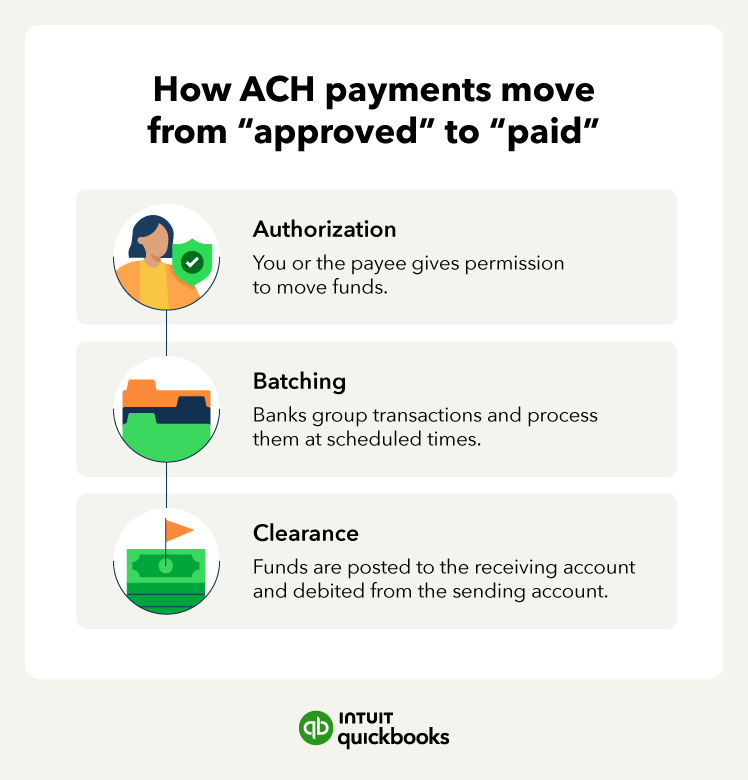
ACH payments use a structured process to move through the US financial system. The four stages to the ACH process are:
- Initiation and authorization: The person or business making the payment authorizes their bank, known as the Originating Depository Financial Institution (ODFI), to make the transfer. This could be for a payroll run, a recurring bill, or a vendor payment.
- Batch submission: Banks don’t send ACH transactions instantly. Instead, they collect them through the day and submit them in batches to the ACH network at scheduled intervals.
- Clearing and settlement: The ACH Network sorts through the batches and sends each one to the relevant receiving bank, known as the Receiving Depository Financial Institution (RDFI). The system then debits the originator’s account and credits the recipients.
- Deposit/withdrawal: The receiving bank then completes the transaction by adding the funds to your business checking account (or other nominated account) if it’s an ACH credit or withdrawing the authorized amount for an ACH debit.
The process works differently with Same Day ACH. There are multiple daily windows for submitting batches, which allows payments to complete within the same business day.
Types of ACH payments
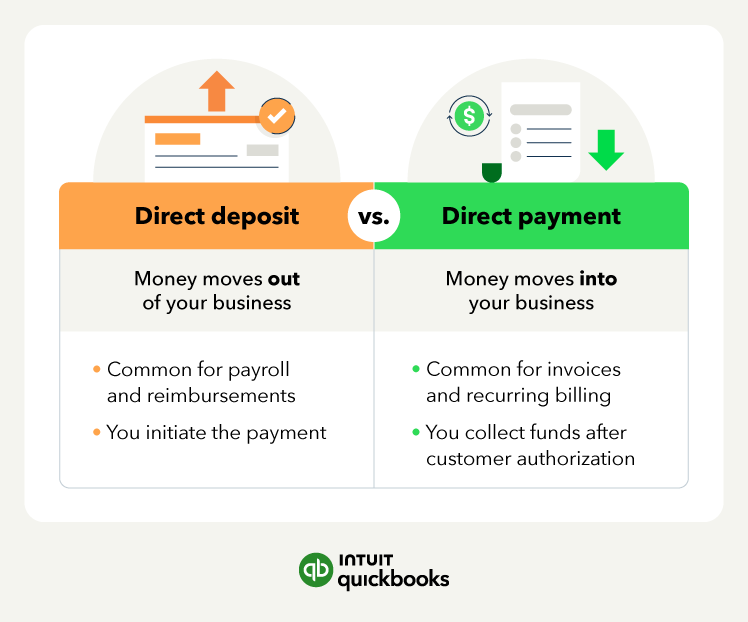
With ACH payments, money moves in two ways: credit and debit. The difference is in who starts the transaction and how the money moves. Understand how both work helps companies better manage their incoming and outgoing payments.
ACH credit (direct deposit)
ACH credit pushes funds from the payer’s account to the recipient’s account. The company sending the payment sends instructions to their bank to transfer money directly to their vendor, customer, or employee.
Businesses use ACH credit for:
- Payroll
- Paying vendors
- Sending reimbursements (like overpaid invoices or returned deposits)
Example: A landscaping company runs payroll every other Friday using ACH credit. The business benefits because there’s no need to print checks or pay wire transfer fees. Employees benefit because they receive their wages on a set day.
ACH Debit (direct payment)
ACH debit pulls money from a payer’s account, but only after they get authorization. In this case, the company receiving the money, like a service provider or landlord, starts the transaction by requesting payment from their customer’s bank account.
Businesses use ACH debit to collect:
- Monthly retainers
- Subscription billing and recurring invoices
- Utilities, rent, and service plans
Example: An IT services business bills clients $500/month using ACH debit. Following client authorization, the business starts to automatically collect ACH payments from clients’ accounts. This saves them admin work and reduces the chance of late payments.
For the client, they don’t have to remember to pay each month and can enjoy interruption-free service.
What's the difference between ACH payment vs. wire transfers?
ACH payments and wire transfers share the following in common: they move money between different accounts electronically. But businesses tend to choose wire transfers when they need to pay or collect money as fast as possible. Some also use instant transfer features to access funds faster than standard ACH processing.
A quick side-by-side comparison:
An example of ACH payment vs. wire transfer
Let’s say a retailer owes a supplier $8,000 with Net 15-day terms. They want to place another order, but that will take them over their $10,000 credit limit.
The supplier won’t ship until the retailer has paid down the outstanding balance enough for the remainder plus the value of the new order to stay within the credit limit. Wire transfers will get there in almost all cases on the same day whereas, depending on cut-off times and processing windows, an ACH payment may take up to three.

Simplify your accounts payable with Bill Pay
Discover the smarter way to manage vendor payments, optimize cash flow, and stay on top of financial reporting—all from one integrated platform.

How to accept ACH payments as a business
To accept ACH payments, you need to set up the right workflows in your business and get authorization from your customers. That’s especially so if you plan to use ACH debit for recurring payments.
Here’s an ACH payment setup checklist:
- Select a payment provider: Choose a payment partner like QuickBooks Payments for ACH invoicing and reconciliation. Many also allow you to accept credit cards or other payment methods through the same system.
- Implement account verification: Check you have typed in the customer’s details correctly to avoid payment bounces by using either a micro-deposit or instant verification.
- Collect customer authorization: Get the permission of your customer to set up ACH debit and keep a record, just in case they dispute it.
- Enter bank details securely: Use a secure form or portal to collect customers’ bank details instead of sending them via email.
- Process the ACH payment: Send the request and let the customer know when it should clear (usually 1-3 business days).
- Monitor for returns or failures: Ask your accounts receivable team to keep an eye out for bounces because of issues like insufficient funds. Make sure you follow up quickly to improve your chances of collecting payment. You could try another ACH payment or switch to an alternative method.
QuickBooks can help automate recording bills and paying them using QuickBooks Bill Pay—a built-in Accounts Payable automation solution for businesses that use QuickBooks.

When to use ACH payments
ACH transfers are a highly effective small business payment method. Use them to offer faster payment options to clients while cutting down on credit and debit card processing costs.
They’re also very handy for businesses that credit and debit card providers classify as “high risk”. For these firms, payment processors can stretch out the settlement window to two weeks after transactions take place, sometimes even longer.
For example, take a marketing agency, considered by some merchant processes as high risk. It bills its 20 clients $2,000 on the 1st of every month, totalling $40,000.
Here’s how collecting payments by ACH and card varies for this firm:
The advertising company saves on fees, increasing profitability, and gets paid faster, improving cash flow.
What are the benefits of ACH payments?
ACH payments offer a range of benefits for businesses. They make it easier to send and receive payments, which makes cash flow management easier. They’re also widely accepted, easy to set up, and integrate well into your accounting software.
The five main benefits to businesses of using ACH payments are:
1. Convenience
When a customer authorizes an ACH debit from their account, you can schedule and collect automatic payments from them. This is very useful for:
- Setting up recurring collection dates, like the first of every month
- Cutting down on credit control follow-up work with fewer reminder emails and chase-up phone calls
- Fewer payment disruptions than credit cards, because ACH debit cards don’t have expiry dates
2. Lower processing costs
For many businesses, ACH costs are lower than those of credit cards. On larger invoices or recurring billing, the difference can be substantial. A general rule of thumb is that the more you’re collecting from a customer, the better ACH payments are.
3. Enhanced security
ACH reduces the risks linked to paper checks and manual payments by using a secure, bank-operated system on both sides of the transaction.
ACH can still fail with the wrong account information or if there are insufficient funds. That’s why it’s important to verify account details and confirm the right information is in place before initiating any payment.

eChecks are essentially the same type of electronic payment as an ACH transfer in that they both use the ACH network. They both rely on routing and account numbers to initiate a payment.
4. Faster processing
ACH payments typically clear in one to three business days. They’re usually faster than paying by check, but they’re not always the fastest digital payment option. Wire transfers and credit cards (depending on your settlement window) can clear sooner. ACH is often best when you want to make a low-cost routine payment
If timing is really important on a particular payment, ask your bank about the daily administration windows they operate. Then, make sure you submit payments early enough in the day to meet the cut-off.
5. Increased retention
ACH payments make it easier for customers to settle their invoices directly from their bank accounts. Although many ACH payments are single, manual transfers, you can automate them using a service like QuickBooks Payments.
Set up autopay and recurring invoices in the software so customers don’t have to remember to pay you, and you don’t have to chase for payment.

AI and Experts: Working for You.
AI agents automate bookkeeping, payroll, bill pay, and sales tax—working with your experts or accountant saving hours each week.
How much does ACH payment processing cost?
The amount you pay for ACH transfers depends on your provider, the number of payments, and whether you’re sending or collecting funds.
Many providers charge either:
- A small percentage fee
- A flat per-transaction fee
- A capped percentage fee
Finding the right provider matters. For example, if you bill $5,000/month in retainers and pay 3% + $0.30 per card payment, your monthly and annual fees would be much greater than, say, a 1.25% ACH fee.
How long do ACH transfers take?
Most ACH transfers take one to three business days. The actual time depends on who you bank with, their internal processes, and the time and day you submit the transaction.

Choose the best payment setup for your business
Clients take the line of least resistance with payments. Reduce the friction in your payment system by letting them pay with their preferred method.
With QuickBooks Payments, you can send invoices automatically and accept digital payments online or through the mobile app. See the benefit on your bottom line, smooth out your cash flow, and reduce admin time spent chasing payments with ACH bank transfers.
Disclaimer:
**Products and features
**QuickBooks Free: Free is currently available at no charge and may be offered for a limited time. Features and availability, are subject to change or discontinuation at any time, with or without notice. If the Free plan is discontinued, we will notify you in advance and provide you with comparable options to transition to another QuickBooks plan that meets your business needs. Certain add-on products may be eligible for use with the Free plan. To utilize any add-on products, you must agree to additional terms and conditions, and limitations and fees for and any selected add-ons will apply.
Terms, conditions, pricing, special features, service and support options are subject to change without notice.
Recommended for you

You could save up to 25% on transaction costs².
Speak with us now to see if you qualify.
Talk to sales 1-800-515-8366
Monday - Friday, 6 AM to 4 PM PT

Explore what you can do with QuickBooks
Explore what you can do with QuickBooks

See profit at a glance


Manage money
Looking for something else?
Firm of the Future
Topical articles and news from top pros and Intuit product experts.
QuickBooks Support
Get help with QuickBooks. Find articles, video tutorials, and more.
Call Sales: 1-800-285-4854





© 2026 Intuit Inc. All rights reserved.
Intuit, QuickBooks, QB, TurboTax, Credit Karma, and Mailchimp are registered trademarks of Intuit Inc.
Money movement services are provided by Intuit Payments Inc., licensed as a Money Transmitter by the New York State Department of Financial Services. For details about our money transmission licenses, or for Texas customers with complaints about our service, please click here.
By accessing and using this page you agree to the Website Terms of Service.