QuickBooks Blog
Accountant performing month-end close documents
Bookkeeping

Month-end close: Best practices & tips to streamline the process


Key takeaways:

  • The month-end close is the accounting process of reviewing, reconciling, and finalizing your monthly financial activity.
  • Missed tasks, documentation issues, and manual work can slow the close and lead to errors.
  • Accurate records from the close give you a clearer view of your cash flow and financial statements for better decision-making.
  • Accounting software like QuickBooks can help you simplify the close and keep your data organized.


Small businesses face several growing financial challenges, from overdue invoices to rising operating costs. Among the 5,000 businesses surveyed in a recent QuickBooks Small Business Insights Survey, many identified cash flow issues and delayed payments as ongoing pain points, problems that an efficient month-end close process can help address. 

The month-end close is a critical process for keeping your business’s finances accurate and organized. Reviewing transactions, reconciling accounts, and finalizing reports helps keep your financial data reliable and ready for the decisions you make each day. 

A consistent month-end close helps keep errors to a minimum and gives you clearer insights for decision-making. This article walks through the key steps, best practices, and common challenges you can address to keep your close on track.

What is the month-end close process?

5 key steps in the month-end closing process

Benefits of the month-end close process

Common month-end close challenges

Best practices for a streamlined month-end close

Comprehensive month-end close checklist

Spend more time growing your business

What is the month-end close process?

The month-end close process is the routine accounting work of reviewing, reconciling, and finalizing your financial transactions for the month. This ensures that all transactions are properly recorded and financial statements accurately reflect the company’s position. 

Key activities include:

  • Recording all transactions such as payroll, vendor payments, and sales revenue
  • Reconcile bank statements, accounts payable, and accounts receivable
  • Adjusting entries for prepayments, accruals, and depreciation
  • Generating financial statements like income statements and balance sheets

A well-organized month-end close ensures financial compliance and improves decision-making. 

5 key steps in the month-end closing process

Effective month-end closing starts with proper preparation and a structured approach. Follow these five steps for accurate financial reporting each month.

Step 1. Record and review your financial data

To set the foundation for an accurate close, start by collecting and reviewing all relevant financial documents. This includes invoices, receipts, bank statements, and any supporting records. Make sure you’re capturing every source of financial activity.

Next, record all incoming cash and accounts receivable. Log received payments and ensure outstanding invoices are accounted for in your system. For accounts payable and expenses, double-check vendor invoices and expense receipts, confirming all payments are accurate and categorized correctly.

Verify that transactions are recorded in the correct period to maintain reporting accuracy. Even small timing errors can affect your financial insights.

Finally, consolidate your data using accounting software. This step minimizes manual errors and organizes all financial information in a centralized system, streamlining the rest of the process.


note icon To keep your financial data accurate during month-end close, connect your bank and credit accounts to your accounting software so transactions pull in automatically.


Step 2. Reconcile your bank accounts and statements

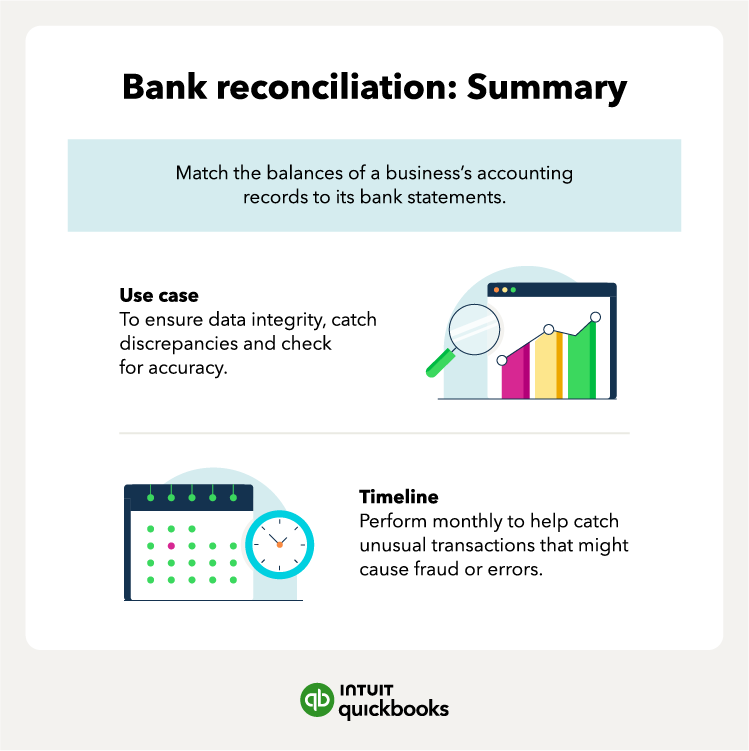
Reconciliation is the backbone of an accurate month-end close. Start with bank account reconciliation by comparing your bank statements to internal records. This step identifies discrepancies such as missing transactions or errors.

Make sure to reconcile all accounts on your balance sheet, like your checking, savings, credit card, and loan accounts. This helps ensure your records reflect your true cash flow and financial position, so discrepancies such as missing transactions or errors are easy to spot.

For accounts payable and receivable, match vendor payments and customer invoices to their respective records. Double-check for duplicate or missing entries to ensure your records are comprehensive. Take time to review fixed assets as well—this involves reconciling records of asset acquisitions, disposals, and depreciation to ensure accuracy.

Thorough reconciliation prevents costly errors, such as duplicate payments, and gives you a clearer picture of your financial health. 

Bank reconciliation use cases and timeline.

Step 3. Make adjusting entries

Once reconciliations are complete, make necessary adjustments to your records. This includes recording noncash items like depreciation, accruals, and prepayments. These entries are essential for accurately reflecting your company’s financial standing.

Adjusting entries also support cleaner expense tracking by capturing costs that didn’t come through as a typical transaction, such as an upcoming bill or a service you’ve received but haven’t paid for yet.

Step 4. Prepare your financial statements

With your adjustments recorded, you can create your key financial statements, including your income statement, balance sheet, and cash flow statement. They show how your business performed during the month and where your finances stand.

Accurate statements also make your reports more reliable, so the insights you and your software pull from them reflect what is really happening in your business.

These reports give you a clear view of what you earned and spent, and how cash moved through your business. You can then use this information to spot trends and make informed decisions about your next steps.

Business planning software can generate your financial reports automatically to keep your month-end close accurate and consistent.

 Intuit Enterprise Suite lets finance teams manage hundreds of entities and intercompany transactions from one system.

Step 5. Review for accuracy and finalize the close

Take a final look at your financial reports to make sure everything is accurate and consistent. Reviewing your reports at this stage helps you catch any discrepancies before they carry into future reporting cycles.

If something looks off, go back to your records and make any updates before closing the month. This could include correcting a miscategorized expense, updating a missing transaction, or adjusting a balance that didn’t reconcile cleanly.

Once everything lines up, you can close the period in your accounting software. This locks in the month’s activity and gives you a clear starting point for the next cycle.

Move, manage, and grow your money

No matter what stage your business is in, QuickBooks can help you manage your business finances.

Benefits of the month-end close process

You may know that closing your books each month is important, but it’s not always clear why it matters. Understanding the benefits can make the process easier and more purposeful.

Accurate financial records

Accurate financial records are essential to your business’s operations. Completing a thorough month-end close helps your business maintain compliance with tax laws and regulations, so you avoid penalties and file taxes efficiently.

Precise records also support effective financial forecasting. You can project cash flow, identify shortfalls, and prepare for expenses. For example, clear data on revenue trends might reveal seasonal fluctuations, allowing you to adjust staffing or inventory. Catching errors early prevents small discrepancies from escalating into significant financial misstatements.

Improved decision-making

Timely and accurate financial statements improve decision-making. By analyzing profitability, cash flow, and expenses, you can assess if your business is meeting goals and identify areas for improvement. For instance, if profit margins are shrinking, you can adjust pricing or reduce costs.

Accurate data also highlights trends and cost-saving opportunities. Are utility costs increasing? Is a product line underperforming? With clear insights, you can make proactive adjustments. 

Better long-term planning

The month-end close impacts more than this month’s results—it supports quarterly and annual reporting. It ensures a steady flow of accurate data for strategic planning by aligning daily operations with long-term goals, it ensures a steady flow of accurate data for strategic planning.

Businesses preparing for audits or seeking funding need consistent financial records. A well-executed close ensures you’re audit-ready and reduces stress during critical periods. It also reassures stakeholders that your business is managed responsibly.

Support for industry-specific needs

A timely month-end close is vital in industries with unique financial challenges. For retail businesses, fluctuating sales volumes—especially around holidays—require precise tracking. An incomplete close could mean missing a surge in inventory costs or an opportunity to optimize staffing.

Manufacturing businesses can face complexities such as balancing supply chain costs, production timelines, and demand variability. A delayed close in this sector could disrupt forecasting and hinder operational planning.

Tailoring your month-end process to your industry helps you navigate challenges more confidently and maintain a competitive edge.


note icon

Start reviewing financial data a week before the end of the month to identify and address discrepancies early.


Common month-end close challenges

The financial close process often presents obstacles that can delay accuracy and efficiency. Identifying common challenges and implementing strategic solutions will help streamline the process and ensure timely, accurate results. 

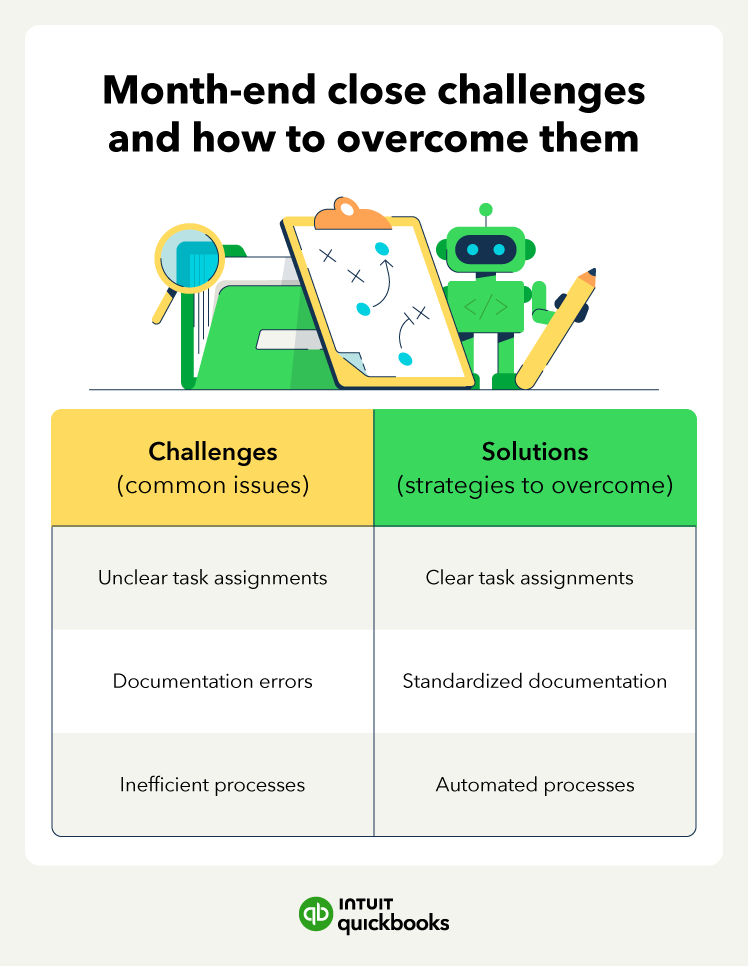
Unclear task assignments 

When roles aren’t clearly defined, team members may miss crucial tasks, leading to delays in the close process and a lack of accountability.

Solution: Develop a detailed checklist that breaks down tasks for each team member. Use project management tools to assign clear responsibilities and set deadlines for each step in the process.

Documentation errors

Incomplete or inaccurate documentation can result in errors in financial statements, creating potential for misreporting and compliance issues.

Solution: Standardize documentation practices by implementing templates and automated data entry tools. Conduct regular training to ensure all team members are familiar with these practices.

Inefficient processes

Relying on manual processes for data entry, reconciliation, and reporting slows down the close process, increases the risk of human error, and can lead to inconsistencies.

Solution: Streamline tasks by investing in close management software that automates repetitive processes, ensuring faster and more accurate closings. Integrate these tools into your existing systems for seamless data flow.

Common month end close challenges and solutions

Best practices for a streamlined month-end close

Adopting a few best practices can help you reduce errors, save time, and improve the efficiency of the month-end close process.

Maintain consistency

Establish and follow a detailed checklist for each month-end close. This ensures every task is covered and no steps are missed. Periodically review and update the checklist to reflect any procedure change, new regulatory requirements, or technological improvements. 

Communicate across teams

Keep stakeholders informed by providing regular updates on the progress of the close. This reduces the risk of delays due to miscommunication or misunderstandings. Foster collaboration between departments such as finance, HR, and operations. 

Leverage technology 

Automate manual tasks such as reconciliation, data entry, and report generation to minimize human error and reduce time spent on routine tasks. Use close management software to centralize the entire close process.

AI and Experts: Working for You.

AI agents automate bookkeeping, payroll, bill pay, and sales tax—working with your experts or accountant saving hours each week.

Comprehensive month-end close checklist

A well-organized month-end close checklist ensures that all necessary tasks are completed accurately and on time. By following a structured approach, you can streamline the process and reduce the risk of errors.

Before closing 

Preparation is key to a smooth month-end close. Review your processes and assign responsibilities to ensure every task is covered.

  • Collect financial documents: Gather all relevant documents, including invoices, receipts, bank statements, and credit card statements. Ensure that all financial transactions for the period are accounted for.
  • Be sure all transactions are recorded and coded correctly: Review each transaction to confirm it’s properly categorized in your accounting system.. 
  • Confirm data entry is complete: Double-check that you’ve entered all data into your accounting system. Ensure all accounts are up to date and relevant transactions are recorded.

During closing

This stage involves reconciling accounts and generating critical financial reports. Prioritize accuracy to avoid errors that could impact decision-making.

  • Reconcile accounts: Perform reconciliations on critical accounts, including bank statements, accounts payable, and accounts receivable. Identifying discrepancies early helps prevent errors in financial statements.
  • Adjust entries for accruals, prepayments, and depreciation: Make necessary adjustments to ensure that accruals and prepayments are accounted for. Don't forget to adjust for depreciation and amortization to reflect the true financial position.
  • Generate and review financial statements: Prepare your balance sheet, income statement, and cash flow statement. Review them thoroughly for accuracy, ensuring they align with your accounting records and reflect the correct figures.

After closing

Completing the final steps ensures your reports are ready for internal use and future audits.

  • Double-check for errors: Take a final pass to check for any inconsistencies or errors in the financial statements. 
  • Save finalized reports for internal use and audits: Store all finalized financial reports in an organized and secure location for future audits. 
  • Begin preparing for the next reporting cycle: Start preparing for the upcoming month-end close by reviewing timelines, task assignments, and any changes in procedures. 

Download our month-end checklist.

Download


Spend more time growing your business

A consistent and efficient month-end close gives you accurate records and clearer business insights, helping you make decisions with confidence. When you’re not tracking down missing information or fixing avoidable errors, you have more time to focus on running your business.

Instead of relying on manual processes each month, consider using accounting software like QuickBooks. With your financial data in one place and routine work handled automatically, you can keep your books accurate and spend more time growing your business.


Recommended for you

Mail icon
Get the latest to your inbox
No Thanks

Get the latest to your inbox

Relevant resources to help start, run, and grow your business.

By clicking “Submit,” you agree to permit Intuit to contact you regarding QuickBooks and have read and acknowledge our Privacy Statement.

Thanks for subscribing.

Fresh business resources are headed your way!

Looking for something else?

QuickBooks

From big jobs to small tasks, we've got your business covered.

Firm of the Future

Topical articles and news from top pros and Intuit product experts.

QuickBooks Support

Get help with QuickBooks. Find articles, video tutorials, and more.