QuickBooks Blog
Young Supervisor Examining Inventory At Factory
Midsize business

Inventory Waste Reduction Strategies for Growing Businesses

For mid-market businesses, inventory represents one of the largest working assets on the balance sheet. With higher SKU counts, more locations, and increased order velocity, small operational inefficiencies can have a wider financial effect. Forecasting gaps or limited visibility across teams can tie up millions of dollars in working capital and weaken service performance.

Processes that once felt manageable at $2M in revenue can create strain at $10M. A slight overbuy can affect all your warehouses. Delayed data updates can distort purchasing and financial reporting.

At this stage, success depends on maintaining cash flow, protecting service levels, and strengthening operational control simultaneously. Doing that well often comes down to having clearer insight into your inventory. Read on to see where waste tends to develop and how technology can help you manage it more effectively.

Jump to:

Why inventory waste increases as businesses scale

Inventory challenges often intensify after growth. Your revenue rises, product lines expand, and you may have new locations—yet inventory performance can feel less predictable. That pattern is common in growing companies.

More SKUs increase forecasting pressure

The more your product mix expands, the more factors there are to consider. Lead times vary, sales patterns shift, and item margins differ. With hundreds or thousands of products, staying aligned with demand takes more coordination. At higher volume, small forecasting differences can have a broader impact. Slight overestimates may gradually tie up cash, while underestimating demand for key products can slow fulfillment.

More locations reduce clarity

Adding multiple warehouses can improve coverage and delivery speed, but it also adds coordination challenges. Inventory may look balanced at a company-wide level, while individual locations may carry too much or too little stock.

Without consolidated reporting, it can be harder to pinpoint where inventory is building up or moving slowly. When that clarity is missing, rebalancing and replenishment decisions may take longer and feel less precise.

More teams add decision layers

Responsibilities often become more specialized. Your procurement, operations, sales, and finance teams interact with inventory at different stages. Sometimes that means two departments are looking at the same numbers but drawing different conclusions.

Systems designed for scaling organizations can help bring teams onto the same page without adding extra administrative work.

What is inventory waste?

Inventory waste shows up when stock fails to convert into revenue as expected, tying up working capital and distorting margin performance. For growing businesses with expanding product catalogs and additional locations, even modest planning gaps can influence financial results.

Inventory waste commonly appears in the following areas:

  • Aging or slow-moving inventory: Products that remain on shelves longer than forecasted, restricting liquidity and compressing margins.
  • Location imbalances: Surplus inventory in one warehouse while another location faces stock pressure. Rising carrying costs: Increased storage, insurance, and internal transfer expenses as facilities grow.
  • Capital held in work-in-progress or finished goods: Delays between production and sale that extend the cash conversion cycle.
  • Labor inefficiencies: Payroll absorbed by rework, manual adjustments, or stalled order fulfillment.

Why is excess inventory considered waste? 

Inventory is recorded as an asset because it is expected to generate revenue. Surplus stock can delay or reduce that return. When purchasing outpaces actual demand, cash remains committed longer than planned, and financial performance begins to tighten.

If you have a multi-warehouse operation and manage extensive product catalogs, surplus stock can affect decision-making in several ways.

Strained liquidity

Dollars already spent on procurement and production are unavailable for payroll expansion, new equipment, or strategic initiatives. As volume increases, the financial exposure grows proportionally.

Constrained investment capacity

Leadership teams allocate capital based on priorities. When inventory absorbs more funding than forecasted, flexibility narrows. Expansion plans, hiring timelines, and technology upgrades may need to wait while inventory levels rebalance.

Escalating exposure over time

When products sit unsold for longer than expected, the financial picture becomes less certain. Customer demand can change. Prices may need to be adjusted. Recovering full margin becomes harder. At the same time, storage and handling costs continue.

Ongoing overstock can influence how leaders think about hiring, expansion, or new investments. Keeping an eye on turnover and inventory age can provide early insight before surplus inventory begins to affect broader business plans.

The six primary causes of inventory waste and how to mitigate them

Inventory waste costs your growing business both time and resources. Unmanaged inventory can restrict cash flow and expose process, purchasing, fulfillment, and reporting gaps.

Reducing inventory waste supports stronger margins and more disciplined capital allocation. The following sections outline six common sources of waste and practical ways to reduce inventory waste as complexity increases.

1. Overproduction 

Overproduction often begins as a hedge against uncertain demand. But producing beyond actual sales:

  • Ties up working capital
  • Increases carrying costs
  • Extends the cash conversion cycle
  • Raises the risk of markdowns or obsolescence

At mid-market scale, even modest forecasting errors can materially affect margins.

How to mitigate: align production with real-time demand data

Reducing overproduction starts with visibility into historical sales trends and intentional replenishment practices. Sales and inventory data help teams review past performance and location-level activity to guide purchasing and reorder decisions.

More channels, additional regions, and broader product lines increase the need for structured coordination beyond basic spreadsheets. Technology tools such as QuickBooks Online Advanced bring inventory, purchasing, and reporting into one system. You can review sales and inventory reports by site, monitor stock levels in real time, and set reorder thresholds that reflect actual demand.

With centralized reporting and automated controls, inventory oversight and reliable reorder management become easier to sustain as operations grow. Over time, that can help protect working capital and limit excess stock.

2. Waste of waiting

Waiting often begins when production, purchasing, and fulfillment fall out of sync. In multi-location operations, a delay at one warehouse or supplier can slow output in another. Disconnected tracking and manual updates make it harder to identify stalled orders or low components before they affect schedules. 

When operations pause, the impact shows up quickly:

  • Idle labor increases payroll without increasing output
  • Delayed shipments push revenue further out
  • Partially assembled goods occupy valuable warehouse space
  • Bottlenecks slow overall throughput

How to mitigate: use automation to keep production moving

Reducing waiting time often comes down to better coordination across locations. Automated inventory tracking can help identify low stock, delayed materials, or stalled production before they slow output.

QuickBooks Online Advanced streamlines inventory management with automated reorder alerts, production tracking, and reporting on supply chain delays. With shared, up-to-date data instead of manual spreadsheets, teams can respond more quickly and keep work moving without unnecessary downtime.

3. Employee motion waste

Employee motion waste often comes from unclear workflows or inconsistent procedures in warehouses or offices. As operations expand, small gaps in process can lead staff to take extra steps, search for materials, or repeat tasks that could be organized more efficiently.

Think of a restaurant server making multiple trips instead of using a tray. In a warehouse, the same thing happens when employees walk back and forth for items that could be staged closer together. Inefficient workflows can:

  • Increase labor hours without improving output
  • Slow fulfillment when teams spend time locating materials
  • Create delays when processes differ from one site to another
  • Complicate training as operations grow

How to mitigate: standardize workflows to reduce unnecessary movement

Reducing motion waste often starts with organizing tasks more clearly. Inventory workflow optimization helps employees spend less time searching for materials or repeating steps. 4. Inventory flaws

Defective goods and materials are part of doing business, but quality issues can escalate. Excess safety stock may temporarily mask deeper problems in sourcing, manufacturing, or handling, delaying corrective action.

Low-quality inputs, inconsistent production standards, or gaps in training can contribute to recurring defects. Without structured oversight, those issues may continue unnoticed in different locations.

Inventory flaws increase costs in several ways:

  • Returns and exchanges add processing and shipping expense
  • Rework absorbs labor without generating new revenue
  • Delivery delays disrupt fulfillment schedules
  • Customer dissatisfaction affects repeat business

Over time, defective inventory compresses margins and increases administrative workload, particularly when root causes are unclear or dispersed between sites.

How to mitigate: use reporting to identify recurring defects

With inventory management solutions such as QuickBooks Online Advanced, you can record returns and track inventory adjustments in one place. Reporting can highlight defect patterns and show how returns affect revenue, helping teams address root causes and reduce repeat issues.

5. Overprocessing 

Overprocessing (not to be confused with overproduction) is unnecessary complexity built into manufacturing or handling. 

As operations scale, extra approval steps, repeated inspections, or additional handling can gradually become standard practice. These steps may not increase customer value, but they do increase labor time, slow output, and eventually compress margins.

Overprocessing reduces mid-market production efficiency by introducing:

  • Additional parts or extended design time
  • Excessive packaging or handling
  • Repeated inspections that don’t improve quality

How to mitigate: simplify workflows with clearer reporting

Reducing overprocessing starts with reviewing each step in the workflow and asking whether it adds customer value.

Inventory process optimization becomes easier when teams can see where time and resources are being used. Use QuickBooks Advanced reporting to help identify patterns that suggest redundant processes. This can give leadership better insight into where simplification may improve efficiency.

6. Transportation 

Transportation is part of running a connected supply chain, but frequent movement can quietly increase costs and risk. Time in transit does not add value to the product, and every additional transfer creates another opportunity for delay or damage.

Transportation waste often appears as avoidable transfers between warehouses, unnecessary regional shifts, or repeated handling within a facility. These movements may stem from uneven stock distribution or limited coordination. In some cases, goods in transit contribute to extended waiting periods when shipments sit idle.

The impact becomes clear in day-to-day operations:

  • Additional labor tied to repeated handling
  • Increased freight expense
  • Greater exposure to product damage
  • Longer delivery timelines

How to mitigate: improve coordination across locations

Reducing transportation waste starts with better alignment between sites and clearer insight into where inventory is held. Inventory logistics optimization focuses on limiting avoidable transfers and positioning products closer to demand.

Multi-location inventory tracking helps teams see quantities across sites in real time. QuickBooks Online Advanced supports this by tracking inventory by location and updating quantities as items move. When integrated with shipping tools, it becomes easier to coordinate outbound orders and reduce unnecessary transfers—helping internal and external movement stay purposeful rather than reactive.


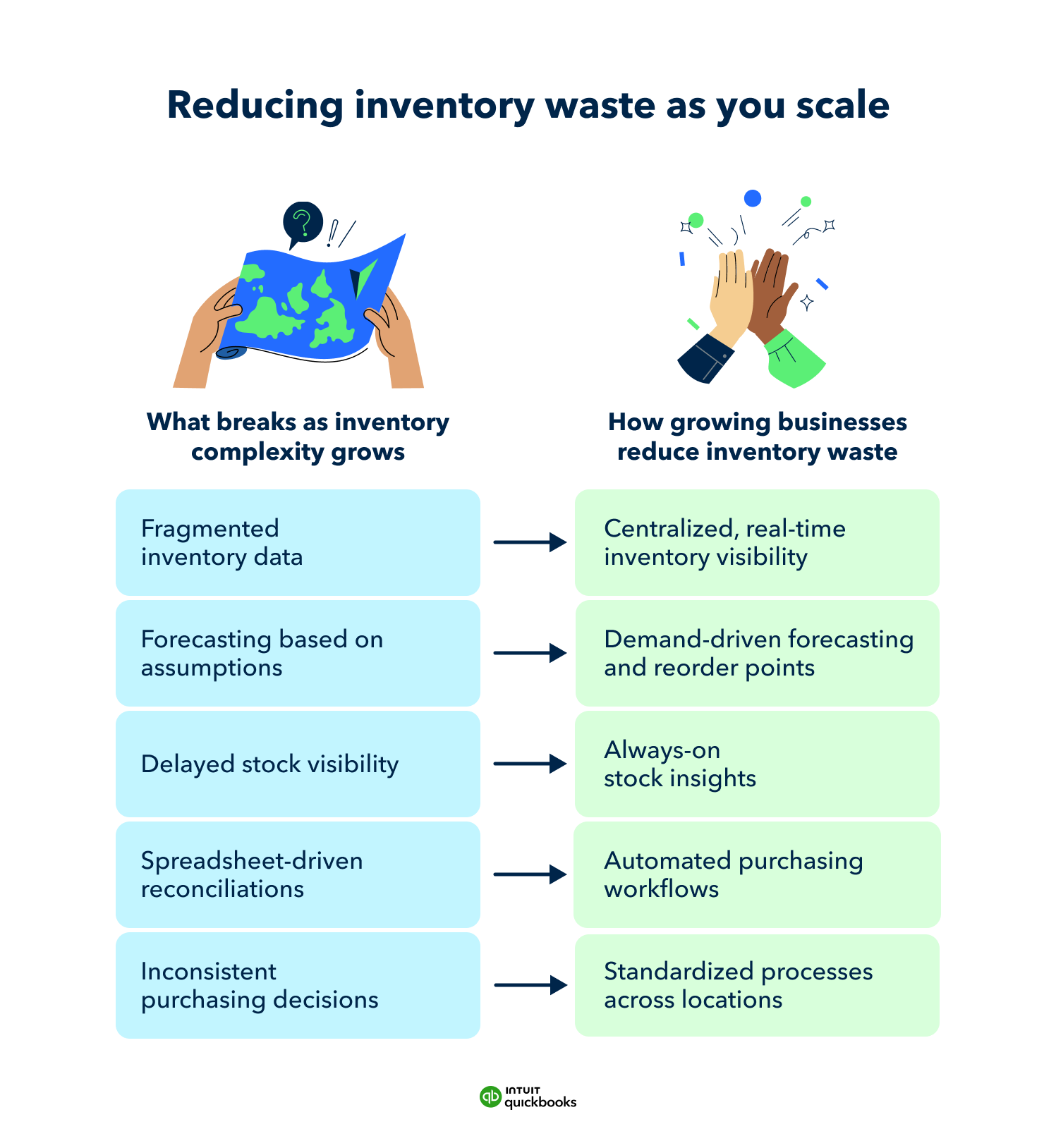
An illustration explaining how businesses can reduce inventory waste as they scale.

Best practices for accounting for inventory waste

Accounting becomes more demanding when inventory gets more complex. What once felt straightforward can require more deliberate review. It gets harder to see where losses occur. In many cases, the issue isn’t obvious. Waste can hide in disconnected systems or delayed reporting, instead of showing up neatly in a spreadsheet.

Stronger oversight helps you understand the true cost of production, protect margins, and make more informed purchasing decisions. The following practices can help bring greater clarity as operations grow.

Reconcile physical inventory with system data regularly

Make reconciliation a routine process, not a year-end task. Schedule cycle counts by product category or location so discrepancies are caught early. Compare physical counts with system records and investigate consistent variances.

Regular reconciliation helps prevent small errors from compounding and gives you a clearer picture of shrinkage, damage, or misallocated stock.

Identify where inventory waste accumulates across the workflow

Look at each stage—receiving, storage, production, fulfillment, and returns—and ask where losses tend to occur. Review adjustments, write-offs, and return data to spot patterns.

If waste clusters in one area, focus process improvements there first. Targeted changes are often more effective than broad operational shifts.

Align inventory levels with real demand signals

Use historical sales data and current order trends to guide purchasing decisions. Review turnover rates by product and location to identify items that consistently move more slowly than expected.

Adjust reorder points gradually rather than making large swings. Small, steady corrections help reduce excess without disrupting service levels.

Separate inventory visibility from inventory control

Seeing inventory levels is different from managing them. Make sure reporting is paired with clear accountability. Get clarity on who approves purchases, who monitors aging stock, and who reviews adjustments.

Define roles and escalation paths so that when data highlights an issue, someone is responsible for acting on it. Clear ownership helps turn insight into measurable improvement.

Measuring the financial impact of inventory waste

Inventory waste shows up first in your cash flow. Larger product catalogs and additional locations increase the financial weight inventory carries on the balance sheet. Its impact shows up in everyday decisions about spending, hiring, and expansion.

Consider how it typically appears:

Cash tied up in excess inventory

Unsold stock represents money already spent but not yet recovered. When too much capital sits in inventory, leaders may delay hiring, equipment purchases, or expansion plans because liquidity is tighter than expected.

Margin erosion from markdowns or obsolescence

Products that linger often require discounts to move. In industries with seasonal demand or product updates, aging inventory can quickly lose value. Even modest markdowns in a large catalog can materially affect overall margin.

Opportunity cost as the business scales

Capital committed to surplus inventory is capital that cannot support new initiatives. A company may postpone entering a new market or investing in automation because funds are tied up in stock that hasn’t turned.

Fragmented data masking financial impact

When inventory information is spread across spreadsheets or disconnected systems, the full financial picture can be difficult to see. Losses accumulate gradually, often surfacing only after margins tighten or cash becomes constrained.

Measuring the financial impact of inventory waste means looking at how inventory affects liquidity and long-term decision-making. Real-time, connected inventory and financial reporting can help bring those effects into view sooner, allowing leadership to respond before they influence broader growth plans.

How growing businesses can use technology to reduce inventory waste

Greater inventory complexity calls for stronger systems to help avoid waste. Technology can support your efforts to reduce waste by helping you:

  • Monitor inventory in real time: View current quantities at the location level so imbalances and slow-moving items don’t go unnoticed.
  • Improve demand planning: Use historical sales trends to guide purchasing and avoid building excess stock.
  • Automate routine safeguards: Set reorder points and alerts to reduce manual checks and limit preventable errors.
  • Connect inventory to financial performance: See how stock levels affect cash flow and margin, so decisions reflect the full picture.


Managing inventory more effectively at scale

Inventory waste affects cash flow and margin. It also changes how confidently you can plan for growth. Stronger oversight becomes more important once inventory starts carrying more financial weight.

Start optimizing inventory today by reviewing where stock is sitting, how quickly it turns, and whether reorder points reflect current demand. Even small adjustments in forecasting and location-level tracking can reveal where resources are being wasted.

Mid-market inventory management software can bring that clarity together. QuickBooks Online Advanced includes inventory dashboards, automated reorder points, historical sales reporting, and multi-location stock tracking in one connected system. With better visibility into what’s moving and what’s not, teams can strengthen inventory oversight and support more disciplined purchasing decisions. You can explore QuickBooks Online Advanced with a 30-day trial to see how it fits your operations.


Recommended for you

Mail icon
Get the latest to your inbox
No Thanks

Looking for something else?

QuickBooks

From big jobs to small tasks, we've got your business covered.

Firm of the Future

Topical articles and news from top pros and Intuit product experts.

QuickBooks Support

Get help with QuickBooks. Find articles, video tutorials, and more.