QuickBooks Blog
A stylized illustration of the difference between in-house payroll vs outsourcing.
Payroll

In-house payroll vs. outsourcing: Which is better for your business?


Key payroll takeaways:

  • In-house payroll is when you handle staff payments and the associated tax filings yourself.
  • Outsourced payroll is when you hand those responsibilities to a third-party provider.
  • In-house can be better for larger companies that can handle the heavy compliance burden.
  • Outsourcing can work well for smaller, more time-strapped businesses, but it comes with costs and limited flexibility.


Running payroll in-house means you have to calculate staff wages and withholdings and file quarterly and year-end returns on time, every time. Getting it right matters because more than half of US workers would consider quitting their jobs if they kept getting paid late or incorrectly.

This administrative burden can be a hurdle; recent QuickBooks data shows that while nearly 78% of small business owners want to grow, only 45% are actually reporting growth. This gap suggests that many businesses need more help achieving their goals—starting with reclaiming time lost to back-office tasks.

While outsourcing can relieve the workload, it costs money, and there are other trade-offs. Below, find out how in house payroll processing vs. outsourcing compares, the cost of each approach, and how to decide which is better for your business.

Jump to:
The difference between in-house vs. outsourced payroll

Depending on the pay structure of your organization, you may distribute paychecks or direct deposit funds to your employees on a weekly or every two weeks basis. Payroll processing is often handled by your internal human resources or financial department. Alternatively, you can outsource your payroll by hiring a third-party payroll provider.

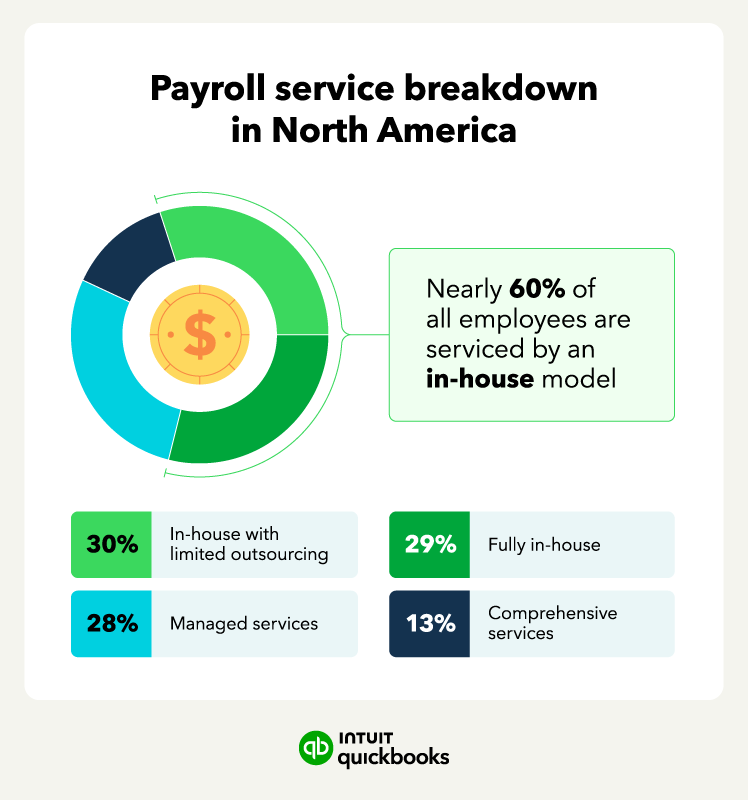
According to a Deloitte survey on payroll operations in North America, 60% of businesses use some type of in-house payroll, and 28% outsource their payroll processing completely. Additionally, 30% of North American businesses use a third-party server to host payroll but complete the process internally.

The main difference between in-house and outsourced payroll processing is that an in-house team is on staff—and on payroll—while an outsourced provider is hired externally. In the sections below, we’ll take a closer look at what defines in-house and outsourced payroll processing, as well as their respective benefits and drawbacks.

What is in-house payroll?

In-house payroll is when an internal department handles payroll processing for the organization. The staff who process payroll in-house are categorized as employees and are paid through the same payroll system they help manage. In-house payroll clerks often fall within the human resources or financial department.

Payroll service breakdown in North America.

How does in-house payroll work?

The in-house payroll process is a collaboration between your payroll processing team, your staff, and the tools you use to get the job done.

Here’s a step-by-step look at how the in-house payroll system works:

1. Set up a payroll bank account. This is where funds will be withdrawn when employees cash their checks or receive a direct deposit.

2. Create a system for team members to track their hours. This will help you determine how much to pay them if they’re hourly employees. Conversely, salaried employees will be paid a standard rate for each paycheck.

3. Establish a payroll schedule—every two weeks is the most common pay period used.

4. Collect timekeeping data for each employee that worked in a given pay cycle, and use the information to determine their gross pay.

5. Subtract any necessary deductions from each employee’s gross pay. This includes retirement and healthcare contributions, income tax withholdings, FICA taxes, and relevant payroll taxes.

6. After you’ve calculated what’s leftover, you can initiate payment on your organization’s predetermined payday.

Benefits and drawbacks of in-house payroll

Managing payroll in-house vs. outsourcing offers a number of specific benefits, but many of them apply only to businesses of certain sizes and structures. The new IRS reporting requirements for 2026 mean the compliance burden is now even greater for internal teams.

Benefits

If you run payroll within your company, the biggest benefit is being closer to your own data than an outside provider will ever be. This familiarity gives you:

  • Direct control over payroll processes: If you need to adjust an entry or add a last-minute bonus before payday to an employee’s wage, you can do it straight away without waiting on hold or submitting a ticket.
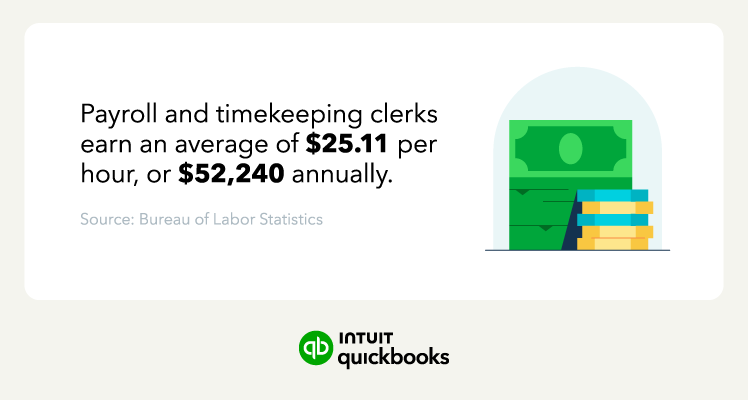
  • Lower costs at scale: With a base fee plus $1 to $5 per paycheck, costs can spiral as your headcount grows. For larger SMBs, employing a dedicated payroll clerk at the median cost of $52,240 may work out cheaper.
  • Enhanced data security: Sensitive employee information like Social Security numbers and bank details stays inside your company’s firewall so you’re not at risk of a payroll agency data breach exposing your employees' information.
An image stating hourly and annual wages for payroll clerks.

Drawbacks

There are significant benefits to in-house payroll, but there are the following hidden “soft costs” that don't often show on a spreadsheet:

  • Substantial time commitment: According to the NSBA's Small Business Taxation Survey, half of small businesses handling payroll internally spend three or more hours a month on payroll tax administration alone.
  • The “growth” gap: Businesses with 1-50 employees are too large for many to manage payroll internally but too small to justify a full-time internal payroll expert.
  • Lack of integrated support: Payroll systems work best when they integrate with your time-tracking, health benefits, commissions, and multi-state scheduling tools. If they don’t, you need to re-key the data between systems manually, which adds to costs and introduces the risk of human error.
  • Liability tracking: You're responsible for tracking and remitting your payroll liabilities.These are the taxes you've withheld, your employer share of FICA, and any benefit deductions that need to be deposited on schedule. Miss a deposit window and penalties start accruing immediately.
  • Compliance risks: In fiscal year 2024, the IRS issued 4.4 million penalties totaling $27 billion on issues related to employment tax deposits. Now add the new 2026 IRS updates (One Big Beautiful Bill Act) with requirements like Box 12 Code TT (Qualified Overtime) and Box 12 Code TP (Cash Tips), where a single manual entry error can trigger penalties of $60 to $680 per incorrect W-2.

How does outsourcing payroll work?

Outsourcing payroll means handing over some or all of your firm’s payroll function to a third-party agency. They calculate pay and withholding taxes for you as well as file returns and other responsibilities.

Here’s how the payroll outsourcing process usually works:

1. Sign up with a payroll service provider

Choosing the right payroll providers starts with identifying the agency whose services and pricing are the best fit for your business. Before committing, consider:

  • Service tiers: Basic tiers generally cover pay calculations and direct deposits. Higher tiers manage tax filings, end-of-year forms, and regulatory updates.
  • Integration capabilities: If your payroll provider can’t pull data directly from your business software, you’ll have to set aside time to export and format the data for them.
  • Pricing structure: Many providers charge a monthly subscription while others charge by payroll or number of employees. Look beyond their headline rates to find out what they levy add-on charges for, minimum contract time, and early exit fees.

2. Follow the onboarding and setup process

Once you've chosen a provider, the next step is to send over your existing payroll data to them. Steps at this stage include:

  • Entering your company details: That includes your federal ID and state tax IDs for every state you operate in.
  • Uploading employee records: Supply each employee’s W-4 details, bank information for direct deposit, and pay rates.
  • Setting pay schedules: Let your provider know whether pay is weekly, bi-weekly, or semi-monthly, so they can automate your pay runs.

Most providers will walk you through this step by step. QuickBooks Payroll, for example, offers expert product support to ensure your first payroll run is error-free.


note icon

Payroll tax vs. income tax: Payroll taxes fund social insurance programmes, whereas income taxes fund general government budgets. You deduct the employee's share of both taxes from their wages. You must also pay a separate employer's share of payroll tax directly from company funds.


3. Automate calculations and deductions

With the data migration complete, the agency then takes over payroll operations and the “math.” Typical services include:

  • Gross pay calculations: Staff hours are pulled directly from your synced timesheets or salary records, so there's no manual prep on your end.
  • Tax withholdings: Your provider calculates and subtracts federal, state, and local taxes from each paycheck.
  • Voluntary deductions: The agency applies deductions like 401(k) contributions and health insurance premiums during each pay cycle.

4. Review and approve the payroll run

Your provider takes responsibility for running payroll, but you still have the final say over every pay run before it's processed. Check for:

  • Anomalies: Look for discrepancies like employees logging unapproved overtime because they’re easier to catch now than to correct later.
  • Roster accuracy: Make sure pay for ex-employees doesn’t stretch past their day of departure and new hires are on the system before their first payday.
  • One-off items: Deviations from norms like bonuses, adjustments, and reimbursements can slip through the cracks because they don’t appear in an employee’s regular pay pattern.

note icon

When you review a payroll run, you'll see deductions for both payroll tax and income tax. If an employee's take-home pay looks different from last time, check their W-4—any change there will affect how much income tax is withheld.


5. Authorize final processing and disbursement

With pre-flight checks complete, you’re ready to green light the payment provider to:

  • Process payments: Your provider authorizes direct deposits, and prints and sends out physical checks. Factor in one or two business days’ lead time for checks to arrive.
  • Generate reports: You’ll receive payroll reports for your records, handy for tax time and if the IRS wishes to audit you.
  • Submit taxes: Full-service providers automatically file payroll tax forms and remit payments, including quarterly returns and year-end W-2s.

Working with a payroll bureau takes a lot of administrative work away from your business. However, many companies still prefer to keep these steps entirely under their own roof. Decide what’s right for you by weighing up the benefits and drawbacks of both approaches.

You're never too small to feel more stable

With competitive APY, no monthly fees, and seamless payments—QuickBooks Checking works harder for those who work for themselves.**

Benefits and drawbacks of outsourcing payroll

Using a payroll provider frees up time and reduces the risk of errors that could lead to IRS fine and employee unhappiness. But, you’ll have a new monthly expense you have to meet and you surrender some control over your internal timelines.

Benefits

Four major benefits to using payroll agencies include:

  • Guided setup and onboarding: Most providers offer templates, step-by-step workflows, and expert support to get you started, much easier than building an in-house system from scratch.
  • Streamlined HR integrations: Sync your business software with your provider’s payroll with benefits, 401(k) contributions, and employee scheduling, giving you a single source of truth on employee compensation and costs.
  • Automatic compliance updates: Employment and tax laws change regularly. Payroll bureaus ensure you remain compliant with federal and state regulations, such as the 2026 W-2 requirements for overtime.
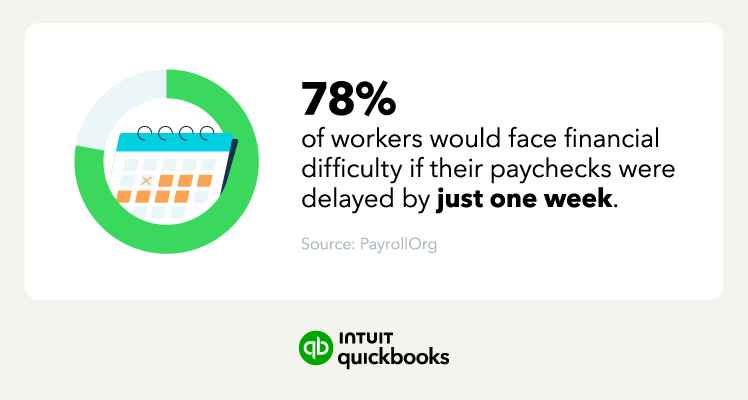
  • Greater accuracy: PayrollOrg's 2025 survey found that 78% of workers would face financial difficulty if their paycheck were delayed by just one week. Payroll providers’ greater accuracy helps maintain strong employee relations.
An image stating that 78% of workers would face financial difficulty if their paycheck were delayed by just one week.

Drawbacks

Five specific disadvantages to using payroll providers include:

  • Visible recurring costs: You’ll typically pay a base fee plus $2-$5 per paycheck, which can feel hard to justify when spreadsheets are free. But that comparison ignores the hours you or your team spend manually running payroll.
  • Third-party data exposure: Bureaus hold your employees’ Social Security numbers and bank details externally, so you’re reliant on their ability to keep staff data secure.
  • Strict submission deadlines: You may have to submit payroll data two to four days before payday, restricting your ability to make last-minute changes like approving a bonus or adjusting a staff member’s hours.
  • Fixed workflows: You work to your provider’s process and not the other way around. This may be frustrating if you regularly have to process exceptions like mid-cycle bonuses or retroactive pay adjustments.
  • Support response times: With in-house payroll, you can walk over to an employee’s desk to sort an issue out. Your payroll provider may require you to submit a ticket and wait hours for a response.
An image listing the average cost of payroll services per paycheck.

How to choose a payroll provider: 5 considerations

Now that you’ve had a chance to review some of the pros and cons of in-house and outsourced payroll services, you probably have a better idea of what direction works best for you.

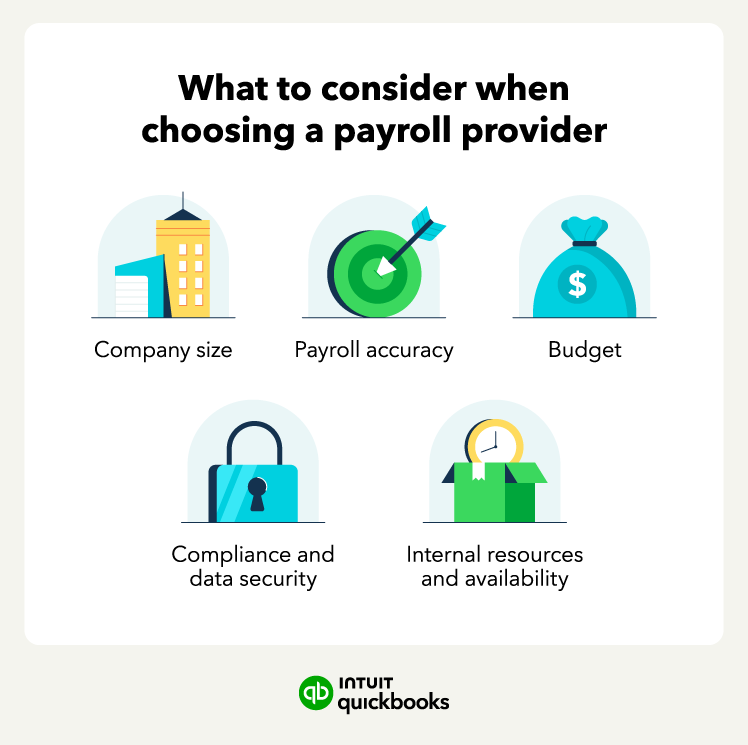
What to consider when choosing a payroll provider.

Before you make your final decision to bring payroll in-house or outsource it, use these guidelines to help you choose a payroll provider.

1. Consider your company's size and any factors that might complicate payroll processing.

2. Assess your budget for each payroll option and weigh your cost savings.

3. Evaluate compliance and security policies to keep your business payroll information and employee data secure.

4. Check your payroll provider’s accuracy to avoid issues later on down the road.

5. Consider how much time you and your team have to process payroll on your own and the level of support you may need.

With our streamlined QuickBooks payroll solutions, you can monitor your payroll and other HR functions all in one place.


note icon

Your provider will send you reports, but it's good practice to keep your own records too. A payroll ledger that tracks wages, deductions, and withholdings gives you something to check their numbers against. It’s also something to hand over if you ever switch providers or get audited.


Next steps for streamlining your payroll process

If you want to keep it in-house, look for ways to improve your internal processes so your team gets paid accurately every cycle, and your payroll reconciles. If you want to outsource, make a list of what you need from a provider and check that they can handle the volume and the scope of work before you sign up.

Already a QuickBooks user? QuickBooks Payroll integrates seamlessly with your existing setup, keeping your books and payroll in sync.

QuickBooks Money: QuickBooks Money is a standalone Intuit offering that includes QuickBooks Payments and QuickBooks Checking. Intuit accounts are subject to eligibility criteria, credit, and application approval. Banking services provided by and the QuickBooks Visa® Debit Card is issued by Green Dot Bank, Member FDIC, pursuant to license from Visa U.S.A., Inc. Visa is a registered trademark of Visa International Service Association. QuickBooks Checking Deposit Account Agreement applies. Banking services and debit card opening are subject to identity verification and approval by Green Dot Bank. Money movement services are provided by Intuit Payments Inc., licensed as a Money Transmitter by the New York State Department of Financial Services. For more information about Intuit Payments' money transmission licenses, please visit https://www.intuit.com/legal/licenses/payment-licenses/. No subscription cost or monthly fees. Other fees and limits, including transaction-based fees, apply.

Industry-leading Annual Percentage Yield (APY): Competitive rate information based on publicly available data for small business checking accounts provided by the largest national and online banks as of September 18, 2023. APYs are subject to change at any time.


Recommended for you

Mail icon
Get the latest to your inbox
No Thanks

Get the latest to your inbox

Relevant resources to help start, run, and grow your business.

By clicking “Submit,” you agree to permit Intuit to contact you regarding QuickBooks and have read and acknowledge our Privacy Statement.

Thanks for subscribing.

Fresh business resources are headed your way!

Looking for something else?

QuickBooks

From big jobs to small tasks, we've got your business covered.

Firm of the Future

Topical articles and news from top pros and Intuit product experts.

QuickBooks Support

Get help with QuickBooks. Find articles, video tutorials, and more.