- Start Your BusinessStart Your Business
- Starting a BusinessThe tools and resources you need to get your new business idea off the ground.
- PaymentsEverything you need to start accepting payments for your business.
- Funding & CapitalResources to help you fund your small business.
- Small Business StoriesCelebrating the stories and successes of real small business owners.
- Self-EmployedThe tools and resources you need to run your own business with confidence.
- Run Your BusinessRun Your Business
- Running a BusinessThe tools and resources you need to run your business successfully.
- AccountingAccounting and bookkeeping basics you need to run and grow your business.
- Cash FlowTax and bookkeeping basics you need to run and grow your business.
- PayrollPayroll essentials you need to run your business.
- TaxesTax basics you need to stay compliant and run your business.
- EmployeesEverything you need to know about managing and retaining employees.
- Grow Your BusinessGrow Your Business
- Growing a BusinessThe tools and resources you need to take your business to the next level.
- Sales & MarketingSpread the word: What you need to know about marketing your small business.
- FundingHow to find funding and capital for your new or growing business.
- Midsize BusinessesThe tools and resources you need to manage your mid-sized business.
- Enterprise Suite BlogThe tools and resources you need to grow your own business with confidence.
- E-CommerceHow to start and run a successful e-commerce business.
- TaxesTaxes
- How to fill out a 1099-NEC formLearn how to fill out and file 1099-NEC forms for independent contractors and freelancers.
- How to file small business taxesLearn how to navigate tax season with confidence and minimize your tax liability with this guide.
- Small business 1099: What you need to know for 2025Navigate the complexities of small business 1099 forms and filings with our comprehensive guide.
- 13 documents to give your accountant for small business taxesYour accountant will need these documents to file your small business taxes successfully.
- What's NewWhat's New
- NewsBrowse the latest news, press releases, and reports from QuickBooks.
- AI Resource HubFind the latest on Artificial Intelligence.
- Small Business DataThe latest research and insights for Small Businesses from QuickBooks.
- Small Business StoriesCelebrating the stories and successes of real small business owners.
- Holiday SuccessEverything you need to thrive during your business's busiest seasons.
- AI InnovationsBrowse the latest AI innovations in QuickBooks on the Intuit platform.
- ToolsTools
- All ToolsFree accounting tools and templates to speed up and simplify your workflow.
- AI-Powered Invoice GeneratorTry out this free invoice generator to create an invoice online using Intuit Intelligence.
- Payment Cost CalculatorFind out how much you could save by switching to QuickBooks Payments.
- Paycheck CalculatorAccurately estimate pay for all your employees.










What is an accounts receivable aging report and why your business needs one
Table of contents
Table of contents
You could save up to 25% on transaction costs².
Speak with us now to see if you qualify.
Talk to sales 1-800-515-8366
Monday - Friday, 6 AM to 4 PM PT
Key accounts receivable aging report takeaways:
- AR aging reports give you instant visibility. See who owes you, how much, and how late—so you can prioritize collections and protect cash flow.
- Overdue invoices are common—and costly. With many small businesses carrying 30+ day past-due invoices, consistent tracking is critical to staying financially stable.
- Use aging data to take action. Identify late-paying customers, adjust credit policies, and improve your collections strategy.
- Aging reports help you plan ahead. Estimate bad debt, forecast cash flow, and make more informed business decisions.
- Automation helps you get paid faster. Tools like QuickBooks streamline reporting, send reminders, and reduce manual follow-ups.
Getting paid on time is still a real challenge for small businesses in 2026. In the Intuit QuickBooks Small Business Insights survey, 56% of U.S. small businesses said they have invoices overdue by more than 30 days, which is a direct hit to cash flow.
An accounts receivable (AR) aging report helps you stay in control. It groups unpaid invoices by how long they’ve been outstanding, like 0–30, 31–60, 61–90, and 90+ days, so you can quickly see who owes you money, how much, and how late it is. That visibility makes it easier to prioritize follow-ups, forecast cash flow, and spot patterns before they turn into bigger problems.
And when you pair your aging report with automation, like Intuit’s AI Payments Agent, you can track balances, send proactive reminders, and reduce the manual work of chasing payments, helping you get paid faster.
To help you get started, we’re answering your common questions and addressing the basics of accounts receivable aging reports.
What is an accounts receivable aging report?
An accounts receivable (AR) aging report categorizes outstanding customer invoices by how long they have been overdue, typically in 30 day intervals. It gives you a clear view of which customers are behind on payments, helping you identify collection risks early, estimate potential bad debt, and maintain healthier cash flow. With U.S. small businesses carrying hundreds of billions in unpaid invoices at any given time, consistent AR tracking is not just helpful, it is essential for financial stability.
What does an accounts receivable aging report show you?
An accounts receivable aging report, also known as an aging schedule, pulls all open invoices from your accounts receivable (A/R) and groups them into distinct date ranges. Rather than looking at individual due dates, you can see at a glance how long each invoice has been unpaid, so you can prioritize your collection efforts.

If you’re just learning how to calculate accounts receivable, aging reports are a good place to start—they give you the data you need to measure how efficiently you’re collecting payments.
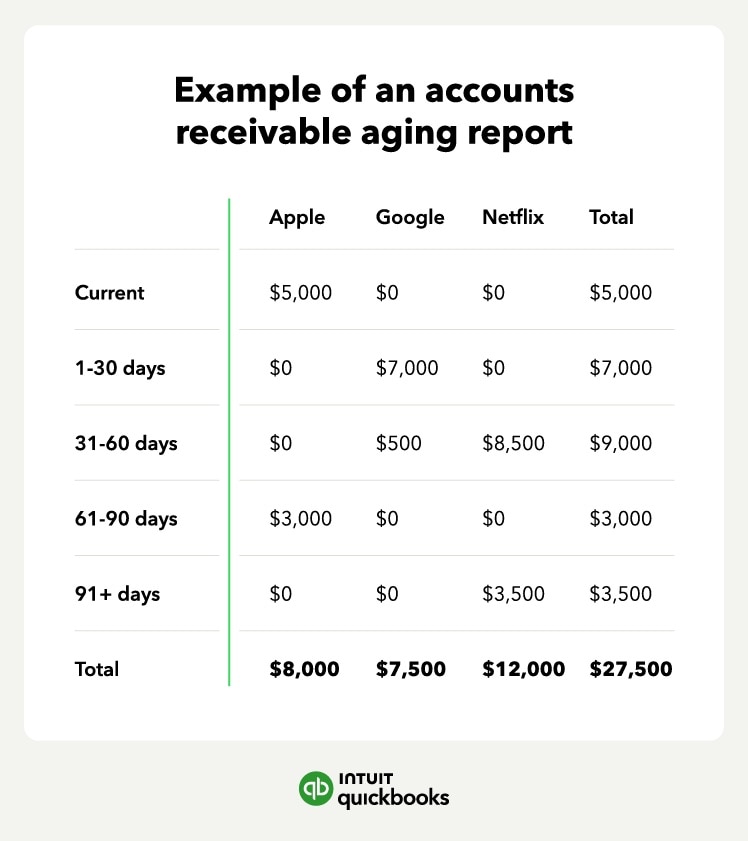
Invoice date ranges commonly found on an aging schedule include:
- Current: Invoices not past due
- 1–30 days: Past due for 1–30 days
- 31-60 days: Past due for 31–60 days
- 61–90 days: Past due for 61–90 days
- 91+ days: Past due for 91 or more days
You can customize these ranges to fit your business needs. The aging report helps you see who’s paying on time and who’s falling behind, giving you a clear picture of your cash flow and collections efforts.

Pro tip: Set up automated reminders with QuickBooks Payments Agent when invoices reach 30 days past due.
How accounts receivable aging reports help your business stay on top of payments
Maintain healthy cash flow
Steady cash flow keeps your business moving. An accounts receivable aging report shows you which invoices are still open and how long they’ve been outstanding, so you can see what’s overdue and take action before cash flow gets tight.
Identify late-paying customers and credit risks
Putting together regular accounts receivable aging reports, which you can easily do with invoicing software, allows you to identify regular late-paying customers. You can then avoid sending goods and services to customers before late payments become an issue and hamper cash flow.
This is also possible with QuickBooks software. You can see which customers have past due balances in QuickBooks, and how long each transaction is past due. Go to reports in your software and visit the “Who owes you” section, then select “Accounts receivable aging detail.”

Guide your collections strategy
You can also use these reports to guide your collections strategy and follow-up efforts. The image below shows an example of a call script you can use when contacting customers about late or missed payments. This visual serves as the accounts receivable aging report in action—helping you follow up effectively based on payment timelines.
Improve accounts receivable turnover
AR aging reports are important because they can help businesses keep track of outstanding payments from customers. You can generate an accounts receivable aging report to calculate and improve your accounts receivable turnover ratio.
How to create an AR aging report
Preparing an accounts receivable aging report is relatively straightforward. To get started, follow these steps:

1. Gather unpaid invoices
In step one, you’ll gather all the unpaid invoices you have for customers. That’s any invoice with an open balance on it, even if it’s a partial balance. Fortunately, accounting software like QuickBooks can pull these automatically.
2. Calculate days past due
For each invoice, you’ll want to calculate the number of days past due. For example, if the invoice was due on the 15th and it’s now the 22nd, the invoice is seven days past due. In QuickBooks, this calculation is done automatically for you, so you always have up-to-date information.
3. Categorize invoices
Next, group each customer's invoices based on your aging schedule, using custom date ranges that fit your business needs.
For example, if a customer has the following unpaid invoices:
- One invoice for $1,000 that is not past due
- Two invoices that total $1,500 and are 15 days overdue
- One invoice for $100 that is 37 days overdue
Your categorized accounts receivable aging report would look like this:
- Current: $1,000
- 1–30 days: $1,500
- 31–60 days: $100
4. Create an aging schedule
You’ll list all your customers that have an open invoice and then do the same thing we did in step three for all your customers. Once complete, you can total the amounts to see how much of your invoices are current, 1-30 days past due, and so on.
QuickBooks can generate the schedule and highlight overdue invoices for collection follow-up, taking the guesswork out of your day. And with QuickBooks Payments AI, you can automate invoice reminders, track payment patterns, and get personalized suggestions to speed up payments and keep cash flow steady.
How to get more value from your AR aging report
An accounts receivable (AR) aging report is more than just a list of unpaid invoices. It’s a tool that gives you insight into how well you’re managing collections, credit, and cash flow. Here’s how to put it to work:
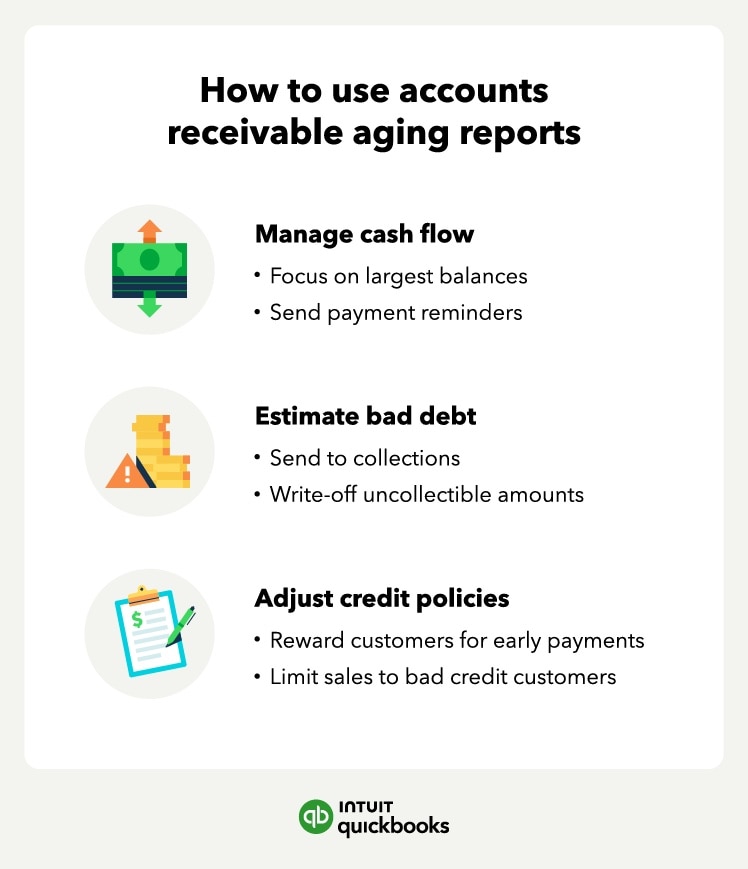
Monitor and protect cash flow
Your aging report is like an early-warning system for cash flow. It helps you spot overdue invoices quickly, prioritize follow-ups, and remove roadblocks that slow down payments. When you address issues sooner, you’re less likely to get caught off guard by a cash crunch.
When your AR report identifies a 60-day gap in receivables, you don't have to wait for the check to clear to keep moving. Apply for QuickBooks Capital funding right from your dashboard to bridge the gap and keep operations running smoothly.
Estimate and plan for bad debt
Not every invoice gets paid. Your aging report helps estimate how much you may never collect, called bad debt, so that you can plan accordingly.
Here’s how a business might calculate its allowance for doubtful accounts:

This $32,000 estimate can help you update your allowance for doubtful accounts and stay realistic about your expected income.
As invoices age, they become less likely to be collected. Use those trends to estimate bad debt and update your allowance for doubtful accounts, so your income projections stay grounded in what you’re actually likely to collect.
Strengthen credit policies and customer risk management
Your aging report can also reveal credit policy red flags. If one customer consistently pays late, it may be time to limit their credit. But if multiple customers fall behind, your credit terms might be too lenient.
Use your report to:
- Identify high-risk customers
- Compare your credit risk to industry benchmarks
- Tighten or revise your credit terms
Also, review your collections process. If you notice frequent payments passing the 60- or 90-day mark, leverage QuickBooks to send invoices faster or offer early payment discounts.
Result: Stronger credit controls, faster payments, and a healthier bottom line.
Use AR insights to improve business strategy
AR data can inform more than collections. Over time, your aging report shows which customers are reliable and which ones create uncertainty, which is helpful when you’re deciding who gets ongoing credit terms. You can also plan purchases, staffing, or delivery schedules around your most likely cash inflows.
When you use historical aging trends to forecast and budget, your AR report becomes a tool for steady, sustainable growth rather than just a list of past-due invoices.
Run your business with confidence
An accounts receivable aging report gives you a clear view of who owes you, how much, and for how long, so you can act fast to improve cash flow. Whether it’s sending a quick reminder or escalating to collections, you’ll know exactly where to focus.
Accounting software like QuickBooks puts your accounts receivable on autopilot. Because your books update with every payment you take, your AR aging report is always tax-ready and accurate without manual intervention, giving you bookkeeping without the busywork.
Tax Resources

Small business tax preparation checklist for 2026: 8 things business owners should know

The ultimate guide to small business tax forms and filing deadlines

Self-employed tax survival kit: what to have ready before you file
Bookkeeping

How much does a bookkeeper cost? Understanding bookkeeper pay rates in 2026

Should you outsource bookkeeping? Benefits, costs, and how it works
Customer Stories

Why Amborella Organics trusts QuickBooks AI to handle the heavy lifting of a $10M+ vision
At Petal Salon, Amanda Lee Harvey keeps her clients in the pink

Normal Ice Cream saves 7 hours a week on banking admin thanks to QuickBooks Bill Pay

How The Baby Pantry shows up for families in need
Recommended for you



Explore what you can do with QuickBooks
Explore what you can do with QuickBooks

See profit at a glance


Manage money
Looking for something else?
Firm of the Future
Topical articles and news from top pros and Intuit product experts.
QuickBooks Support
Get help with QuickBooks. Find articles, video tutorials, and more.
Call Sales: 1-800-285-4854





© 2026 Intuit Inc. All rights reserved.
Intuit, QuickBooks, QB, TurboTax, Credit Karma, and Mailchimp are registered trademarks of Intuit Inc.
Money movement services are provided by Intuit Payments Inc., licensed as a Money Transmitter by the New York State Department of Financial Services. For details about our money transmission licenses, or for Texas customers with complaints about our service, please click here.
By accessing and using this page you agree to the Website Terms of Service.