You could save up to 25% on transaction costs².
Speak with us now to see if you qualify.
Talk to sales 1-800-515-8366
Monday - Friday, 6 AM to 4 PM PT

Table of contents
Table of contents
More than 2 in 5 small businesses report cash flow problems, according to the QuickBooks Small Business Insights report. Late payments are often the culprit. They cost you time, strain your resources, and keep revenue tied up when you need it most. One way to encourage timely payments and protect your bottom line is by adding a finance charge to overdue invoices.
In this post, we’ll break down what finance charges are, how they work, and when it makes sense to use them. Plus, we’ll cover key rules like the Truth in Lending Act to help you stay compliant.
Interest rates are a type of finance charge, but they’re not the same thing.
A finance charge is any additional cost paid beyond the original amount owed, such as late fees, processing fees, or interest.
An interest rate, by contrast, is a percentage fee charged on borrowed funds. It considers factors like the loan amount, your creditworthiness, and repayment terms, and it's one of the most common types of finance charges.
Here’s a quick breakdown of how they differ:
Finance charges are regulated by the government per the Truth in Lending Act (TILA), which requires lenders to disclose loan cost information, like:
This act was passed in an effort to provide consumers with the information they need to make smart financial decisions and comparison shop for loans. Moreover, the Credit Card Accountability Responsibility and Disclosure Act of 2009 was an addition to the TILA. Also known as the Credit CARD Act, it protects borrowers and curbs predatory lending practices.
As you plan for the year ahead, it’s important to stay informed about regulatory changes that could affect your business, especially if you extend credit to customers or deal with payment processing.
These changes may not apply to every business, but it’s a good idea to check whether they affect your payment policies or customer agreements. Staying compliant now can help you avoid headaches down the road.
Running a small business means juggling cash flow, managing risk, and covering day-to-day costs. One way to stay on top is by charging finance fees in certain situations. Here are a few common reasons why you might take this approach.
Late payments are one of the most common reasons for charging a finance fee. When customers don’t pay on time, it can throw off your cash flow and make it harder to cover your own expenses.
To help prevent this, consider adding a flat fee (e.g., $25-$50) or a monthly interest charge (e.g., 1-2% of the invoice total). Just make sure to clearly state these fees in your contracts and invoices. Use terms like “late fee” rather than “penalty” to stay compliant with legal guidelines.
If a client’s check bounces or a payment fails, you could be stuck with a bank fee, typically $20 to $40. Instead of eating that cost, pass it along to the client. The same goes for failed ACH transfers or declined card payments. A small fee helps cover your time and processing costs.
You may choose to add a small surcharge for credit card payments to offset the 1.5%-3.5% fee charged by card processors. However, the legality of these surcharges varies by state and local laws, so check the rules in your area before applying them.
Finance charges can take different forms depending on the situation. To help you understand how they work in practice, here are some common examples you might encounter when dealing with late or failed payments.
A client makes a $200 purchase with Net 30 payment terms. They only pay $33 by the due date, leaving a $167 balance. Because they didn't pay the full amount on time, you add a late fee—this fee is a finance charge.
A client writes a $500 check but bounces due to insufficient funds. Your bank charges you a $35 returned check fee. You pass that fee on to the client and a $25 processing fee (as outlined in your payment terms).
Total amount the client now owes:
Once you’ve determined your finance charges, you can begin to calculate them by doing some simple math. Here are the steps to take:
First, you need to establish which method you’ll use to calculate finance charges. The most common methods include:
Make sure your chosen rate aligns with industry standards and any applicable state or federal regulations.
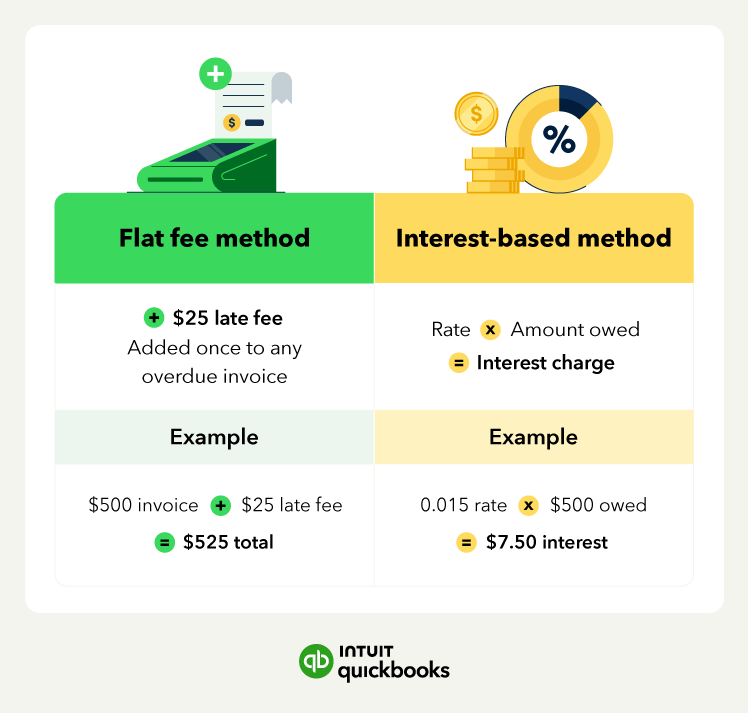
Look at the total amount the customer still owes. This includes the original invoice amount and any previous late fees or charges that have already been added. For example, a customer owes $500 and has missed the payment deadline.
Now, use your selected method to calculate the charge.
For a flat fee, simply add the fee to the total amount. For example:
For an interest-based fee, multiply the outstanding balance by your chosen percentage. For example:
While the math may be simple, it can add up if you have multiple finance charges to calculate. You make this process much easier for you and your team by using accounting software. QuickBooks can help you identify clients with past due invoices, automate finance charge calculations, and send payment reminders.
A finance charge is a fee you apply to a customer’s account when they don’t pay on time. It’s often added as interest, but it can also be a flat fee to help cover your time and costs. Here’s a simple breakdown of how it works and what to do at each step.

Start by laying out clear payment terms with your customers. Net 10, Net 30, and Net 60 are common—meaning payment is due in 10, 30, or 60 days. Add these terms to your invoices, contracts, and any customer agreements so there’s no confusion later on.
You might want to give customers a little extra time before charging a late fee. A grace period of 7, 10, or 14 days is common and can help maintain good relationships. If you go this route, just be sure to clearly include it in your payment terms.
Once the grace period ends and the payment still hasn’t come through, it’s time to apply a finance charge. You can charge a flat late fee (like $25 per missed payment) or a percentage of the unpaid amount (say, 1%-2% per month). Either method works—it just depends on what makes sense for your business.
After you’ve calculated the charge, update the invoice with the new total. You can either send a fresh invoice that includes the late fee or add a quick note to the original one explaining the added charge. Make sure the customer knows what’s changed and what they now owe.
If the invoice is still unpaid, don’t be afraid to follow up. A friendly reminder by email or phone is often all it takes. If they’re having trouble paying, consider offering a payment plan. But if the balance keeps hanging out there, you may need to bring in a collections agency or explore legal options.
Tools like QuickBooks Payments can take some of this off your plate. The AI-powered features help you track overdue invoices, send automatic payment reminders, and get a clearer picture of what you're owed and when. That way, following up becomes less of a chore and more of a system.
Finance charges are typically included within a customer’s invoice. The invoice should make it clear what the one-time or monthly payments are to avoid confusion. Make sure to have a discussion with your clients before putting a charge on their invoice.
In addition to discussing these fees with your customers at the beginning of a new engagement, you’ll want to send several notifications to help your customers avoid overpayment.
Alert your customer a week before your payment is due and a day after the invoice due date has elapsed. At that point, you will want to send a finance charge letter as a heads-up that you’ll charge interest if the payment continues to be late.
Keeping up with finance charges is key to maintaining cash flow and staying on top of your business’s financial health. Here are some simple ways to track and manage them.
Instead of manually calculating finance charges, let accounting software do the work for you. Many platforms can:
Even if you use accounting software, it helps to keep a simple record of finance charges to give you a quick snapshot of which customers consistently pay late and how much you’ve collected in finance charges.
To do this, create a spreadsheet that tracks customer names, invoice numbers, the original balance due, the date finance charges were applied, and the total amount accrued over time.
Make it a habit to review and reconcile your accounts every month. This process helps:
Nobody likes seeing a small bill turn into a bigger one. Finance charges can encourage on-time payments, but they can also frustrate customers, especially if the payment process is confusing. That’s why it’s important to be clear, consistent, and customer-friendly.
Here are a few ways to help customers pay off finance charges while keeping relationships strong:
Even if you have a standard policy, every customer and situation is different. Consider factors like payment history or the length of your relationship before applying a charge. Finance fees are a useful tool—but how you use them can either build trust or push customers away.
Having a clear, consistent policy that includes finance charges protects your business and encourages timely payments to improve your overall cash flow.
When it’s time to apply a finance charge, using accounting software like QuickBooks can simplify the process. It helps you track overdue payments, calculate fees, and automatically update invoices—saving you time and reducing errors.

Call Sales: 1-800-285-4854