- Start Your BusinessStart Your Business
- Starting a BusinessThe tools and resources you need to get your new business idea off the ground.
- PaymentsEverything you need to start accepting payments for your business.
- Funding & CapitalResources to help you fund your small business.
- Small Business StoriesCelebrating the stories and successes of real small business owners.
- Self-EmployedThe tools and resources you need to run your own business with confidence.
- Run Your BusinessRun Your Business
- Running a BusinessThe tools and resources you need to run your business successfully.
- AccountingAccounting and bookkeeping basics you need to run and grow your business.
- Cash FlowTax and bookkeeping basics you need to run and grow your business.
- PayrollPayroll essentials you need to run your business.
- TaxesTax basics you need to stay compliant and run your business.
- EmployeesEverything you need to know about managing and retaining employees.
- Grow Your BusinessGrow Your Business
- Growing a BusinessThe tools and resources you need to take your business to the next level.
- Sales & MarketingSpread the word: What you need to know about marketing your small business.
- FundingHow to find funding and capital for your new or growing business.
- Midsize BusinessesThe tools and resources you need to manage your mid-sized business.
- Enterprise Suite BlogThe tools and resources you need to grow your own business with confidence.
- E-CommerceHow to start and run a successful e-commerce business.
- TaxesTaxes
- How to fill out a 1099-NEC formLearn how to fill out and file 1099-NEC forms for independent contractors and freelancers.
- How to file small business taxesLearn how to navigate tax season with confidence and minimize your tax liability with this guide.
- Small business 1099: What you need to know for 2025Navigate the complexities of small business 1099 forms and filings with our comprehensive guide.
- 13 documents to give your accountant for small business taxesYour accountant will need these documents to file your small business taxes successfully.
- What's NewWhat's New
- NewsBrowse the latest news, press releases, and reports from QuickBooks.
- AI Resource HubFind the latest on Artificial Intelligence.
- Small Business DataThe latest research and insights for Small Businesses from QuickBooks.
- Small Business StoriesCelebrating the stories and successes of real small business owners.
- Holiday SuccessEverything you need to thrive during your business's busiest seasons.
- AI InnovationsBrowse the latest AI innovations in QuickBooks on the Intuit platform.
- ToolsTools
- All ToolsFree accounting tools and templates to speed up and simplify your workflow.
- AI-Powered Invoice GeneratorTry out this free invoice generator to create an invoice online using Intuit Intelligence.
- Payment Cost CalculatorFind out how much you could save by switching to QuickBooks Payments.
- Paycheck CalculatorAccurately estimate pay for all your employees.










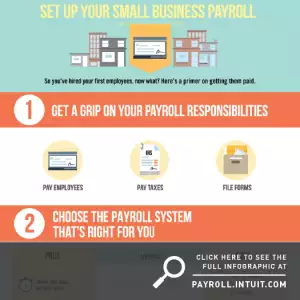
Payroll processing can provoke no shortage of headaches for those new to small-business ownership. Setting up your company’s payroll — from computing employee taxes to establishing routine pay periods — can be a daunting task, but it doesn’t have to leave you perpetually frazzled and frustrated.
There are four essential (and surprisingly simple) steps involved in handling your company’s payroll.
1. Understand what’s involved. Familiarizing yourself with the basic concepts and legal requirements of employee payroll is the first step. “Payroll” simply refers to the total amount of money paid by an employer to his or her employees on a recurring basis. More complex, however, are payroll taxes. Every employer must meet specific payroll responsibilities, according to federal, state, and local laws. Paying employees means you must simultaneously withhold portions of their compensation to meet applicable income tax, social security, Medicare, and other requirements. As a result, it’s critical to report and deposit payroll taxes to the appropriate agency on time, every time.
2. Find what works for you. There’s more than one way to handle employee payroll. In fact, the options at your fingertips are plentiful:
- Do it yourself (a time-consuming process that, although cost-effective, could expose your business to the risk of costly payroll mistakes);
- Invest in commercial payroll software (a reliable and commonly preferred method);
- Invest in a full-service payroll software (this takes payroll off your hands completely);
- Hire an accountant (a means to obtain quality professional assistance, often at a fairly high price); or
- Outsource your payroll (a convenient choice, but one that brings a loss of control and flexibility).
Choose the method that makes the best sense for your business — and that’s easy on your nerves, your schedule, and your budget.
Easy, accurate, done. That’s payroll, perfected.
Handle withholdings, employee classifications, benefit deductions and more with QuickBooks Payroll.
3. Know what you need from employees. Time and again, employers make the mistake of getting their own ducks in a row while failing to organize employee information in a similarly efficient manner. Ask your employees to complete the appropriate forms that verify their legal status and specify their tax withholding. Once this information is entered into your payroll system, paycheck calculations can be generated with the applicable taxes withheld.
4. Proceed to pay. The final step in the payroll process is to disperse funds and corresponding filings to the appropriate tax agencies. Once you’ve paid your employees and all outstanding payroll taxes, you will have successfully completed the payroll process — a process that will continue, but in a substantially less nerve-wracking way.
To learn more about setting up your small-business payroll, check out Intuit’s comprehensive new guide on how to set up payroll

Explore what you can do with QuickBooks
Explore what you can do with QuickBooks

See profit at a glance


Track and manage time
Looking for something else?
Firm of the Future
Topical articles and news from top pros and Intuit product experts.
QuickBooks Support
Get help with QuickBooks. Find articles, video tutorials, and more.
Call Sales: 1-800-285-4854





© 2026 Intuit Inc. All rights reserved.
Intuit, QuickBooks, QB, TurboTax, Credit Karma, and Mailchimp are registered trademarks of Intuit Inc.
Money movement services are provided by Intuit Payments Inc., licensed as a Money Transmitter by the New York State Department of Financial Services. For details about our money transmission licenses, or for Texas customers with complaints about our service, please click here.
By accessing and using this page you agree to the Website Terms of Service.