QuickBooks Blog
An illustration of a computer, calculator, and clipboard, representing items you'll need to calculate eBay taxes.
taxes

How to file taxes for eBay and TikTok sales in 2026


2026 tax filing road map for online sellers:

  • For most sellers, the federal 1099-K reporting threshold is back to $20,000 in gross payments and 200 transactions for 2025. This means fewer casual sellers will receive the form.
  • If you made a profit (sold something for more than you paid for it), you must report that profit on Form 1040 regardless of whether you receive a 1099-K.
  • Income from newer channels like TikTok Shop, Etsy, and Poshmark is treated the same as eBay sales. You must track and report this income on Schedule C (if operating as a business).
  • If you run your sales as a business, you can deduct all "ordinary and necessary" expenses (like platform fees, shipping, and packaging) to significantly lower your taxable income.


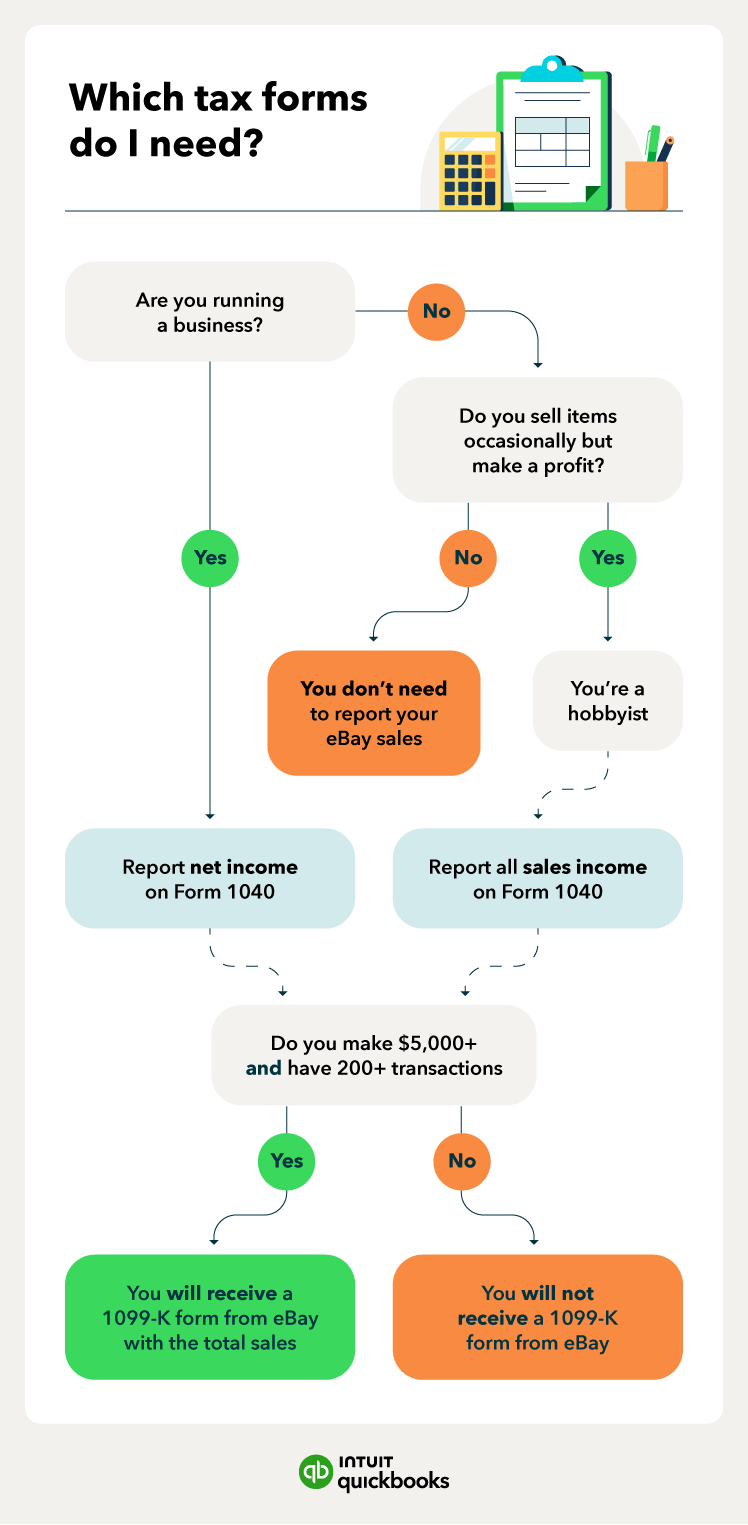
Do you need to report eBay and TikTok sales on taxes? Yes, in most cases. Whether you sell on eBay, TikTok Shop, or any other marketplace as a hobby or a business, you need to report that income on your Form 1040 when you file your taxes for 2025.

Selling online through platforms like eBay and the rapidly growing TikTok Shop can be a fun side gig or a serious business. Everyone (from casual sellers to professional e-commerce owners) needs to know exactly how to report their income. 

In this post, you’ll find essential information on tax forms, calculating income, and maximizing deductions to make tax season easier, no matter where you sell.

Understanding online marketplace taxes

What’s the difference between a hobby and a business?

How to calculate your online sales

Which sales are subject to income tax?

Tax deductions for online sellers

Understanding Form 1099-K (the latest threshold update)

How to fill out Form 1040 for online business sales

Find peace of mind come tax time

Get a tax guide for eBay and TikTok.

Understanding online marketplace taxes

Tax season can feel overwhelming, especially when you're managing sales across multiple platforms. But getting the basics down is the first step to feeling confident. Here’s what you should know about reporting your online income:

  • Report income on Form 1040: You must report your taxable income with Form 1040. You'll also need a Form 1099-K if you meet the federal reporting threshold (or a lower state threshold), regardless of your activity's category.
  • Deduct expenses: If you sell as a business, you can significantly reduce your taxable income by deducting ordinary and necessary business-related expenses.
  • Personal sales vs. profit: If you only occasionally sell used personal items for less than you originally paid, those sales are generally not considered taxable profit.

note icon For the 2025 tax year, the federal Form 1099-K reporting threshold has been restored to the original high level: $20,000 in gross payments and 200 transactions. This applies to platforms like eBay, TikTok Shop, and payment processors like PayPal. Always check for your state's specific threshold, as some maintain a lower reporting requirement.


A flowchart to determine where you need to report your eBay sales and whether eBay will send you a Form 1099-K.

What’s the difference between a hobby and a business?

While all profits must be reported to the IRS, the distinction between a hobby and a business is crucial for deductions and handling losses.

If your selling activity is a business, your goal is profit. You use Schedule C to report income and deduct business expenses, which reduces your taxable income. You can also report a net loss if expenses exceed revenue.

If your activity is a hobby, your primary goal is personal enjoyment, even if you make money. You must report all gross income but can no longer deduct any hobby expenses against that income.

The IRS provides basic factors to help you determine your status:

  • Do you operate in a "businesslike" manner, maintaining detailed bookkeeping?
  • Is your primary intention to make a profit?
  • Do you depend on the income from this activity?
  • Can you reasonably expect to turn a profit in the future?
An illustration of how to calculate your eBay sales.

How to calculate your online sales

To report your sales correctly, you need to understand the difference between your gross sales and your net income (or profit).

  • Gross sales: The total amount you receive from buyers, including shipping costs, from all platforms (eBay, TikTok, etc.). You can find this in your sales records.
  • Net income (for businesses): This is your profit after deducting all legitimate business expenses, such as platform fees, shipping, and the cost of the items you sold.
  • Hobby income: This is reported as your gross income, as you cannot deduct hobby expenses.

A note on cost of goods sold (COGS)

Your COGS is the purchase price of the items you sell, plus any costs to prepare them for sale. Tracking COGS is nonnegotiable. It's subtracted from your revenue to determine your true gross profit, which is what the IRS is interested in.

Which sales are subject to income tax?

If you use a marketplace to sell off used personal items for less than you originally paid, these sales are generally not taxable because you made no profit.

  • Selling at a loss (nontaxable): If you sell an item for less than you originally paid, you have no taxable profit. You should keep receipts of the original purchase to prove your cost basis.
  • Selling for a profit (taxable): If you sell an item for more than its original cost, you’ll need to report that gain. For personal assets (like collectibles), report the gain on Schedule D. For business inventory, the profit is reported on Schedule C.
  • Regular, recurring sales: If you have regular transactions that resemble a business, the IRS may categorize your activity as a business, and all profits are taxable income.

Tax deductions for online sellers

If your online sales activity is classified as a business, you can deduct a variety of expenses that are "ordinary and necessary" for your operations. This is the single best way to lower your tax bill.

Possible Deductions Include:

  • Cost of goods sold (COGS): The purchase price of the inventory you sell.
  • Online marketplace & payment fees: All fees charged by eBay, TikTok Shop, PayPal, etc.
  • Shipping and packaging: Postage, shipping insurance, boxes, tape, and labels.
  • Home office expenses: A portion of your rent or mortgage interest, utilities, and insurance if you have a dedicated space used exclusively for your business.
  • Advertising and marketing: Costs to promote your listings on any platform.
  • Software and subscriptions: Fees for listing tools, inventory management, and accounting software.

note icon

Keeping accurate records is your best defense in an audit and ensures you claim every deduction you've earned. Tools like QuickBooks with AI-powered receipt capture automatically log and categorize your expenses.


Understanding Form 1099-K (the latest threshold update)

Form 1099-K is an IRS informational form used by third-party payment networks (like eBay Managed Payments and TikTok Shop) to report your gross payments for goods and services.

Will eBay or TikTok Shop send a 1099-K for 2025?

For your 2026 filing, the federal threshold for 1099-K reporting has reverted to the original high level.

For payments processed in 2025, an online marketplace is only required to issue a Form 1099-K if you meet both of the following federal criteria:

  1. Your gross payments exceeded $20,000, AND
  2. You had more than 200 transactions.

note icon

Remember: This threshold applies per platform. Sales on eBay and TikTok are calculated separately. Even if your sales fall below this threshold, you are still responsible for reporting all taxable profit on your tax return.


Simplify workflows with everything in one place

Essential business tools work seamlessly together on one platform, saving you time across your most critical jobs.

How to fill out Form 1040 for online business sales

Form 1040 is the standard form used to file your individual income tax return. If you are operating a sole proprietorship, here is the basic process:

Step 1: Gather your records

Organize your 1099-K (if received) and your detailed income and expense records from all your selling platforms.

Step 2: Complete Schedule C (profit or loss from business)

This is the core document for your online business.

  1. Report income: Sum your gross sales from all platforms.
  2. Report expenses: Itemize and categorize your business expenses (deductions).
  3. Calculate net profit or loss: Subtract your total expenses from your gross profit. This net figure is your business's taxable income.

Step 3: Complete Schedule SE (self-employment tax)

If your net profit from your online business is $400 or more, you must pay self-employment tax (Social Security and Medicare). Use Schedule SE to calculate this.

Step 4: Complete Form 1040

Transfer your net profit or loss from Schedule C to the appropriate line on your main Form 1040, add any other income, and calculate your final tax liability.

Find peace of mind come tax time

Educating yourself about eBay taxes is the first step to preparing for a stress-free filing experience. Ease your tax season anxiety with QuickBooks accounting software that helps you keep your documents organized all year long, savings accounts that support your self-employment goals, and the resources you need to succeed. These tools can help you maximize tax deductions and report eBay sales on your tax forms the right way.


Disclaimer: This content is for information purposes only and the information provided should not be considered legal, accounting, or tax advice or a substitute for obtaining such advice specific to your business. Additional information and exceptions may apply. Applicable laws may vary by state or locality. No assurance is given that the information is comprehensive in its coverage or that it is suitable for dealing with a customer’s particular situation. Intuit Inc. does it have any responsibility for updating or revising any information presented herein. Accordingly, the information provided should not be relied upon as a substitute for independent research. Intuit Inc. cannot warrant that the material contained herein will continue to be accurate, nor that it is completely free of errors when published. Readers should verify statements before relying on them.

Disclaimer: Intuit Assist and certain other AI features and functionalities are currently available at no additional cost to certain QuickBooks users. Pricing, terms, conditions, special features, and service options are subject to change without notice. Intuit reserves the right to discontinue the feature at any time for any reason in its sole and absolute discretion.


Recommended for you

Mail icon
Get the latest to your inbox
No Thanks

Get the latest to your inbox

Relevant resources to help start, run, and grow your business.

By clicking “Submit,” you agree to permit Intuit to contact you regarding QuickBooks and have read and acknowledge our Privacy Statement.

Thanks for subscribing.

Fresh business resources are headed your way!

Looking for something else?

QuickBooks

From big jobs to small tasks, we've got your business covered.

Firm of the Future

Topical articles and news from top pros and Intuit product experts.

QuickBooks Support

Get help with QuickBooks. Find articles, video tutorials, and more.