You could save up to 25% on transaction costs².
Speak with us now to see if you qualify.
Talk to sales 1-800-515-8366
Monday - Friday, 6 AM to 4 PM PT

Table of contents
Table of contents
A disputed invoice is an invoice your customer formally challenges because they question the amount, the terms, or the work you billed them for. Disputed invoices are part of the reason that, according to the Intuit QuickBooks Small Business Late Payments Report, 56% of all US small businesses with outstanding invoices are owed $17,500 on average.
For small businesses, disputing an invoice means delayed cash flow and hours spent going back and forth trying to resolve the issue. From unclear invoice payment terms to disagreements over what you delivered, find out five ways to deal with disputed invoices and what drives them.
Most disputed invoices begin with customers misunderstanding one or more of the elements of the bill you sent them. The following five “transparency gaps” are the sources of most disagreements:
Working from a clear invoice template with itemized charges and your agreed terms prevents most disputes.
Many SMBs are moving to smarter invoice dispute management by shifting from manual tracking of invoices to “decision-grade data”. AI can now "auto-classify" disputes by scanning email sentiment and comparing it to historical patterns.
In many cases, it can segment customer reactions successfully, distinguishing between "silent disputers" who ghost payments and "partial payers" who require a more data-driven follow-up.
Knowing what triggers a dispute and how your customer tends to react gives you a head start on resolving it.
 Before you send any invoice out, review it thoroughly yourself as if you were the customer seeing it for the first time. If there’s something unclear or missing, correct it before it becomes an actual dispute.
When a dispute happens, how you handle it in the first few days often decides whether you keep the customer and collect what they owe.
Here's how to deal with a disputed claim on an invoice with QuickBooks Online:

Use Intuit Intelligence in QuickBooks Online to ask a question, "What are the top 3 reasons this specific client disputes?" and review the answers before you respond. Even on the basic version of the platform, you can check the customer's payment history to spot the same patterns.
The answer may highlight systemic flaws in your own fulfillment process or a one-off error, like regularly missing delivery dates or forgetting to apply an agreed discount. If the same issue keeps coming up again and again, put it right before the next invoice goes out.
Use the digital audit trail in QuickBooks to guide the client back to the truth of an invoice dispute. Show them a time-stamped log of their own team's previous approvals to resolve "misunderstandings" without being confrontational.
For example, it might be a project manager approving a scope change or someone agreeing to pay extra for faster delivery, but this sign-off has not made its way back to the person in charge of making payment.
When a customer can see that their own people viewed, confirmed, or approved the original invoice, that’s often enough to settle a dispute.
Look for the "middle ground" with a client by adapting your payment policies to work for both of you. That might include getting them to agree to:
With this arrangement, you benefit from lower costs and better cash flow, and your client gets to pay however they want. QuickBooks Online’s Payments Agent tracks each client’s payment habits and sends reminders for you, so they settle their bills faster without you having to chase them up.
Offering 2% off for payment within 10 days is a credit control method many SMBs use, but make sure it doesn’t eat into your profits too much. On a $5,000 invoice, you may get the cash in sooner, though you’ll only receive $4,900.
Advance the dispute through a stakeholder map. Identify the person with the authority to release payment and work toward reaching them. In many businesses, the person who ordered the work and the person who authorizes payment are not the same.
Reaching them is easier when you have a documented chain of approval from both sides, featuring the customer's purchase order and email confirmations. Plus, knowing next time who to contact saves you starting from scratch.
E-invoice metadata and approval logs are objective and verifiable evidence in many countries’ mediation or small claims processes, including those generated by bookkeeping software.
Maintaining "compliant intent" in a digital-first legal environment makes your case much stronger when it comes to being heard. Preserve as much evidence of what was agreed, what was delivered, and what was invoiced as you can.
Long-term projects, custom service contracts, and construction jobs naturally create a breeding ground for invoice disputes. Because these projects span months and often involve multiple client decision-makers, visibility gaps inevitably form. When you send a bill weeks after the work occurred, clients often forget what they already approved.
The 2026 parallel approver feature in QuickBooks Online lets you involve up to five client stakeholders at the same time. This simultaneous sign-off means that the right people vet and approve every milestone, line item, and change order before anyone officially sends the invoice.
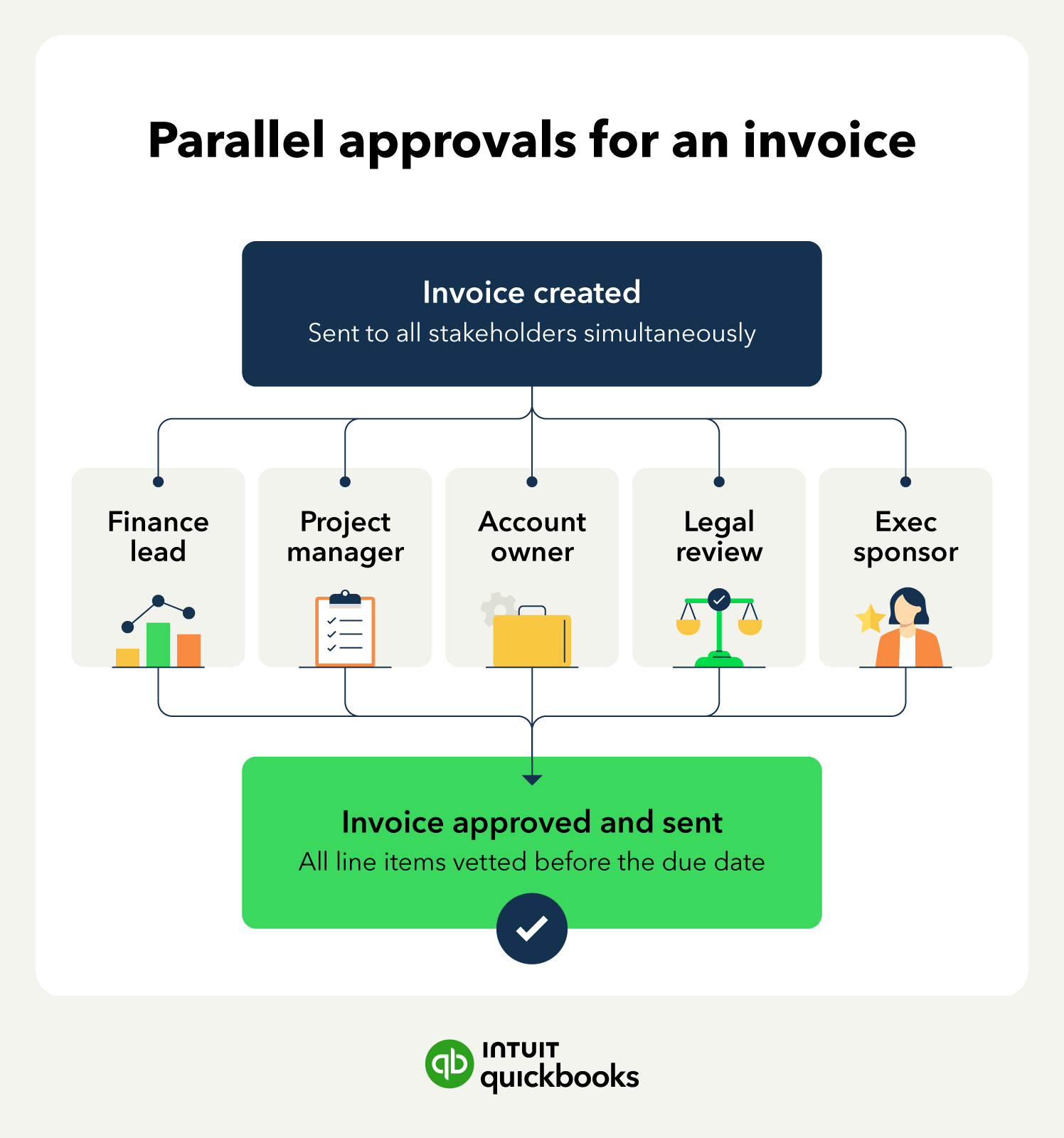
Pre-approved invoicing makes a later dispute nearly impossible. You resolve all friction points, like pricing questions, during the workflow, rather than arguing over them weeks after the invoice due date.
For businesses managing complex, multi-stage projects, standard invoices don't provide enough historical context. That is why industry-standard AIA-style progress invoicing eliminates math fatigue and confusion by providing you and your client a single, clear view of all the moving pieces in your project.
This can include:
For businesses that track billable hours across long projects, this absolute transparency removes the guesswork that eventually ends up as expensive disputes. Your client sees exactly what they have already paid for and what is left on the contract, keeping everyone on the same page from start to finish.
Move away from one-size-fits-all payment terms by segmenting your clients based on behavior data. Shift frequent disputers to deposit-required terms or milestone-based billing so you collect part of what they owe you before you complete the work.
Without these adjustments, unpaid invoices can eventually turn into bad debt expense on your books.
Global e-invoicing mandates for several countries require digital documentation to avoid heavy penalties during dispute windows. If you do business internationally, your accounting software needs to support compliant e-invoicing or you risk fines on top of the original claim.
Turning "friction into financial truth" allows a resolved dispute to actually strengthen a business relationship by exposing and fixing workflow flaws. Every disagreement you face is an opportunity to improve how you do business and your payment terms, too, making future conflict less likely.
Many companies like ACH as a payment method because it doesn’t expose them to credit card chargebacks or the risk of a bounced check.
QuickBooks Bill Pay allows you to take cards, ACH payments, Apple Pay®, PayPal, or Venmo, so your customers have options that don't leave you exposed to chargebacks or bounced checks.
Disputed invoices deplete your working capital and tie up your time resolving them.
If you handle these situations poorly, you risk turning a simple misunderstanding into an uncollectible debt and losing a customer forever. However, if you use clear documentation to resolve disagreements quickly, you can actually turn a dispute into an opportunity to build deeper client trust and strengthen your business relationships.
QuickBooks Online provides you with the audit trails, approval workflows, and payment flexibility to prevent disputes and resolve them faster.








Call Sales: 1-800-285-4854