You could save up to 25% on transaction costs².
Speak with us now to see if you qualify.
Talk to sales 1-800-515-8366
Monday - Friday, 6 AM to 4 PM PT

Table of contents
Table of contents
Things to remember when filing small business 1099s:
Keeping up with tax compliance often feels like trying to hit a moving target. This year is no exception, as the 2027 filing season brings some of the biggest 1099 shakeups we've seen in decades. Whether you’re hiring a freelancer, paying rent for your office, or watching your business savings grow through interest, those 1099 forms are the essential link between your bank account and the IRS.
Recent legislation just raised reporting thresholds and made digital filing the new standard for nearly every business. Mastering these updates optimizes your bookkeeping and protects you from this season's increased penalties.
In this guide, we’ll break down the latest 1099 rules, clear up the confusion between different form types, and share the best ways to automate your filing so you can spend less time on paperwork and more time growing your business.
If small businesses pay certain expenses or receive certain forms of income, they will either need to send or receive a Form 1099. The IRS sets thresholds that will determine whether you need to fill out a 1099 form.

Important change: The One Big Beautiful Bill Act raised the 1099-NEC and 1099-MISC reporting thresholds from $600 to $2,000 for payments made during the 2026 calendar year. This is the threshold that applies to the forms you're filing now, for the 2027 season.
Who you paid and what the payment was for determines whether a 1099 form is needed. Here’s a rundown of the most common groups you’ll send them to:
Not every payment needs a form. Here are some common exceptions:
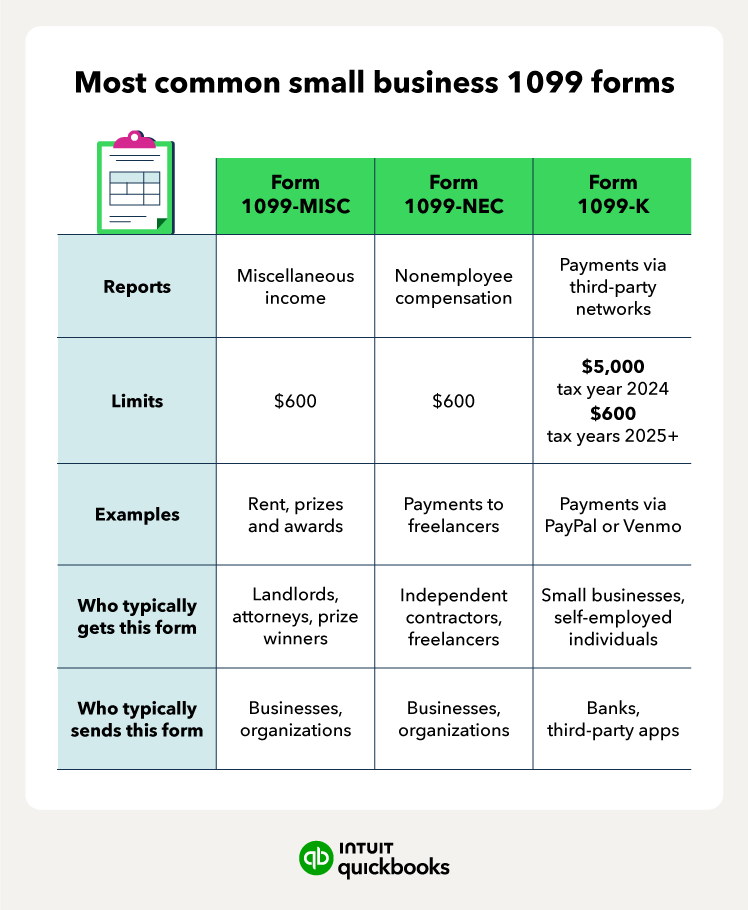
There are over 20 types of 1099 forms, but many small businesses will only come in contact with a handful:
The 1099-K threshold has reverted to $20,000 and 200 transactions. This is a relief for many who use apps like Venmo or PayPal for occasional business sales.
However, if you pay a contractor via credit card or a payment app, you do not issue a 1099-NEC. The payment processor is responsible for the 1099-K, and issuing both could result in the contractor being double-taxed on the same income.
When you use an integrated solution like QuickBooks Bill Pay, the system automatically tracks payments against the new $2,000 threshold. Bill Pay automatically identifies who needs a form based on the bills you've already paid, so you don't have to manually tally up transactions at year-end.
When it comes to issuing 1099-NEC forms, you must send one to every non-corporate entity you paid for services over the threshold during the calendar year.
1099-NEC forms serve two purposes:
1. Reports nonemployee compensation payments to the IRS
2. Allows your contractor or freelancer to do their taxes
If you are a small business with employees whom you issue a paycheck to and withhold payroll taxes, you won’t issue a 1099-NEC to them. Instead, you issue employees a W-2 tax form.
However, there are other 1099 forms your small business may need to send or receive that have nothing to do with your workers. Note that Form 1099-NEC is for non-employee compensation.
Useful considerations for small business owners:
For 2026, the IRS has made electronic filing the standard. The 10-form rule means that if you have 10 or more total information returns (including W-2s and all 1099s), you must e-file.
Note that before preparing your 1099 forms, you’ll need to collect W-9 tax forms from those you need to send 1099 forms to. The W-9 form is the equivalent of the W-4 form that employees complete. It contains key information, such as the Social Security or tax identification number.
If you use 1099 services like QuickBooks, you can simply electronically file your forms.

For filling out your 1099 forms, the process is similar no matter which form you need. You’ll find that there are several copies:
The recipient will use their copies to file their federal and state tax returns. The due date for filing 1099 forms is March 31, 2027 if done electronically (or March 1, 2027 if by paper, since Feb 28 falls on a Sunday).

2027 filing calendar:
Unlike other 1099s, the 1099-NEC does not have a later e-filing date. Both the recipient copy and the IRS filing are due by the February 1st deadline.
Small businesses can make filing small business 1099 forms easier with a few best practices.
To ensure a smooth 1099 filing process, follow these steps:
1. Gather necessary information: Collect the information you’ll need from your small business tax prep checklist. This includes info from each payee or independent contractor. It’s best to have them complete a Form W-9 to get their info before doing business together.
2. Complete your forms correctly: Use the appropriate 1099 form, such as the 1099-MISC or the 1099-NEC, for nonemployee compensation. Fill in the required information for each contractor, including the amounts paid.
3. Submit to agencies: Send a copy of each completed form to both the contractor and the appropriate agency. This will be the IRS for most small businesses, but you may also need to send copies to your state tax department.
4. Be aware of deadlines: The deadline for many 1099 forms is March 31, 2027, if you e-file, but deadlines are usually sooner if you paper file. Also, the deadline for Form 1099-NEC is much earlier than others—on February 1, 2027
5. Keep records: Maintain copies of the 1099 forms and any supporting documentation for at least three years. These records can help with tax audits or other purposes.
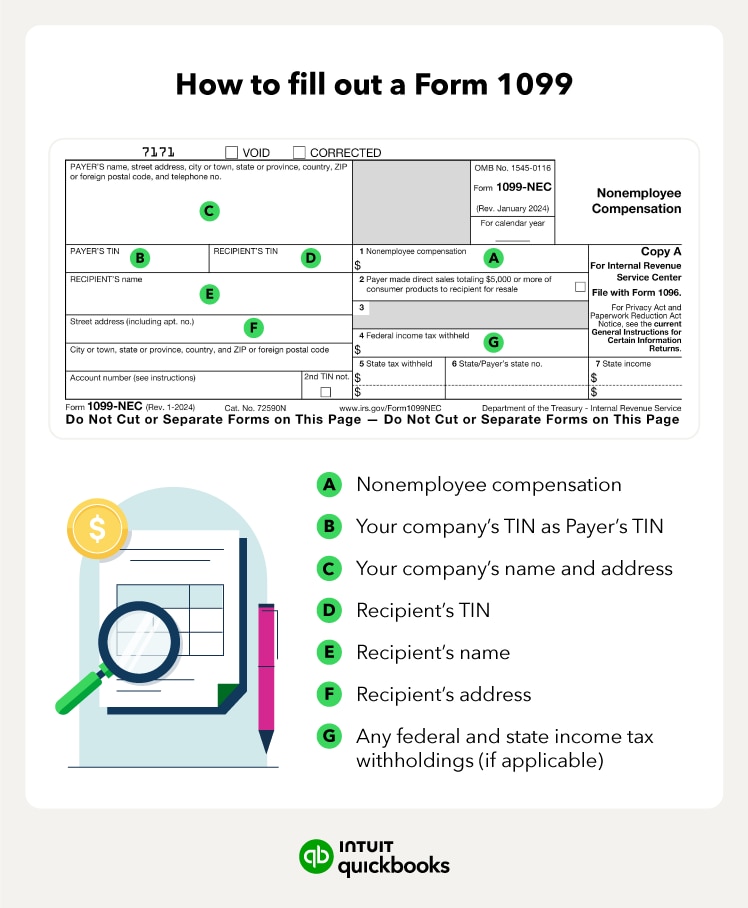
When filing your 1099 form, here are some of the key sections you’ll need to fill out:
Having a filing system in order for your Form 1099s can ensure you’re in compliance with tax laws and avoid penalties. Remember to stay up-to-date on tax changes and consult with a tax professional if needed.
Master your 1099s by tackling the new $2,000 threshold and electronic filing mandates head-on. Collect W-9s early and deploy modern accounting tools to turn a stressful tax season into a routine win. These forms help build your business’s financial transparency and keep you audit-ready.
Monitor mid-year IRS updates closely and consult a tax professional to lock in your compliance strategy. QuickBooks Bill Pay can make handling 1099 filing easier, with 1099 E-File supporting unlimited e-filing and automatic contractor copies.
Disclaimer: This content is for information purposes only and the information provided should not be considered legal, accounting, or tax advice or a substitute for obtaining such advice specific to your business. Additional information and exceptions may apply. Applicable laws may vary by state or locality. No assurance is given that the information is comprehensive in its coverage or that it is suitable for dealing with a customer’s particular situation. Intuit Inc. does it have any responsibility for updating or revising any information presented herein. Accordingly, the information provided should not be relied upon as a substitute for independent research. Intuit Inc. cannot warrant that the material contained herein will continue to be accurate, nor that it is completely free of errors when published. Readers should verify statements before relying on them.








Call Sales: 1-800-285-4854