- Start Your BusinessStart Your Business
- Starting a BusinessThe tools and resources you need to get your new business idea off the ground.
- PaymentsEverything you need to start accepting payments for your business.
- Funding & CapitalResources to help you fund your small business.
- Small Business StoriesCelebrating the stories and successes of real small business owners.
- Self-EmployedThe tools and resources you need to run your own business with confidence.
- Run Your BusinessRun Your Business
- Running a BusinessThe tools and resources you need to run your business successfully.
- AccountingAccounting and bookkeeping basics you need to run and grow your business.
- Cash FlowTax and bookkeeping basics you need to run and grow your business.
- PayrollPayroll essentials you need to run your business.
- TaxesTax basics you need to stay compliant and run your business.
- EmployeesEverything you need to know about managing and retaining employees.
- Grow Your BusinessGrow Your Business
- Growing a BusinessThe tools and resources you need to take your business to the next level.
- Sales & MarketingSpread the word: What you need to know about marketing your small business.
- FundingHow to find funding and capital for your new or growing business.
- Midsize BusinessesThe tools and resources you need to manage your mid-sized business.
- Enterprise Suite BlogThe tools and resources you need to grow your own business with confidence.
- E-CommerceHow to start and run a successful e-commerce business.
- TaxesTaxes
- How to fill out a 1099-NEC formLearn how to fill out and file 1099-NEC forms for independent contractors and freelancers.
- How to file small business taxesLearn how to navigate tax season with confidence and minimize your tax liability with this guide.
- Small business 1099: What you need to know for 2025Navigate the complexities of small business 1099 forms and filings with our comprehensive guide.
- 13 documents to give your accountant for small business taxesYour accountant will need these documents to file your small business taxes successfully.
- What's NewWhat's New
- NewsBrowse the latest news, press releases, and reports from QuickBooks.
- AI Resource HubFind the latest on Artificial Intelligence.
- Small Business DataThe latest research and insights for Small Businesses from QuickBooks.
- Small Business StoriesCelebrating the stories and successes of real small business owners.
- Holiday SuccessEverything you need to thrive during your business's busiest seasons.
- AI InnovationsBrowse the latest AI innovations in QuickBooks on the Intuit platform.
- ToolsTools
- All ToolsFree accounting tools and templates to speed up and simplify your workflow.
- AI-Powered Invoice GeneratorTry out this free invoice generator to create an invoice online using Intuit Intelligence.
- Payment Cost CalculatorFind out how much you could save by switching to QuickBooks Payments.
- Paycheck CalculatorAccurately estimate pay for all your employees.











Table of contents
Table of contents
What to know about 1099 forms for 2026:
- Form 1099-NEC reports contractor payments over $600.
- Form 1099-MISC covers rent, prizes, or other nonemployee income.
- Deadlines differ: 1099-NEC due Jan. 31; 1099-MISC due Mar. 31 (e-file).
Avoid penalties by double-checking payer and recipient details.
As your business grows and you start hiring freelancers or contractors, taxes can get tricky fast. One common source of confusion: Knowing whether to file a Form 1099-MISC or 1099-NEC.
Many small business owners still use the wrong 1099 forms or miss key deadlines. To help you file, we break down 1099-MISC vs. 1099-NEC differences, deadlines, and penalties for the 2026 tax year.
In this guide, we’ll clarify the differences between the 1099-MISC vs. 1099-NEC forms, helping you determine which one to use and how to file them correctly.
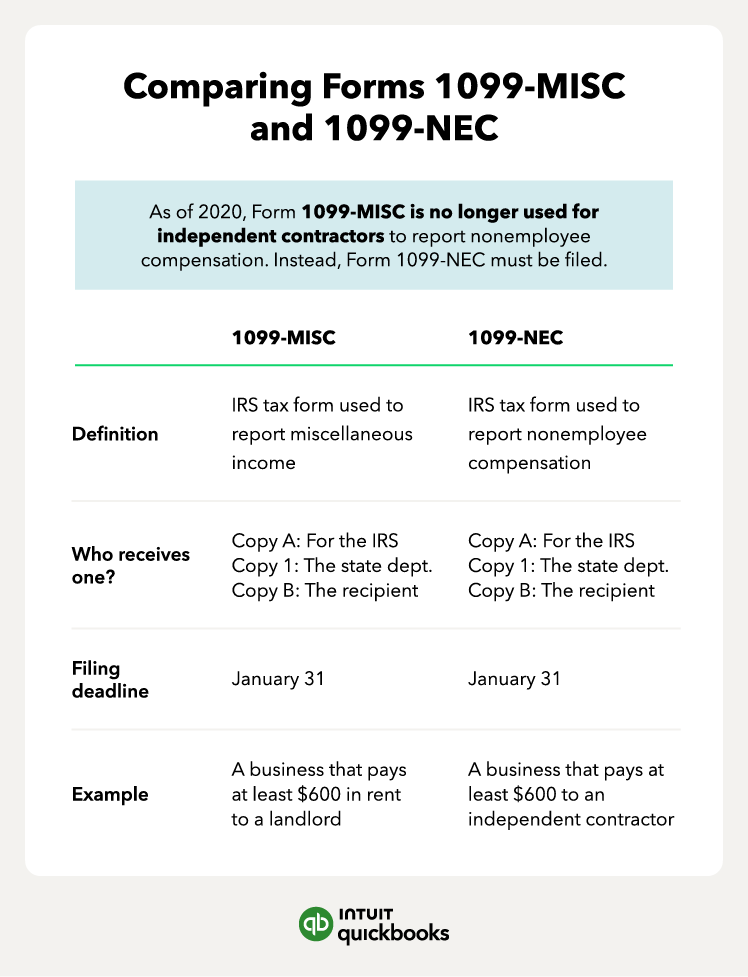
What is Form 1099-MISC?
Form 1099-MISC is for reporting nonemployee earnings from income streams like royalties, rent, and prize winnings. A 1099-MISC and a 1099-NEC are commonly mistaken as the same form, but they serve different purposes. The IRS sets limits for how much you can pay before needing to file a 1099-MISC form.
You’ll need to file a Form 1099-MISC if either of the following is true:
- Paid at least $10 in royalties or broker payments in lieu of dividends or tax-exempt interest.
- Paid at least $600 for:
- Rents
- Awards and prizes
- Attorney payments
- Other income payments
- Health care and medical payments
- Crop insurance proceeds
- Fishing boat proceeds
- Cash spent on fish for resale
- Payments from a notional principal contract to an individual, estate, or partnership
Other sources of income use separate 1099s, such as dividend income (1099-DIV) or brokerage commissions (1099-B).
How to fill out Form 1099-MISC
When filling out a 1099 form, you can get a copy of Form 1099-MISC for information purposes from the IRS website. If you need to order preprinted 1099 forms, you’ll want to do that from an office supply store or online vendor like QuickBooks.
There are five copies of Form 1099-MISC you’ll fill out and use:
- Copy A: For the IRS
- Copy 1: For your state tax department
- Copy B: For the recipient (the person you paid)
- Copy 2: Also for the recipient
- Copy C: For the payer (your copy for recordkeeping)
Here’s an example of what each Form 1099-MISC will look at, including the three key sections you’ll be using:
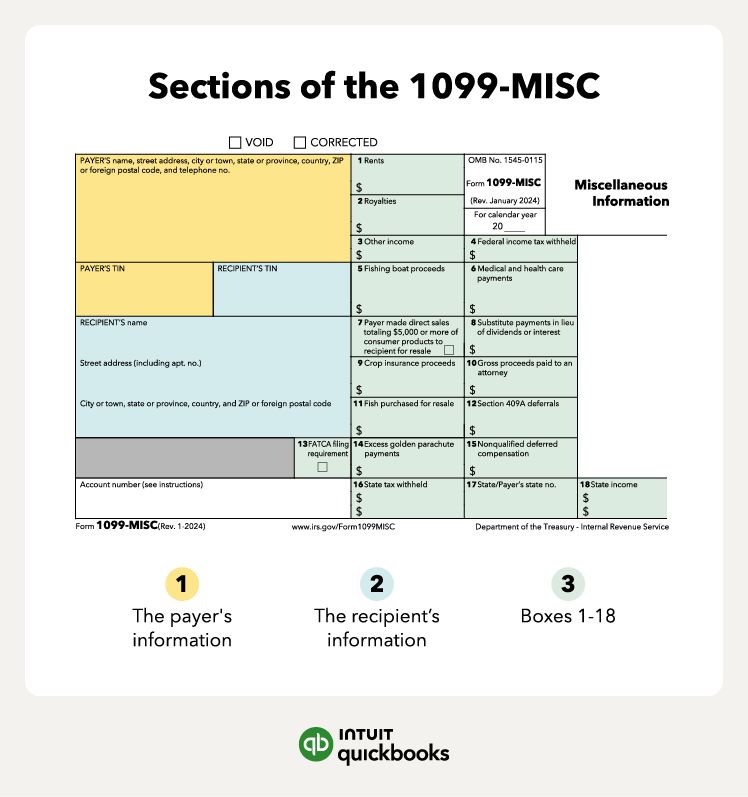
Once you’re ready to fill out the 1099-MISC forms, here’s how to complete each section:
- Payer's information: The payer (that's you) will need to fill in the top portion of the 1099-MISC with the basic information, such as your name and address. Remember to check your information carefully, as accounting errors can also occur on simple forms.
- Recipient's information: You’ll need their name, address, and tax identification or Social Security number. You should collect all of this information before doing business, usually by sending them a Form W-9.
- Boxes 1-18: Lastly, you need to fill in the amounts for each category you paid the recipient. There are 18 boxes, but not all of them apply—you’ll likely only use three or four.
If you get to a box and don’t understand what information they are requesting, visit the IRS website on page 5 for clarification.
What is Form 1099-NEC?
A Form 1099-NEC, Non-Employee Compensation, is for reporting nonemployee earnings. This form helps the IRS track an independent contractor's total earnings and collect the correct amount of taxes.
Any business that pays an independent contractor over $600 will need to issue a 1099-NEC to the contractor and tax authorities. For example, if you have 20 subcontractors and your total payments to each were over $600 for the year, you'll send each contractor a Form 1099-NEC.
Stay on top of 1099s
See your vendors and everyone who needs a 1099 all in one place, to help you stay compliant. Get unlimited 1099 e-filing, with printing and mailing, for no additional fee.**
How to fill out Form 1099-NEC
Filling out 1099 forms is a similar process, whether it’s a 1099-MISC or 1099-NEC. You can get an informational copy of Form 1099-NEC from the IRS website—the number of forms you need depends on the number of independent contractors you pay over $600 to.
There are five copies of Form 1099-NEC you’ll fill out and use:
- Copy A: For the IRS
- Copy 1: For your state tax department
- Copy B: For the recipient (the person you paid)
- Copy 2: Also for the recipient
- Copy C: For payer (your copy for recordkeeping)
Here’s an example of what each Form 1099-NEC will look at, including the three key sections you’ll be using:
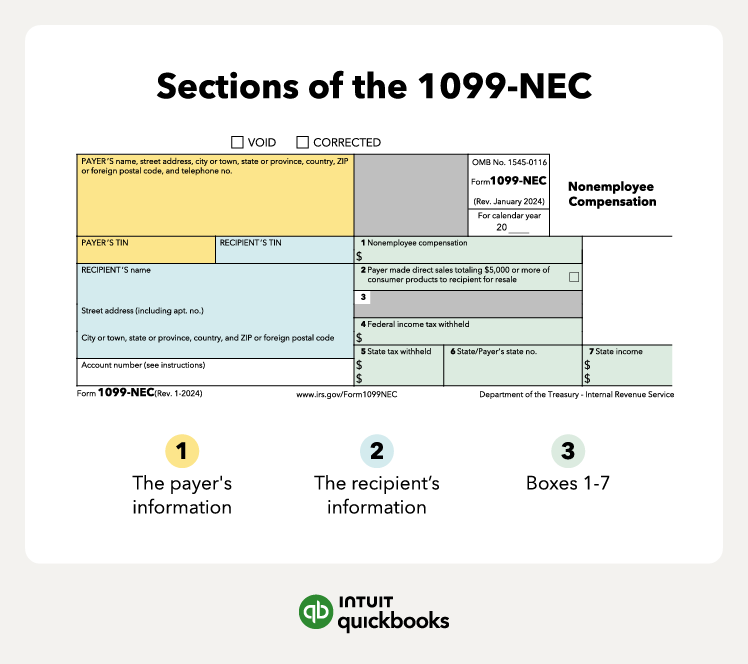
See the differences between 1099-NEC vs. 1099-MISC forms.
Once you’re ready to fill out the 1099-NEC forms, here’s how to complete each section:
- Payer’s information: Same as the 1099-MISC—you’ll fill in the top portion of the 1099-NEC with your basic information. Again, remember to check your information carefully. If you don’t file correctly, you will need to resubmit it.
- Recipient information: Any freelancer or subcontractor you pay over $600 to will receive a 1099-NEC, and it’s up to you to know who those contractors are. For each contractor, you should have collected a Form W-9 before beginning work. It will have all the necessary information to fill in for the recipient's portion of the 1099-NEC.
- Boxes 1-7: Unlike the 1099-MISC, Form 1099-NEC only has seven boxes. In most cases, the only box that will apply to you is box 1: Nonemployee compensation. If any of the other boxes do apply to you, you’ll want to follow guidance from the IRS website.
Note that if you use contractor payment services like QuickBooks Contractor Payments to pay your 1099 workers, completing and filing Form 1099-NEC is simple.
Forms 1099-MISC vs. 1099-NEC: How to file each
When preparing to file your 1099 forms by the deadline, the first step is to ensure you have them ready by the deadline. A key difference between 1099-MISC and 1099-NEC forms is the filing deadline. The filing deadline for these two forms is:
- Form 1099-MISC: March 31 if filing electronically (Feb 28 if filing paper copies)
- Form 1099-NEC: Jan 31
As for the rest of the process, let’s look at where each copy goes:

Forms 1099-MISC vs. 1099-NEC: How to file each
When preparing to file your 1099 forms by the deadline, the first step is to ensure you have them ready by the deadline. A key difference between 1099-MISC and 1099-NEC forms is the filing deadline. The filing deadline for these two forms is:
- Form 1099-MISC: March 31 if filing electronically (Feb 28 if filing paper copies)
- Form 1099-NEC: Jan 31
As for the rest of the process, let’s look at where each copy goes:
1. Filing with the IRS
Filing Copy A with the IRS is a crucial part of the tax filing process for both forms. There are two methods for filing Copy A:
- Electronic filing: This is the fastest way to get it done. You’ll use the IRS’ FIRE (Filing Information Returns Electronically) system, which allows you to submit your forms faster with fewer errors. If you use accounting software with payroll integrations like QuickBooks Payroll, you can e-file directly from your software.
- Paper filing: This is the slower option. You’ll submit your copies by mail to a specific address, depending on where your business is.
If you use accounting software or contractor payment services, they can likely file electronically for you.
2. Sending copies to the recipient
Next, you’ll send the recipient their copies—Copy B and Copy 2. With their consent, you can send the form electronically. Again, if you use software or a service, they can likely send these for you.
3. State filing requirements
State filing requirements for Forms 1099-MISC and 1099-NEC vary depending on the state. Some states require you to file these forms with the state, while others do not have such requirements.
States exempt from 1099 filing include Alaska, Florida, Illinois, Nevada, New Hampshire, New York, South Dakota, Tennessee, Texas, Washington, and Wyoming. If you are a business or independent contractor operating in these states, you do not have to submit 1099 forms to the state.
Filing requirements can change, so you’ll want to check with each state's tax authority for the most up-to-date information.

Stay on top of 1099s with Bill Pay**
See your vendors and everyone who needs a 1099 all in one place. Plus, get unlimited 1099 e-filing, with printing and email, for no additional fee.
Best practices for Forms 1099-MISC or 1099-NEC
It’s easy to make mistakes on 1099 forms. One of the keys to remember is that you may need to file more than one or none at all. For 1099-MISC and 1099-NEC forms, this could look like this:
- 1099-MISC only: Reporting specific types of payments besides wages
- 1099-NEC only: Reporting nonemployee compensation
- Both forms: Paying an independent contractor over $600 and over $600 in rent
- Neither form: Only paying an independent contractor $300 for the year and not making any miscellaneous payments
If you do have to file one of these forms, ensure you adhere to filing deadlines and that all information is accurate. This includes the recipient’s taxpayer identification or Social Security number.
Penalties for incorrect or late filings on 1099 forms
Missing the deadline for filing Form 1099-NEC can lead to fines and fees, which increase the later the filing is submitted. Adhering to the 1099-MISC and 1099-NEC due date is crucial to avoid these penalties.
The IRS imposes varying penalties for late Form 1099 submissions:
- $60 per form if you file up to 30 days after the due date
- $130 per form if over 30 days late but before Aug 2
- $330 per form after Aug 1 or if you don’t file at all
- $660 per form for intentionally disregarding filing requirements
To avoid these penalties, file your 1099 forms correctly and on time. If you encounter unforeseen delays, you can request an extension using Form 8809 to get additional time for filing.
 Keep detailed records of all 1099 payments to simply file and ensure timely submissions.
Organize contracts, invoices, and payments for easy access during tax season.
Keep detailed records of all 1099 payments to simply file and ensure timely submissions.
Organize contracts, invoices, and payments for easy access during tax season.
Things to know about 1099-MISC vs. 1099-NEC
Even experienced business owners can get tripped up by 1099 filing rules. Let’s explore some of the important things to keep in mind.
Using the wrong 1099 form leads to penalties and delays
Filing the wrong 1099 form, such as using 1099-MISC instead of 1099-NEC, can cause reporting errors and processing delays with the IRS. These mistakes can also result in fines or requests for corrected forms. To avoid issues, double-check which form applies before submitting.
Income from Form 1099-MISC counts as taxable income
Even if you don’t receive a Form 1099-MISC, you’re still responsible for reporting that income. The IRS cross-references 1099s with tax returns, so omitting this income could trigger a notice or audit.
Failing to file a 1099 can trigger IRS penalties
If your business fails to send 1099 forms to contractors or the IRS, you could face escalating fines depending on how late the forms are filed. Information return penalties can apply even if the oversight was unintentional. Staying organized and tracking payments throughout the year helps you avoid last-minute errors.
Form 1099-NEC and Form W-2 report different income types
A 1099-NEC reports payments made to independent contractors, while a W-2 reports employee wages. Employees have taxes withheld from their paychecks; contractors do not. Understanding which form applies helps ensure accurate tax reporting for both you and your workers.
Receiving a 1099-MISC instead of 1099-NEC requires clarification
If you were expecting a 1099-NEC but received a 1099-MISC, make sure you're handling the right paperwork. Here's what you should do:
- Review the 1099-MISC: Carefully examine the form to understand why it was issued and confirm that the income reported is accurate. A 1099-MISC typically reports payments for items like rent, prize winnings, or certain types of non-employee compensation.
- Contact the payer: If you believe the 1099-MISC was issued in error, reach out to the taxpayer to correct the information. Explain the discrepancy and provide any necessary documentation to support your claim.
- Confirm deadlines: Make sure the corrected form is issued promptly to avoid delays in your tax filing. Verify that the changes are processed before you submit your tax return.
- Consult with a tax professional: If you're unsure how to proceed or have questions about why you received a 1099-MISC, contact a professional tax advisor. They can help clarify the situation and provide guidance on your next steps.
Always keep copies of any communication and documentation for your records. This will be helpful if you need to provide evidence to the IRS or address any questions.
Settlement payments may require a 1099 form
Most settlement payments are reportable on a 1099 form unless the payment qualifies for a tax exemption. For example, compensation for physical injuries is generally excluded, while punitive damages are not. When in doubt, review the settlement agreement or check with a tax professional.
Find peace of mind come tax time
Filing the right 1099 form doesn’t have to be stressful. Once you know whether a payment counts as nonemployee compensation (Form 1099-NEC) or miscellaneous income (Form 1099-MISC), you’re halfway there.
Stay ahead this 2026 tax season by organizing your contractor info early, keeping W-9s up to date, and using tools like QuickBooks Online to automate filing and avoid late fees. With the right system in place, you can spend less time sorting forms—and more time growing your business.
Disclaimers:
QuickBooks Bill Pay: QuickBooks Bill Pay account subject to eligibility criteria, credit, and application approval. Subscription to QuickBooks Online required. Not available in U.S. territories or outside the U.S. Money movement services are provided by Intuit Payments Inc., licensed as a Money Transmitter by the New York State Department of Financial Services. For more information about Intuit Payments' money transmission licenses, please visit https://www.intuit.com/legal/licenses/payment-licenses/.
**Unlimited 1099 e-file: 1099 forms are e-filed with the IRS only for the current filing year and for payments recorded in QuickBooks. Includes state filings for eligible states participating in IRS Combined Federal/State Filing program. If you have the Bill Pay Basic plan, 1099 e-filing services will be charged at the standard 1099 E-file Service pricing.
You could save up to 25% on transaction costs².
Speak with us now to see if you qualify.
Talk to sales 1-800-515-8366
Monday - Friday, 6 AM to 4 PM PT
Payroll Compliance

Details on the One Big Beautiful Bill Act and how it affects payroll

USPS changes may affect your postmark date

Mandatory State Paid Family Leave Programs
Accounting

Here’s what’s new in QuickBooks Online for August 2026

The accounting equation: A beginner’s guide with examples
Customer Stories

Why Amborella Organics trusts QuickBooks AI to handle the heavy lifting of a $10M+ vision
At Petal Salon, Amanda Lee Harvey keeps her clients in the pink

Normal Ice Cream saves 7 hours a week on banking admin thanks to QuickBooks Bill Pay

How The Baby Pantry shows up for families in need
Recommended for you




Explore what you can do with QuickBooks
Explore what you can do with QuickBooks

See profit at a glance


Get expert help
Looking for something else?
Firm of the Future
Topical articles and news from top pros and Intuit product experts.
QuickBooks Support
Get help with QuickBooks. Find articles, video tutorials, and more.
Call Sales: 1-800-285-4854





© 2026 Intuit Inc. All rights reserved.
Intuit, QuickBooks, QB, TurboTax, Credit Karma, and Mailchimp are registered trademarks of Intuit Inc.
Money movement services are provided by Intuit Payments Inc., licensed as a Money Transmitter by the New York State Department of Financial Services. For details about our money transmission licenses, or for Texas customers with complaints about our service, please click here.
By accessing and using this page you agree to the Website Terms of Service.