








QuickBooks Blog
Construction supervisor manages multiple construction sites
Productivity

How to manage multiple construction projects at scale

Table of contents

Table of contents

Ask about discounts

You could save up to 25% on transaction costs².

Speak with us now to see if you qualify.

Talk to sales 1-800-515-8366

Monday - Friday, 6 AM to 4 PM PT

More about payments

Taking on more work is a sign your construction business is growing—but it also introduces new financial pressure. Costs hit faster, timelines overlap, and small gaps in visibility can quickly impact margins. One job may be ahead while another falls behind or uses more cash, making it harder to stay balanced. What worked for a few jobs doesn’t hold up the same way as volume increases.

Managing multiple projects successfully comes down to having the right structure in place. With standardized processes, reliable financial data, and clear oversight, you can stay on top of performance, protect profitability, and make better decisions as you grow.

A high-level view of how to manage multiple construction projects

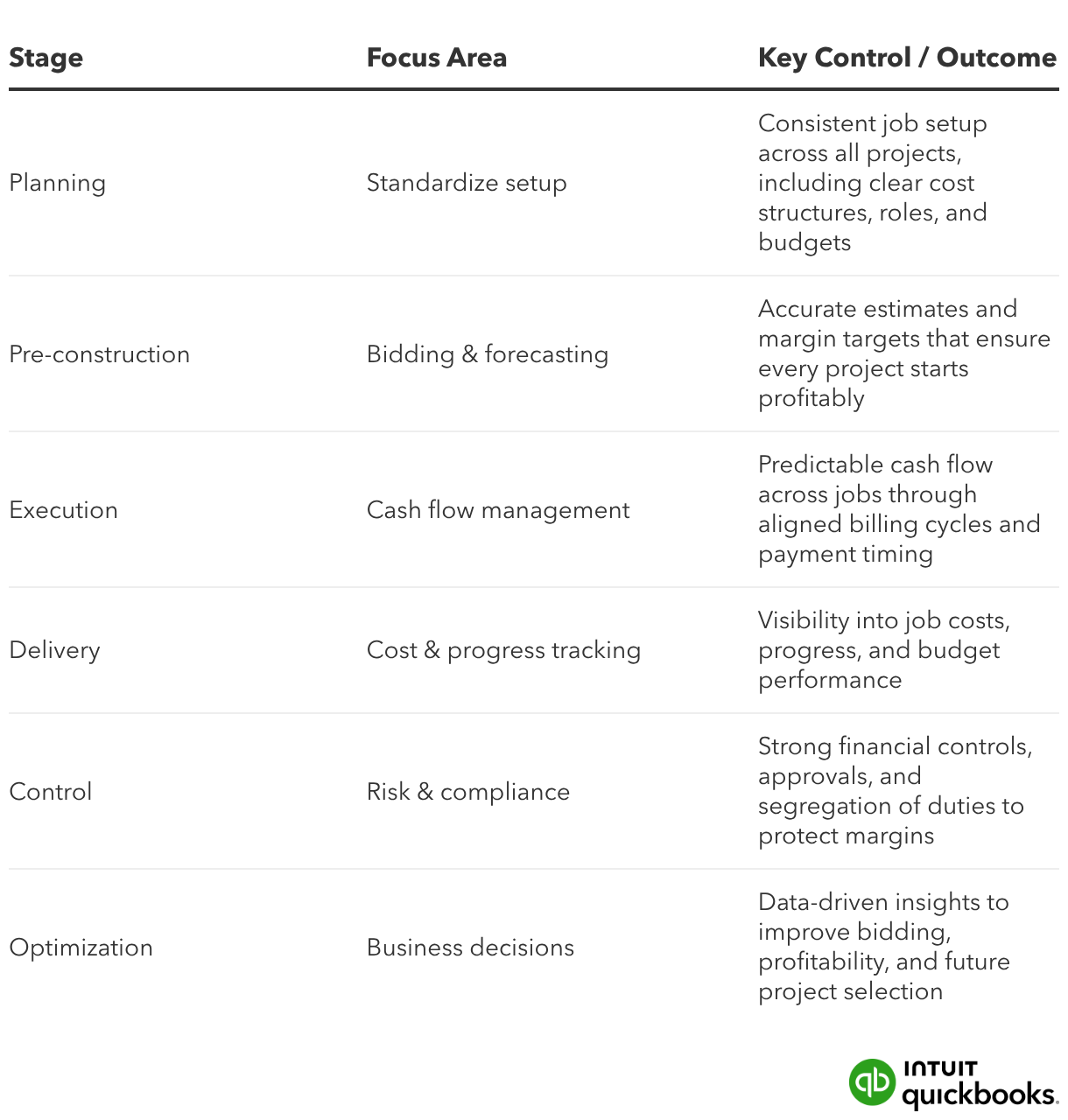
Before getting into specific workflows, it helps to step back and look at how strong construction teams structure the entire process. Managing multiple jobs successfully comes down to aligning planning, financial oversight, and execution from the start—so each project follows a consistent path, and performance stays visible at every stage.

The framework below outlines how construction firms manage multiple active projects without losing control as they grow:
Common challenges when managing multiple construction projects

Managing a handful of jobs is one thing. Managing ten, fifteen, or more at the same time introduces a different level of financial complexity. Costs move in parallel, timelines overlap, and small gaps in visibility can quickly turn into margin pressure or cash constraints.

For construction business owners and finance leaders, the challenge is staying ahead of performance across every project—not just reacting after the fact.

Here are some of the most common issues that come up at this stage:

Cash flow gaps between jobs

Overlapping projects often mean paying for labor and materials before payments are collected. Delays in billing or retainage can stretch that gap and put pressure on working capital. Cash tied up in one project can limit your ability to fund others, especially when timelines don’t line up.

Limited visibility into project costs and profitability

Costs spread throughout systems or tracked inconsistently make it difficult to see which jobs are actually performing well. Without timely job-level insight, overruns can go unnoticed until margins are already impacted.

Inconsistent processes across teams

Different project managers often follow different workflows for tracking expenses, submitting invoices, or reporting progress. That inconsistency leads to uneven data and slows down reporting.

Difficulty tracking performance in real time

Relying on delayed updates limits the ability to adjust mid-project. When data lags, decisions around staffing, purchasing, or timelines are often made too late to protect profitability.
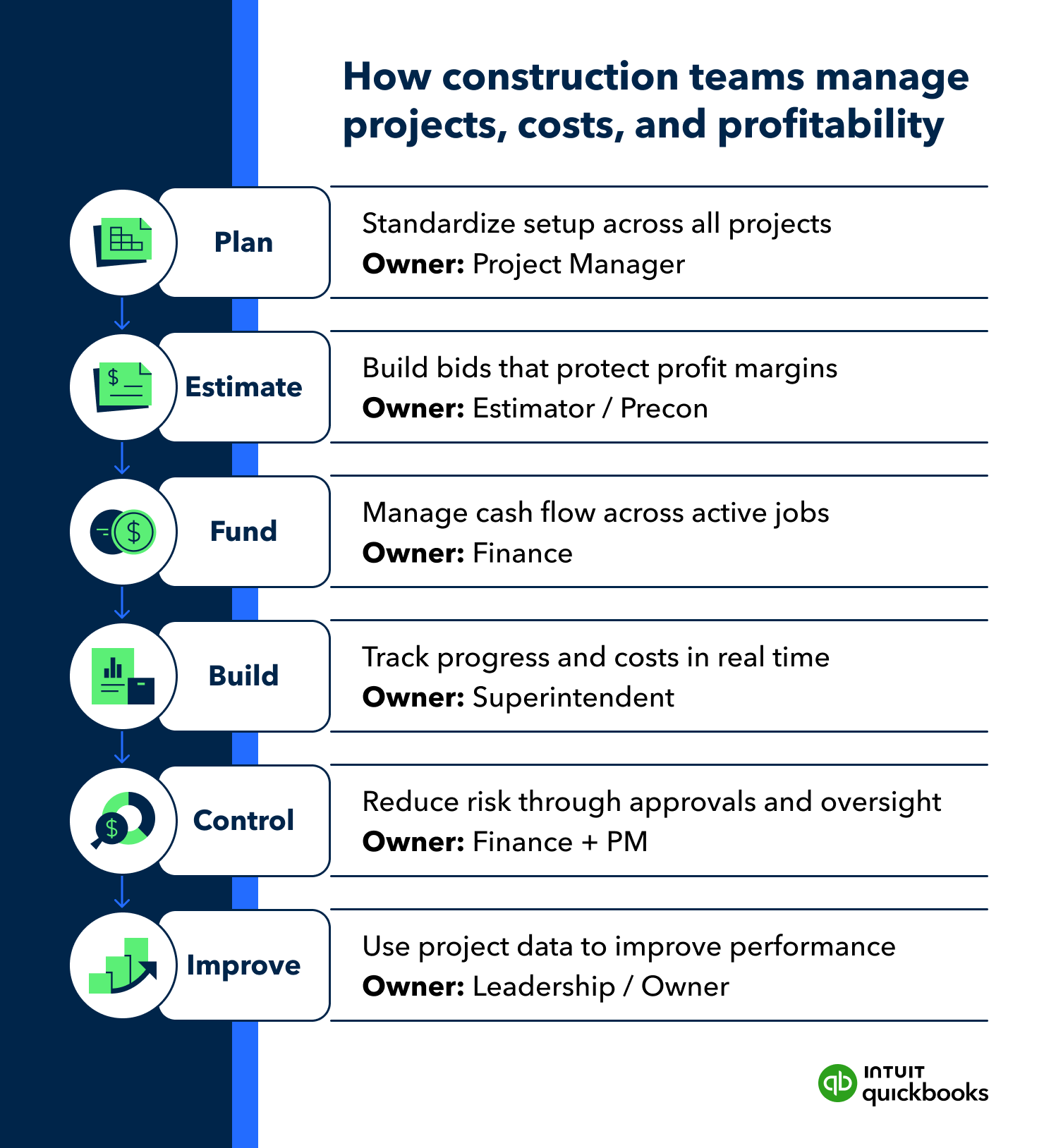
Construction project management stages and responsibilities

Standardize setup for managing multiple construction projects

Standardizing how each job is structured—job costs, billing schedules, and roles—creates consistent data. That consistency allows teams to review jobs side by side, monitor cash flow, and see where issues are starting to build.

As more jobs run simultaneously, an inconsistent setup can start to show up in the numbers. One project tracks subcontractors one way, another handles billing differently, and reporting stops lining up. A consistent structure across every project keeps financial data aligned and easier to act on.

Start by putting a uniform framework in place for how each job is set up and managed:

Flexible solutions for growing businesses

Get the tools you need to streamline your business and the insights to drive it forward. All in QuickBooks Online Advanced.

Centralize job costs, invoices, labor, materials, and billing schedules

Construction projects generate costs from multiple sources—crew labor, subcontractors, materials, equipment, and staged billing. Keeping all of that in one place ensures nothing slips through the cracks, even as more jobs run simultaneously. 

  • How to implement: Set up each job with the same structure for tracking labor hours, subcontractor invoices, material purchases, and progress billing. For example, track crew labor and subcontractor costs directly against the job instead of logging them separately, so you always have a complete view of total job costs.

Use consistent cost categories for all projects

Different job types may vary, but your cost structure shouldn’t. Consistent categories make it possible to compare jobs and spot trends.

  • How to implement: Create standard cost codes for categories like site prep, framing, electrical, plumbing, labor, and materials. Apply those same categories to every project so you can quickly see where costs are running high across multiple jobs.

Define roles, responsibilities, budgets, and profit targets upfront

Construction projects move fast, and unclear ownership can slow things down, especially when multiple teams are working at once. Financial accountability should be set before work begins to keep decisions moving and prevent gaps in oversight. 

Create a single system of record for all project financials

Spreadsheets, texts, and separate tools make it harder to trust the numbers. A centralized system keeps everything in sync.

  • How to implement: Track all job-related financial activity—costs, invoices, and payments—in one system. For example, instead of reconciling multiple spreadsheets at month-end, use a platform that updates job costs and financials as activity is recorded, so reports reflect current project activity.

Improve bidding and forecasting to win more profitable work

Stronger bidding starts with better financial inputs. As project volume grows, relying on rough estimates or outdated assumptions increases the risk of underpricing and margin loss. A more structured approach to forecasting helps ensure every project starts on a solid financial footing.

Use historical project data to improve cost estimates

Using historical project data leads to more accurate bids and fewer surprises during execution. It also captures cost patterns that emerge as project volume increases.

  • How to implement: Review completed jobs to compare estimated vs. actual costs for labor, materials, and subcontractors. Use those insights to adjust future bids—for instance, if electrical work consistently runs 10% over estimate, build that adjustment into new proposals.

Build labor, materials, and overhead benchmarks into bids

Benchmarking improves bidding consistency and reduces guesswork when estimating several jobs at once.

  • How to implement: Establish standard cost benchmarks for common activities like framing, site work, or finishing. Include a consistent approach for calculating overhead costs, such as supervision, equipment, and administrative expenses, so estimates reflect total project cost, not just direct spend.

Set margin targets before submitting proposals

Defining margin expectations upfront helps guide pricing decisions and project selection.

  • How to implement: Set a minimum acceptable margin for each project type before building the bid. Use that target to validate whether projected costs and pricing align—if not, adjust the scope or pricing before submitting.

Avoid underpricing or taking on low-profit jobs

Disciplined bidding protects capacity and keeps resources focused on profitable work.

  • How to implement: Evaluate each opportunity against your margin targets, timeline, and resource availability. If a project requires tight timelines and heavy subcontractor use but doesn’t meet your margin threshold, it may not be worth pursuing.

Manage cash flow across all active construction projects

Managing multiple jobs successfully depends on timing as much as totals. Cash can look strong on paper while still falling short in practice if payments and expenses don’t line up due to varying project timelines. Cash from one project often supports costs on another, and without a full view of all active jobs, it’s easy to miss emerging risk.

Track timing of incoming payments vs. outgoing costs

Gaps between inflows and outflows need to be tracked closely. You need to know when money is coming in, when it’s going out, and how those timelines differ from one job to the next.

  • How to implement: Map out expected customer payments alongside scheduled expenses. For example, if a large materials purchase is due before a milestone payment is collected, plan for that gap in advance.

Align payroll, supplier payments, and progress billing

Coordinating payment timing helps reduce strain on working capital. It also keeps cash moving between jobs more predictable as projects progress at different speeds.

  • How to implement: Time billing schedules with major cost phases. Use progress billing tied to project phases so incoming payments better offset labor, subcontractor, and material costs as they occur. For larger or commercial jobs, this may follow AIA-style invoicing, where billing is based on percent complete with a detailed breakdown of work.

Monitor current cash usage

Ongoing visibility into cash helps prevent one job from draining resources needed for another. It also highlights where cash is tied up in work that hasn’t been billed yet.

  • How to implement: Track cash position at both the company and project levels. For example, monitor how much cash each active job consumes each week. Adjust spending or billing priorities as needed.

Identify potential cash shortages early

Early visibility into cash gaps gives you time to pivot before they impact operations.

  • How to implement: Use short-term cash projections to flag upcoming shortfalls and review earned vs. billed (WIP) across projects to see where revenue is ahead or behind billing. If projections show a dip in available cash over the next 30–60 days, you can speed up invoicing, delay nonessential expenses, or adjust project timelines.

Watch project costs and progress

Financial data and project status visibility allow you to identify overruns early and protect your margins for each active job. It also highlights how projects are performing relative to each other, including which ones are using a disproportionate share of time, cost, or resources. Without timely reporting, critical adjustments often happen too late—after costs have already exceeded the budget.

Compare actual costs to budgets for labor, materials, and overhead

Regular cost comparisons help keep projects in scope with original estimates and prevent small gaps from growing.

  • How to implement: Review job cost reports on a set cadence and compare actual spend to budget for key cost areas like labor, materials, and overhead. If material costs begin trending higher than expected, adjust sourcing or purchasing decisions before they affect the entire project.

Monitor job progress alongside financial performance

Progress and spend need to be evaluated together to understand true job performance.

  • How to implement: Track percent complete against budget usage. If a project is halfway done but most of the budget is already spent, reassess staffing, sequencing, or scope before the gap widens.

Identify cost overruns early before they impact margins

Early signals give you room to respond before profitability is affected.

  • How to implement: Set checkpoints at key project phases to review cost trends. If labor or subcontractor costs begin to exceed expectations, make adjustments mid-project rather than waiting until closeout.

Maintain visibility across all active projects

A current view of your active jobs reveals where time, cost, and resources are starting to drift, so teams can rebalance effort where it’s needed most.

  • How to implement: Use a centralized and integrated financial reporting platform to review project performance at any point in time. This makes it easier to identify which jobs are on track and which require immediate action.

Flexible solutions for growing businesses

Get the tools you need to streamline your business and the insights to drive it forward. All in QuickBooks Online Advanced.

Strengthen risk management and financial controls

Strong financial controls can reduce common construction business errors. They can protect margins and help ensure appropriate tracking and approval of every dollar.

As project volume increases, informal processes create more exposure. More transactions, more vendors, and more team members involved in spending can introduce gaps without clear oversight. When several jobs are active, those gaps can affect more than one project at a time. Structured controls help maintain accuracy and accountability.

Separate responsibilities for approvals, payments, and recordkeeping

Dividing financial responsibilities reduces the risk of errors and unauthorized activity.

  • How to implement: Assign different team members to approve expenses, process payments, and record transactions. Apply role-based access controls so each user only has permission to view or act on the financial data relevant to their role.

Implement approval workflows for spending and change orders

Defined approval processes help control costs and prevent unplanned budget increases.

  • How to implement: Set approval thresholds for expenses and change orders based on project size or budget impact. For example, require additional sign-off for large material purchases or scope changes before committing costs.

Standardize billing and invoicing processes across jobs

Standardized billing practices improve cash flow and reduce delays or disputes, especially when projects bill at varying points in time.

  • How to implement: Use the same invoicing structure and schedule for all projects, such as progress-based or percentage-of-completion billing. This creates predictability for both your team and your clients.

Reduce risk of errors, leakage, and fraud

Stronger controls help catch issues early and maintain trust in your financial data.

  • How to implement: Establish regular reviews of transactions, approvals, and reconciliations. For example, periodically review vendor payments and job costs to identify duplicate charges, missed entries, or unusual activity.

Use project data to make better business decisions

Project-level data helps you focus on the work that drives profit and shows how jobs are performing relative to each other. Gain insights into resource-straining jobs and make more informed decisions about which jobs to pursue.

As more projects move through your pipeline, patterns start to emerge. The key is using that data intentionally—so past performance shapes future bids, staffing, and project selection.

Identify the most profitable project types and clients

Profitability often varies by project type, client, or scope, even if revenue looks similar.

  • How to implement: Review completed projects to compare and calculate profit margins by job type or client. For example, if tenant improvements consistently deliver higher margins than ground-up builds, you may prioritize similar work moving forward.

Spot low-margin or high-risk work

Not all projects are worth pursuing, especially if they consistently lead to cost overruns or delays.

  • How to implement: Analyze past jobs for patterns such as frequent change orders, tight timelines, or heavy reliance on subcontractors. If certain project types regularly underperform, adjust your bidding strategy or decline similar opportunities.

Use performance trends to improve estimating and forecasting

Historical trends help refine future estimates and reduce bidding uncertainty.

  • How to implement: Track how actual costs compare to original estimates. If labor or material costs trend higher in specific phases, incorporate those adjustments into future bids to improve accuracy.

Guide decisions on scaling workload or capacity

Data helps determine how much work your team can take on without impacting performance.

  • How to implement: Assess how current projects are performing relative to crew capacity and timelines. For example, if margins drop when too many jobs run at once, it may signal the need to pace new work or strategically expand your team.

Steps to improve how you manage multiple construction projects

Managing multiple construction jobs simultaneously requires more structure than spreadsheets, manual tracking, or disconnected systems can support. Gaps in visibility, inconsistent processes, and delayed reporting can put pressure on margins and cash flow.

The steps below focus on practical changes you can put in place quickly, then build on over time to strengthen oversight, improve consistency, and support better financial decisions.

Now

  • Track all projects in one system to reduce manual work and keep data consistent.
  • Standardize job setup and cost tracking so every project follows the same structure.

Next 30 days

  • Improve bidding using actual cost and margin data from completed projects.
  • Create consistent billing and invoicing processes to support steadier cash flow.

Next 90 days

  • Strengthen financial controls and approval workflows as activity increases.
  • Use project data to guide bidding decisions and focus on higher-margin work.

Ongoing

  • Review project performance regularly to catch issues early and protect margins
  • Refine estimates and processes using insights from completed jobs to improve future results

Manage projects more efficiently as you grow with QuickBooks

Managing more projects requires a system that brings financial data, workflows, and decision-making into one place. QuickBooks Online Advanced plus the construction module gives you visibility into job costs, phase-based budgets, and connected billing—so you can run tighter jobs and protect margins from day one.

Key capabilities that support growing construction businesses

  • Phase-based budgets and job cost tracking: Compare estimates to actuals as work progresses to catch overruns early and protect margins when multiple jobs are underway.
  • Custom report builder and dashboards: Build reports with KPIs and AI summaries to turn job data into clear, actionable insights.
  • AI-powered insights: Surface trends, highlight issues, and support faster decision-making without manual analysis.
  • Workflow automation and task management: Automate approvals, reminders, and follow-ups to keep projects moving and reduce back-office work.
  • Custom fields for project tracking: Capture job-specific details like phases, cost codes, or locations for more accurate reporting.
  • Advanced role-based permissions: Control who can view, approve, and manage financial data as your team grows.
  • Standardized estimates and proposals: Create detailed, consistent estimates and proposals to improve bid quality and win more work.
  • Progress and AIA-style invoicing: Bill based on project phases or percent complete to speed up approvals and keep cash flow steadier when billing spans multiple jobs.
  • Connected project financials: Manage estimates, change orders, invoicing, and reporting in one place with integrated construction workflows.
  • Automated reporting and dashboards: Keep financial data current with scheduled reports and updated performance views.

QuickBooks Online Advanced with the construction module gives you the structure to manage growth with confidence and maintain control from bid to closeout.

Run and grow your business, unlock deeper insights, and work like you have a larger team behind you

Recommended for you

Mail icon
Get the latest to your inbox
No Thanks

Looking for something else?

QuickBooks

From big jobs to small tasks, we've got your business covered.

Firm of the Future

Topical articles and news from top pros and Intuit product experts.

QuickBooks Support

Get help with QuickBooks. Find articles, video tutorials, and more.


