QuickBooks Blog
A woman filing her small business 1099
taxes

Small business 1099: Complete guide for 2026


Things to remember when filing small business 1099s:

  • Purpose: A small business 1099 is an information return used to report various types of income or payments to the IRS and the recipient.
  • Most common 1099 forms: You'll primarily use 1099-NEC to report independent contractor payments and 1099-MISC for miscellaneous costs like rent.
  • New 2026 threshold: Starting in 2026, the reporting threshold for most 1099 forms increases from $600 to $2,000.
  • Mandatory e-filing: If you file 10 or more information returns in aggregate, the IRS now requires you to file electronically rather than via paper. 2026 deadlines: For the 2025 tax year (filed in 2026), 1099-NEC forms are due to both the IRS and recipients by February 2, 2026, since January 31 falls on a Saturday.


Keeping up with tax compliance often feels like trying to hit a moving target. This year is no exception, as 2026 brings some of the biggest 1099 shakeups we’ve seen in decades. Whether you’re hiring a freelancer, paying rent for your office, or watching your business savings grow through interest, those 1099 forms are the essential link between your bank account and the IRS.

Recent legislation just shifted the goalposts by raising reporting thresholds and making digital filing the new standard for nearly every business. Mastering these updates optimizes your bookkeeping and protects you from 2026’s increased penalties.

In this guide, we’ll break down the latest 1099 rules, clear up the confusion between different form types, and share the best ways to automate your filing so you can spend less time on paperwork and more time growing your business.

Jump to:

How small business 1099 forms work

If small businesses pay certain expenses or receive certain forms of income, they will either need to send or receive a Form 1099. The IRS sets thresholds that will determine whether you need to fill out a 1099 form.


note icon

Important change for 2026: The One Big Beautiful Bill Act has raised the 1099-NEC and 1099-MISC reporting thresholds from $600 to $2,000 for payments made during the 2026 calendar year. However, if you are filing in early 2026 for work done in 2025, the $600 limit still applies.


Who needs a 1099?

  • Freelancers and contractors: Anyone who provides a service but isn't on your payroll.
  • Landlords: If you pay rent to an individual or partnership (rather than a large corporation).
  • Attorneys: Legal fees must be reported even if the law firm is incorporated.
  • Prize winners: If your business runs a contest or promotion.


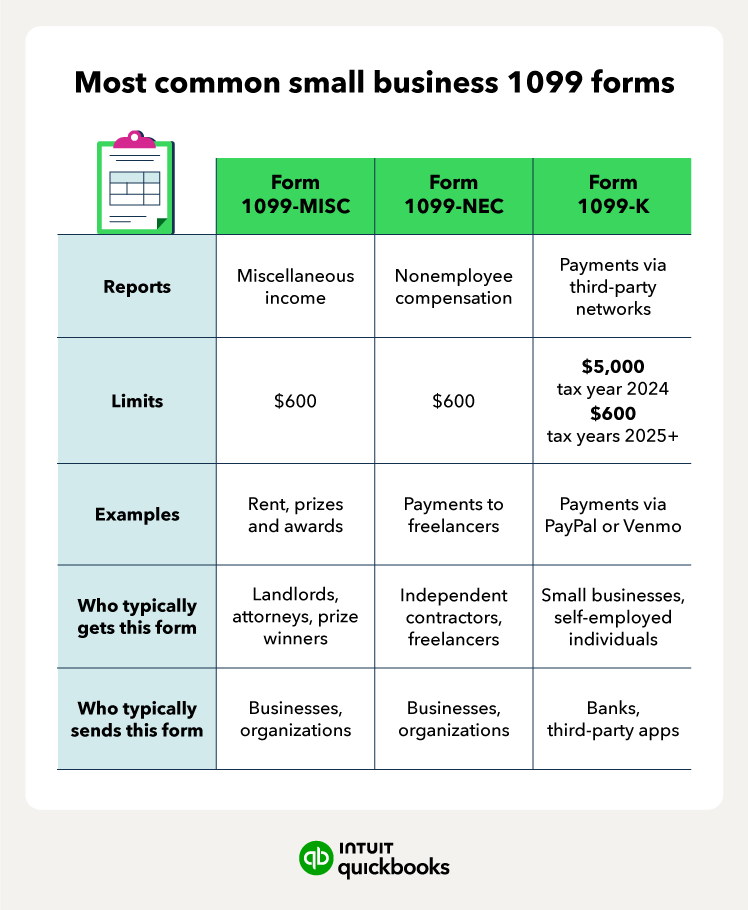
Most common 1099 forms

Types of small business 1099 forms

There are over 20 types of 1099 forms. Many small businesses will only come in contact with a handful.

The 1099-K threshold has reverted to $20,000 and 200 transactions. This is a relief for many who use apps like Venmo or PayPal for occasional business sales. 

However, if you pay a contractor via credit card or a payment app, you do not issue a 1099-NEC. The payment processor is responsible for the 1099-K, and issuing both could result in the contractor being double-taxed on the same income.

When you use an integrated solution like QuickBooks Bill Pay, the system automatically tracks payments against the new $2,000 threshold. Bill Pay automatically identifies who needs a form based on the bills you've already paid, so you don't have to manually tally up transactions at year-end.

Simplify your accounts payable with Bill Pay

Discover the smarter way to manage vendor payments, optimize cash flow, and stay on top of financial reporting—all from one integrated platform.

When do you need to send 1099-NEC forms?

When it comes to issuing 1099-NEC forms, you must send one to every non-corporate entity you paid for services over the threshold during the calendar year.

1099-NEC forms serve two purposes:

1. Reports nonemployee compensation payments to the IRS 2. Allows your contractor or freelancer to do their taxes.

If you are a small business with employees whom you issue a paycheck to and withhold payroll taxes, you won’t issue a 1099-NEC to them. Instead, you issue employees a W-2 tax form.

However, there are other 1099 forms your small business may need to send or receive that have nothing to do with your workers. Note that Form 1099-NEC is for nonemployee compensation.

Useful considerations for small business owners:

  • Entity check: You generally don't send 1099s to C-corps or S-corps, but you must send them to LLCs that are taxed as sole proprietorships or partnerships.
  • Service vs. product: 1099-NEC is for services. If you purely bought physical inventory from a vendor, a 1099 is typically not required.
  • Backup withholding: If a contractor refuses to provide a TIN, you may be required to withhold 24% of their pay and send it to the IRS.

Where can you get 1099 forms?

For 2026, the IRS has made electronic filing the standard. The 10-form rule means that if you have 10 or more total information returns (including W-2s and all 1099s), you must e-file.

  • Software solutions: Most small businesses use accounting software like QuickBooks, which allows for seamless e-filing.
  • IRS IRIS Portal: The IRS provides a free portal called IRIS (Information Returns Intake System) specifically for small businesses to e-file 1099s.
  • Paper forms: If you file fewer than 10 forms and prefer paper, you cannot simply print a PDF from the website. You must order official "scannable" red-ink forms from the IRS or buy them at office supply stores.

Note that before preparing your 1099 forms, you’ll need to collect W-9 tax forms from those you need to send 1099 forms to. The W-9 form is the equivalent of the W-4 form that employees complete. It contains key information, such as the Social Security or tax identification number.

If you use accounting software like QuickBooks, you can simply electronically file your 1099s.

Small business 1099 filing requirements

For filling out your 1099 forms, the process is similar no matter which form you need. You’ll find that there are several copies:

  • Copy A you’ll send to the IRS and
  • Copy 1 you’ll send to your state tax department (if required)
  • Copy B and Copy 2 go to the recipient, such as your independent contractor
  • Copy C is for your records

The recipient will use their copies to file their federal and state tax returns. The due date for filing 1099 forms is March 31 if done electronically (or Feb 28 if by paper).

A green screen with numbers on it on a table.

2026 filing calendar:

  • February 2, 2026: Deadline to send 1099-NEC and 1099-MISC to recipients.
  • February 2, 2026: Deadline to e-file or paper-file 1099-NEC with the IRS.
  • March 31, 2026: Deadline to e-file 1099-MISC (if not reporting NEC).

note icon

Unlike other 1099s, the 1099-NEC does not have a later e-filing date. Both the recipient copy and the IRS filing are due by the February 2nd deadline.


1099 filing tips for small businesses

Small businesses can make filing small business 1099 forms easier with a few best practices.

To ensure a smooth 1099 filing process, follow these steps:

1. Gather necessary information: Collect the information you’ll need from your small business tax prep checklist. This includes info from each payee or independent contractor. It’s best to have them complete a Form W-9 to get their info before doing business together.

2. Complete your forms correctly: Use the appropriate 1099 form, such as the 1099-MISC or the 1099-NEC, for nonemployee compensation. Fill in the required information for each contractor, including the amounts paid.

3. Submit to agencies: Send a copy of each completed form to both the contractor and the appropriate agency. This will be the IRS for most small businesses, but you may also need to send copies to your state tax department.

4. Be aware of deadlines: The deadline for many 1099 forms is March 31 if you e-file, but deadlines are usually sooner if you paper file. Also, the deadline for Form 1099-NEC is much earlier than others—on February 2.

5. Keep records: Maintain copies of the 1099 forms and any supporting documentation for at least three years. These records can help with tax audits or other purposes.

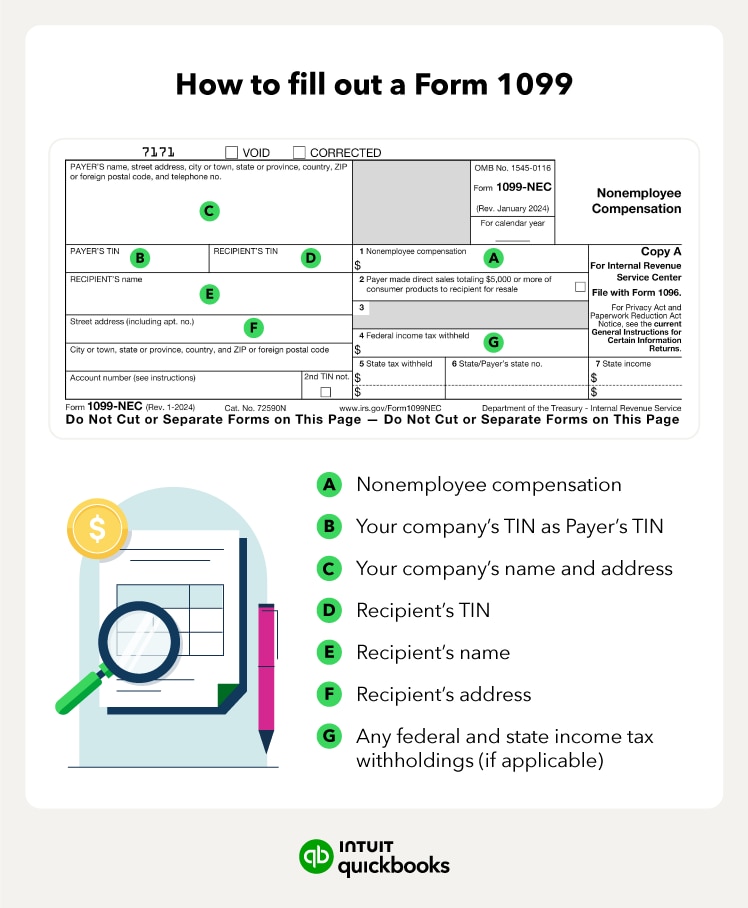
When filing ‌your 1099 form, here are some of the key sections you’ll need to fill out:

Step-by-step instructions on how to fill out a 1099 form

Having a filing system in order for your Form 1099s can ensure you’re in compliance with tax laws and avoid penalties. Remember to stay up-to-date on tax changes and consult with a tax professional if needed.

Find peace of mind come tax time

Master your 2026 1099s by tackling the new $2,000 threshold and electronic filing mandates head-on. Collect W-9s early and deploy modern accounting tools to turn a stressful tax season into a routine win. These forms help build your business’s financial transparency and keep you audit-ready.

Monitor mid-year IRS updates closely and consult a tax professional to lock in your compliance strategy. Accounting software with integrated payroll services like QuickBooks Payroll can make handling payroll and other accounting procedures easier, as well as filing 1099 forms.

Disclaimer *QuickBooks Online Payroll & Contractor Payments: Money movement services are provided by Intuit Payments Inc., licensed as a Money Transmitter by the New York State Department of Financial Services, subject to eligibility criteria, credit and application approval. For more information about Intuit Payments Inc.’s money transmission licenses, please visit https://www.intuit.com/legal/licenses/payment-licenses/*


Recommended for you

Mail icon
Get the latest to your inbox
No Thanks

Get the latest to your inbox

Relevant resources to help start, run, and grow your business.

By clicking “Submit,” you agree to permit Intuit to contact you regarding QuickBooks and have read and acknowledge our Privacy Statement.

Thanks for subscribing.

Fresh business resources are headed your way!

Looking for something else?

QuickBooks

From big jobs to small tasks, we've got your business covered.

Firm of the Future

Topical articles and news from top pros and Intuit product experts.

QuickBooks Support

Get help with QuickBooks. Find articles, video tutorials, and more.