QuickBooks Blog
A woman reviewing 2026 SUTA tax rates.
taxes

What is SUTA tax? 2026 rates and how to calculate them


What you need to know about SUTA taxes:

  • The State Unemployment Tax Act (SUTA) is a mandatory employer-paid payroll tax that funds unemployment insurance for workers who are laid off through no fault of their own.
  • While most states require only the employer to pay, workers in Alaska, New Jersey, and Pennsylvania also contribute a small percentage through employee withholdings.
  • Your total tax liability is determined by your state’s taxable wage base (a cap on subject earnings) and your specific experience rating based on past claims.
  • Paying your state taxes on time can trigger a 5.4% FUTA tax credit, significantly reducing your federal unemployment tax burden to just 0.6%.


Over half of Americans considered starting a business in 2025, according to QuickBooks' Entrepreneurship in 2025 report, so understanding business finances is crucial. Beyond employee payroll, entrepreneurs must navigate various tax obligations, including SUTA and FUTA taxes.

SUTA is the State Unemployment Tax Act, which requires employers to pay unemployment taxes into their respective state’s unemployment program. FUTA is for the Federal Unemployment Tax Act, which requires payments into the federal unemployment insurance program. The SUTA tax rates and taxable wage bases are subject to tax changes that can vary by state and year.

In most states, SUTA and FUTA do not show up on your employee’s pay stub because you (the employer) pay the full amount. Let’s look at exactly how SUTA taxes work, how to figure out your rate, and how to calculate them.

Jump to:

Your accounting, your taxes. All in one place.

Save time by seamlessly moving from books to taxes in QuickBooks, then file your return with unlimited expert help and your maximum refund.*

How SUTA tax works

SUTA is a payroll tax employers pay to the state. Money from SUTA taxes goes into a state unemployment fund on behalf of that state’s employees. The fund pays unemployment insurance to employees who become unemployed through no fault of their own, such as through company layoffs.

When you hear of someone collecting unemployment, they are likely drawing from SUTA funds. The SUTA tax rate companies pay varies depending on the state in which they do business. Your state’s labor department will provide guidelines for paying SUTA taxes.

Who pays SUTA tax?

In most states, the employer is solely responsible for paying SUTA tax. This means the tax is not deducted from employee wages. However, there are three states where employees also contribute to the state unemployment fund:

  • Alaska
  • New Jersey
  • Pennsylvania

note icon

Check your specific state's laws to understand who is responsible for paying SUTA tax. You can usually find this information on your state's labor department website.


Who is exempt from paying SUTA tax?

While most for-profit businesses are required to pay SUTA tax, there are some exemptions. These typically include:

  • Certain nonprofit organizations: Organizations that qualify for 501(c)(3) status may be exempt.
  • Some agricultural employers: The specific rules vary by state, but exemptions may exist for agricultural employers with a limited number of employees or those who pay less than a certain amount in wages.
  • Household employers: In some states, you may not have to pay SUTA tax for domestic workers like nannies or housekeepers if you pay them less than a specified amount.
  • Self-employed individuals: If you are self-employed, you are generally not required to pay SUTA tax. However, you also won't be eligible to receive unemployment benefits if you lose your income.

Now that we've covered who is responsible for paying SUTA taxes, let's dive into how to calculate your SUTA tax liability.

Calculating your SUTA tax

While all employers must pay the SUTA tax, the exact amount each company must pay varies. Currently, two factors determine your SUTA tax: your company’s taxable wage base and SUTA tax rates.

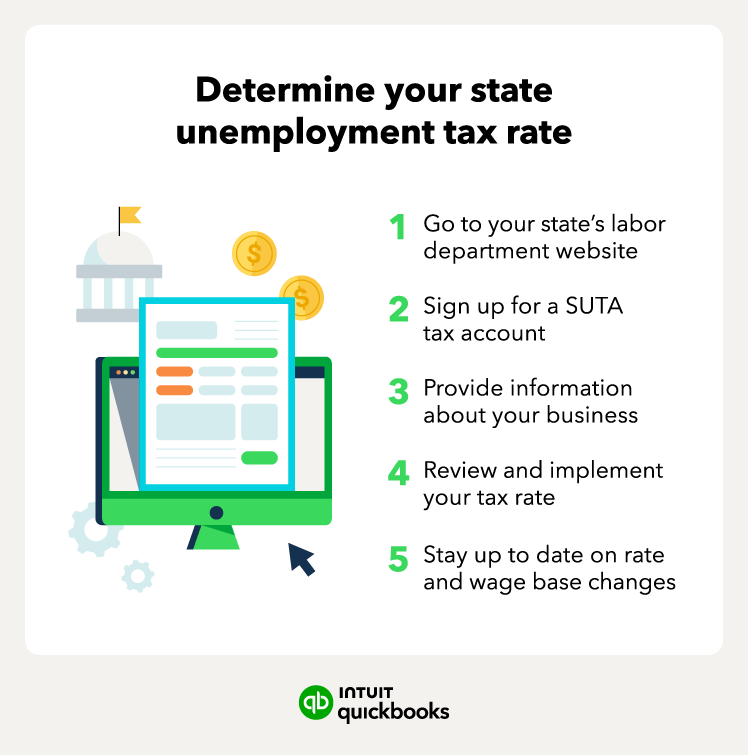
Determine your state unemployment tax rate

SUTA tax rates in 2026

To accurately calculate your SUTA liability, you must identify two key factors: your state's taxable wage base and your specific employer tax rate.

1. The taxable wage base

The taxable wage base is the maximum amount of an employee’s annual earnings that is subject to SUTA tax. Once an employee’s year-to-date earnings surpass this limit, you no longer pay SUTA tax on that individual for the remainder of the calendar year.

Because each state manages its own unemployment insurance fund, these limits vary wildly. For example, in 2026:

  • California remains at the federal minimum of $7,000.
  • Colorado has increased its base to $30,600 to maintain fund solvency.
  • Washington leads the nation with a base of $78,200.

2. Your SUTA tax rate

While states set a statutory range (the minimum and maximum rates shown in the table below), your specific rate is usually assigned annually based on your "experience rating." This rating is determined by how many former employees have filed for unemployment benefits against your account.

Note: If you are a new employer, you will typically be assigned a "New Employer" rate (often between 1.0% and 3.5%) until you have enough history to receive an experience rating.


note icon

Companies often receive a FUTA tax credit for the unemployment contributions they pay to the state.


SUTA vs. FUTA tax

Properly calculating and paying SUTA taxes is crucial, as it also impacts the amount of FUTA tax a business must submit. Each business receives a credit toward FUTA taxes based on SUTA tax payments.

In general, employers must pay 6% of gross wages, up to a cap of $7,000 per worker, to fund FUTA for each employee. In all 50 states, employers pay the same 6% rate for every worker, but the federal government may change the rate in future years.

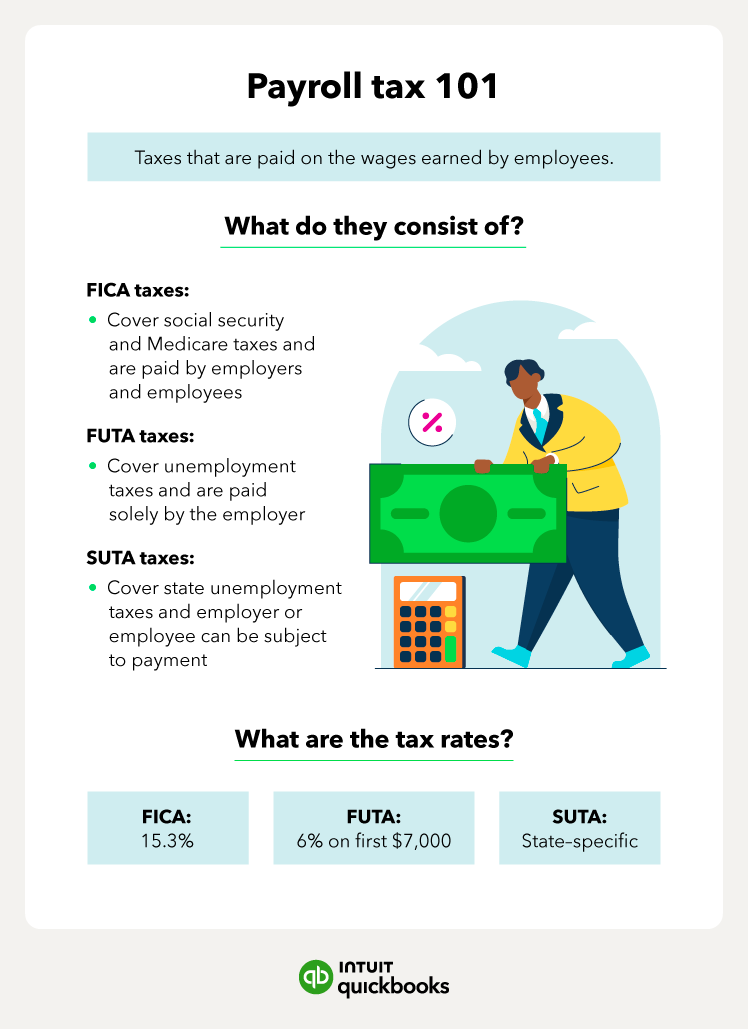
Note that SUTA and FUTA taxes are also known as unemployment taxes. Meanwhile, FICA taxes make up Social Security and Medicare taxes.

An illustration of payroll taxes, such as FICA, FUTA, and SUTA taxes.

How to file and pay SUTA tax

Each state has its own process for filing and paying SUTA taxes. Generally, you will need to:

  • Register with your state's labor department: This typically involves providing information about your business, such as your Employer Identification Number (EIN) and the number of employees you have.
  • File SUTA tax returns: Most states require quarterly filing, but some may have different deadlines. You will need to report your total wages paid and calculate the amount of SUTA tax owed.
  • Pay SUTA taxes: You can usually pay online, by mail, or by phone. Make sure to pay by the due date to avoid penalties and interest.

You can find specific instructions and forms on your state's labor department website.


note icon

Set reminders for SUTA tax deadlines to avoid late payments and penalties. Consider using a Payroll AI Agent in QuickBooks to help you manage your SUTA obligations.


SUTA tax credits

If you file and pay your SUTA taxes on time with the state, you may be eligible for a tax credit when it comes time to file your annual FUTA taxes. You can report the SUTA tax you pay using Form 940 to get the tax credit—as long as your business is not located in a credit reduction state.

A credit reduction state owes money to the federal government’s unemployment fund to pay their workers’ unemployment insurance. You can check the Department of Labor’s updated list of credit reduction states.

FUTA offers a maximum 5.4% tax credit to companies that pay their state unemployment contributions on time. When you subtract that 5.4% FUTA credit from the standard 6% rate, this greatly reduces the amount of FUTA tax your company owes to a much lower 0.6%.

Pay your team and manage benefits with the #1 payroll service provider. Explore QuickBooks Payroll plans.

Tips on keeping your SUTA tax rate low

Your company may not be eligible for the FUTA tax credit if you don’t file and pay its SUTA taxes on time. Here are some tips to keep your SUTA tax rate as low as possible:

  • Know your state’s filing schedule: Many state unemployment tax programs require tax deposits each quarter, which is similar to the FUTA requirements.
  • Reduce employee turnover: To improve employee retention, find workers with diverse skill sets who you can transfer to new departments or locations as the needs of your business change.
  • Implement human resource policies: Clearly define the responsibilities of HR and payroll departments to ensure you’re keeping detailed documentation with employees.

Good HR practices allow you to lay out expectations of employees, as well as keep track of potential issues with employees. If an employee files a wrongful unemployment claim, use your documentation to improve the chances of getting the claim denied and thereby avoid paying out unemployment insurance.


note icon

Conduct regular performance reviews and offer competitive benefits to help retain employees and minimize turnover. This can help keep your SUTA tax rate low.


Find peace of mind come tax time

Unemployment taxes like SUTA taxes are an important component of payroll taxes. While payroll is notoriously complicated, you can easily navigate the various tax dates, rates, and payments with a good system in place.

Luckily, payroll software, like QuickBooks Payroll, offers a full suite of payroll tools for businesses of any size. With software to simplify your SUTA and FUTA calculations, you can get back to doing what you do best—running and growing your business.


Disclaimers:

QuickBooks Online Payroll & Contractor Payments: Money movement services are provided by Intuit Payments Inc., licensed as a Money Transmitter by the New York State Department of Financial Services, subject to eligibility criteria, credit and application approval. For more information about Intuit Payments Inc.’s money transmission licenses, please visit https://www.intuit.com/legal/licenses/payment-licenses/


Recommended for you

Mail icon
Get the latest to your inbox
No Thanks

Get the latest to your inbox

Relevant resources to help start, run, and grow your business.

By clicking “Submit,” you agree to permit Intuit to contact you regarding QuickBooks and have read and acknowledge our Privacy Statement.

Thanks for subscribing.

Fresh business resources are headed your way!

Looking for something else?

QuickBooks

From big jobs to small tasks, we've got your business covered.

Firm of the Future

Topical articles and news from top pros and Intuit product experts.

QuickBooks Support

Get help with QuickBooks. Find articles, video tutorials, and more.