QuickBooks Blog
Image Alt Text
Bookkeeping

Balance sheet example and template: How to read and prepare one in 2026


Key takeaways:

  • Using a balance sheet example helps show what your business owns, what it owes, and how much equity remains.
  • Reviewing your balance sheet regularly helps you understand your financial health and spot potential issues before they grow.
  • Every balance sheet follows the equation Assets = Liabilities + Equity and must always balance.
  • Templates, accounting software, and AI accounting tools can reduce manual work and help keep balance sheets up to date.


According to recent QuickBooks research, the average US small business is chasing $17,500 in late payments. Without a clear balance sheet example, these "hidden" assets and the debts you owe can easily slip through the cracks.

A balance sheet is an important financial statement that summarizes your business's financial situation and helps you evaluate performance and your ability to meet financial obligations.

This guide will show you what a balance sheet is, how to use it, and how it can help you manage your business finances more effectively. We’ll also provide you with a balance sheet example and template you can use for your own business.

Jump to:

What is a balance sheet?

A balance sheet is a financial statement that lists a company’s assets, liabilities, and equity. The purpose of a balance sheet is to provide a summary of the entity’s financial position at a specific point in time.

The balance sheet is also known as a statement of financial position. Businesses typically produce balance sheets on a monthly, quarterly, or annual basis, depending on their needs. They are valuable business tools that can help you make financial decisions, so it’s useful to refer to them throughout the year.

Balance sheet example

Every company's balance sheet will look slightly different, but they should all include similar information, including:

  • Assets: Includes current assets and fixed assets
  • Liabilities: Such as accounts payable and taxes payable
  • Shareholders’ equity: Like common stock and retained earnings

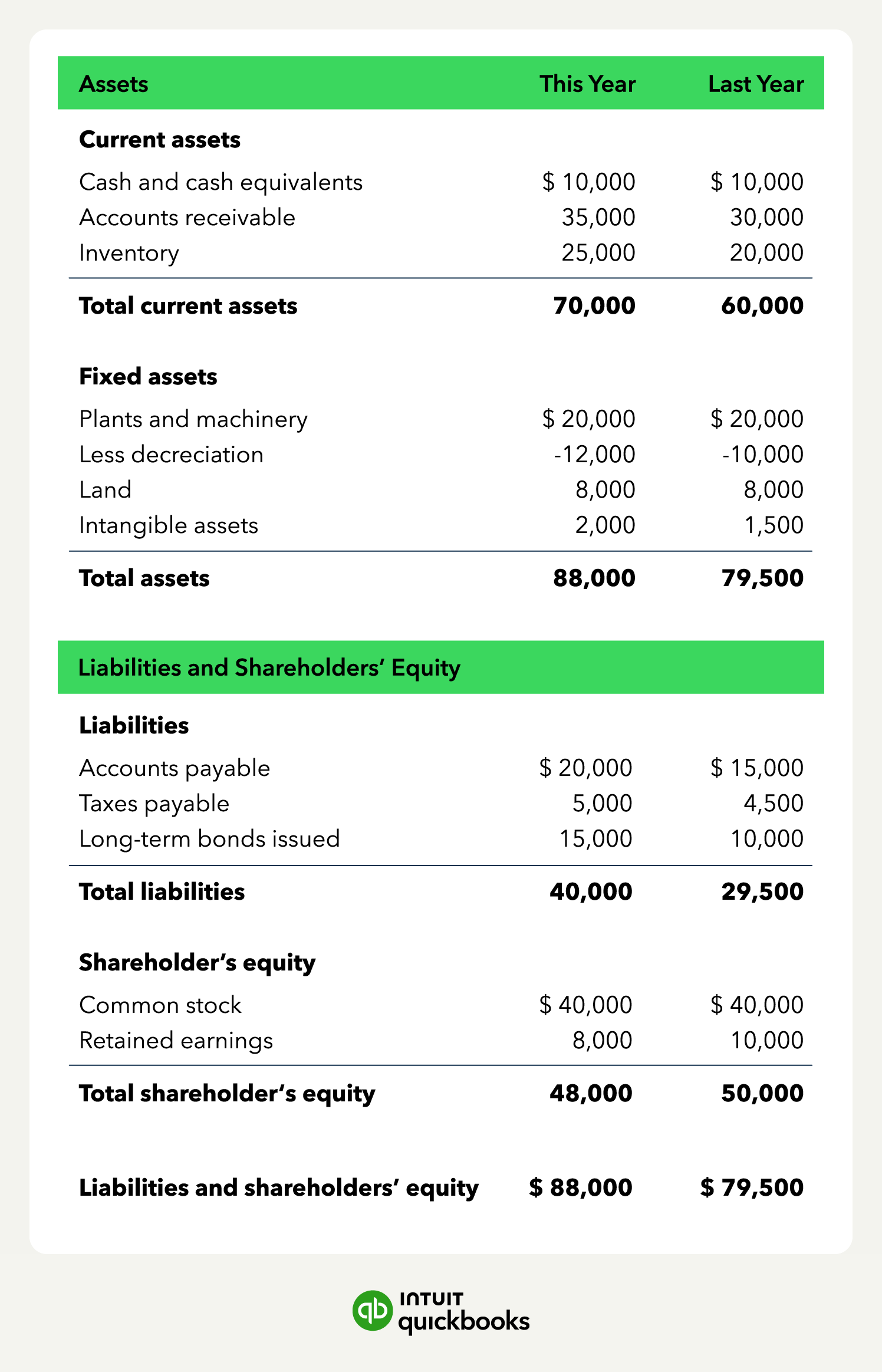
Let’s take a look at an example of a balance sheet so you can better understand what these statements include and how that information can benefit your business.

A balance sheet example showing a business's assets, liabilities, and equity.

Balance sheets aren’t the only documents you’ll want to prepare to gain a better understanding of your financial situation. You’ll also want to look at your income statements and cash flow statements. Managing these reports regularly takes time, especially as your business grows.

AI and Experts: Working for You.

AI agents automate bookkeeping, payroll, bill pay, and sales tax—working with your experts or accountant saving hours each week.

The 3 key components of a balance sheet

Balance sheets are designed to give you insight into your business’s financial condition. They do this by looking at three key components: Assets, liabilities, and equity. Let’s look at each of these components and what they tell you on a balance sheet.

Assets

Assets are resources a business owns and can use to produce economic value. Common business assets include cash, different types of inventory, and equipment.

Assets fall into several categories. Categorizing assets correctly is important for a clear understanding of your company’s financial position and proper accounting.

Assets fall into several main categories, including:

  • Liquid vs. illiquid assets: Liquid assets can be quickly converted to cash, usually within a year or less. Illiquid or long-term assets are those that can’t be easily converted into cash.
  • Tangible vs. intangible assets: Tangible assets are physical assets that the company owns, such as land, buildings, and inventory. Intangible assets are intellectual property, like your domain name, patents, and trademarks.
  • Operating vs. nonoperating assets: Operating assets are those that are necessary for regular business operations. Nonoperating assets are nonessential but still generate income or provide a return.
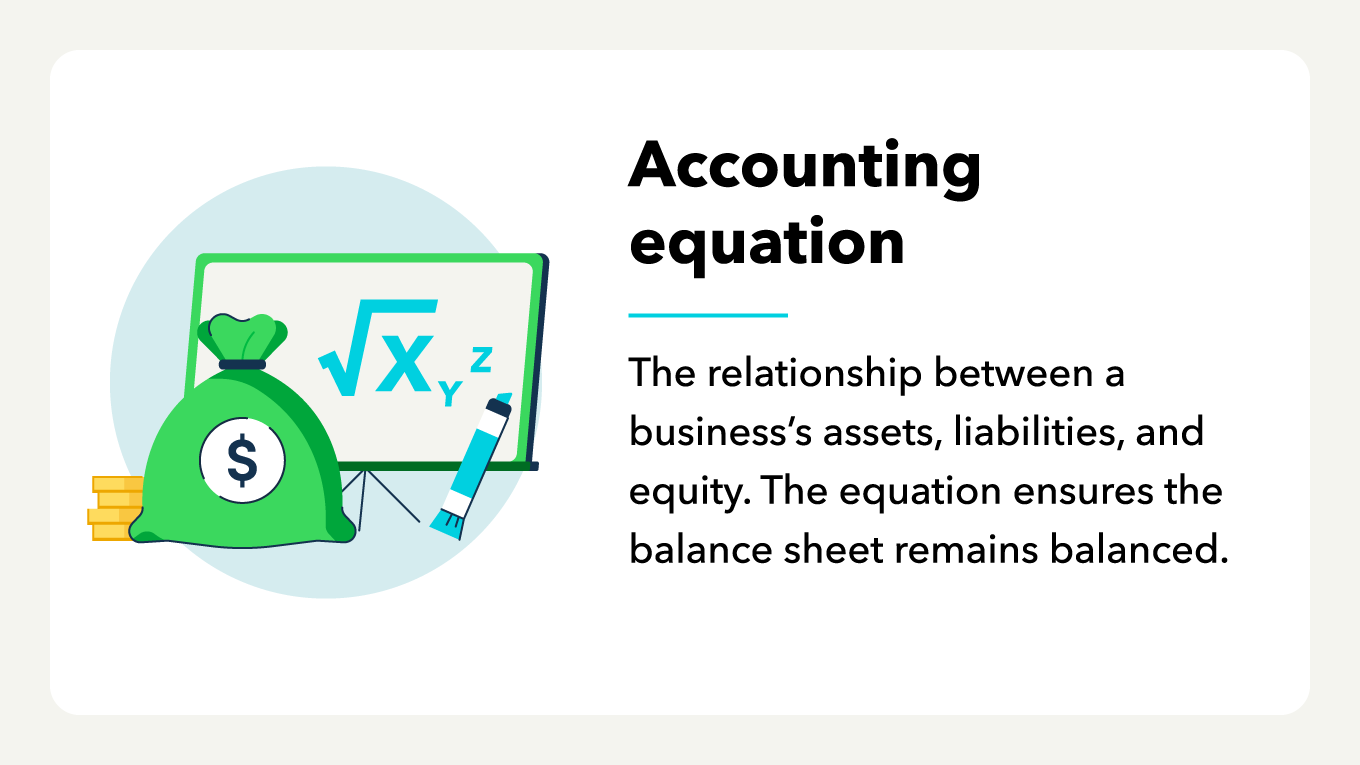
A graphic showing accounting equation definition

Liabilities

Liabilities are a business’s owed financial obligations. Some common examples of business liabilities are loans and wages.

Categorizing your company’s liabilities is less complex than classifying assets because liabilities are either current or noncurrent:

  • Current liabilities are short-term debts—generally meaning they can be paid off within the year. Rent, utilities, employee pay, and other accounts payable are examples of current liabilities.
  • Noncurrent liabilities are long-term liabilities or debts—those that cannot be paid off within the year. Deferred tax liabilities, bonds payable, and pension benefits you’ll owe employees are examples of noncurrent liabilities.

QuickBooks Online users have year-round access to live experts who can give personalized answers to bookkeeping questions and help manage their finances.

Equity

Equity is the value of the business owner’s interest in the company if all assets were liquidated and all liabilities paid off. To calculate equity, subtract liabilities from assets. Equity can also be referred to as owners’ equity, shareholders’ equity, or stockholders’ equity.

Balance sheet calculation explanation

Balance sheets follow a simple accounting equation that must always balance. The goal is to weigh your total liabilities against your total owner’s equity to see how much you truly own.

The calculation provides a quick snapshot of your company’s financial situation at a point in time. Since your liabilities and equity can change from month to month, your total assets will change accordingly.


note icon

If your balance sheet does not balance, it usually means something is missing or misclassified. Common issues include forgetting accrued expenses, mislabeling owner contributions, or leaving out depreciation. Double-check your inputs before assuming the data is incorrect.


Balance sheet equation and example

The balance sheet equation, often referred to as the fundamental accounting equation, is simple:

Assets = Liabilities + Owner’s Equity

You’ll use this equation to get detailed insight into your company’s financial situation.

Example: Say you run a coffee shop with a total owner’s equity of $15,000. That equity is what you own outright and can include items like furniture, real estate, or equipment. After crunching the numbers, you believe you have $19,500 in total assets. This includes cash in the bank, money that customers owe you, and your inventory.

You also have the following liabilities:

  • Accounts payable to suppliers: $1,500
  • Short-term business loan: $3,000

Using the balance sheet equation, you can calculate your total assets.

Assets = Liabilities ($1,500 + $3,000) + Owner’s equity ($15,000) Assets = $4,500 + $15,000 Assets = $19,500

In the end, the assets totaled on your balance sheet should match your initial asset calculation. If the balance sheet doesn’t balance, you may need to examine your assets more closely or re-run the equation to ensure you account for everything.

Balance sheet building blocks example.

Reading and understanding a balance sheet

Reading a balance sheet and analyzing the information it presents is fairly straightforward. Here are the steps you’ll need to take:

1. Locate the three main sections of the balance sheet. Balance sheets are organized into three sections. The left or topmost section includes assets, and the right or bottom section includes liabilities and equity.

2. Examine your assets. Check the balance sheet for your assets. This will include your liquid assets (assets you can turn into cash immediately) and nonliquid assets (assets that you need to hold to realize their full value).

3. Look at your liabilities. Look at your current liabilities to see how much short-term debt you have. Then, look at your noncurrent liabilities, which allows you to see how much long-term debt you have and where the debt or liability lies.

4. Review your company’s equity. Your total business equity lets you determine the current owners’ equity in the business.

5. Make sure the numbers match. At the very bottom of the balance sheet, you’ll see totals for assets and liabilities plus equity. Verifying that these numbers match allows you to confirm that the data in your balance sheet is correct.

6. Watch for trends. Over time, you’ll want to watch for trends in the data shown in your balance sheets. This will help you figure out where your business stands and what you may need to do to overcome financial challenges.

Balance sheets need to be updated regularly and should be used often to assess the financial health of your business.

How to create a balance sheet in 6 steps

You should tailor a balance sheet to your business. This means customizing the report and the information you include within it. However, creating a balance sheet is fairly simple—here’s how to do it in six steps:


note icon

Don't wait until tax season to pull these numbers. Close your books monthly and review your balance sheet to catch small discrepancies before they become costly issues.


1. Determine your dates

Remember, balance sheets show your financial position for a set time. This means you’ll need to determine the exact dates you want to examine. Are you going back one month, three months, or the entire last year? This will help you decide what data you need to include.

2. Add your assets

The assets listed on your balance sheet should be balanced at the end of the equation. This means you’ll need to total up the assets you have. You should subtotal liquid and nonliquid assets individually, then total them at the bottom of the assets section.

The assets you factor in should include items like inventory, equipment (even if you’re still paying it off), cash in the bank, investments, and other similar items.

3. Add liabilities

Your liabilities are your business's debts. They can include loans, credit card debt, interest owed, wages, and other similar expenses. You should subtotal current and noncurrent liabilities individually and total them together at the bottom of the liabilities section.

4. Determine equity

You’ll need to figure out how much equity you have in your business for the period of your balance sheet. To determine your equity, you’ll want to total up items such as stock and retained earnings, among other items.

5. Add liabilities and equity together

To make sure your balance sheet balances, you’ll need to add the total liabilities for the period to your total equity. This will give you your total assets based on the information you enter into the equation. Present this total on your balance sheet.

6. Compare the total assets with the total liabilities and equity

The total assets you calculated with the balance sheet should equal the total assets you identified before running the balance sheet. If they, well, balance, then the balance sheet has been completed correctly.

It’s important to note that the balance sheet should always balance. However, there are instances where it might not be because a mistake has been made in the process. If your balance sheet doesn’t balance, you should double-check your data and calculations.

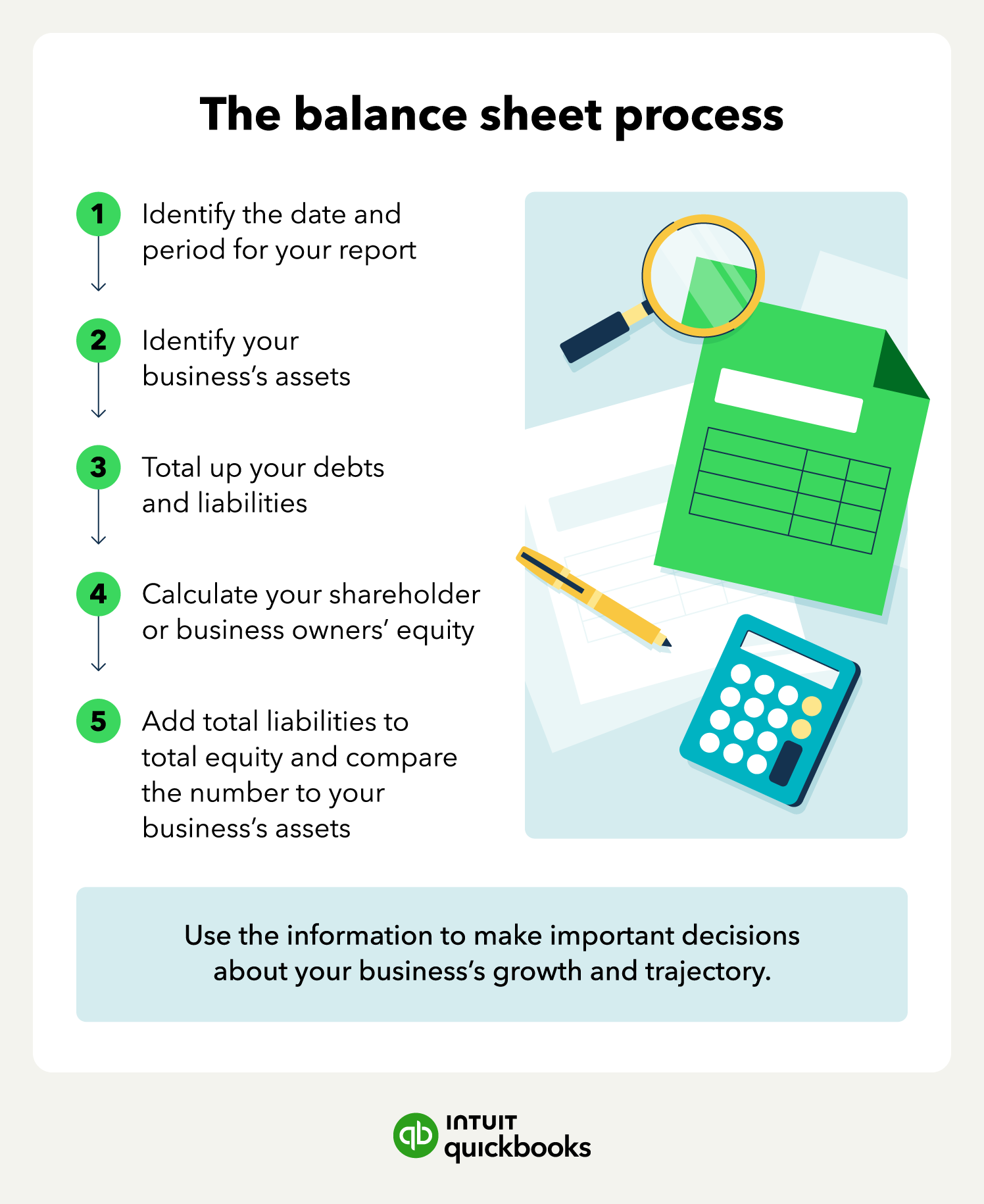
The process of creating a balance sheet.

Balance sheet template

For many business owners, using accounting software to automate the creation of balance sheets is easier. But there may be a time when creating a balance sheet by hand can be beneficial.

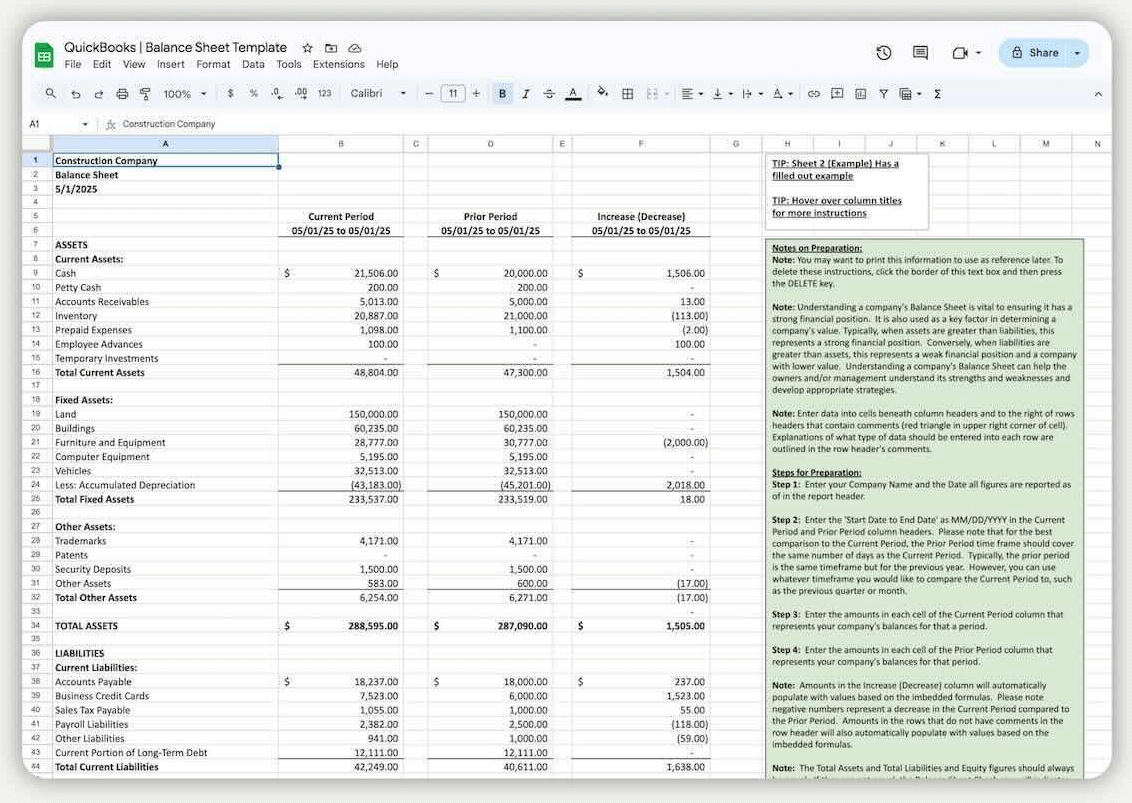
Instead of struggling with Excel, use our free balance sheet template to simplify the process. Maintaining your business’s financial health is a key component of long-term success.

A filled out balance sheet template.

Balance sheet uses for small businesses

The balance sheet is meant to give you a clear view of what your business owes and owns. The insights you can gain from the balance sheet—along with other financial statements—allow you to make informed financial decisions as your business grows.

There are several ways to utilize balance sheets, such as:

  • Determine your ability to meet financial obligations: You can calculate your company’s current ratio or days cash on hand to help. The current ratio provides insight into whether you can meet your short-term debt payments. The days cash on hand ratio tells you how many days’ worth of expenses you can cover given your financial position.
  • Compare year-over-year or period-over-period finances: Doing so allows you to see how your financial circumstances have changed and identify areas for opportunity and improvement.
  • See your business’s net worth: Potential buyers want to know what a business is worth before making an offer. Your balance sheet can give you a good estimate of your company’s worth before you put it on the market—and acts as the proof to back it up.
  • Apply for credit: Lenders will want to verify that you can pay back your debts, whether you’re taking out a new line of credit or a term loan. They can use your balance sheets to better understand your business’s financial position and current debts.

Note that you may also need your balance sheet when completing your taxes or providing financial information to regulatory authorities. In some cases, businesses are required to submit their balance sheet and other financial statements for tax purposes.

Spend more time growing your business

Balance sheets can tell you a lot about your business’s performance and give you a real-time picture of your financial health. Use a balance sheet example to set yourself up for success, and download our free template to put your first balance sheet together manually.

Get started with QuickBooks accounting software to simplify balance sheet creation and make it easier to compile accurate financial information. You can also use our AI-accounting tools to automate data entry and keep your balance sheet up to date.


    Recommended for you

    Mail icon
    Get the latest to your inbox
    No Thanks

    Looking for something else?

    QuickBooks

    From big jobs to small tasks, we've got your business covered.

    Firm of the Future

    Topical articles and news from top pros and Intuit product experts.

    QuickBooks Support

    Get help with QuickBooks. Find articles, video tutorials, and more.