QuickBooks Blog
A business owner using a barcode inventory system.
Midsize business

How to leverage a barcode inventory system to drive growth


Barcode inventory system meaning: A barcode inventory system is a method that helps businesses track inventory faster and easier. When a product has a barcode, it’s scanned with a handheld mobile device and synchronized with inventory management software in real time.


If your business is in a rapid growth stage, you already know that inventory tracking gets harder. Managing thousands of SKUs across multiple store locations and online channels introduces complexity that standard spreadsheets can’t keep up with. What used to be a quick review now requires coordination between store operations, e-commerce, and finance. Without clear, up-to-date visibility, minor inventory issues can lead to delayed orders, stockouts, and unnecessary margin loss.


A barcode inventory system gives you a more reliable way to manage that complexity. It automates inventory tracking as products move through receiving and fulfillment, improving accuracy and keeping stock aligned across locations.

In this post, we’ll break down how barcode inventory systems work, where they add the most value as operations scale, and what to consider when selecting and implementing a system that can support growing volume and complexity.

Jump to:

Types of barcodes

A barcode is simply a unique graphic with numbers or text, just like the ones you see on products at the supermarket, in warehouses, or in fulfillment environments. The graphic represents data visually. When a barcode is scanned, the data from that product is instantly transferred to a computer or inventory management system.

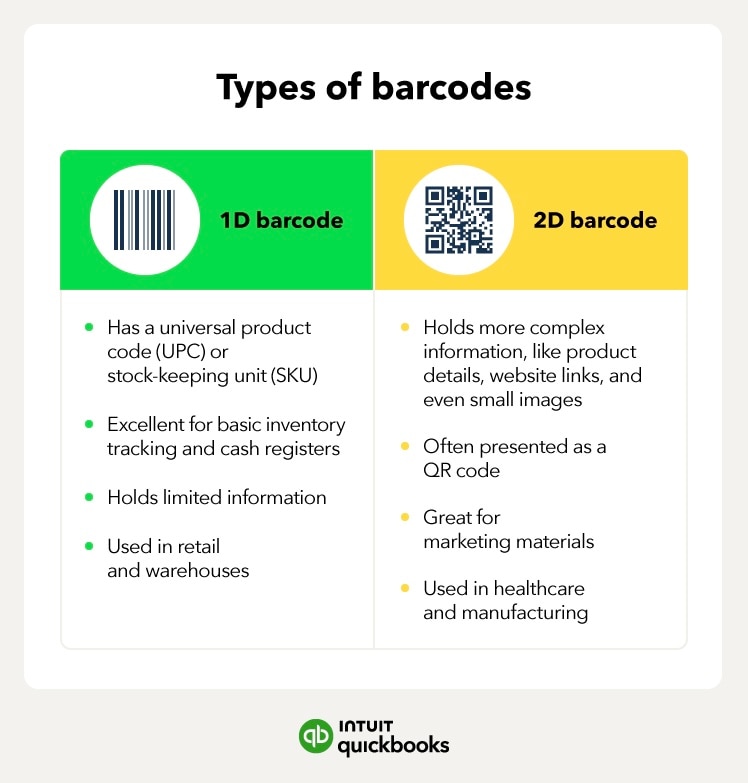
There are two types of barcodes:

The types of barcodes, such as 1D and 2D barcodes.

1D barcode 

The 1D barcode is the one you’re likely most familiar with. These are the black-and-white stripes on most products in grocery stores, department stores, retail stockrooms, and warehouse shelves. 1D barcodes are pretty straightforward, typically containing the product’s unique code, like a universal product code (UPC) or stock-keeping unit (SKU). 

1D barcodes are excellent for basic inventory tracking, supply chain management, and point-of-sale systems. However, they can only hold a limited amount of information.

2D barcode 

2D barcodes track more complex information, like product details, batch or lot data, small images, and links to your website or internal systems. A 2D barcode can come in many different shapes, but you’ve probably seen them most in the form of a QR code.

2D barcodes are commonly used in fulfillment operations, manufacturing workflows, and supplier traceability, in addition to marketing materials like direct mailers and brochures. They’re also often used in the healthcare and manufacturing industries.

Businesses with more complex inventory operations often use a combination of 1D and 2D barcodes to support different workflows across warehouses, sales channels, and suppliers.

How barcode inventory systems work

Whether you use 1D, 2D, or both barcodes, a barcode inventory system can help you manage and track all types of inventory in your business. This includes large product catalogs across multiple locations or sales channels.

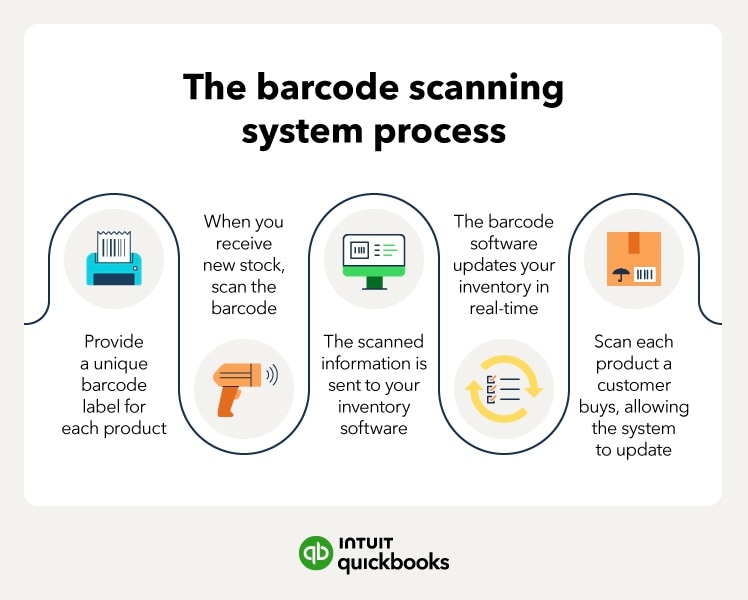
Here’s how it works:

  1. Each product in your inventory gets a unique barcode label. 
  2. When you receive new stock, scan the barcode using a handheld scanner or smartphone app. 
  3. The scanned information is instantly sent to your inventory management software.
  4. The barcode inventory software updates your inventory count in real time.
  5. When someone buys a product, you scan it again. This time, the system automatically deducts it from your inventory, helping keep counts accurate even as order volume increases.
The barcode scanning system process.

For businesses managing high transaction volumes, fast-growing SKU counts, or inventory spread across multiple locations, a barcode inventory scanning system helps you monitor your stock so you don’t have to do it yourself.


note iconStock discrepancies are common when taking inventory due to human error, like misplacing items and double counting. Inventory barcode systems reduce these discrepancies by automating data entry, eliminating the need for manual entry.

Barcode inventory system advantages

There’s no shortage of benefits when adding a barcode inventory system to your business. For scaling organizations, the value goes beyond efficiency and supports stronger operational control and decision-making. Here are some of the main ones: 

Improve inventory accuracy at scale: Sometimes, we make mistakes, especially when performing repetitive and tedious tasks like typing in long product codes. Barcode scanning eliminates the risk of typos and data entry errors. It helps maintain accurate inventory records even as SKU counts, order volume, and locations increase.

Enable real-time visibility across operations: Barcode systems update your inventory every time items are scanned. Store locations, online channels, and stockroom or fulfillment workflows will be able to more easily spot low stock, monitor product movement, and understand performance.

Support stronger internal controls and traceability: Barcode inventory systems are useful in any industry where records must be kept, including retail, e-commerce, wholesale, healthcare, and warehouse or stockroom operations. Barcode systems also help with inventory analysis tasks, like item-level tracking, audit trails, and traceability, which are increasingly important as teams grow and responsibilities are distributed.

Streamline reconciliation and reporting: Conducting a manual inventory count can be a job in itself. Automated scanning helps align inventory data with financial records, reducing the time spent reconciling discrepancies between inventory, purchasing, and accounting systems.

Protect margins through better purchasing decisions: Barcode systems help businesses reduce stockouts and overstocking by providing clearer demand signals. With more accurate inventory data, teams can make more informed purchasing decisions, improve order management, and protect margins as operations scale.

Barcode inventory system disadvantages

While the pros outweigh the cons, no system is perfect. For growth-focused businesses, these considerations are less about drawbacks and more about planning for scale. Here are the trade-offs to be aware of when implementing a barcode inventory system:

Initial setup requires planning and coordination: Your products won’t label themselves. Between setting up your barcode inventory management system, accounting for all of your products, and team onboarding, implementation requires an upfront investment of time and coordination. For organizations managing expanding product catalogs, multiple store locations, online channels, or higher order volume, this setup phase establishes the foundation for long-term inventory accuracy and operational control.

Consistent adoption is required to maintain accuracy: If items aren’t consistently scanned as they move through receiving, storage, fulfillment, or transfer workflows, inventory data can quickly become unreliable. As operations grow more complex, disciplined system usage becomes even more essential for reliable reporting across teams.

How to implement a barcode system for inventory

While setting up your barcode system is time-consuming, it’s not a difficult process. Here’s a step-by-step guide on how to implement a barcode system for inventory:

1. Define your Stock Keeping Units

First, you need to decide how you’ll identify your products. Stock-keeping units (SKUs) are unique codes you assign to each product variant. For example, a small white T-shirt might have the SKU “TS-WHITE-S.” There’s no wrong way to give an SKU an identifier, so long as you create a logical SKU system that makes sense for your business. 

2. Choose a barcode inventory system

Next, you need to pick a barcode inventory management system that will seamlessly integrate with your existing software. While doing your research, consider factors like ease of use, scalability, and mobile capabilities. 

3. Decide which types of barcodes you want to use

Choosing between 1D and 2D barcodes depends on how your inventory moves through the business. If you only need basic product identification, 1D barcodes may be sufficient. If you require item-level traceability, batch or lot tracking, or integration with fulfillment and stockroom workflows, 2D barcodes may be more appropriate.

4. Create your barcodes

Use online tools or barcode generation software to create barcodes for each of your products. Each barcode should have a unique identifier and contain the information needed for accurate tracking. For larger inventories, generating and managing barcodes in bulk can help maintain consistency as new SKUs are introduced.

5. Apply barcodes to your inventory

With your barcodes created, it’s time to label your products. Print barcode labels using a dedicated barcode printer or label sheets from a standard printer. In retail stockrooms or fulfillment environments, durability and placement are essential to ensure labels remain scannable through receiving, storage, and shipping.

6. Train your team

Once the system is in place, train your team on how to use it. This often includes onboarding multiple departments, such as receiving, fulfillment, and inventory management. You’ll also want to define clear expectations for when and how items are scanned. Emphasize consistent scanning to keep physical and recorded inventory aligned.

7. Test your system

Your barcode system for inventory isn’t something you can set and forget. Before rolling it out broadly, test workflows across locations or departments by running sample transactions and spot-checking inventory counts. Regular testing helps surface gaps early, especially for high-turnover or discrepancy-prone items.

Many businesses perform targeted spot checks monthly, with more frequent reviews for high-volume SKUs or complex fulfillment paths.

How to choose a barcode inventory system

What are your operational goals and growth plans?

Are you looking to improve inventory accuracy, support higher order volume, or gain end-to-end insights across locations and channels? Growing businesses should also consider whether the system can scale as SKU counts grow and workflows become more complex, rather than focusing only on ease of initial setup.

How well does the system integrate with your existing tech stack?

Barcode inventory systems deliver the most value when they connect seamlessly with your accounting software, inventory management platform, point-of-sale (POS) system, e-commerce tools, and fulfillment workflows. Strong integration supports sharper reporting on inventory, cost of goods sold (COGS), and profitability, while reducing manual reconciliation as transaction volume and locations increase.

What reporting and automation capabilities are available?

Look beyond basic inventory counts. Robust reporting, automated updates, and configurable workflows can help teams monitor stock movement, purchasing needs, and performance trends across stores and channels in real time, which becomes increasingly important at scale.

Can the system support multiple users and roles?

As teams expand, inventory management is no longer handled by a single person. Multi-user access and role-based controls help maintain accountability and internal controls across departments such as receiving, fulfillment, operations, and finance.

What do other businesses say—and how does that align with your needs?

Customer reviews and peer recommendations can provide helpful context. But they should complement, not replace, an evaluation of scalability, integration, and long-term fit for your specific environment.

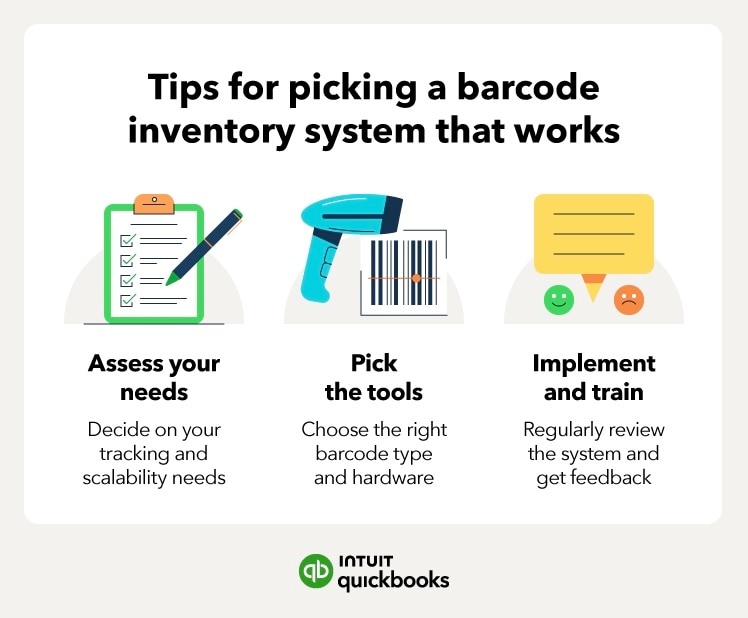
The tips for picking a barcode inventory system.

Barcode inventory system best practices

The better you set up your system, the better it’ll work for you. For growing businesses, that setup is an investment in both control and efficiency. To get the most out of your barcode inventory software, keep these best practices in mind:

Use integrated systems: Barcode systems work best when they integrate with other business software, such as inventory management, point-of-sale, e-commerce, fulfillment, and accounting systems. Connecting inventory data with financial records provides insights into cash flow, cost of goods sold (COGS), and overall profitability, reducing the need for manual reconciliation as transaction volume and locations expand.

Train teams across functions: With growth, multiple departments—receiving, fulfillment, finance, and store operations—interact with inventory data. Ongoing training and defined usage standards help ensure data remains reliable across teams and locations.

Automate where possible: Look for opportunities to automate routine workflows, such as updating inventory counts, syncing transactions between POS and e-commerce systems, or triggering replenishment based on predefined thresholds. Automation reduces operational friction and supports scalability even when order volume and SKU counts increase, freeing teams to focus on higher-value activities.

Barcode inventory systems are essential for high-volume businesses

There’s a reason growing retail, e-commerce, and wholesale businesses rely on barcode scanning systems. They track products from the moment they arrive at a stockroom, fulfillment center, or store to the point they’re shipped or sold. Teams can manage inventory across channels with more confidence, reduce shrinkage, and keep fulfillment moving as order volume increases.

They’re especially helpful for businesses that sell both online and in-store. Barcode inventory systems keep stock levels aligned across platforms, reducing errors and creating a smoother buying experience.

Here are other ways barcode inventory systems support day-to-day operations:

  • Locate items quickly across stores, stockrooms, or storage areas
  • Speed up picking, packing, and checkout workflows
  • Simplify returns and exchanges across sales channels
  • Spot slow-moving or excess inventory to inform purchasing and margin decisions

    Navigate midsize business challenges and opportunities

    Inventory management becomes directly tied to financial performance once a business operates across multiple locations, carries broader product assortments, and sells through both online and in-store channels. Greater SKU depth and transaction volume require systems that maintain accuracy across users and reporting cycles.

    QuickBooks Online Advanced is designed to support this level of complexity. It extends beyond basic inventory tracking by connecting financial data, user controls, and reporting within a single operating environment.

    With QuickBooks Online Advanced, businesses gain:

    • Multi-location inventory tracking with unified visibility into stock levels and movement
    • Real-time inventory updates synced through connected barcode apps
    • Direct integration with accounting data, ensuring COGS and margin reporting reflect current activity
    • Advanced reporting tools and configurable dashboards that surface product performance and purchasing trends without relying on disconnected files
    • Role-based access controls that maintain accountability as responsibilities expand
    • When inventory complexity begins to affect reporting reliability or margin performance, a platform built for higher transaction capacity and coordinated workflows becomes essential. QuickBooks Online Advanced and its powerful inventory management capabilities gives leadership clearer control over inventory, sharper margin insight, and the structure needed to scale without losing financial clarity.

    Barcode inventory system FAQ

    Should a growing business upgrade from manual tracking to a barcode inventory system?

    Yes. As transaction volume and SKU complexity rise, manual tracking becomes error-prone and slow. Barcode systems automate data capture, reduce mistakes, and provide current inventory status, helping teams make better operational decisions. They also scale more efficiently than spreadsheets or handwritten logs.

    Can a barcode inventory system integrate with accounting software like QuickBooks Online Advanced?

    Yes. Barcode inventory systems can integrate with accounting and inventory platforms, allowing scans to sync stock changes directly into accounting software like QuickBooks Online Advanced or connected inventory apps. This integration ensures system-wide updates across inventory, sales, and financial records, improving accuracy and reporting.

    How do barcode systems support multi-location inventory management?

    Barcode systems update inventory instantly as items are scanned—whether in stockrooms, retail outlets, or fulfillment settings—so stock levels stay synchronized between locations. That real-time tracking reduces errors, prevents stockouts or overstock situations, and simplifies replenishment decisions.

    How do you create a barcode inventory system?

    While every business has different needs, creating a barcode system involves the same general steps. First, determine your needs and find a barcode inventory system that can meet them. Then, assign unique codes to your products, create barcodes, label your inventory, and train your team to use the system properly. It requires upfront coordination, but supports long-term inventory accuracy and operational consistency.

    What is the difference between SKU and UPC?

    SKU (stock-keeping unit) is an internal code businesses use to identify and track their products. UPC (universal product code) is a standardized barcode used across multiple retailers to identify a product. Simply put, SKUs are specific to your business, while UPCs are universal and often required for products sold in major retail stores.

    What is the best barcode for inventory management?

    It depends on your operational needs. Many growing retail and e-commerce businesses use 1D barcodes for basic product identification. However, if you need to store more complex information or support traceability and marketing use cases, 2D barcodes, like QR codes, may be a better fit.

    How do barcodes help with inventory?

    Barcodes offer you a quick, accurate way to track products. They eliminate manual data entry errors, enable real-time inventory updates, speed up stock counts and checkouts, and generate data that supports more informed purchasing and margin decisions.


    Flexible solutions for growing businesses

    Get the tools you need to streamline your business and the insights to drive it forward. All in QuickBooks Online Advanced.


    Recommended for you

    Mail icon
    Get the latest to your inbox
    No Thanks

    Looking for something else?

    QuickBooks

    From big jobs to small tasks, we've got your business covered.

    Firm of the Future

    Topical articles and news from top pros and Intuit product experts.

    QuickBooks Support

    Get help with QuickBooks. Find articles, video tutorials, and more.