QuickBooks Blog
Three people standing in front of a car.
Invoicing

Free auto repair invoice template: PDF, Excel & Word downloads

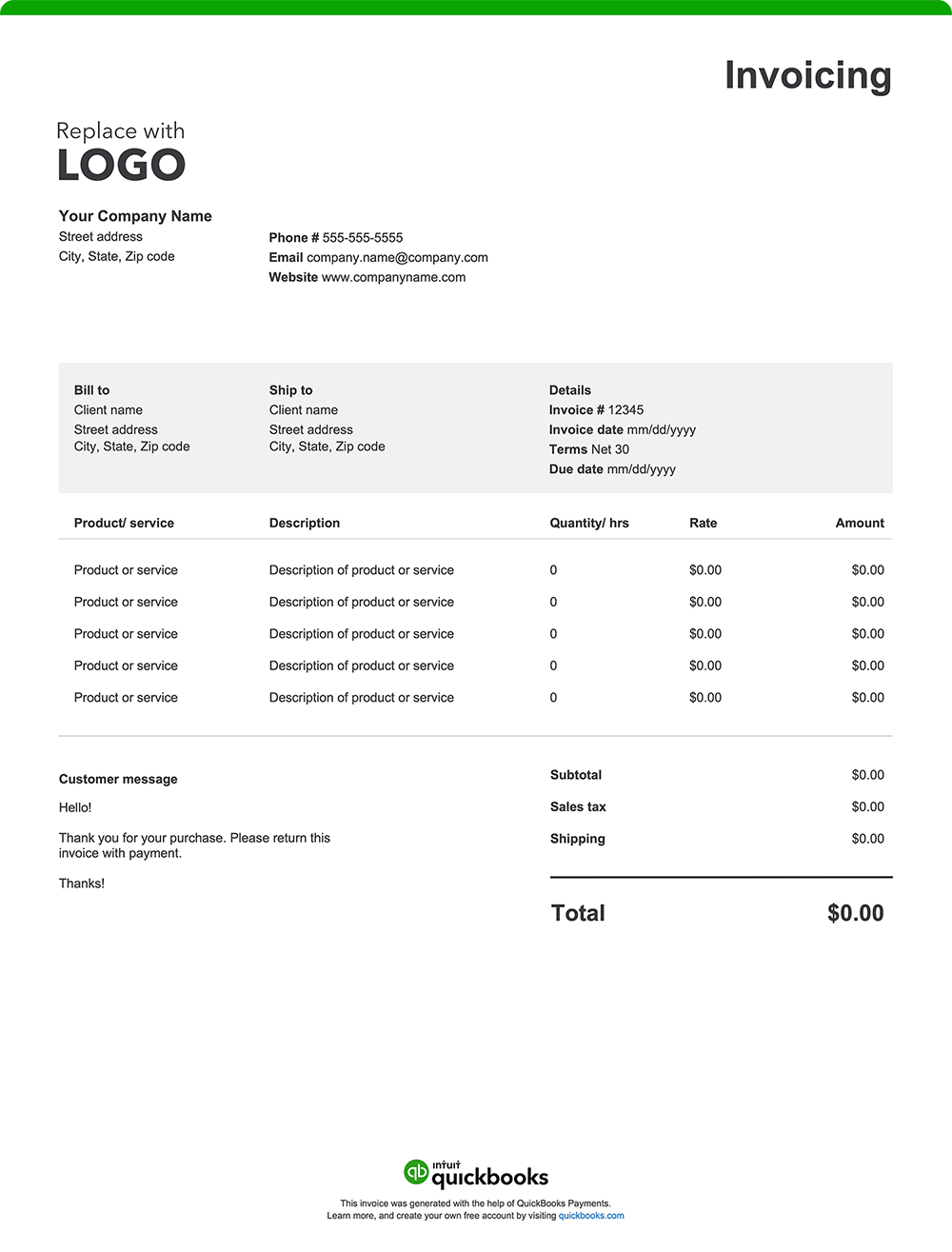
If you run an auto repair or automotive-related business, you’re handling more than fast point-of-sale transactions. You may be managing custom repairs, diagnostics, parts delivery, or other specialized services that require detailed invoices. Provide transparency, support timely payments, and help ensure accountability by creating clear, well-organized invoices using a free invoice template or invoicing software. Download a free, customizable, and printable automotive invoice template from QuickBooks.

*See invoice template | Generate free invoice*

Jump to:

Downloadable invoice templates for automotive businesses

Excel / Word / PDF

7 elements every auto repair invoice should include

From quick diagnostics to complete engine overhauls, your work speaks for itself. Make sure your invoice does, too—clear, accurate, and ready to get you paid.

A detailed, well-structured invoice helps keep your records straight and your cash flow steady. Here’s a breakdown of what every automotive invoice should include. 

1. Business details

Include your shop name, address, phone number, email, and logo. This gives your invoice a professional appearance and reinforces your brand identity with repeat clients and fleet accounts. In some areas, it’s also required to list your shop license number or state repair registration number. 

2. Customer and vehicle information

Add the customer’s name, phone number, and email. Be sure also to include the vehicle's year, make, model, Vehicle Identification Number (VIN), and license plate number. These important details help link the invoice to a specific vehicle and job. 

Certain states also require that the odometer reading be recorded both when the vehicle is dropped off for service and when the invoice is issued.

3. Invoice number and date

Use a unique invoice number for each job and include the issue date. These identifiers support clean bookkeeping, simplify reporting, and make follow-ups easier for both you and your client. They also serve as important reference points for warranty coverage and documentation of service history.

4. Itemized list of services and parts  

List each service performed and every part used. Include quantities, unit prices, and labor hours. A detailed breakdown helps customers understand exactly what they’re paying for, which can prevent confusion. Examples include:

  • Brake pad replacement – 2 sets @ $85 each
  • Labor – 3 hours @ $90/hour
  • Oil filter – 1 unit @ $12.50
  • Engine diagnostics – flat rate $100
  • Vehicle inspection – flat rate $45

5. Any additional charges incurred

Maintain transparency by listing any extra fees that weren’t part of the base service. For example: 

  • Towing or mobile service charges
  • Tire recycling fees
  • Fluid or battery disposal fees
  • Environmental or shop supply fees
  • Weekend or emergency service rates

6. The total amount due

The "Amount Due" section of your invoice should outline the final total, incorporating:

  • The initial subtotal of services provided
  • Applicable taxes based on local requirements
  • Additional fees, such as towing or fluid disposal fees
  • Any discounts applied to the original cost, such as loyalty discounts
  • Any other adjustments impacting the total amount owed

7. Payment terms and instructions

Alleviate confusion by detailing payment terms and instructions. 

Here's what to include:

  • Payment terms: Specify the payment due date, such as "net 30" (payment due within 30 days of the invoice date), "Due on Receipt," or any other agreed-upon payment terms.
  • Accepted payment methods: List all the ways your clients can pay you, such as check, credit card, online payment, or cash.
  • Payment details: Provide all the necessary information for each payment method, like your check mailing address or a link to your online payment portal.
  • Late payment penalties: If you charge penalties for late payments, state the penalty amount or percentage.
  • Early payment discounts: Note any early payment discounts and the conditions for receiving them.

What is an automotive invoice?

An automotive invoice is a document used to bill customers for vehicle-related services, parts, or specialty work. Invoicing is common for repair jobs, fleet maintenance, mobile services, and parts distribution. It provides a detailed breakdown of labor, materials, and charges, serving as a record for both the business and the customer.

Common businesses that use automotive invoices

Like other industries, invoicing plays a vital role across the automotive services and maintenance sector, helping professionals manage billing, track outstanding payments, and support cash flow. From independent repair shops to mobile service providers, many businesses rely on invoices to document services rendered and create a transparent billing and payment trail.

Auto repair shops

Shops that handle diagnostics, repairs, and replacements issue invoices detailing labor hours, parts used, and associated fees. This includes everything from brake work and alignments to engine overhauls.

Mobile mechanics

Technicians providing on-site diagnostics or repairs often invoice after completing a job, listing travel fees, service costs, and parts used.

Auto detailing businesses

Auto detailers operating from a fixed location or mobile unit use invoices to bill for interior/exterior services, paint correction, ceramic coatings, or specialty treatments.

Parts and accessories suppliers

Businesses that distribute OEM or aftermarket parts typically issue invoices for bulk orders or recurring deliveries, which include unit costs, shipping charges, and restocking fees, if applicable.

Collision and body shops

Shops performing bodywork, paint jobs, and insurance repairs issue detailed invoices that may be shared with customers and insurance companies, covering parts, materials, and paint matching fees.

Fleet maintenance providers

Automotive professionals managing commercial fleets or municipal vehicles often invoice clients on a monthly basis or per service call, providing bills for multiple vehicles. 

Transmission specialists

Transmission shops invoice for complex diagnostics, part rebuilds, or full replacements, including labor-intensive services and often multi-day jobs.

Brake and muffler shops

These specialists invoice for inspections, replacements, and repairs related to brake systems, mufflers, and exhaust components. They typically bill for both parts and labor line items.

Oil change and lube centers

Fast-service providers issue invoices or receipts for oil changes, filter replacements, fluid top-offs, and routine maintenance checks, often in itemized package formats.


Automotive billing overview

Automotive billing covers any charges for labor, parts, diagnostics, or specialty services. A structured invoice outlines what your customers owe so they can clearly understand the charges, make timely payments, and keep accurate records for their own maintenance history or insurance claims. For business owners, well-organized invoices support cash flow, simplify bookkeeping, and reflect professionalism.

Automotive invoice template best practices

If you run an automotive service business, the following billing best practices can improve clarity for customers, expedite payments, and keep your records correct and in check. They also can help ensure your invoicing stays aligned with industry regulations and tax requirements.

Highlight your brand

Your business is your brand. Reinforce your name by using consistent visuals and information—like your logo, colors, and contact details—on every invoice to build recognition and trust with your customers.

Personalize for each job

Personalize each invoice with customer and vehicle information. Including the year, make, model, VIN, or odometer reading adds clarity. This level of detail and customization also helps keep track of service history and makes it easy to verify warranty eligibility for specific parts and labor.

Break down all charges 

List services and parts separately with clear descriptions, quantities, unit prices, and totals. Include labor hours, diagnostic fees, and shop supplies. Itemized breakdowns outline the full scope of work and help prevent confusion. Reference OEM or aftermarket part numbers for added transparency around parts and pricing.

Add visual documentation

Consider attaching before-and-after photos of major repairs to validate the work performed and strengthen customer relationships.

Set payment terms upfront

Manage expectations and encourage timely payment by including the due date, accepted payment methods, and any applicable late fees. 

Check for accuracy

Review all invoice details before sending. Mistakes in labor hours, part pricing, or tax calculations could delay payment and affect customer confidence.

Send as a PDF

Export and send your invoice as a PDF to ensure compatibility and preserve formatting. PDF invoices are easier to store, print, and reference later.

When to use an automotive invoice template

An invoice template is useful for automotive professionals who need to bill customers after services are completed—especially when payment isn’t collected upfront. This is common for:

  • Repairs and diagnostics billed after vehicle pickup
  • Collision work handled through insurance
  • Fleet service or commercial vehicle accounts
  • Mobile mechanic jobs
  • Detailing services for dealerships or recurring clients
  • Parts delivery to body shops or wholesale buyers
  • Warranty-related or manufacturer-paid repairs

Key considerations for an automotive invoice template

An effective invoice template aligns with your day-to-day workflow, reflects your shop's professionalism, and helps ensure you receive payment promptly. Look for a template that can do the following:

Work for multiple service types

Your invoice should accommodate different jobs—whether it’s a brake repair, detailing package, or parts order—without needing constant reformatting.

Be easy to read at a glance

Customers should be able to quickly understand what they’re being charged for. A clean layout minimizes confusion and reduces the need for follow-up calls or disputes.

Function on mobile devices 

If you work on-site or manage invoices from the shop floor, choose a format that works seamlessly on mobile devices and can generate PDF copies easily.

Include space for notes and disclaimers

An invoice template should have room to include warranty terms, recommended follow-up services, or disclaimers about what was or wasn’t addressed. This section is also a great place to add a quick thank-you message or highlight any issues that may need attention soon so the customer stays informed and knows when to come back.

Automatically calculate taxes and fees

Ensure the template can handle shop fees, environmental surcharges, sales tax, and any other region-specific charges to avoid manual errors.

Support for recurring or batch billing

For businesses servicing fleets or recurring clients, look for invoice templates or tools that can duplicate jobs, manage multiple vehicles, or handle batch billing efficiently.

Auto repair invoice templates vs. QuickBooks

Basic invoice templates in Excel, Word, or PDF may be sufficient for smaller operations like mobile mechanics or independent detailers, but they often require repetitive data entry and lack the flexibility to grow with your business. QuickBooks offers a faster, more reliable way for busy shop owners and other automotive professionals to create invoices, track payments, and manage cash flow.

Less manual work, fewer mistakes

Standard templates require you to retype customer info, labor rates, and parts details for every job. This increases the risk of errors and slows you down. QuickBooks saves your service descriptions, pricing, and customer records, allowing you to streamline accurate invoice generation.

Automate your invoicing

Handling regular fleet accounts or recurring maintenance visits? QuickBooks gives you automation tools that save time and reduce administrative work:

  • Batch invoicing: Send multiple invoices at once.
  • Recurring invoices: Bill repeat clients or scheduled service packages.
  • Auto-reminders: Follow up on outstanding payments automatically

Invoice from anywhere

Whether you're in the garage, out on a roadside call, or handling back-office tasks, QuickBooks lets you send invoices from your phone or tablet. You can also attach estimates, photos, or signed work authorizations to keep everything organized and in one place.

Monitor your cash flow in real-time

QuickBooks shows you which invoices have been sent, viewed, or paid—and flags any that are overdue. Real-time reporting tools help you forecast revenue, manage expenses, and spot trends.

Make it easy to get paid

Offer your customers multiple payment options directly on the invoice. QuickBooks supports credit cards, ACH transfers, PayPal, and Apple Pay. The easier it is for customers to pay, the faster you get your money.

Send invoices via email or SMS

Deliver invoices via email or text. Add a personal message and a link to pay. It’s a convenient way to keep payments on schedule.

Try our free auto repair invoice generator

Create a custom automotive invoice online with QuickBooks. The invoice generator tool allows you to autofill vehicle details, add your shop’s branding, and send invoices with ease. Prefer a printable version? Download free templates in Word, Excel, or PDF.

When you’re ready for a more streamlined approach, QuickBooks makes it simple to automate invoicing, track payments, manage job costs, and generate detailed reports—all from one platform. That means less paperwork, simpler tax prep, and better insight into your business performance.

QuickBooks has the tools you need to help your business thrive.

Recommended for you

Mail icon
Get the latest to your inbox
No Thanks

Get the latest to your inbox

Relevant resources to help start, run, and grow your business.

By clicking “Submit,” you agree to permit Intuit to contact you regarding QuickBooks and have read and acknowledge our Privacy Statement.

Thanks for subscribing.

Fresh business resources are headed your way!

Looking for something else?

QuickBooks

From big jobs to small tasks, we've got your business covered.

Firm of the Future

Topical articles and news from top pros and Intuit product experts.

QuickBooks Support

Get help with QuickBooks. Find articles, video tutorials, and more.