QuickBooks Blog
A person sitting at a desk with a laptop.
Invoicing

Free proforma invoice template: PDF, Excel, & Word downloads

Downloadable proforma invoice templates

Excel / Word / PDF

9 elements every proforma invoice should include

A proforma invoice provides a detailed cost estimate before a sale is finalized. It helps with pricing discussions, budgeting, and custom or bulk orders where buyers need detailed cost breakdowns. While not always necessary, proforma invoices enhance transparency and agreement between parties. 

Here’s what a standard proforma invoice should include:

1. “Proforma” distinction

The invoice should be clearly labeled as a “proforma invoice” to indicate that it is a preliminary document and not a final bill. This distinction prevents confusion and ensures buyers understand that details may change before the actual transaction.

2. Date of issuance

The invoice creation date provides a reference point for both parties. It establishes a timeline, which can be important if the invoice has an expiration date. If it is an international transaction, the date can help determine applicable currency exchange rates at that time.

3. Invoice number

Assign a unique invoice number to help with recordkeeping and referencing in later discussions. In many cases, businesses will use this invoice number on the final invoice.

4. Your company details

Your invoice should prominently display your or your firm’s name, address, phone number, email, and website.

Include a logo to enhance your brand recognition and professionalism. This information facilitates easy identification and reinforces your credibility.​

5. Your customer’s information

Ensure your invoice reaches its correct recipient by including your client's name, address, and contact details.​

6. Itemized list of goods, services, and costs

List and describe all products, quantities, and projected costs. Your buyers can review exactly what they will receive, making it easier to approve the transaction.

7. Price expiration

The date the estimated pricing will expire helps set clear expectations and prevents misunderstandings if costs change due to market fluctuations, material costs, or time-sensitive pricing.

8. Estimated total amount due

A breakdown of the subtotal, taxes, shipping costs, and fees gives customers a complete financial picture of the purchase. This figure allows them to budget and plan accordingly.

9. Payment terms and instructions

A proforma invoice does not require a specific payment due date since it is not an actual invoice. However, defining accepted payment methods and other information can be useful so the customer knows what to expect.

Here's what to include:

  • Payment terms: Payment terms specify how the payment will be handled once the invoice is issued. For example, "Net 30" (payment due within 30 days of the invoice date), "Due on Receipt," or any other agreed-upon terms.
  • Accepted payment methods: List all the ways your customers can pay you, whether by check, credit card, online payment, or cash.
  • Payment details: Provide all the necessary information for each payment method, like your check mailing address or a link to your online payment portal.
  • Late payment penalties: If you charge penalties for late payments, state the penalty amount or percentage.
  • Early payment discounts: Mention any early payment discount available and how to qualify for it.

Proforma invoice template vs QuickBooks

A proforma invoice gives customers an estimated cost before a sale is finalized. While basic Excel, Word, and PDF proforma invoice templates can be a starting point for invoice creation, they often lack automation and require manual data entry. A better option? QuickBooks invoicing and accounting software.

Less manual entry means fewer errors

Traditional invoice templates often require manual data entry for essential details like client information and product and service descriptions. This process can be time-consuming and prone to errors.

QuickBooks streamlines proforma invoicing by automating much of this manual work. It populates client details and the descriptions of goods and services, saving you valuable time and improving accuracy.

Automate invoicing

Businesses often issue multiple proforma invoices for different sales stages. QuickBooks offers automation tools to streamline this process:

  • Batch invoicing: Quickly generate and send multiple proforma invoices simultaneously, cutting down on manual data entry. With batch invoicing, you can generate invoices 37% faster.¹
  • Automated workflows: Set up customized workflows to automate tasks such as sending invoice reminders, ensuring timely communication and consistency. ​
  • Real-time tracking: Monitor when a proforma invoice is sent and viewed.

Invoice from anywhere

Whether you're remote or on-site with your clients, QuickBooks lets you create and send invoices from your mobile device or tablet. You can also attach relevant supporting documents to promote clarity and keep everything in one place.

Manage cash flow

Proforma invoices provide preliminary estimates of costs before orders are finalized. QuickBooks offers tools to manage cash flow effectively, including tracking pending transactions and forecasting future cash flow through its advanced reporting features.

Convert proforma invoices into final invoices

Once a customer confirms an order, QuickBooks lets you easily convert a proforma invoice into a standard invoice. You eliminate duplicate work and transition smoothly and accurately from estimate to final invoice.

Offer flexible payment options

A proforma invoice is not a payment request. However, once converted into a final invoice, QuickBooks supports multiple payment methods, including credit cards, ACH transfers, Apple Pay, PayPal, and Venmo.

Send invoices through email or SMS

QuickBooks allows you to send invoices directly via email or SMS, catering to client preferences and ensuring prompt delivery. For ongoing projects, you can set up recurring proforma invoices without having to create entirely new ones.

Common industries that use proforma invoices

Proforma invoices are used across a range of industries where providing cost estimates upfront is essential.

International trade and export

Used for declaring the value of goods to customs and giving customers an estimated cost before goods are shipped.

Manufacturing

Manufacturers may use proforma invoices to provide customers with estimated production costs, including materials, labor, and shipping.

Construction and contracting

Proforma invoices outline estimated costs for labor, materials, and project timelines. They help clients understand the financial scope of a project before work begins.

Wholesale and distribution

These businesses may issue proforma invoices to outline bulk purchase costs and terms before shipping, allowing buyers to review charges and approve the order.

Why are proforma invoices issued?

Proforma invoices are issued to provide an estimated cost or quotation for goods or services before a transaction is finalized. They help buyers understand the expected costs and terms, often used for customs clearance or to secure payment arrangements. Unlike a regular invoice, they do not demand payment.

When are proforma invoices issued?

Proforma invoices are typically issued when a business needs to provide an estimated cost to customers before finalizing a sale. They are commonly used when:

  • Declaring the value of goods for customs during export
  • Complete details for a commercial invoice aren’t available
  • A client would like to make an advance payment

Is a proforma invoice legally binding?

A proforma invoice is not legally binding. It is a business document that provides a price estimate for products or services but does not serve as a demand for payment.

Proforma invoice vs. commercial invoice

The primary difference between a proforma invoice and a standard commercial invoice is that a proforma invoice is preliminary and subject to change. Unlike a commercial invoice, it doesn’t require an invoice number and should be clearly marked as "proforma."

Draft invoice vs. proforma invoice

A draft invoice is typically a preliminary version of a standard commercial invoice, subject to final adjustments before issuance. A proforma invoice, however, is a bill of sale sent before goods or services are delivered, providing an estimate of costs. Both serve as preliminary documents, but a proforma invoice is more formal and detailed.

Advance invoice vs. proforma invoice

An advance invoice is a request for payment before goods or services are delivered, often used when payment terms require upfront payment. A proforma invoice, while also issued before delivery, serves as an estimate and does not demand payment.

Try our free proforma invoice generator
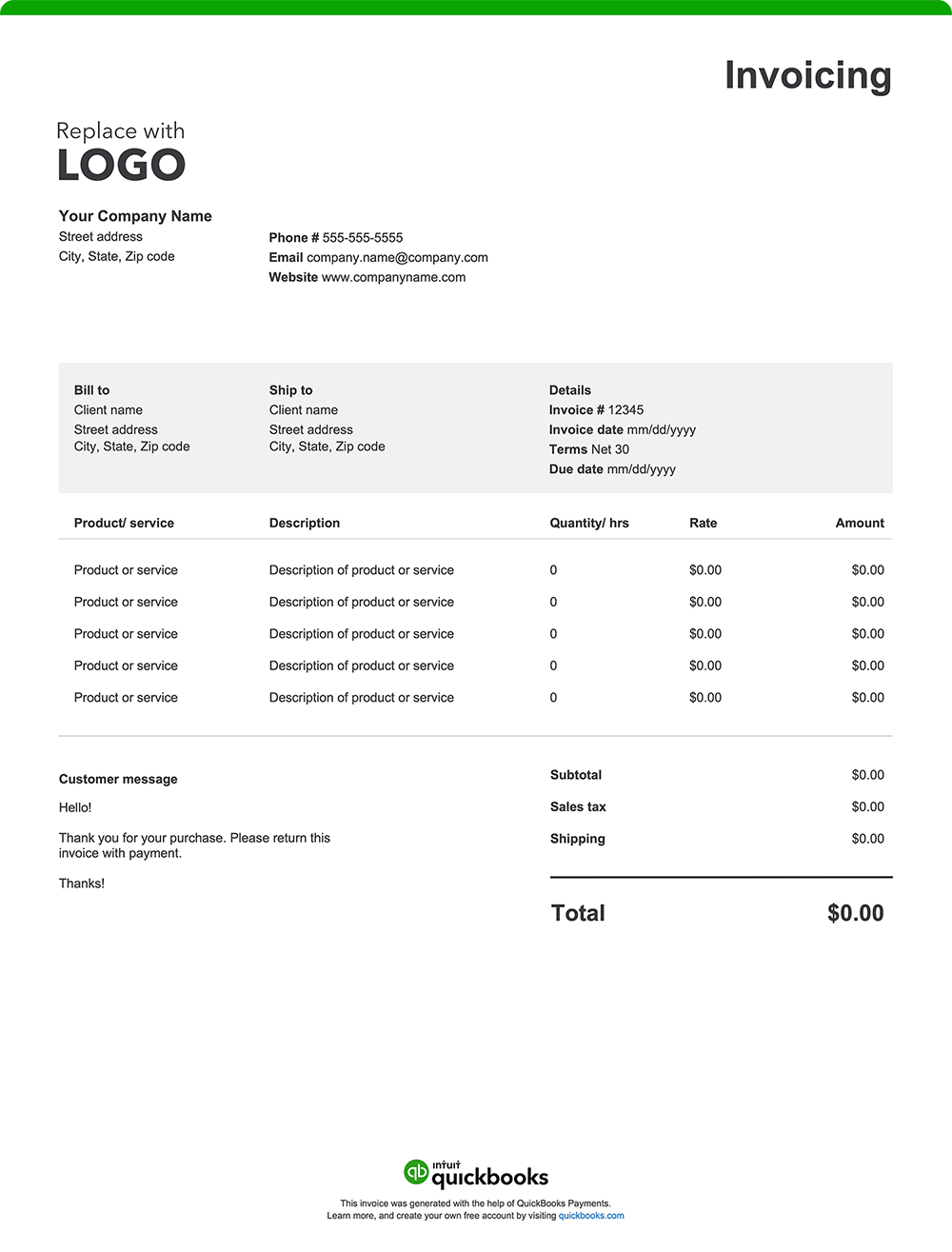
Create a custom proforma invoice online with QuickBooks—autofill job and project details, add branding, and send with ease. Prefer a blank template? Download free printable options in Word, Excel, or PDF.

When you’re ready for a more efficient way to manage proforma invoices, consider QuickBooks. Our invoicing software automates the process, allowing you to create professional proforma invoices quickly. Once the final invoice is issued, QuickBooks makes it easy to track payments, integrate expense management, and generate reports, keeping all your financial data in one place. That means better organization, simplified tax preparation, and valuable insights to support your business decisions.

QuickBooks has the tools you need to help your business thrive.

Claims

1. Batch Invoicing 37% Faster claim: Based on internal tests comparing QuickBooks Online regular invoice workflow with QuickBooks Online Advanced multiple invoice workflow. QuickBooks Online Advanced supports the upload of 1,000 transaction lines for invoices at one time. Number of invoices imported depends on number of transaction lines in the .CSV file. Customer received payment for participating in the tests.


Recommended for you

Mail icon
Get the latest to your inbox
No Thanks

Get the latest to your inbox

Relevant resources to help start, run, and grow your business.

By clicking “Submit,” you agree to permit Intuit to contact you regarding QuickBooks and have read and acknowledge our Privacy Statement.

Thanks for subscribing.

Fresh business resources are headed your way!

Looking for something else?

QuickBooks

From big jobs to small tasks, we've got your business covered.

Firm of the Future

Topical articles and news from top pros and Intuit product experts.

QuickBooks Support

Get help with QuickBooks. Find articles, video tutorials, and more.