QuickBooks Blog
An image showing a team using business intelligence software.
Midsize business

How to use business intelligence software to protect margins + grow your company


Key takeaways:

  • Use BI to unify data across your organization so you spot margin erosion, cash shortfalls, and growth opportunities before they hit the P&L.
  • Start by centralizing your data into a single source of truth, then automate reporting and build scenario models.
  • Dashboards are only as good as the data feeding them, so get the foundation right first.


Business intelligence software provides a single, unified view of financial performance across all your locations, departments, and revenue streams. Without it, you’re forced to make high-stakes decisions based on fragmented data and manual workarounds.

A Forrester study commissioned by Intuit found that 59% of growing businesses are dealing with exactly this problem, resulting in inconsistent and disconnected financial reporting. This gives boards less confidence in the numbers behind pricing, investment, and capital allocation decisions.

Here's how to use business intelligence to close those gaps and give the leadership team the visibility to act faster.

Jump to:

What is business intelligence software?

Business intelligence (BI) software consolidates data from finance, operations, sales, and HR into one consistent set of metrics. For CFOs, the value is in what that consistency delivers. You segment performance by location, product, or service line and identify exactly what changed, where, and why, without waiting for someone to build you a report.

But the software is only half the equation. The other half is the business rules you build around it. You define the standards for revenue recognition, cost allocation, and metric ownership. You set review cadences and escalation triggers so that when a number moves off plan, there is already a process for who responds and how.

That governance turns a dashboard from a passive scorecard into a prompt for action.

Modern BI is self-service and interactive, replacing the old model where users waited for IT to produce static reports. Here is what that shift looks like in practice:

Modern BI combines governed definitions with self-service reporting. You get a group view you trust and the ability to interrogate individual products and service lines in real time to identify variances, margin pressure, and cost overruns before they escalate.

How to implement business intelligence

You don’t need a full ERP overhaul to get value from BI. You need a practical rollout plan that fits around your existing tech stack.

For scaling businesses, implementation works best in four stages:

An image showing the four stages of a BI rollout for a mid-market business.

Stage 1: Get visibility

When finance teams don’t work from centralized data, the cost shows up in how they spend their time. The FP&A Trends survey found that finance teams spend only 35% of their time on high-value work, while data collection and validation takes up 45%.

If your firm starts with inconsistent source data from, for example, multiple spreadsheets, your BI reports will inherit them, which can affect the level of confidence you have in the numbers you use to make decisions.

So, when implementing BI, start by centralizing your data into a “single source of truth” to maximize visibility, accessibility, and consistency.

First, agree and roll out standard naming and mapping rules across your core systems, like your CRM and payroll platform. Then, connect them to your BI platform so the data flows into one reporting view.

With this foundation, your dashboards and reports pull from the same clean source, meaning you spend time analyzing what’s happening now in the business rather than waiting for the close.

Stage 2: Build automation

Automating data collection is where BI starts returning time to your finance team. In the same FP&A Trends Survey, only 18% of organizations reported they can produce a forecast within two days, while 53% take more than five days. Implementing BI software within your company eliminates manual data dumps and VLOOKUPs, allowing you to shift from monthly reporting to live monitoring of cash, margin, and AR trends.

This automation reduces the risk of errors affecting the numbers you sign off on, so you have full confidence in what you're presenting to the board.

Take time back with AI agents in your corner

Let QuickBooks AI agents handle the busywork so you and your team can focus on what really matters.

Stage 3: Craft predictions

BI tools simplify scenario analysis by allowing you to layer historical performance data against your current projections. Instead of manually rebuilding spreadsheets, you can use existing data to monitor how your actuals are tracking against your forecast in real time.

The value of this capability is clear: AFP's FP&A Benchmarking Survey found that teams using structured scenario planning reported 14% higher strategic alignment, but only 38% have adopted it.

By grounding your analysis in historical reporting, you can evaluate the potential impact of business shifts—such as changes in headcount or new contracts—based on past performance trends. This allows you to walk leadership through different outcomes without questioning the integrity of the underlying data.

So, if someone asks you what the impact of a recruitment drive or the loss of a contract would mean, you can walk them through the different outcomes. This moves the conversation past questioning the reliability of the underlying numbers to active debates on which growth strategies to follow.

3 high-impact use cases for business intelligence and reporting tools

The same data that powers your financial reporting is accessible across the business. When leaders in other teams, like operations, sales, and procurement, work from the same numbers, you stop debating whose numbers are right and move on to decision-making.

Here are three high-impact use cases for BI intelligence and reporting tools:

Managing risk and liquidity

BI gives you an early warning system for cash and credit risk. Instead of discovering higher DSO figures or margin variance at period end, you track KPI movements in key indicators as they happen and act before they impact cash flow.

Example: AR aging is moving higher at a construction contractor with multiple active sites. After breaking down outstanding invoices across three large projects, it becomes clear that one job is running more than 60 days past due on average. You escalate collections on that account and tighten credit terms on new variations until the balance is back within the agreed terms.

Optimizing operations

BI shows COOs where bottlenecks in production or service delivery occur before they escalate into customer complaints or contract penalties. You see the financial impact of these operational problems, so when the COO comes to you with a suggested fix, you can compare the cost of the problem against the cost of fixing it.

Example: A manufacturer’s gross margin drops two percentage points. BI shows this is not across-the-board cost inflation, but input costs on one of their five lines have jumped 18% in two months. The COO and CFO then decide whether they should absorb the cost, pass it on, renegotiate with the supplier, or source an alternative.


note icon

Shahla Karimi, founder of a New York-based luxury jewelry brand, uses QuickBooks Online Advanced to track expenses, run payroll, and generate forecasting reports. This frees up her time to focus on decision-making rather than manual accounting.


Growing the business

BI gives VPs of Sales visibility into where revenue growth is actually coming from and which customer segments deliver the highest lifetime value. As CFO, you can see how profitable each revenue stream is, so you can fund growth that delivers long-term value rather than chasing volume alone.

Example: A hospitality group notices bookings are up 12% year-on-year, but margins are down 22%. A BI breakdown shows that growth has come from discount aggregator sites while direct corporate bookings, which deliver materially higher profit per booking, have declined.

The VP increases the budget for the corporate loyalty program to boost direct bookings, while the CFO monitors margin improvement at the group and property levels.

Flexible solutions for growing businesses

Get the tools you need to streamline your business and the insights to drive it forward. All in QuickBooks Online Advanced.

Pros and cons of using business intelligence software

Company business intelligence software delivers significant and measurable benefits, but there are trade-offs.

Benefits of using BI

BI shortens the distance between the question and the answer, so pricing, spend, and resource decisions happen inside the reporting cycle, not after it.

Key business intelligence benefits:

  • Faster decision-making cycles, so you can adjust pricing or reallocate resources quickly to adapt to market shifts rather than waiting for the next reporting cycle.
  • Each dashboard and report figure traces back to individual transactions, providing increased transparency and accountability, so when the board or auditors ask where a number came from, you can show them.
  • You can interrogate current data yourself without waiting for FP&A to build a custom report.

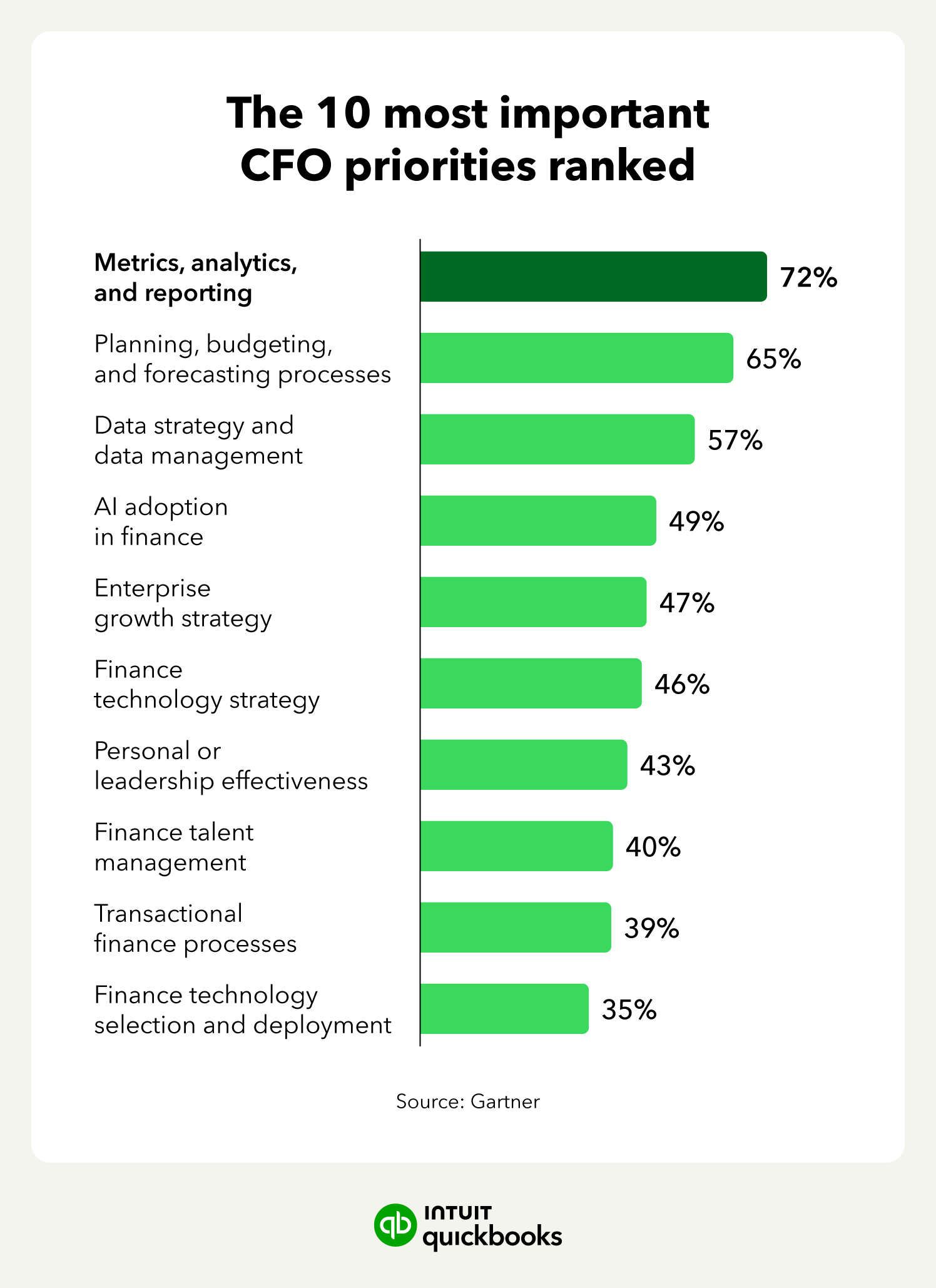
And the data shows just how impactful these benefits are for growing organizations. A Gartner survey of CFOs ranked metrics, analytics, and reporting as their leading priority. The immediate benefit BI brings after implementation is reducing manual errors and ‘version control’ issues, so broken formulas and outdated files don’t undermine your numbers.

An image showing a graph of the Gartner data that shows the priorities of CFOs, highlighting the importance of metrics, analytics, and data.

Challenges and criticisms of BI

Manual processes are the biggest barrier to timely, trusted reporting. Intuit's Business Solutions Survey found that businesses spend an average of 25 hours a week on manual data entry or reconciling data across apps. A Consero survey reported that 48% of CFOs without a technology partner needed at least 21 days to close the books.

That delay shows up directly in slower reporting and less confidence in the numbers used for pricing, spend, and cash decisions. BI can reduce much of that work, but you may need to invest time in data mapping and cleaning first.

Other issues to consider are:

  • Data quality drift: If your firm doesn’t stay on top of data quality, report and forecasting quality will drift: the “Garbage In, Garbage Out" risk. Then, you’re back to questioning the numbers instead of acting on them.
  • Metric overload: Track too many metrics, and you may waste time debating what BI analysis actually means rather than acting on it.
  • Adoption risk: You need to offer training and create new workflows to support your team’s adoption of BI, or they may migrate slowly back to familiar but inefficient tools, like spreadsheets.

Most challenges are front-loaded. Get the foundation right, and you benefit from the compounding return of better decisions made on data the whole leadership team trusts.


note icon

If your AR aging is climbing but you're not sure which clients or entities are driving it, that's the kind of gap BI is built to close. Reducing DSO becomes far simpler when you can filter by entity, customer segment, and aging bracket in one view.


How to set your team up for success with BI tools

BI delivers the best returns when your key business apps, like your accounting software, CRM, and payroll platform, are connected. Here is a setup checklist:

  • Standardize and clean your data: Before connecting your accounting software, CRM, and payroll platform to BI, agree on naming conventions, chart of accounts structure, and metric definitions across the organization.
  • Automate the data flow: Ensure data moves into your BI platform automatically with no manual exports or reconciliation. If someone is still copying numbers into a spreadsheet, you have a break in the chain.
  • Assign metric owners: Every dashboard metric needs someone who investigates when the number moves off target and reports back with a root cause and recommended action. Without this, dashboards become a passive scorecard.
  • Use a platform that supports it: Accounting software like QuickBooks Online Advanced offers built-in reporting, structured data, a report builder, and enhanced custom fields. It provides the foundational capabilities your company needs to get the most use out of business intelligence.

Boost productivity and enhance profitability

Advanced business intelligence gives you the visibility to spot trends earlier and evaluate potential outcomes before committing resources. When every function uses the same data, you can move faster to cut waste, respond to market changes, and confidently plan investments and growth.

Contact us to discover how QuickBooks Online Advanced can help you implement and benefit from the insights business intelligence delivers.


Recommended for you

Mail icon
Get the latest to your inbox
No Thanks

Looking for something else?

QuickBooks

From big jobs to small tasks, we've got your business covered.

Firm of the Future

Topical articles and news from top pros and Intuit product experts.

QuickBooks Support

Get help with QuickBooks. Find articles, video tutorials, and more.