You could save up to 25% on transaction costs².
Speak with us now to see if you qualify.
Talk to sales 1-800-515-8366
Monday - Friday, 6 AM to 4 PM PT

Table of contents
Table of contents
Running a business means keeping cash moving. And for many small businesses, that isn’t always simple.
According to the 2025 Small Business Late Payments Report, 47% of U.S. small businesses have invoices overdue by 30+ days.

When you need funds today for payroll, inventory, or an unexpected expense, faster access can help. But speed can also come with tradeoffs, like fees and fewer options to reverse a transfer if something goes wrong.
When you see the word "instant," you expect immediate results. In the world of business payments, this usually means moving funds from your accounts to where they need to be without the standard multi-day waiting period. QuickBooks provides two distinct experiences that give you fast access to your cash.
QuickBooks provides customers with two main ways to move money quickly, depending on where the funds are coming from and where they need to go:
Not always. “Instant” describes how fast the money shows up for you. Behind the scenes, different providers may use different payment rails and fraud checks to move the funds. That can affect when the transfer is available, whether it can be canceled, and what fees or limits apply.
That’s why two transfers that feel equally fast can work very differently. The table below breaks down the most common rails so you can compare speed, cost, and reversibility at a glance.
Understanding how money moves can help you choose the most cost-effective and secure small business payment methods. Here’s a simple breakdown of the main payment rails you’re likely to come across.
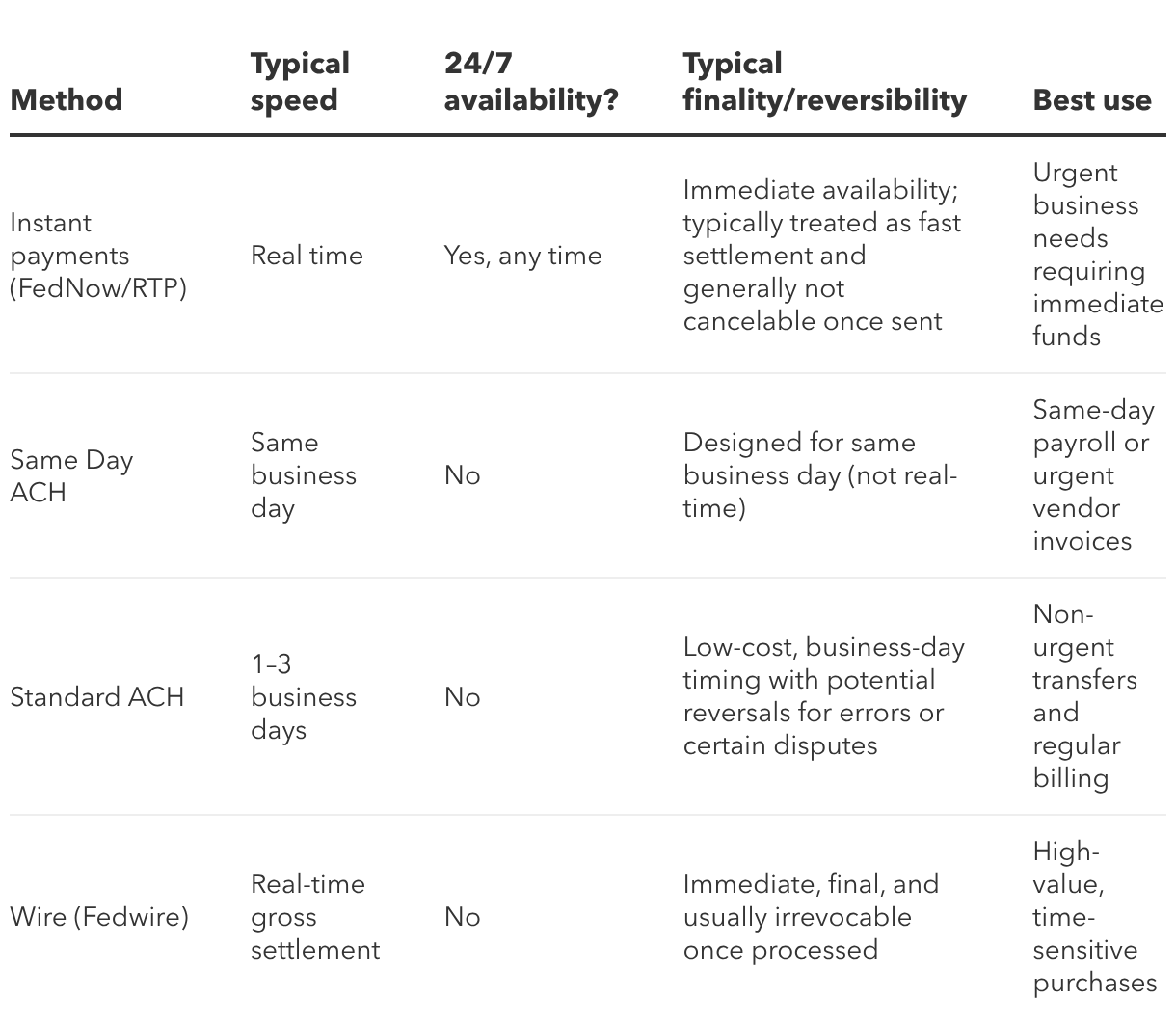
Here’s a simple way to compare the tradeoffs between speed, cost, and flexibility across common payment rails.
Wire transfers are fast and final once processed, but timing can depend on provider windows and banking hours. You can’t typically send them on weekends or holidays. If you’re comparing ACH vs. wire transfer, the key distinction is finality. Once a wire is sent, the funds are permanently transferred.
Getting paid quickly helps you keep your business moving forward. If you use QuickBooks Payments within QuickBooks Online, you can use Instant Deposit to access your customer payments without waiting days for standard clearing.
Instant Deposit is an added feature within QuickBooks Payments. To use it, you’ll need an active payments account in good standing. You’ll also need an eligible debit card or bank account to receive the funds. Keep in mind that standard eligibility requirements still apply to the payments you process.
Getting your money faster is straightforward:
When you use Instant Deposit, there are a few specific product details you should keep in mind:
When your money is already in your QuickBooks Checking account, and you need to move it fast, an instant transfer can help you get it where it needs to go.
Instant transfers with QuickBooks Checking let eligible customers send money to a linked debit card in as little as 30 minutes, including on weekends and holidays.
Before you start a transfer, it helps to know a few key details so everything goes as smoothly as possible.
When you’re managing cash flow, it helps to know exactly what happens after you press “send.” These are some of the most common questions business owners ask.
Not always. Instant Deposit usually comes with a 1.75% fee. If you use a QuickBooks Checking debit card, that fee is often waived.
Your funds can arrive in minutes, usually within 30 minutes. Timing may vary due to delays from your bank or other third parties.
You can deposit as little as $1 and up to $125,000 per day. You can also use Instant Deposit up to 5 times a day.
Not every payment is eligible right away. QuickBooks reviews transactions for eligibility and may place holds or reviews on some payments to help protect your account.
No. Once you request an Instant Deposit, it can’t be voided or canceled.
QuickBooks Checking instant transfers come with a 1.5% fee based on the total transfer amount.
No. Once the transfer starts, it can’t be stopped or reversed.
Your transfer may be lower than expected because fees, limits, or holds can affect the final amount. In some cases, the receiving bank or your agreement with QuickBooks can also affect how much arrives.
Because instant payments move fast and limit your ability to reverse errors, you should always verify your details. Use this quick checklist to protect your funds:
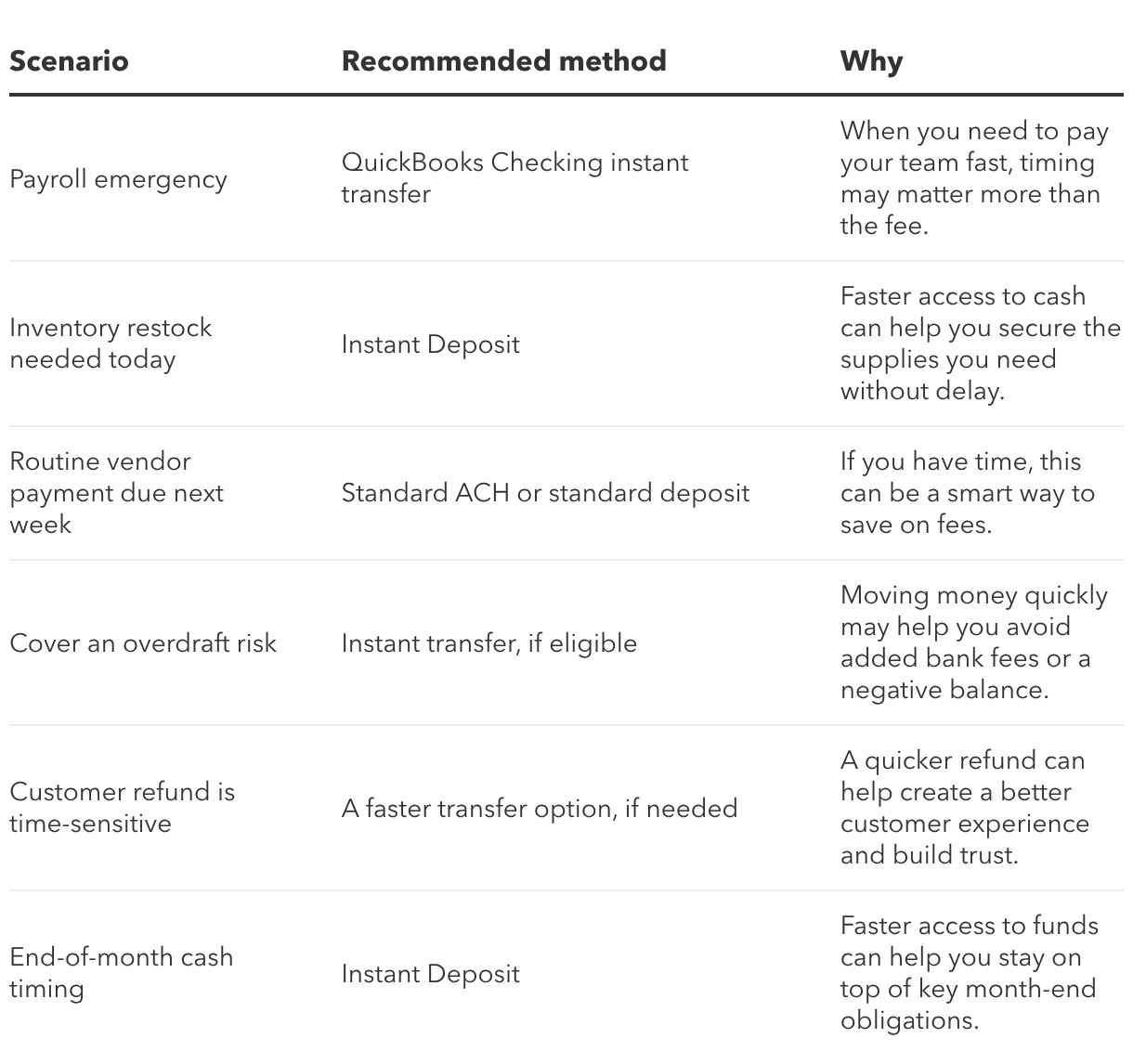
Having the option to access funds instantly is great, but that doesn’t mean you should use it for every transaction. We created a simple framework to help you decide when it makes sense to pay a small fee for speed.
To give you a clearer picture, here are common business scenarios and the recommended transfer method for each.
To help you visualize the cost, here’s how the percentages break down on common transfer amounts.
QuickBooks Checking instant transfer (1.5%)
QuickBooks Instant Deposit (1.75%)
Clean books make it easier to understand your cash flow and make confident decisions. When you use faster payment features, QuickBooks helps you keep things organized so reconciliation feels more manageable.
When you use Instant Deposit, QuickBooks deposits the full amount into your account first. The fee is then taken out later as a separate transaction. That means you may see separate line items in your records, which can make it easier to track what you earned and what you paid for faster access to your funds.
For instant transfers sent from QuickBooks Checking, QuickBooks shows the transfer amount and the fee as separate line items in your register. Just keep in mind that your receiving bank may show only the net amount, with the fee already deducted.
You know your business best, and you have options when cash flow timing gets tight. When you understand how each transfer method works, it’s easier to choose the one that fits the moment.
Here are some quick takeaways to remember:
With expert-backed tools and the power of Intuit Intelligence, QuickBooks helps you stay organized, make confident decisions, and keep your business moving. Ready to take the next step? Explore your payment options in QuickBooks today.
Disclaimer:
*QuickBooks Checking account: Banking services provided by and the QuickBooks Visa® Debit Card is issued by Green Dot Bank, Member FDIC, pursuant to license from Visa U.S.A., Inc.. Visa is a registered trademark of Visa International Service Association. Green Dot Bank operates under the following registered trade names: GoBank, GO2bank and Bonneville Bank. Registered trade names are used by, and refer to, a single FDIC-insured bank, Green Dot Bank. Deposits under any of these trade names are deposits with Green Dot Bank and are aggregated for deposit insurance coverage up to the allowable limits. Green Dot is a registered trademark of Green Dot Corporation. ©2022 Green Dot Corporation. All rights reserved. QuickBooks products and services, including Instant Deposit, QuickBooks Payments, Cash flow planning / forecasting are not provided by Green Dot Bank.

Call Sales: 1-800-285-4854