









Happy New Year to you and your teams! As the year kicks off, it can be easy to get caught up in a flurry of projects, rather than setting intentions and strategies for the year ahead. A great foundation to build from is your company’s mission. Check out how grounding your business in a mission makes all the difference. From there, explore more inspiration for the year ahead with “9 Business strategies for growth.” And, be sure to check out this month’s news.
Get 50% OFF QuickBooks
for 3 months
for 3 months

New inventory features
In a nutshell: Several inventory updates are now available in QuickBooks Online Plus, QuickBooks Online Advanced, and Intuit Enterprise Suite, as well as QuickBooks Online Simple Start and QuickBooks Online Essentials if you purchase the $40/month inventory add-on.
You’ll find four new sets of features related to inventory:
- Done-for-you inventory quantity adjustments: This capability reduces the manual data entry required for inventory quantity adjustments. Your warehouse staff can upload a physical inventory worksheet after completing a cycle count, and the physical counts will be automatically extracted and prefilled in your Inventory Quantity Adjustment transaction form.
- Moving Average Cost (MAC) accounting method: For businesses with non-perishable goods and/or stable turnover, MAC accounting helps smooth out price fluctuations. MAC accounting can also provide a more realistic reflection of current inventory values and market conditions to promote more accurate financial reporting and improved decision making.
- Item receipts: Support for item receipts helps your business create a documented record of received goods, ensuring accurate quantity tracking, alignment with purchase orders, and reduced processing times.
- Sales order improvements: These enhancements give you more flexibility and improved tracking for items promised to your customers. New capabilities within sales orders include custom fields, smart search functionality, adding attachments, support for bundles, and converting Sales orders to POs.
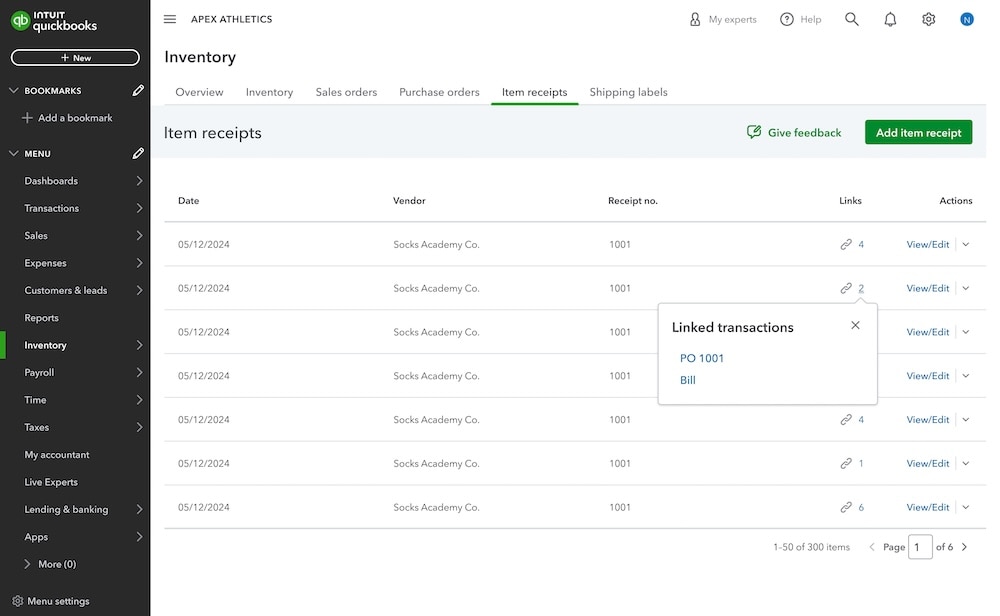
Check out the inventory tab in QuickBooks Online
Recommended for you




Get the latest to your inbox
No ThanksLooking for something else?
Call Sales: 1-800-285-4854




