You could save up to 25% on transaction costs².
Speak with us now to see if you qualify.
Talk to sales 1-800-515-8366
Monday - Friday, 6 AM to 4 PM PT

Table of contents
Table of contents
Yes, the free version of QuickBooks is QuickBooks Free, a $0-per-month plan built for solo business owners who want to take charge of their finances. It offers a streamlined set of features and differs from the 30-day free trial for paid QuickBooks Online plans, which gives temporary access to a broader toolset.
Why does this matter? Because finding the right financial foundation sets you up for success from day one. When you match the best software to your business stage, you save time, avoid hassle, and get more room to focus on what really matters: building your business and living your dream. Money management should feel supportive, not stressful. We’re here to make it simple and clear.
This guide walks you through what QuickBooks Free includes, what its limits look like, and how you’ll know when it’s time to upgrade.
When you’re searching for free QuickBooks for your small business, it helps to know exactly what’s included. QuickBooks Free comes with core tools that can help you stay organized from day one:
If you need to send more invoices, there’s a way to do that. When you set up QuickBooks Payments, our built-in online payment processor, you can send unlimited invoices instead of staying within the two-invoice monthly limit. That can give you more room to grow when business starts to pick up.

The free QuickBooks software plan is a practical starting point, but it has some limits. QuickBooks Free is for one user only. You can’t invite your accountant or bookkeeper in to help. Advanced tools like Intuit Intelligence, which provide deep insights, aren’t part of the free package.
There are also a few usage limits to keep in mind. You can send up to two invoices per month, upload up to two receipts per month, and manage one contractor. For some businesses, that may be enough for now. But as your workload grows, those limits may start to feel tighter.
That’s your signal to consider upgrading. QuickBooks Lite offers more flexibility, including unlimited invoices, unlimited receipt capture, unlimited mileage tracking, automated sales tax tracking, and support for more contractors. For businesses with more advanced accounting needs, Simple Start may make more sense.
QuickBooks Free is a permanent, $0-per-month plan with monthly caps on certain features. The QuickBooks Online free trial gives you the whole platform, limit-free, for 30 days, so you can test-drive before committing.
Understanding that difference can make it easier to choose what works best for your business. You may decide the free plan gives you what you need right now. Or you may want to try the full experience through a trial before moving to a paid option with more features and flexibility.
Here’s how the main options stack up:
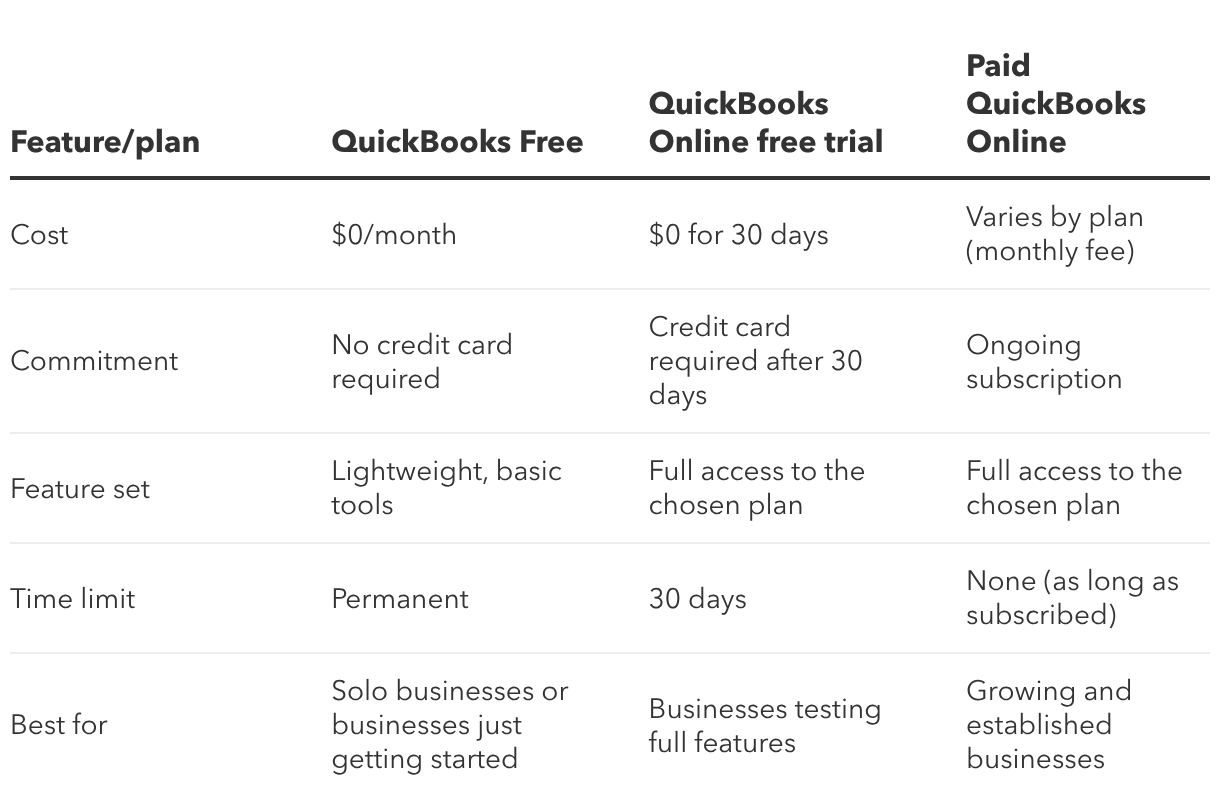
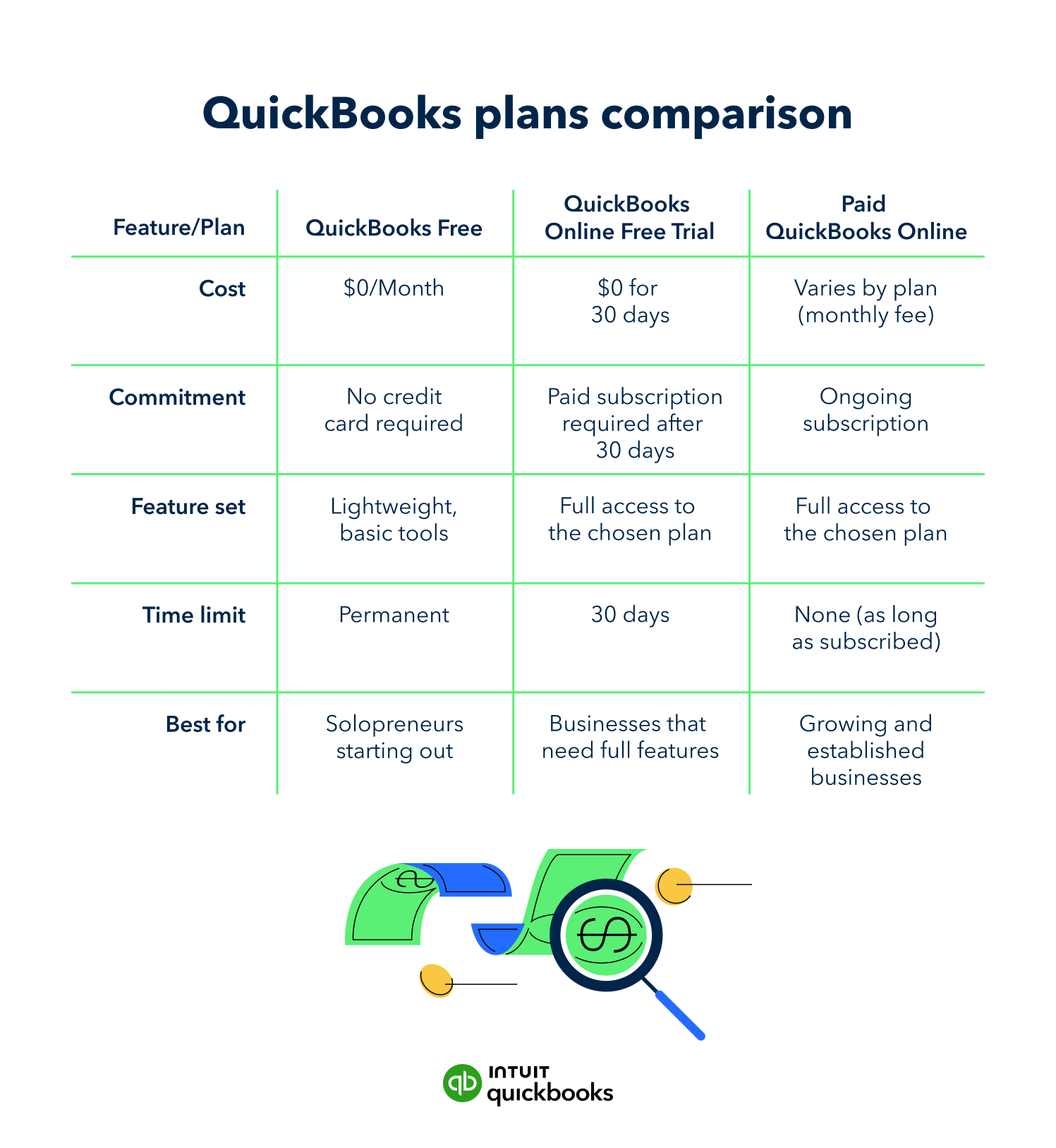
QuickBooks Free is built for solopreneurs and businesses of one that want a simple, no-cost way to manage the basics. It can be a strong fit if you work on your own, have fairly light monthly activity, and want a clear way to track income and expenses without paying for more tools than you need.
QuickBooks Free may be a good fit if:
It may be time to look beyond the free plan if:

We designed the sign-up process for QuickBooks Free to be fast, easy, and stress-free. No need to enter payment details. Just get started and explore what’s possible.
Ready to dive in? Here’s how to try QuickBooks Free for yourself:
1. Go to the QuickBooks Free signup page and create your Intuit account using your preferred email address.
2. Follow the setup prompts to help us tailor the experience to your business.
3. Connect your primary business bank account to track business expenses automatically.
4. Switch on QuickBooks Payments if you want to send unlimited invoices and accept online payments.
Push the free plan to its limits, like sending your two invoices, viewing reports, and uploading receipts. If you’re feeling confident and in control, stay on the free plan as long as it works for you. If you’re bumping up against limits, upgrade to Simple Start for more advanced accounting tools and added flexibility.
When you have the right foundation, it is easier to stay on top of your finances and focus on the work that matters most. QuickBooks Free is a free accounting software that gives solo business owners a simple, no-cost way to get organized and better understand their business finances.
Sign up for QuickBooks Free to get started, or explore the QuickBooks to find the right tools for wherever your business goes next.
**Products and features
***QuickBooks Free: Free is currently available at no charge and may be offered for a limited time. Features and availability, are subject to change or discontinuation at any time, with or without notice. If the Free plan is discontinued, we will notify you in advance and provide you with comparable options to transition to another QuickBooks plan that meets your business needs. Certain add-on products may be eligible for use with the Free plan. To utilize any add-on products, you must agree to additional terms and conditions, and limitations and fees for and any selected add-ons will apply.*
*Terms, conditions, pricing, special features, service and support options are subject to change without notice.*

Call Sales: 1-800-285-4854