







You could save up to 25% on transaction costs².
Speak with us now to see if you qualify.
Talk to sales 1-800-515-8366
Monday - Friday, 6 AM to 4 PM PT

Table of contents
Table of contents
Most small businesses already automate some of their work. Recurring invoices go out on schedule. Payroll runs on time. Bank feeds sort transactions. You set the rules for your business tasks, and automation handles them.
AI works differently. It can work with information that doesn’t fit a set rule, such as an unexpected drop in sales or a vendor payment that’s higher than usual. That’s the value of AI integration in business: helping you make sense of what’s happening, even when you didn’t plan for it.
AI use is already widespread. According to the *Intuit QuickBooks 2026 AI Impact Report*, 77% of U.S. small to midsize businesses surveyed said they regularly use AI, up from 48% in July 2024.
Automation already handles much of the routine work involved in running a business. In many cases, it’s built into the tools you use every day:
Traditional automation works best when a task follows predictable rules. Once those rules are set, the work can run in the background without someone stepping in each time.
But business conditions don’t always follow a predictable path. Expenses may rise unexpectedly, sales may slow for several months, or a shipping delay could put pressure on cash flow. Understanding these situations requires more than completing a scheduled task—it requires context.
AI builds on the foundation of automation by analyzing business information, identifying patterns, and helping explain what may be driving a change. Because these capabilities can be integrated into the tools and workflows businesses already use, AI doesn’t have to be a separate technology initiative.
This progression—from carrying out predefined tasks to helping businesses interpret changing conditions—sets the stage for the next generation of AI capabilities.

Four capabilities are shaping the future of AI in business: each one moves AI from completing a task to helping you understand your business and what your numbers mean.
Predictive AI looks at historical numbers alongside real-time activity to anticipate what may be ahead. That could be a cash flow gap in six weeks, a seasonal spike in demand, or a staffing shortfall before it hits the schedule.
For example, say sales tend to slow at the end of summer, but several large bills are due at the same time. Predictive AI can use those patterns along with current sales and expenses to flag a possible cash flow gap before it becomes a problem.
With that information, business owners and finance teams have more time to adjust. They may decide to hold off on a planned purchase, follow up on unpaid invoices, or set aside more cash to cover upcoming bills.
Tools like QuickBooks Online support this. In QuickBooks, predictive capabilities focus on financial forecasting. Intuit Intelligence uses historical business data to forecast income, expenses, and cash flow. You can also explore what-if scenarios to see how different decisions could affect your finances before you make them.
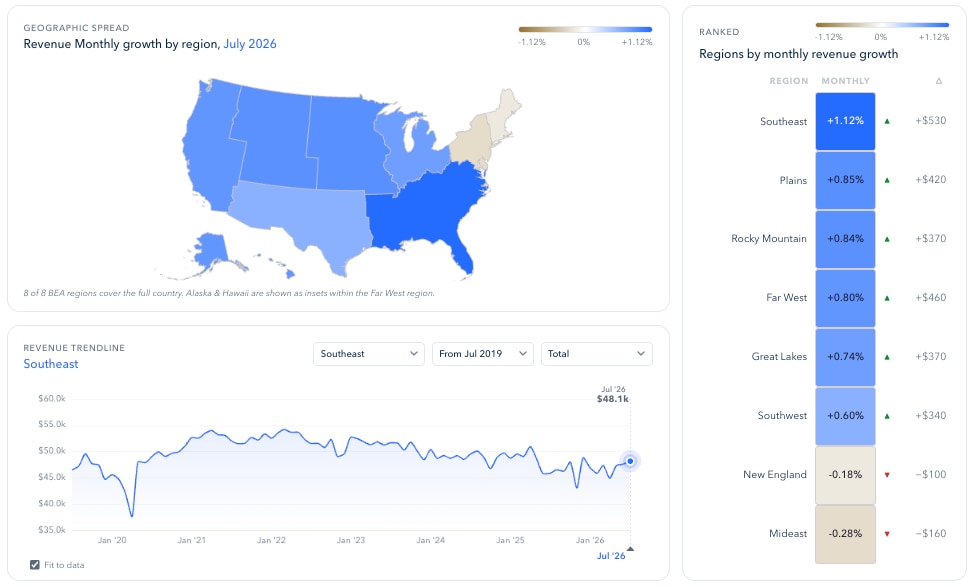
Sales, expenses, and payroll data often live in separate systems. Connected intelligence can analyze that data across different parts of the business and show where one change may be related to another.
Let’s say shipping costs are rising at the same time that customer orders are taking longer to fulfill. AI tools can assess data from both areas and show how the changes may be related, without you having to compare multiple reports yourself. Seeing those relationships can make it easier to find the source of a problem and understand its effect on your financial results.
Intuit Intelligence works with the business data in QuickBooks to surface relevant connections and provide more context around your financial results.
Natural-language AI lets you ask a question about your business and get a straightforward answer back. For example, “What was my highest expense category last quarter?” Instead of pulling a report and scanning several tabs, you can ask the question in a chat.
Intuit Intelligence brings this type of experience into QuickBooks. You can ask questions about your business in everyday language and get answers based on your QuickBooks data.
It can also help you get more from your financial information without digging through the numbers yourself. AI-powered reporting can make those insights easier to use by helping you create and customize reports around the questions that matter to your business.
Adaptive AI can adjust its output as business conditions, goals, and data change. A dip in sales volume, a new revenue goal, or an emerging seasonal pattern can alter the forecasts and insights it provides.
With Intuit Intelligence, forecasts can adjust as new QuickBooks data comes in. That means projections can reflect recent business changes, rather than relying only on what was true when the forecast was first created.
Getting ready for AI integration in business starts with a few practical steps:

AI for small businesses can add more intelligence to the tools and systems already being used.
Intuit Intelligence brings AI into QuickBooks, where it can work with a business’s own data and workflows. From AI-powered bookkeeping to KPI tracking,these capabilities can help teams analyze their finances, track performance, and get a clearer view of their business.
With deeper insights into financial changes, businesses can plan for different possibilities and choose the right next steps for their needs.
As AI integration continues to develop, the opportunity is to help businesses understand, decide, and act with greater confidence.

Call Sales: 1-800-285-4854