QuickBooks Blog
A person standing in front of a table with a cake.
Invoicing

Free catering invoice template: PDF, Excel, and Word downloads

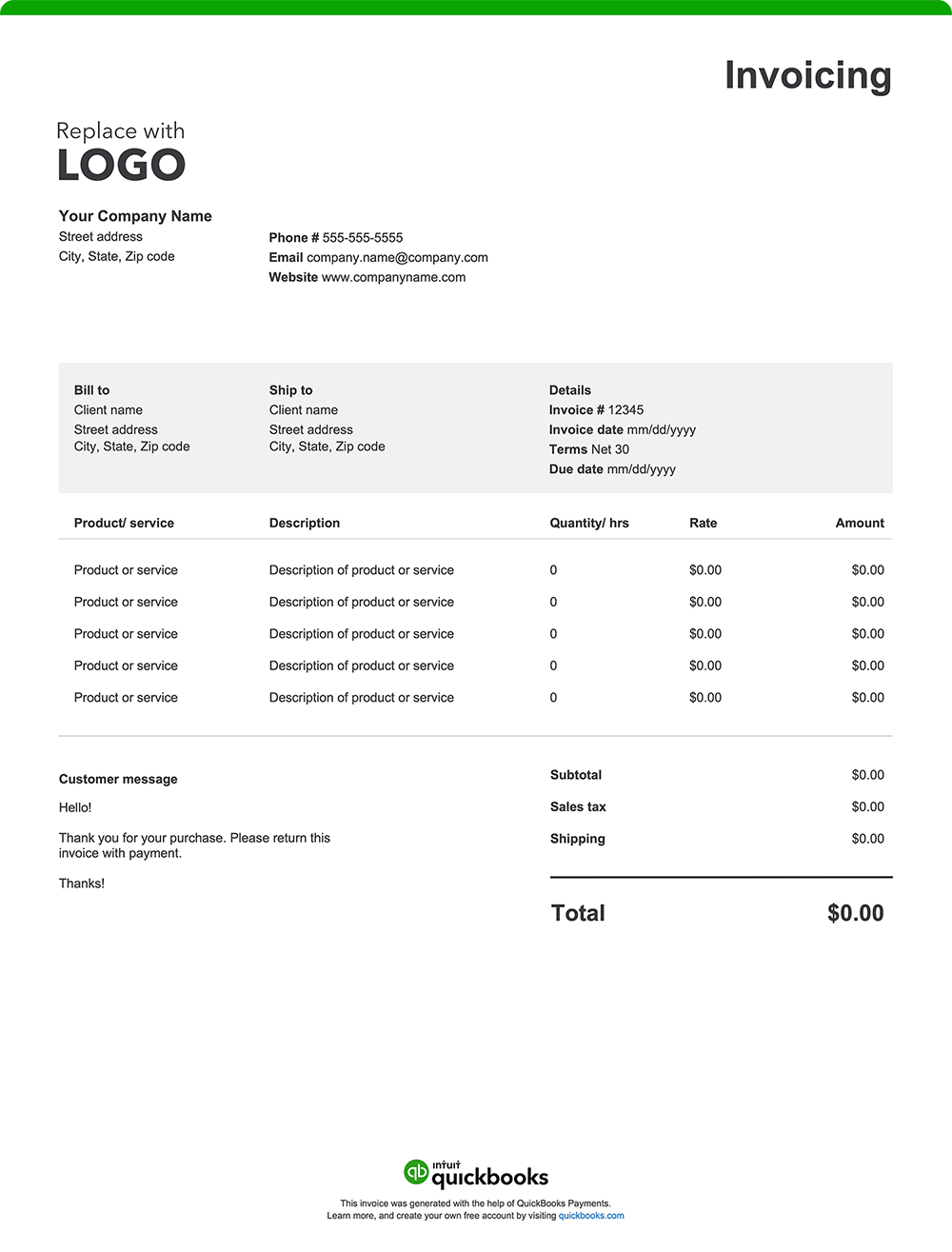
From weddings and corporate luncheons to community events and weekly meal drop-offs, catering businesses handle a wide range of orders—and billing should be just as organized. A clear, customizable invoice helps outline what was served, when, and how much it cost. It sets expectations, supports prompt payments, and helps you manage your cash flow. Use a free invoice template or invoicing software to send professional invoices that match the quality of your service. Download a free, customizable, and printable catering invoice template from QuickBooks.

*See invoice template | Generate free invoice*

Jump to:

Downloadable invoice templates for catering businesses

Excel / Word / PDF

7 elements every catering invoice should include

You bring the food and the flawless execution—now make sure your billing lives up to the same standard. Whether you’re plating for a wedding, delivering a corporate lunch, managing concessions, or fueling a festival crowd from your food truck, a detailed, well-structured catering invoice helps you get paid promptly. 

Catering invoices are typically sent in one of two ways:

  • Pre-event invoicing is common when you require a deposit or full payment in advance. This helps cover food costs, staffing, and other preparation expenses. Many caterers request a percentage upfront (e.g., 25–50%) to secure the booking, then send a final invoice for the remaining balance—usually due before the event date. In some cases, the final invoice may be issued after the event if there are variable charges based on actual guest count or last-minute additions.
  • Post-event invoicing may apply when final charges depend on actual guest count, extended service hours, or added items. This is often used for corporate clients, repeat customers, or events with variable costs.

Here’s what every catering invoice should include:

1. Catering business details

Include your business name, logo, address, phone number, email, and website. This reinforces your brand, reflects credibility, and gives clients an easy way to reconnect or learn more about your services for future catering needs.

2. Client information

List the client’s full name, company (if applicable), and contact details. For weddings, corporate events, or large functions, you might also note the event coordinator’s name or on-site contact.

3. Invoice number and date

Assign a unique invoice number and include the invoice issue date. For catering jobs, it’s also helpful to include the event name and date, especially if you’re handling multiple events for the same client. This keeps your records organized and avoids confusion.

4. Detailed breakdown of goods and services

Itemize everything provided, from food to staffing to rentals. Include rates, quantities, and descriptions that match your original estimate or proposal. Be specific so your client knows exactly what they’re paying for. Examples include:

  • 50 guest plated dinner – $35 per person
  • Bartender service – 4 hours @ $60/hour
  • Corporate boxed lunches – 25 meals @ $13 each
  • Viennese dessert table – $12 per guest

5. Additional charges

List any extras not included in the base package. These could include:

  • Setup or breakdown fees
  • Service charges 
  • Delivery charges
  • Weekend or holiday surcharges
  • Overtime for staff
  • Equipment rentals (e.g., heaters, linens, serving trays)

6. Total amount due

Calculate the subtotal, add any applicable taxes and fees, subtract any deposits already paid, and present the final amount due. If you require a pre-event deposit, make sure it's listed here so the remaining balance is easy for you and your client to track.

7. Payment terms and instructions

Alleviate confusion by detailing payment terms and instructions. 

Here's what to include:

  • Payment terms: Specify the payment due date, such as "net 30" (payment due within 30 days of the invoice date), "Due on Receipt," or any other agreed-upon payment terms.
  • Accepted payment methods: List all the ways your clients can pay you, such as check, credit card, online payment, or cash.
  • Payment details: Provide all the necessary information for each payment method, like your check mailing address or a link to your online payment portal.
  • Late payment penalties: If you charge penalties for late payments, state the penalty amount or percentage.
  • Early payment discounts: Note any early payment discounts and the conditions for receiving them.

What is a catering invoice?

A catering invoice is used to bill clients for food, service, and event-related charges when payment isn’t collected upfront. It’s commonly issued for weddings, corporate functions, private parties, and other large events where pricing reflects guest count, menu selections, staffing, rentals, and delivery.

Invoicing is essential for both one-time events and recurring catering services, such as if you are the in-house provider at a venue facility. While the level of detail may vary depending on the event’s size and complexity, every invoice should be clearly itemized to ensure transparency, timely payment, and a positive client experience.

Common catering businesses that use invoicing

A wide range of catering businesses rely on invoicing to bill clients clearly, track payments, and keep cash flow coming in. From full-service caterers to niche providers, here are some common types of catering operations that use invoices.

Full-service event caterers

Invoicing is used to bill for weddings, corporate events, galas, and private parties. Invoices often include per-person rates, staffing, rentals, setup, and delivery.

Drop-off and corporate catering

For business lunches, training sessions, or recurring office meals, invoices typically outline menu items, delivery fees, and headcount.

Specialty and boutique caterers

Niche caterers, such as dessert or bakery caterers or charcuterie services, may invoice based on custom packages, quantities, and service time.

Mobile catering and pop-up events

Catering services provided via food trucks or mobile kitchens often invoice after festivals, private bookings, or pop-up events. Invoices typically break down hours, staffing, and menu.

Venue-exclusive or in-house caterers

Caterers working within event venues may issue post-event invoices covering all food, beverage, rentals, and staffing provided as part of the function.

Concession catering

Caterers operating food stands or booths at fairs, stadiums, or large public events often use invoices to bill event organizers or reconcile sales after the event. Invoices may include product quantities sold, agreed revenue splits, rental or vendor fees, and staffing hours.

Catering billing overview

Catering billing, whether issued before or after an event, covers charges for food, staffing, rentals, and related services. It ensures timely payment, supports accurate recordkeeping and keeps expectations aligned.

A catering invoice typically includes:

  • Caterer and client contact information
  • Event details (e.g., date, type, and location)
  • Itemized menu, services, and equipment rentals
  • Quantity, rates, and pricing details
  • Payment terms and due date
  • Taxes, gratuities, delivery, or service fees (if applicable)

How to make an invoice for catering: template best practices

Use these best practices to create professional invoices that make it easy for clients to review and pay on time.

Add your branding

Include your logo, brand colors, and business name to reinforce your company identity.

Date and number your invoice

Assign a unique invoice number and include the issue date. This helps with organization and tax reporting. Plus, it acts as a reference point for quickly resolving client questions or disputes.

Customize for the event

Tailor each invoice with your client’s name, company (if applicable), and function-specific details such as the event name, location, or type. If you need to verify

Break down charges clearly

Itemize all costs. Include quantity, per-unit rate, and total price for transparency.

Set payment terms upfront

Avoid confusion by listing the due date, accepted payment methods (e.g., credit card, ACH, check), and any late fees or early payment discounts. Specific terms help encourage prompt payment. 

Double-check for accuracy

Review your invoice before sending to ensure everything is accurate. Small errors can slow down payments or damage client trust.

Send invoices as PDFs

Send finalized invoices in PDF format to ensure they open easily across all devices and systems. Many caterers also include links to secure online payment portals for added convenience.

When to use a catering invoice template

A catering invoice template is useful anytime payment isn’t collected immediately. Templates help ensure consistency, reduce admin time, and give your catering business a professional edge.

Catering invoice templates can be used when billing for:

  • Weddings and private parties
  • Corporate lunches and business meetings
  • Fundraisers, galas, and community functions
  • Weekly meal prep or subscription services
  • Large group drop-offs or buffet-style events
  • Food truck services for private bookings or festivals
  • Concession catering at fairs, stadiums, or events
  • Institutional meal plans or retainer-style agreements
  • Equipment rentals or staffing-only services
  • Holiday events or seasonal catering packages

Key considerations for a catering invoice template

An effective catering invoice template should adapt to your business needs, whether you're managing one-time events or recurring food service contracts. When choosing or customizing a template, consider the following:

Adaptability for different event types

It’s important that your invoice template can adjust to the various job types your business may manage. It should be easy to tailor for different services, events, guest counts, and billing needs without having to rebuild it each time.

Clear layout for fast review

Clients should be able to glance at your invoice and understand exactly what they’re being charged for. A streamlined layout reduces confusion and follow-up questions.

Mobile-friendly formatting

If you're sending invoices from an event site or food truck, mobile-friendly templates ensure you can generate and send polished invoices from a phone or tablet—no desktop required.

Room for custom notes

Custom notes help personalize your service. For example, you may want to add a thank-you message or a link to a feedback survey.

Built-in tax and tip calculations

Make sure your template can automatically calculate sales tax, service fees, or gratuities to help prevent mistakes and save time.

Support for recurring or batch billing

If you invoice repeat clients regularly or bill multiple accounts simultaneously, look for templates or tools that streamline those processes.

Catering invoice templates vs. QuickBooks

Basic templates in Excel, Word, or PDF can be fine for smaller catering setups like food trucks or pop-up vendors. But when your business scales—or when you’re juggling multiple clients, menus, and event dates—manual invoicing can be slow and error-prone. QuickBooks offers a faster, more streamlined way to create invoices, track payments, and stay organized from prep to payment.

Skip the repetition, reduce errors

Generic invoice templates require you to re-enter client info, pricing, and services each time. This is cumbersome and leaves more room for mistakes. QuickBooks saves customer and item details, so you can invoice quickly and trust that your numbers are accurate.

Automate your catering invoicing

If you manage recurring accounts, weekly meal services, or back-to-back events, automation can save significant time:

  • Batch invoicing: Send multiple invoices in one go.
  • Recurring invoices: Perfect for standing orders or meal subscriptions.
  • Auto-reminders: Set up payment reminders so you don’t have to chase down late payments.

Invoice from the kitchen or the event floor

QuickBooks works on your phone or tablet, so you can send invoices on the fly—whether you're prepping food or wrapping up an event. You can also attach contracts, menus, or other documentation for added clarity.

Monitor payments and cash flow

Know which invoices are sent, viewed, or overdue at a glance. Real-time tracking and built-in reporting give you insight into revenue, client history, and seasonal trends.

Make it easy for clients to pay

QuickBooks makes it easy for clients to pay you right from the invoice. Accept credit cards, ACH transfers, PayPal, and Apple Pay. The easier it is to pay, the faster the money hits your account.

Email or text your invoice

Deliver invoices to match your client’s preferences. Send directly by email or text, and add a personal touch that helps keep relationships strong and payments on track.

Try our free catering invoice generator

Create a custom catering invoice online with QuickBooks—autofill job and project details, add branding, and send with ease. Prefer a blank template? Download free printable options in Word, Excel, or PDF.

When you’re ready for a more efficient way to manage your invoices, consider QuickBooks. Our invoicing software automates the process, allowing you to create professional invoices quickly. Once the final invoice is issued, QuickBooks makes it easy to track payments, integrate expense management, and generate reports, keeping all your financial data in one place. That means better organization, simplified tax preparation, and valuable insights to support your business decisions.

QuickBooks has the tools you need to help your business thrive.

Recommended for you

Mail icon
Get the latest to your inbox
No Thanks

Get the latest to your inbox

Relevant resources to help start, run, and grow your business.

By clicking “Submit,” you agree to permit Intuit to contact you regarding QuickBooks and have read and acknowledge our Privacy Statement.

Thanks for subscribing.

Fresh business resources are headed your way!

Looking for something else?

QuickBooks

From big jobs to small tasks, we've got your business covered.

Firm of the Future

Topical articles and news from top pros and Intuit product experts.

QuickBooks Support

Get help with QuickBooks. Find articles, video tutorials, and more.