QuickBooks Blog
A group of people standing in a building.
Invoicing

Free freelance invoice template: PDF, Excel, & Word downloads

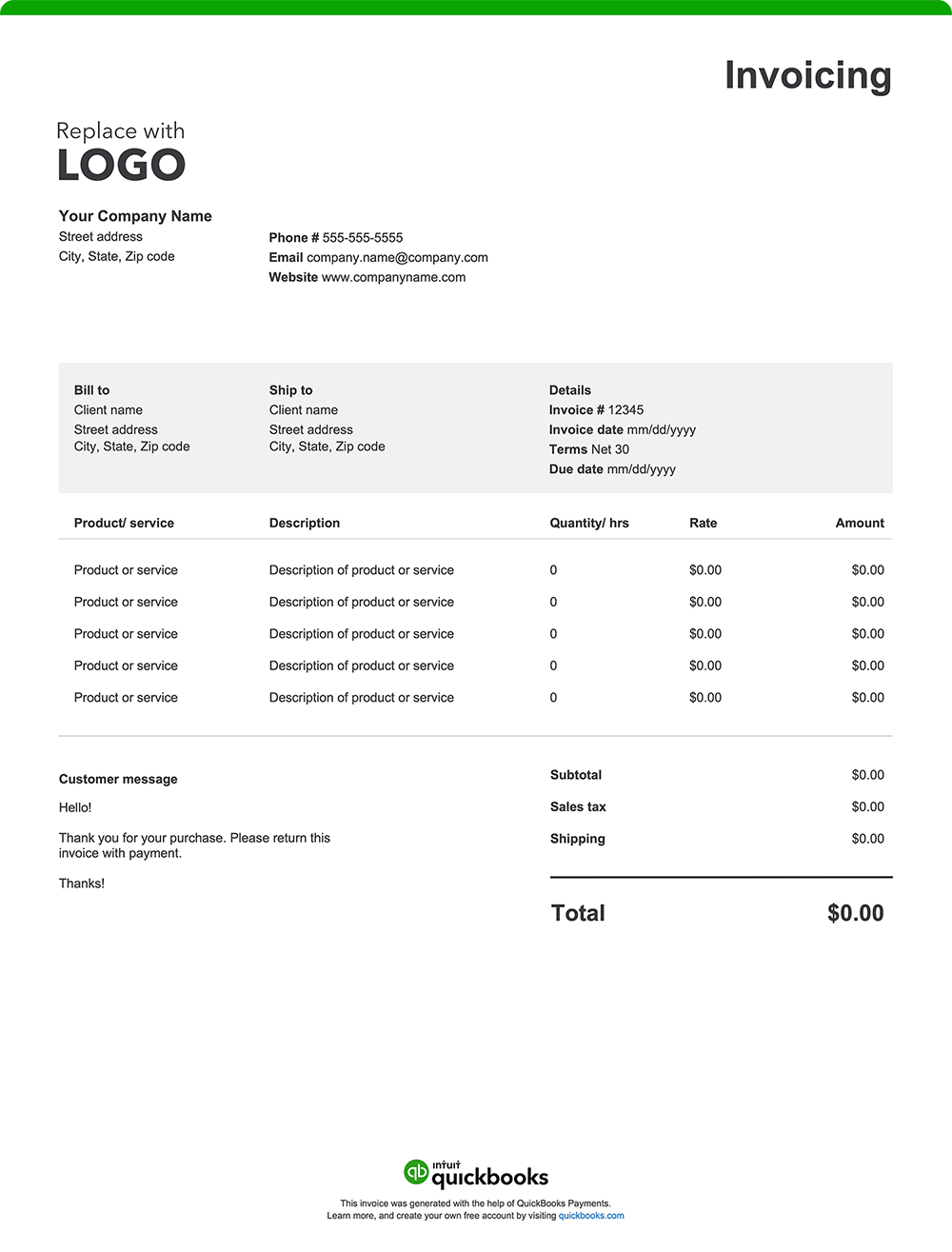
Freelancing gives you flexibility—but staying on top of your invoicing is a must for maintaining your cash flow. Whether you’re a writer, designer, developer, or other type of solopreneur, a clear and professional invoice helps you get paid faster and keeps your business running smoother. Provide transparency to your clients by creating an invoice using a free invoice template or invoicing software. Download a free, customizable, and printable freelance invoice template from QuickBooks.

*See invoice template | Generate free invoice*

Jump to:

Downloadable invoice templates for freelancers

Excel / Word / PDF

8 elements every freelance invoice should include

Your skills and expertise support your clients. Ensure you employ an invoicing process that reflects your professionalism and encourages prompt payment. If you’re a freelancer, here are the 8 essential elements for your invoices:

1. Your business details

Include your name (or business name), address, email, and phone number. If you have a website or social handles, include those too. A logo adds a polished touch.

2. Client information

List your client’s name, business, address, and email so there’s no confusion about who’s being billed. This is especially useful if you’re working with a large organization.

3. Invoice number and date

Assign each invoice a unique number and include the date it was sent. They provide a reference point for both you and your client, supporting good recordkeeping practices and easier tax preparation. 

4. Description of services

Detail the services you provided. For example, a freelance web developer might list “5 landing pages” and a designer might include “Logo design – three initial concepts plus two revisions.” The more specific you are, the less chance for misunderstandings.  

5. Service breakdown and fees

List your fees depending on your billing structure:

  • Hourly rates (e.g., $50/hour x 10 hours for editing)
  • Flat fees (e.g., $500 for a photoshoot)
  • Retainer fees (e.g., $1,000/month for ongoing social media support)
  • Milestone payments (e.g., 50% upfront, 50% on delivery)

6. Additional costs

Add any additional costs to ensure you’re reimbursed for out-of-pocket project-related extras like:

  • Travel to a client site
  • Stock photo licensing
  • Subscriptions for tools used like design software or cloud storage
  • Rush or after-hours fees

7. Total amount due

Tally everything up and make it easy for clients to see exactly what they’re paying and why. Include:

  • Subtotal
  • Applicable taxes
  • Any discounts (e.g., “Referral discount – 10%”)
  • Final total

8. Payment terms and instructions

As a freelancer, setting clear, upfront payment expectations is a must for getting paid on time. Be sure to specify the following:

  • Payment terms: State when payment is due. Common terms include “Due on Receipt,” “Net 15,” or “Net 30.” Be sure the timing fits the scope and pace of your work.
  • Accepted payment methods: Offer convenient payment options like ACH bank transfer, credit card, or online payment platforms you already use. 
  • Payment instructions: Let your clients know how to pay you. Include details, such as your link to your online payment portal, your business profile name, or mailing address if you accept checks.
  • Late fees or penalties: If you charge a fee for late payments, include the amount or percentage, and when it applies.
  • Early payment discounts: Want to incentivize faster payments? Offer a small discount for clients who pay within a shorter window.

Freelance invoice template format best practices

An invoice should not only get you paid. It should also build long-term client trust and reinforce your professional image—even if you’re a one-person show. Follow these invoicing template best practices to get started: 

Include your branding

Add your name or business name, logo (if you use one), and consistent brand elements like fonts or colors. 

Add invoice number and date

A dated invoice with a distinct invoice number is beneficial for both you and your clients. It helps with recordkeeping, tracking, tax preparation, and future referencing in case of queries or disputes. 

Customize 

Your clients aren’t one-size-fits-all. Along with including their names and addresses, consider adding a personal touch on the invoice. For example, reference a recent project or including a quick thank-you for ongoing work. This can make your invoice feel more tailored and thoughtful—and may boost client loyalty.

Break down charges

A transparent invoice helps avoid misunderstandings. Itemize all provided services with your corresponding rates.

Set clear payment terms

Facilitate prompt payment by including payment due dates, accepted payment methods, and any special terms or conditions.

Proofread 

Errors can slow payment and potentially cause confusion and discrepancies. Double-check all details to ensure invoice accuracy.

Save and send as a PDF

Always send your invoice as a PDF so the layout stays intact. It looks more polished, and most clients can open it easily on any device.

Common payment structures for freelancers

Freelancers typically use payment structures like hourly rates, flat fees, milestone payments, and retainer agreements. Hourly rates bill for time spent, while flat fees cover specific deliverables. Milestone payments are tied to project progress, and retainers ensure ongoing service payments. Some freelancers also require upfront deposits, usually a percentage due before work begins.

When to send an invoice as a freelancer

Freelancers often invoice right after completing a project or delivering a service, but timing can vary based on the type of work, cash flow needs, and client load. For one-off projects, requesting a deposit upfront and the rest upon completion is common. Long-term or retainer work is typically billed weekly, bi-weekly, or monthly invoices, which helps keep billing organized and consistent when managing multiple clients.

Standard payment terms for freelancers

Payment terms often include Net 30, Net 15, or Due on Receipt, defining when payment is due after invoicing. Late fees may apply for overdue payments, while discounts can incentivize early payments. While you can be flexible with payment terms, it is important to set clear expectations to prevent issues and ensure you get paid.

Industry-specific freelance invoices

Freelance invoices may follow a similar format, but all will be slightly different depending on the work type. For example:

  • Photography: Breaks down charges for the shoot, editing, travel, and prints. Include usage rights.
  • Consulting: Includes hours worked or project fee, along with a service description.
  • Legal services: Lists flat fees, billable hours, or retainer usage with precise dates.
  • Graphic design: Notes deliverables, file formats, and any additional charges for revisions.
  • Web and software development: Includes phases like planning, setup, coding, testing, and maintenance.
  • Writing/content creation: Specifies content type and any editing fees.

Freelancer invoice template vs QuickBooks 

Like any professional service, freelancing requires efficient invoicing to maintain steady cash flow and support timely payments. While basic Excel, Word, and PDF invoice templates can be a starting point for invoice creation, they often lack the functionality and automation that consultants need to manage multiple clients, varied billing structures, and changing project scopes. And if you’re working on your own, that can be time-consuming and leave room for costly mistakes. A better option? QuickBooks invoicing and accounting software for freelancers. 

Reduce manual entry and errors 

Manually entering client details, hours, and rates for every invoice can be tedious and error-prone. QuickBooks automates this process by saving client profiles, preferred rates, and service descriptions. 

Automate invoicing 

Juggling numerous clients with diverse billing schedules can be challenging. QuickBooks offers automation features that can streamline your billing.

  • Batch invoicing: Quickly create and send multiple invoices at once, cutting down on manual data entry. With batch invoicing, you can generate invoices 37% faster.¹
  • Automated workflows: Set up customized workflows to automate tasks such as sending invoice reminders or approving invoices, ensuring timely communication and consistency. ​
  • Real-time tracking: QuickBooks lets you see when clients view or pay invoices, making it easy to follow up on overdue payments and streamline collections.

Invoice from anywhere

Whether you're freelancing from a co-working space, your client’s office, or your couch, QuickBooks lets you send invoices from your phone or laptop. You can also attach files like project briefs or contracts to keep everything in one place.

Offer flexible payment options

Provide your clients with various payment methods, including credit cards, debit cards, ACH transfers, and popular platforms like Apple Pay, PayPal, and Venmo. This flexibility can expedite payments and enhance client satisfaction. ​

Stay on top of your cash flow

Freelance income can be unpredictable, but QuickBooks makes it easier to track what’s coming in and when. Monitor outstanding invoices, forecast future payments, and view your cash flow—all in one dashboard. This insight also helps you stay on top of overdue payments and manage follow-ups.

Send invoices through email or SMS

Email or text your invoice directly from the platform, and get notified when it’s viewed or paid. For ongoing work, QuickBooks can even send recurring invoices automatically so you never miss a billing cycle.


How to send an invoice as a freelancer

The easiest way to send invoices is by email or invoicing software. Email lets you attach a PDF with a clear subject line and payment details. Invoicing software like QuickBooks provides additional features such as automated tracking, payment reminders, and integrated payment options, simplifying the billing process.

How do I accept payments in QuickBooks?

You are in control of how you get paid. Accept payment options such as credit cards, bank transfers, checks, or even cash. Create invoices with a "Pay Now" button for instant online payments, or you can swipe cards on the spot with our mobile card reader. Payments will be tracked to the correct job, and funds will be deposited directly into your bank account.

Try our free freelance invoice generator

Create a custom freelance invoice online with QuickBooks—autofill job and project details, add branding, and send with ease. Prefer a blank template? Download free printable options in Word, Excel, or PDF.

When you’re ready for a simpler, time-saving alternative to manual invoice creation, consider QuickBooks. Our invoicing software automates your billing process, allowing you to create professional, instantly payable invoices with ease. Plus, it seamlessly integrates with expense tracking and other reporting tools, keeping all your financial management in one place. That means streamlined tax preparation, enhanced organization, and robust insights—so you can spend less time invoicing and more time focusing on the work you love.

QuickBooks has the tools you need to help your business thrive.

Recommended for you

Mail icon
Get the latest to your inbox
No Thanks

Get the latest to your inbox

Relevant resources to help start, run, and grow your business.

By clicking “Submit,” you agree to permit Intuit to contact you regarding QuickBooks and have read and acknowledge our Privacy Statement.

Thanks for subscribing.

Fresh business resources are headed your way!

Looking for something else?

QuickBooks

From big jobs to small tasks, we've got your business covered.

Firm of the Future

Topical articles and news from top pros and Intuit product experts.

QuickBooks Support

Get help with QuickBooks. Find articles, video tutorials, and more.